

QUOTE(yongtjunkit @ Nov 22 2020, 08:39 PM)
Yup running ios 14,, other ap doesn't seem to be an issue though, only the tplink c1200 is having issues

and yup, did verify that random mac address is off before connectingOfficial TP-Link C1200 V1(EU) Firmware is out, Hidden WDS functionality works!, Page 29
|
|
 Nov 22 2020, 08:48 PM Nov 22 2020, 08:48 PM
Show posts by this member only | IPv6 | Post
#1221
|
 
Senior Member
2,516 posts Joined: Mar 2016 
|
QUOTE(yongtjunkit @ Nov 22 2020, 08:39 PM) Yup running ios 14,, other ap doesn't seem to be an issue though, only the tplink c1200 is having issues and yup, did verify that random mac address is off before connecting |
|
|
|
|
|
Nov 22 2020, 08:49 PM
Show posts by this member only | IPv6 | Post
#1222
|

Senior Member
3,669 posts Joined: Apr 2006
|
QUOTE(potatobanana @ Nov 22 2020, 08:48 PM) Windows / Chrome / Edge - Tested in multiple laptop & desktop with same result Since you don't want to tell the specification of your multiple laptop/PC........  Moving to router setting ; Did you enable QOS? NAT Boost enabled or not? |
|
|
Nov 22 2020, 08:59 PM
Show posts by this member only | IPv6 | Post
#1223
|
|
Senior Member
3,669 posts Joined: Apr 2006
|
QUOTE(yongtjunkit @ Nov 22 2020, 08:48 PM) and yup, did verify that random mac address is off before connecting Hmm.....maybe you want to try to turn off "Wifi Assist"? The nuclear option is IOS 'Reset Network Setting'.....  |
|
|
Nov 22 2020, 09:08 PM
|
|
Junior Member
453 posts Joined: Jul 2016
|
QUOTE(JohnLai @ Nov 22 2020, 08:49 PM) Since you don't want to tell the specification of your multiple laptop/PC........ Previously we are able to obtain full 300mbps, only few months back things starting to behave weirdly by obtaining ~150mbps and game ping was higher than usual. Moving to router setting ; Did you enable QOS? NAT Boost enabled or not? For PC specification, we had tested with different cable and devices, hence we are phasing out the specification as cause. But for the main laptop, it is using Intel 7260 N WiFi card, the TM technician use a different router to test with and it able to achieve 300mbps. QOS Disabled 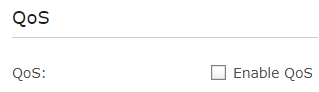 NAT Boost Disabled 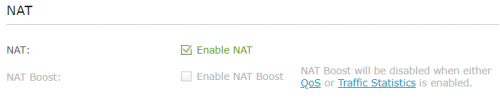 This post has been edited by potatobanana: Nov 22 2020, 09:09 PM |
|
|
Nov 22 2020, 09:15 PM
Show posts by this member only | IPv6 | Post
#1225
|
|
Senior Member
3,669 posts Joined: Apr 2006
|
QUOTE(potatobanana @ Nov 22 2020, 09:08 PM) Previously we are able to obtain full 300mbps, only few months back things starting to behave weirdly by obtaining ~150mbps and game ping was higher than usual. Found the problem. For PC specification, we had tested with different cable and devices, hence we are phasing out the specification as cause. But for the main laptop, it is using Intel 7260 N WiFi card, the TM technician use a different router to test with and it able to achieve 300mbps. NAT Boost Disabled Please disable Traffic Statistics and enable NAT Boost. |
|
|
Nov 22 2020, 09:35 PM
|
|
Junior Member
453 posts Joined: Jul 2016
|
QUOTE(JohnLai @ Nov 22 2020, 09:15 PM) Found the problem. Manage to obtain back the full 300mbps bandwidth Please disable Traffic Statistics and enable NAT Boost.  I just saved 100 bucks, almost thought of spending for another set of router Jom treats on me  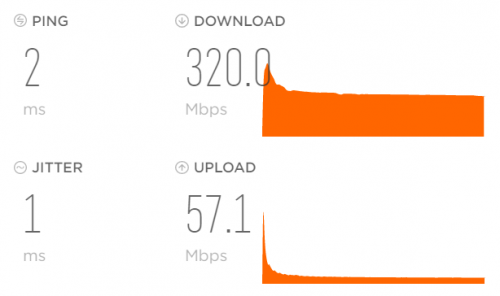 Downside is, since it is happening for a few months already, just a few days back I had requested TM to downgrade my plan, they are still processing the application However the ping issue still around. Game is diep.io (Singapore server) Many thanks TS John Appreciate the advice and help This post has been edited by potatobanana: Nov 22 2020, 09:36 PM |
|
|
|
|
|
Nov 22 2020, 09:41 PM
Show posts by this member only | IPv6 | Post
#1227
|
|
Senior Member
3,669 posts Joined: Apr 2006
|
QUOTE(potatobanana @ Nov 22 2020, 09:35 PM) Manage to obtain back the full 300mbps bandwidth =.= I just saved 100 bucks, almost thought of spending for another set of router Jom treats on me Downside is, since it is happening for a few months already, just a few days back I had requested TM to downgrade my plan, they are still processing the application However the ping issue still around. Game is diep.io (Singapore server) Well, congratulation on getting your speed back. Now, here is some reading on NAT Boost https://routerguide.net/nat-acceleration-on-or-off/ Baca, jangan tak baca. As for your ping issue to diep.io = it is diep.io problem. Not routing to SG issue.  EDIT: Better cancel your downgrade application as soon as possible.  This post has been edited by JohnLai: Nov 22 2020, 09:42 PM |
|
|
Nov 22 2020, 09:56 PM
|
|
Junior Member
453 posts Joined: Jul 2016
|
QUOTE(JohnLai @ Nov 22 2020, 09:41 PM) =.= This current place does not have many users / heavy users. Hence 100mbps will be sufficient (as tested with accidental disabling of the NAT Boost)Well, congratulation on getting your speed back. Now, here is some reading on NAT Boost https://routerguide.net/nat-acceleration-on-or-off/ Baca, jangan tak baca. As for your ping issue to diep.io = it is diep.io problem. Not routing to SG issue. EDIT: Better cancel your downgrade application as soon as possible. I will still proceed to downgrade as there are some other reasons as well (Recent price hike, discount ended..) Good share on the NAT Boost guide, seems like 100mbps is the deciding factor. Easy to understand as well with it's layman term. For the diep.io ping issue, I even tested using data / enabling VPN and stuff but most likely due to TM side. (Not confirmed) Thanks a lot for the help once again.  |
|
|
Nov 23 2020, 08:49 AM
Show posts by this member only | IPv6 | Post
#1229
|
|
Senior Member
2,516 posts Joined: Mar 2016
|
QUOTE(JohnLai @ Nov 22 2020, 08:34 PM) Did you just update your IOS to version 14? Apparently the default ssid/password allows my iphone to connect Suspect it might be IOS issue rather than the router itself.  |
|
|
Dec 1 2020, 10:45 PM
Show posts by this member only | IPv6 | Post
#1230
|

Senior Member
5,197 posts Joined: Jan 2003 From: Muor....  
|
im having problem watching unifi tv. only channel 555 can watch, other channel stutter badly. any solution?
the problem occurs usually after im switching off the modem n router for a long time due to balik kg. im still using unifi tv white box |
|
|
Jan 16 2021, 09:26 PM
Show posts by this member only | IPv6 | Post
#1231
|

Senior Member
1,363 posts Joined: Jan 2010
|
guys i never updated my router firmware since the day i got it which is a few years already. But everything is working ok do i still need to update it? At the back of my router it says my is Ver:1.0 and all updates in the link are only for EU and US version, so i dont have to update anything???
This post has been edited by JustcallmeLarry: Jan 16 2021, 09:51 PM |
|
|
Jan 17 2021, 10:21 AM
Show posts by this member only | IPv6 | Post
#1232
|

Senior Member
7,118 posts Joined: Oct 2011 From: Wakanda
|
QUOTE(JustcallmeLarry @ Jan 16 2021, 09:26 PM) guys i never updated my router firmware since the day i got it which is a few years already. But everything is working ok do i still need to update it? At the back of my router it says my is Ver:1.0 and all updates in the link are only for EU and US version, so i dont have to update anything??? There’s a saying... “If it ain’t broke, don’t fix it”. I last updated mine awhile ago and since both are chugging nicely.. I just leave em be. It’s not like we have super custom firmware for the C1200. |
|
|
Jan 17 2021, 10:36 AM
|

Junior Member
386 posts Joined: Jan 2006 From: bikini bottom
|
hi , im using Time , they provide me with C1200 . Everytime the internet down , it wont reconnect back automaticly , I need to off both of the modem and router to reconnect back , no problem with speed. only this problem
anybody can help ? or should I contact Time ? |
|
|
|
|
|
Jan 17 2021, 03:17 PM
Show posts by this member only | IPv6 | Post
#1234
|

Senior Member
1,230 posts Joined: Oct 2005
|
My TP-Link AC1200 lasted about three years. Back in October 2020, I had frequent internet failures which I initially thought it's the line issue. After frequently called 100 and getting assistance from Unifi team, it's been confirmed that my AC1200 had finally stopped working. It showed connected but no internet. It's been a great pleasure & experience for me using the AC1200 which rarely gave me problems.
Now I try a new router from Asus. Just about time for me to upgrade to Wifi 6. I got a special price on Shopee 11.11 sale, RM462 for TUF AX3000, which I thought a very good price. I hope it'll last longer than AC1200. |
|
|
Jan 17 2021, 04:37 PM
Show posts by this member only | IPv6 | Post
#1235
|
|
Senior Member
7,118 posts Joined: Oct 2011 From: Wakanda
|
QUOTE(bluestolks @ Jan 17 2021, 10:36 AM) hi , im using Time , they provide me with C1200 . Everytime the internet down , it wont reconnect back automaticly , I need to off both of the modem and router to reconnect back , no problem with speed. only this problem Yes, I suggest you should contact TIME. Particularly if the route is still under a year old, should be under warranty. Ask for a router replacement. anybody can help ? or should I contact Time ? QUOTE(nikrizal @ Jan 17 2021, 03:17 PM) My TP-Link AC1200 lasted about three years. Back in October 2020, I had frequent internet failures which I initially thought it's the line issue. After frequently called 100 and getting assistance from Unifi team, it's been confirmed that my AC1200 had finally stopped working. It showed connected but no internet. It's been a great pleasure & experience for me using the AC1200 which rarely gave me problems. Now I try a new router from Asus. Just about time for me to upgrade to Wifi 6. I got a special price on Shopee 11.11 sale, RM462 for TUF AX3000, which I thought a very good price. I hope it'll last longer than AC1200. |
|
|
Feb 2 2021, 11:13 AM
|
|
Probation
1 posts Joined: Feb 2021
|
Hello, guys. I'm new here and would like to know how to send the factory firmware to the TP-Link EC230-G1. I've tried changing the IP to 192.168.0.66 in ethernet adapter, but I can't do it with the TFTP software. Does anyone have a tutorial? I would be very happy if someone could help me. Thank you very much!
|
|
|
Feb 2 2021, 07:05 PM
|
|
Junior Member
864 posts Joined: May 2005
|
My C1200 had been rock stable after firmware update. Now it runs as my 3rd NAS & Wifi extender for my outdoor IP Camera.
|
|
|
Feb 20 2021, 04:50 PM
Show posts by this member only | IPv6 | Post
#1238
|
|
Junior Member
256 posts Joined: Aug 2019
|
Hi guys there is a firmware update available for this router from Unifi. Just called the customer service on Wednesday and they told me there's an update available which is the 20201103 version. Previously it was on 20200306. Just got this router from Unifi in December 2020. After the latest firmware upgrade, it has been 3 days now and there's no random reboot happen. Hope this info will help you guys bananabread, Alpha_Tay, and 1 other liked this post
|
|
|
Feb 23 2021, 04:10 AM
Show posts by this member only | IPv6 | Post
#1239
|

Senior Member
1,725 posts Joined: Jan 2003
|
QUOTE(John42 @ Feb 20 2021, 04:50 PM) Hi guys there is a firmware update available for this router from Unifi. Just called the customer service on Wednesday and they told me there's an update available which is the 20201103 version. Previously it was on 20200306. Just got this router from Unifi in December 2020. After the latest firmware upgrade, it has been 3 days now and there's no random reboot happen. Hope this info will help you guys QUOTE(John42 @ Feb 22 2021, 12:29 PM) Nope you need to call the customer service and ask them for the latest firmware version. They will send your request to their support team for them to upgrade the firmware remotely from their side. Mine was done within less than an hour. The latest firmware version is 1.0.0 Build 20201103 rel.11985(EU). This post has been edited by Alpha_Tay: Feb 23 2021, 04:20 AM John42 liked this post
|
|
|
Feb 25 2021, 05:41 PM
|

Senior Member
1,288 posts Joined: Apr 2012
|
Once flashed from TIME into EU firmware, can we go rollback to TIME firmware?
Mine is EU firmware now but it could not upgrade when I load TIME firmware |
| Change to: |  0.0430sec 0.0430sec
 0.27 0.27
 6 queries 6 queries
 GZIP Disabled GZIP Disabled
Time is now: 4th December 2025 - 09:26 PM |
 Quote
Quote