Welcome Guest ( Log In | Register )

Outline · [ Standard ] · Linear+

 Official TP-Link C1200 V1(EU) Firmware is out, Hidden WDS functionality works!, Page 29

views
     
potatobanana
post Nov 22 2020, 07:04 PM

Casual
***
Junior Member
453 posts

Joined: Jul 2016
Hi guys,


Not sure if anyone faces the same situation as below.

I am currently using TP-Link AC1200, the problem is, the router was sluggish/limited.
Example: My broadband speed is 300mbps, but the max speed I can get is ~150mbps, also the ping was higher.

TM personnel had performed the checking and the root cause was pinpointed to the router, we did try firmware upgrade as well but still same situation.

They did recommend us to change the router, just wondering anyone faces this similar situation before?


Thank you
potatobanana
post Nov 22 2020, 08:43 PM

Casual
***
Junior Member
453 posts

Joined: Jul 2016
QUOTE(JohnLai @ Nov 22 2020, 07:13 PM)
-.-? Incomplete info.

~150Mbps = via wifi or LAN cable?
*
Using LAN cable

Broadband package is 300mbps, but maximum we only manage to get 150mbps (tested by TM technician)
potatobanana
post Nov 22 2020, 08:48 PM

Casual
***
Junior Member
453 posts

Joined: Jul 2016
QUOTE(JohnLai @ Nov 22 2020, 08:45 PM)
The target PC/laptop specification and web browser used?
*
Windows / Chrome / Edge - Tested in multiple laptop & desktop with same result

Edit: Could relate to hardware?

This post has been edited by potatobanana: Nov 22 2020, 08:48 PM
potatobanana
post Nov 22 2020, 09:08 PM

Casual
***
Junior Member
453 posts

Joined: Jul 2016
QUOTE(JohnLai @ Nov 22 2020, 08:49 PM)
Since you don't want to tell the specification of your multiple laptop/PC........ dry.gif

Moving to router setting ;
Did you enable QOS?
NAT Boost enabled or not?
*
Previously we are able to obtain full 300mbps, only few months back things starting to behave weirdly by obtaining ~150mbps and game ping was higher than usual.

For PC specification, we had tested with different cable and devices, hence we are phasing out the specification as cause.
But for the main laptop, it is using Intel 7260 N WiFi card, the TM technician use a different router to test with and it able to achieve 300mbps.

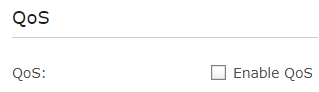
QOS Disabled
user posted image

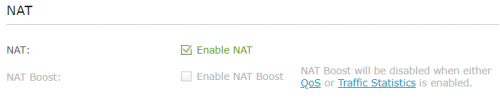
NAT Boost Disabled
user posted image

This post has been edited by potatobanana: Nov 22 2020, 09:09 PM
potatobanana
post Nov 22 2020, 09:35 PM

Casual
***
Junior Member
453 posts

Joined: Jul 2016
QUOTE(JohnLai @ Nov 22 2020, 09:15 PM)
Found the problem.
Please disable Traffic Statistics and enable NAT Boost.
*
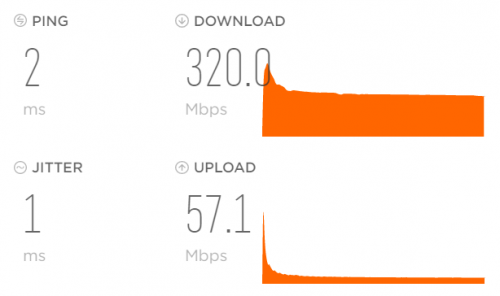
Manage to obtain back the full 300mbps bandwidth thumbup.gif

I just saved 100 bucks, almost thought of spending for another set of router
Jom treats on me biggrin.gif
user posted image

Downside is, since it is happening for a few months already, just a few days back I had requested TM to downgrade my plan, they are still processing the application

However the ping issue still around.
Game is diep.io (Singapore server)

Many thanks TS John thumbup.gif
Appreciate the advice and help

This post has been edited by potatobanana: Nov 22 2020, 09:36 PM
potatobanana
post Nov 22 2020, 09:56 PM

Casual
***
Junior Member
453 posts

Joined: Jul 2016
QUOTE(JohnLai @ Nov 22 2020, 09:41 PM)
=.=
Well, congratulation on getting your speed back.  dry.gif
Now, here is some reading on NAT Boost https://routerguide.net/nat-acceleration-on-or-off/
Baca, jangan tak baca.

As for your ping issue to diep.io = it is diep.io problem. Not routing to SG issue.  console.gif

EDIT: Better cancel your downgrade application as soon as possible.  sweat.gif
*
This current place does not have many users / heavy users. Hence 100mbps will be sufficient (as tested with accidental disabling of the NAT Boost)
I will still proceed to downgrade as there are some other reasons as well (Recent price hike, discount ended..)

Good share on the NAT Boost guide, seems like 100mbps is the deciding factor.
Easy to understand as well with it's layman term.

For the diep.io ping issue, I even tested using data / enabling VPN and stuff but most likely due to TM side. (Not confirmed)
Thanks a lot for the help once again. laugh.gif

potatobanana
post Aug 30 2021, 01:41 AM

Casual
***
Junior Member
453 posts

Joined: Jul 2016
Anyone experienced SSID missing?

My phone and other devices can scan 2.4Ghz, but not 5Ghz

Tried reboot the router from admin page but still same issue, have to do a full reboot by switch power on/off then 5Ghz reappear again


Change to:
| Lo-Fi Version
0.0549sec    0.28    7 queries    GZIP Disabled
Time is now: 6th December 2025 - 03:25 AM