

QUOTE(soonwai @ Feb 2 2018, 12:27 AM)
It should be:
Username: tmadmin
Password: Adm@XXXX
XXXX = last 4 digit of MAC address

Yeap just found it. Thanks though.Username: tmadmin
Password: Adm@XXXX
XXXX = last 4 digit of MAC address
Tech Support ZTE H267A Modem + Router Unifi
|
|
 Feb 2 2018, 12:29 AM Feb 2 2018, 12:29 AM
Show posts by this member only | IPv6 | Post
#81
|
 
Junior Member
447 posts Joined: May 2009 From: Selangor  
|
QUOTE(soonwai @ Feb 2 2018, 12:27 AM) It should be: Yeap just found it. Thanks though.Username: tmadmin Password: Adm@XXXX XXXX = last 4 digit of MAC address |
|
|
|
|
|
Feb 3 2018, 05:25 PM
Show posts by this member only | IPv6 | Post
#82
|

Junior Member
62 posts Joined: Mar 2013
|
based in these few pages as feedback from forumers here, what i can conclude here for this 4 in 1 modem is weak wifi signal.
Anyone here can you comments whether it work same like Huawei HG655a in term of performance? |
|
|
Feb 10 2018, 12:50 PM
|
|
Junior Member
41 posts Joined: Jan 2003 From: Miri
|
@patricktoh read some of your replies and found useful.
I have recently switched to Maxis via Unifi, and plan to ditch the maxis router and use the ZTE H267A and custom router. may i know if you or anyone have knowledge to do the following replace maxis technicolor TG784nv3 with ZTE H267A and have the voip ported to ZTE H267A? so i dont need two router. |
|
|
Feb 13 2018, 12:30 AM
|
|
Junior Member
490 posts Joined: Jan 2006 From: Kuala Lumpur
|
QUOTE(cruidi @ Feb 10 2018, 12:50 PM) @patricktoh read some of your replies and found useful. Hi cruidi,I have recently switched to Maxis via Unifi, and plan to ditch the maxis router and use the ZTE H267A and custom router. may i know if you or anyone have knowledge to do the following replace maxis technicolor TG784nv3 with ZTE H267A and have the voip ported to ZTE H267A? so i dont need two router. I have not done so but technically can be done as long you could replicate/dump all the key configurations from Maxis modem - Internet VLAN - VoIP VLAN & configuration These 2 weeks I am very busy hence unable to assist you but after CNY we can try. Patrick Toh |
|
|
Mar 14 2018, 07:15 PM
|

Junior Member
213 posts Joined: Aug 2008 From: Malaysia
|
Hi there I would like to enquire if these settings are possible on the Huawei HG8240H ONU modem as well?
|
|
|
Apr 1 2018, 07:12 PM
|
|
Newbie
19 posts Joined: Apr 2017
|
Bumping up this thread to say thanks to @patricktoh for his help and guidance with this wifi set up just now. You are the best.
 |
|
|
|
|
|
Apr 1 2018, 07:29 PM
|
|
Junior Member
490 posts Joined: Jan 2006 From: Kuala Lumpur
|
QUOTE(axercr777 @ Apr 1 2018, 07:12 PM) Bumping up this thread to say thanks to @patricktoh for his help and guidance with this wifi set up just now. You are the best. You're most welcome. Solving network problems is my hobby.  |
|
|
Apr 7 2018, 01:11 PM
|
|
Newbie
2 posts Joined: Dec 2007
|
QUOTE(patricktoh @ Nov 11 2017, 10:11 PM) Did you?? 1. Remove the UniFi PPP login and password in ZTE DSL WAN page? 2. Create a new Internet VLAN - ID: 500, connection type: bridge, xDSL transfer mode: PTM, 802.1p: 0 3. Bind the Internet VLAN to a LAN port e.g. LAN-1 4. Connect LAN-1 to Tenda WAN port 5. Configure PPPoE in Tenda 6. Turn off ZTE wifi Share the result here QUOTE(patricktoh @ Nov 14 2017, 09:02 PM) Received ZTE H267A today. What I did after the installer completed the installation. Hi, I just apply for Unifi Lite 10Mbps (Subb) , it's use copper line, not fiber line, installer give me ZTE H267A Modem + Router as well. I wish to use my own Xiaomi Pro router and I had try both method provide above but seem like I fails to connect to internet using my own router. I am not sure the method above can work on Unifi Lite (Subb) or does it need special setting?? sorry for my poor english At Internet > WAN > DSL tab > DSL Connection 1. Create new item (Internet bridge VLAN) - Connection name: BR_VLAN_500 - DSL Transfer mode: PTM - VLAN: On - VLAN ID: 500 - Apply 2. PPPoE set to Off 3. Click VLAN Trunk tab - LAN1 set to On - Supported VLAN number: 1 - VLAN ID1: 500 - PVID: N/A - Apply 4. Once done connect own router WAN port to ZTE LAN1. HyppTV connect to ZTE default LAN4 Optional>> 5. If you want to pass the HyppTV to own router then - At DSL connection > BR_VLAN_600 set to On (default is On) 6. At VLAN Trunk - LAN1 set to On - Supported VLAN number: 2 - VLAN ID1: 500 - VLAN ID2: 600 - PVID: N/A - Apply 2 minor observations. I will try to fix it when have time. 1. ZTE system time not sync with time server. Suspect it can't pick-up internet traffic 2. Internet LED is off. Should be related to above  , hope can get help here, thanks! , hope can get help here, thanks! |
|
|
Apr 7 2018, 05:58 PM
|
|
Junior Member
490 posts Joined: Jan 2006 From: Kuala Lumpur
|
QUOTE(lamtwl @ Apr 7 2018, 01:11 PM) Hi, I just apply for Unifi Lite 10Mbps (Subb) , it's use copper line, not fiber line, installer give me ZTE H267A Modem + Router as well. I wish to use my own Xiaomi Pro router and I had try both method provide above but seem like I fails to connect to internet using my own router. I am not sure the method above can work on Unifi Lite (Subb) or does it need special setting?? sorry for my poor english If you have done the my steps in second dialog box then the problem should be from Xiaomi settings. Xiaomi Pro has UniFi profile? I am on copper wire too. , hope can get help here, thanks!Check this link: https://forum.lowyat.net/topic/4262597/all It says native Xiaomi Pro doesn't support VLAN tagging then you can forget about using it for UniFi except as wifi Access Point. This post has been edited by patricktoh: Apr 7 2018, 06:36 PM |
|
|
Apr 7 2018, 07:58 PM
Show posts by this member only | IPv6 | Post
#90
|
|
Newbie
2 posts Joined: Dec 2007
|
QUOTE(patricktoh @ Apr 7 2018, 05:58 PM) If you have done the my steps in second dialog box then the problem should be from Xiaomi settings. Xiaomi Pro has UniFi profile? I am on copper wire too. Check this link: https://forum.lowyat.net/topic/4262597/all It says native Xiaomi Pro doesn't support VLAN tagging then you can forget about using it for UniFi except as wifi Access Point. Thank you  |
|
|
Apr 30 2018, 12:07 PM
|
|
Newbie
1 posts Joined: Apr 2018
|
Hello all, Thank you for the great thread. I am trying to help my Malaysia office with their static IP and their upgrade to TM 100/50 Fiber. The technicians put in a new wireless router and I didn't know how the old one was configured so we're no longer getting a DHCP address of our public IP to our firewall. I have tried everything listed in this thread but I cannot get our Cisco ASA to connect via PPPoE. I tried to bridge the whole ZTE router as well as the instructions in here.
Hardware Topology: Alcatel-Lucent I-240G-P ONT ZTE ZXHN H267A Cisco ASA 5505 Our previous TM device would give us our static public as a DHCP lease. Any suggestions would be welcomed. I assumed their wireless router did the PPPoE connection and then would hand it off on LAN-1. I also tried to bypass and go straight in the I-240G-P ONT and do the PPPoE in the ASA with VLAN 500 on the outside interface with no success. *Edit* Right now I am doing a static DHCP to the MAC of the Cisco ASA and doing a 1 to 1 NAT to accomplish what I need for right now (Site to Site IPSEC VPN) but i would really like to get any firewall out of the way between my firewall and the ISP. This post has been edited by jas0nmack: Apr 30 2018, 01:23 PM |
|
|
May 1 2018, 10:16 AM
Show posts by this member only | IPv6 | Post
#92
|

Senior Member
1,472 posts Joined: Apr 2005 From: SumwHeRe In MaLaYsIa 
|
QUOTE(lamtwl @ Apr 7 2018, 01:11 PM) Hi, I just apply for Unifi Lite 10Mbps (Subb) , it's use copper line, not fiber line, installer give me ZTE H267A Modem + Router as well. I wish to use my own Xiaomi Pro router and I had try both method provide above but seem like I fails to connect to internet using my own router. I am not sure the method above can work on Unifi Lite (Subb) or does it need special setting?? sorry for my poor english You are lucky u get ZTE instead of Huawei, this is quite simple to do it, unbind vlan 500 from port 1 and tag PVID 500 at port 2 and connect your mi router to Port 2 , hope can get help here, thanks!What PVID do is actually watever local traffic going in to ZTE via Port 2, will be tag with 500, so your Mi router does not need to se any vlan. PVID (Port Vlan ID) QUOTE(jas0nmack @ Apr 30 2018, 12:07 PM) Hello all, Thank you for the great thread. I am trying to help my Malaysia office with their static IP and their upgrade to TM 100/50 Fiber. The technicians put in a new wireless router and I didn't know how the old one was configured so we're no longer getting a DHCP address of our public IP to our firewall. I have tried everything listed in this thread but I cannot get our Cisco ASA to connect via PPPoE. I tried to bridge the whole ZTE router as well as the instructions in here. can you share your "show run interface" so we may get an idea what have gone wrong,Hardware Topology: Alcatel-Lucent I-240G-P ONT ZTE ZXHN H267A Cisco ASA 5505 Our previous TM device would give us our static public as a DHCP lease. Any suggestions would be welcomed. I assumed their wireless router did the PPPoE connection and then would hand it off on LAN-1. I also tried to bypass and go straight in the I-240G-P ONT and do the PPPoE in the ASA with VLAN 500 on the outside interface with no success. *Edit* Right now I am doing a static DHCP to the MAC of the Cisco ASA and doing a 1 to 1 NAT to accomplish what I need for right now (Site to Site IPSEC VPN) but i would really like to get any firewall out of the way between my firewall and the ISP. another way to do it as bridging using PVID via zte h267a but it look weird that way lol This post has been edited by amirsubhi: May 1 2018, 10:17 AM |
|
|
May 4 2018, 04:32 PM
|

Senior Member
1,635 posts Joined: May 2005
|
I also have some issues to connect from the ZTE H267A, to Juniper SSG5 firewall or DD-WRT router. I followed the instructions from patricktoh, create VLAN500, turned off the PPPoE, and set LAN1 to VLANID 500. But the firewall/router keep showing unable to connect.
I tested with the few scenarios below, but none of them work. 1.) ZTE H267A LAN1(VLANID:500) > Juniper SSG5 PPPoE 2.) ZTE H267A LAN3(PVID:500) > Juniper SSG5 PPPoE 3.) ZTE H267A LAN1(VLANID:500) > DD-WRT WAN1 PPPoE 4.) ZTE H267A LAN3(PVID:500) > DD-WRT WAN1 PPPoE 5.) ZTE H267A LAN1(VLANID:500) > DD-WRT WAN1 with VLAN2.500 PPPoE 6.) ZTE H267A LAN3(PVID:500) > DD-WRT WAN1 with VLAN2.500 PPPoE Anyone can enlighten me how to make it work? |
|
|
|
|
|
May 5 2018, 10:58 AM
|
|
Junior Member
490 posts Joined: Jan 2006 From: Kuala Lumpur
|
QUOTE(loonsave @ May 4 2018, 04:32 PM) I also have some issues to connect from the ZTE H267A, to Juniper SSG5 firewall or DD-WRT router. I followed the instructions from patricktoh, create VLAN500, turned off the PPPoE, and set LAN1 to VLANID 500. But the firewall/router keep showing unable to connect. PM-ed. whatapps me. I tested with the few scenarios below, but none of them work. 1.) ZTE H267A LAN1(VLANID:500) > Juniper SSG5 PPPoE 2.) ZTE H267A LAN3(PVID:500) > Juniper SSG5 PPPoE 3.) ZTE H267A LAN1(VLANID:500) > DD-WRT WAN1 PPPoE 4.) ZTE H267A LAN3(PVID:500) > DD-WRT WAN1 PPPoE 5.) ZTE H267A LAN1(VLANID:500) > DD-WRT WAN1 with VLAN2.500 PPPoE 6.) ZTE H267A LAN3(PVID:500) > DD-WRT WAN1 with VLAN2.500 PPPoE Anyone can enlighten me how to make it work? DD-WRT is loaded onto what router? brand + model? I am not familiar with Juniper SSG5 but read this to get an idea VLAN & PPPoE for UniFi - https://www.tp-link.com/in/faq-346.html DD-WRT for UniFi - https://klseet.com/12-dd-wrt/dd-wrt-setup/2...d-wrt-for-unifi This post has been edited by patricktoh: May 5 2018, 11:31 AM |
|
|
May 7 2018, 12:33 AM
|
|
Newbie
1 posts Joined: May 2018
|
hi, im using this zte h267a modem since last year but i always suffer for my wifi connection which automatically dc for all the wifi devices for awhile then it automatically connect it back (more like cant detect internet connection for 10-20seconds). any solution for this?this issue mostly happen during gaming so im kinda frustated for this issue
|
|
|
Jun 26 2018, 09:14 PM
|
|
Junior Member
61 posts Joined: Jan 2013
|
Hi guys, just got my h267a modem upgrade from Unifi today and saw the modem and router are now combined. I don't mind not being able to use my own router but is there anyway to remove the @unifi from the ssid?
|
|
|
Jun 27 2018, 10:59 PM
|
|
Junior Member
490 posts Joined: Jan 2006 From: Kuala Lumpur
|
QUOTE(KKS21199 @ Jun 26 2018, 09:14 PM) Hi guys, just got my h267a modem upgrade from Unifi today and saw the modem and router are now combined. I don't mind not being able to use my own router but is there anyway to remove the @unifi from the ssid? Do you have admin access to the Router-AP? See attached pictures that I am able to define my preferred SSID without @unifi.Attached thumbnail(s) 

|
|
|
Jun 28 2018, 10:41 PM
|
|
Junior Member
61 posts Joined: Jan 2013
|
QUOTE(patricktoh @ Jun 27 2018, 10:59 PM) Do you have admin access to the Router-AP? See attached pictures that I am able to define my preferred SSID without @unifi. HiI use tmadmin user for logging into the router. You can see the @unifi part can't be edited. 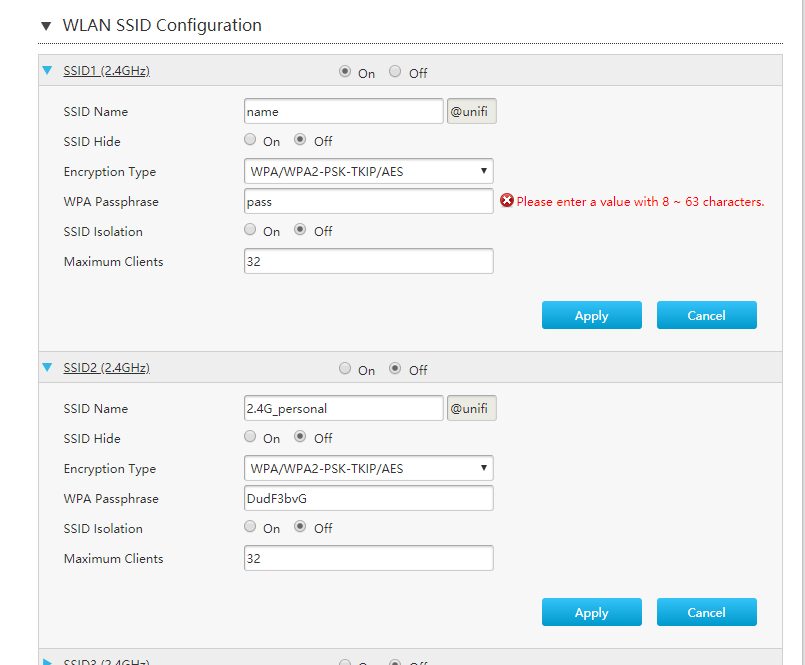 This post has been edited by KKS21199: Jun 29 2018, 10:32 AM |
|
|
Jun 29 2018, 01:36 PM
|
|
Junior Member
490 posts Joined: Jan 2006 From: Kuala Lumpur
|
QUOTE(KKS21199 @ Jun 28 2018, 10:41 PM) Hi OIC. What's the firmware version? I guess need to hack/intervene the html form code via "F12 Developer Tools" to null the @unifi before hit the "Apply" button. Not difficult if you know how to use the F12 and basic html coding. I use tmadmin user for logging into the router. You can see the @unifi part can't be edited. Want to try? PM me.  If you have Skpye screen sharing then will make the trail session easy. If you have Skpye screen sharing then will make the trail session easy.  |
|
|
Jun 29 2018, 10:46 PM
|
|
Junior Member
61 posts Joined: Jan 2013
|
QUOTE(patricktoh @ Jun 29 2018, 01:36 PM) OIC. What's the firmware version? I guess need to hack/intervene the html form code via "F12 Developer Tools" to null the @unifi before hit the "Apply" button. Not difficult if you know how to use the F12 and basic html coding. Want to try? PM me. If you have Skpye screen sharing then will make the trail session easy. CODE <input class="w50 PostIgnore" type="text" id="SuffixSSID" name="SuffixSSID" disabled="disabled" readonly="readonly" value="@unifi"> Thats the code for the @unifi box. Changing the value doesn't update on screen. And changing the code to this and editing the value manually within the page doesn't seem to do anything either. I can save it, but once I reload it goes back to @unifi CODE <input class="w50" type="text" id="SuffixSSID" name="SuffixSSID" value=""> 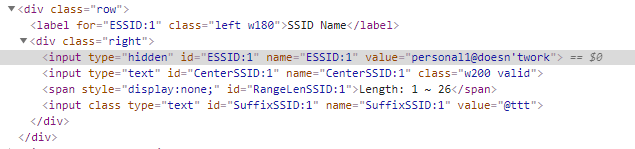 Seems like there is a JS updating it. Not sure how to modify the firmware itself as modifying the js after the page loads doesnt help  |
| Change to: |  0.0297sec 0.0297sec
 0.62 0.62
 6 queries 6 queries
 GZIP Disabled GZIP Disabled
Time is now: 11th December 2025 - 07:17 PM |
 Quote
Quote