Welcome Guest ( Log In | Register )

9 Pages « < 5 6 7 8 9 >Bottom

Outline · [ Standard ] · Linear+

Tech Support ZTE H267A Modem + Router Unifi

views
     
#Victor
post Jul 10 2018, 12:45 PM

Look at all my stars!!
*******
Senior Member
4,672 posts

Joined: Nov 2016
QUOTE(AmyDazz @ Jul 10 2018, 12:16 AM)
I am envious of your line quality. Damn excellent! All those high SNR and very low line attenuation.

Where do you stay? Is it a new developed apartment?
*
The stat is taken from a 15 years old apartment, does it consider new?

This post has been edited by #Victor: Jul 10 2018, 12:46 PM
KKS21199
post Jul 11 2018, 09:36 PM

Getting Started
**
Junior Member
61 posts

Joined: Jan 2013
QUOTE(Max @ Jul 9 2018, 06:48 PM)
hi bro.. how do u remove the @unifi suffix?
any guide to follow.  sweat.gif
*
hey,

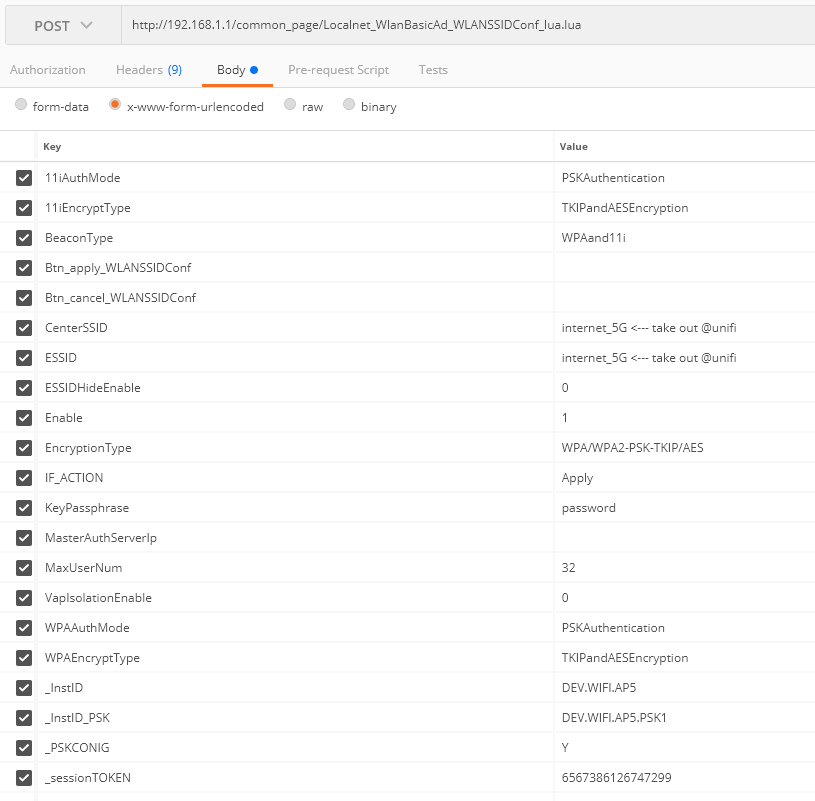
You have to get Postman app for chrome (with interceptor) or the standalone app for windows and modify the POST request that the page makes and replay it again to the router.

user posted image

Once you have it installed, just login to the router like you normally would. Go to the WAN page and open the SSID you want to edit and click on Apply (make sure your interceptor is own on both the app and chrome if you are using the chrome extension). Postman will catch the POST request and display it on the History list (left side). Click on it and you will see something similar to the picture above. Just modify the CenterSSID and ESSID and click Send. Before sending make sure you are connected back to the same WiFi that you were when you clicked Apply in the WAN Page (For certain SSID updates, the router disconnects and reconnects back within a few seconds.)

https://chrome.google.com/webstore/detail/p...ncdddomop?hl=en

https://chrome.google.com/webstore/detail/p...fpcfhicfo?hl=en

Make sure the Interceptor is enabled in the Postman header toolbar. (for postman chrome extension)

user posted image
Max
post Jul 11 2018, 11:25 PM

Regular
******
Senior Member
1,705 posts

Joined: Jan 2003
From: Sepang - Putrajaya - Cyberjaya


QUOTE(KKS21199 @ Jul 11 2018, 09:36 PM)
hey,

You have to get Postman app for chrome (with interceptor) or the standalone app for windows and modify the POST request that the page makes and replay it again to the router.

user posted image

Once you have it installed, just login to the router like you normally would. Go to the WAN page and open the SSID you want to edit and click on Apply (make sure your interceptor is own on both the app and chrome if you are using the chrome extension). Postman will catch the POST request and display it on the History list (left side). Click on it and you will see something similar to the picture above. Just modify the CenterSSID and ESSID and click Send. Before sending make sure you are connected back to the same WiFi that you were when you clicked Apply in the WAN Page (For certain SSID updates, the router disconnects and reconnects back within a few seconds.)

https://chrome.google.com/webstore/detail/p...ncdddomop?hl=en

https://chrome.google.com/webstore/detail/p...fpcfhicfo?hl=en

Make sure the Interceptor is enabled in the Postman header toolbar. (for postman chrome extension)

user posted image
*
Thanx bro for the guide.. i will try tomorrow.. doesn't have chance today to do..

Btw, another thing about DNS. I changed in the LAN and under the DNS page/tab.. but it doesn't work.. cant access block site..
KKS21199
post Jul 12 2018, 11:00 PM

Getting Started
**
Junior Member
61 posts

Joined: Jan 2013
QUOTE(Max @ Jul 11 2018, 11:25 PM)
Thanx bro for the guide.. i will try tomorrow.. doesn't have chance today to do..

Btw, another thing about DNS. I changed in the LAN and under the DNS page/tab.. but it doesn't work.. cant access block site..
*
I had the same problem, but I just added IPv6 DNS to my computer and laptop under my network properties.

CODE
The Google Public DNS IPv6 addresses are as follows:

2001:4860:4860::8888
2001:4860:4860::8844


I also added it here but I am really not sure if it does anything sweat.gif

user posted image
Max
post Jul 12 2018, 11:07 PM

Regular
******
Senior Member
1,705 posts

Joined: Jan 2003
From: Sepang - Putrajaya - Cyberjaya


QUOTE(KKS21199 @ Jul 12 2018, 11:00 PM)
I had the same problem, but I just added IPv6 DNS to my computer and laptop under my network properties.

CODE
The Google Public DNS IPv6 addresses are as follows:

2001:4860:4860::8888
2001:4860:4860::8844


I also added it here but I am really not sure if it does anything  sweat.gif

user posted image
*
Like this have to set dns in all devices manually..
Why la this aio router modem cant do this dns globally.. haih..
aynshtayn
post Jul 24 2018, 11:57 AM

New Member
*
Newbie
4 posts

Joined: Nov 2012
From: Wangsa Maju
I think I have found right thread to ask this question biggrin.gif
I'm trying to configure VOIP service to use with third party voip service (betamax in my case, google voice also works).
First I thought I can configure it to use par with TM with 2 phones as this modem has 2 phone plugs. But voip settings allow one server only.
So I decided to change to betamax setup everything.
1. Router seems to connect back to tm sip servers even if I change settings to different server (hardcoded?).
2. I need to leave outbound servers empty (required by betamax), routers seems to write back tm sip outbound sip even though I remove and apply changes

Any thoughts on how to change SIP settings?
cabuk
post Jul 25 2018, 09:57 PM

New Member
*
Newbie
3 posts

Joined: Jul 2018


QUOTE(patricktoh @ Nov 11 2017, 10:11 PM)
Did you??
1. Remove the UniFi PPP login and password in ZTE DSL WAN page?
2. Create a new Internet VLAN - ID: 500, connection type: bridge, xDSL transfer mode: PTM, 802.1p: 0
3. Bind the Internet VLAN to a LAN port e.g. LAN-1
4. Connect LAN-1 to Tenda WAN port
5. Configure PPPoE in Tenda
6. Turn off ZTE wifi

Share the result here smile.gif
*
Thank patricktoh.. i follow the step and work properly.

patricktoh
post Jul 26 2018, 12:14 AM

Casual
***
Junior Member
490 posts

Joined: Jan 2006
From: Kuala Lumpur


QUOTE(cabuk @ Jul 25 2018, 09:57 PM)
Thank patricktoh.. i follow the step and work properly.
*
thumbup.gif
alvpkl
post Jul 29 2018, 02:24 PM

Getting Started
**
Junior Member
124 posts

Joined: Mar 2011


Does anyone know how to block Youtube using the IPV6 filter? It doesn't work in the configuration below:


Attached thumbnail(s)
Attached Image
#Victor
post Jul 30 2018, 01:40 PM

Look at all my stars!!
*******
Senior Member
4,672 posts

Joined: Nov 2016
Does anyone know how to setup H267A to enable printer shared to the network using the router's USB port? I can see the printer name appear in router home page under USB device but seems can't find option to enable print server.
undine
post Sep 15 2018, 01:59 PM

Getting Started
**
Junior Member
123 posts

Joined: Nov 2008
QUOTE(patricktoh @ Nov 14 2017, 09:02 PM)
Received ZTE H267A today. What I did after the installer completed the installation.

At Internet > WAN > DSL tab > DSL Connection
1. Create new item (Internet bridge VLAN)
- Connection name: BR_VLAN_500
- DSL Transfer mode: PTM
- Type: Bridge Connection
- VLAN: On
- VLAN ID: 500
- Apply

2. PPPoE set to Off

3. Click VLAN Trunk tab
- LAN1 set to On
- Supported VLAN number: 1
- VLAN ID1: 500
- PVID: N/A
- Apply

4. Once done connect own router WAN port to ZTE LAN1. HyppTV connect to ZTE default LAN4

Optional>>
5. If you want to pass the HyppTV to own router then
- At DSL connection > BR_VLAN_600 set to On (default is On)

6. At VLAN Trunk
- LAN1 set to On
- Supported VLAN number: 2
- VLAN ID1: 500
- VLAN ID2: 600
- PVID: N/A
- Apply

2 minor observations. I will try to fix it when have time. smile.gif
1. ZTE system time not sync with time server. Suspect it can't pick-up internet traffic
2. Internet LED is off. Should be related to above
*
nice, buying ASUS AC-rt68U soon and will follow this setup. just moved to a new house and got my zxhn h267a modem/router today
benny6612
post Oct 27 2018, 03:59 PM

New Member
*
Newbie
10 posts

Joined: Dec 2017
QUOTE(patricktoh @ Jan 9 2018, 12:42 PM)
If you use bridge mode then you can't reach ZTE modem. The remote access will reach the router that established the PPPoE connection. Presume you want to access the PPPoE router, 2 basic things need to happen

I) Enable remote access from internet to the router
2) You must get hold of the public IP of the active PPPoE connection. I believe you're aware of the public IP keeps changing whenever connection cycled
*
Now got another problem. Some kids meddled with my zte modem. Pressing god knows what buttons. Now... my wireless doesnt connect to any device.

LAN cable still works fine. But my devices, tv, ipad,ps4 cant connect. Help plsss. How can i set my zte modem back to normal which would allow auto connect for my devices.....

At first.. i had to change my device ip address from dhcp to static.. with new ip address... then only can connect.

After awhile. Dunno why static also cannot connect. And now with dhcp it states "authentication error".. and all devices cannot connect.

Wah sehh... damn sien lo. Wanna be angry at the kids also dunno.
patricktoh
post Oct 27 2018, 08:25 PM

Casual
***
Junior Member
490 posts

Joined: Jan 2006
From: Kuala Lumpur


QUOTE(benny6612 @ Oct 27 2018, 03:59 PM)
Now got another problem. Some kids meddled with my zte modem. Pressing god knows what buttons. Now... my wireless doesnt connect to any device.

LAN cable still works fine. But my devices, tv, ipad,ps4 cant connect. Help plsss. How can i set my zte modem back to normal which would allow auto connect for my devices.....

At first.. i had to change my device ip address from dhcp to static.. with new ip address... then only can connect.

After awhile. Dunno why static also cannot connect. And now with dhcp it states "authentication error".. and all devices cannot connect.

Wah sehh... damn sien lo. Wanna be angry at the kids also dunno.
*
I presume the wifi and dhcp settings messed-up. Do you know how to access into zte modem settings? PM your phone number to WhatsApp.
#Victor
post Oct 27 2018, 09:37 PM

Look at all my stars!!
*******
Senior Member
4,672 posts

Joined: Nov 2016
QUOTE(benny6612 @ Oct 27 2018, 03:59 PM)
Now got another problem. Some kids meddled with my zte modem. Pressing god knows what buttons. Now... my wireless doesnt connect to any device.

LAN cable still works fine. But my devices, tv, ipad,ps4 cant connect. Help plsss. How can i set my zte modem back to normal which would allow auto connect for my devices.....

At first.. i had to change my device ip address from dhcp to static.. with new ip address... then only can connect.

After awhile. Dunno why static also cannot connect. And now with dhcp it states "authentication error".. and all devices cannot connect.

Wah sehh... damn sien lo. Wanna be angry at the kids also dunno.
*
Reset ur modem and reconfigure it.
benny6612
post Oct 28 2018, 12:10 AM

New Member
*
Newbie
10 posts

Joined: Dec 2017
QUOTE(#Victor @ Oct 27 2018, 09:37 PM)
Reset ur modem and reconfigure it.
*
Modem already resetted and reconfigured.

Various kinds of scenarios now.

1. I use a tp-link range extender on 2.4ghz. ZTE 2.4/5ghz are both turned off. (Wifi connected on phone and tv - "May not be able to acceas Internet appears" with "!" Or "No internet access")

2. I disconnect the lan cable from the tp-link router. Turn on the ZTE 2.4/5ghz. (Failed to obtain IP address appears on phone or "Error in authentication" )

3. Following no.2, I configure my phone's network ip setting from dhcp to static. Internet access enabled only on phone. But tv, laptop and ps4 cannot connect to wifi.

I have checked all zte configuration and tp link config as well.
Tplink setting - "range extender only" with smart ip setting.

All in all. One works but not all works. This randomly happened...not sure if it was becuz of something the kids did or it's at unifi or zte config..

Unifi has resetted my port 3 times. But still the same result. sad.gif
chiafoo
post Oct 28 2018, 11:16 AM

Casual
***
Junior Member
450 posts

Joined: Jan 2007


QUOTE(benny6612 @ Oct 28 2018, 12:10 AM)
Unifi has resetted my port 3 times. But still the same result. sad.gif
*
Factory Reset the modem and use the Service Scenarios configuration/wizzard to set SUBB/HSBB again nex follow step by step to enable the dhcp and wifi .

#Victor
post Oct 28 2018, 12:45 PM

Look at all my stars!!
*******
Senior Member
4,672 posts

Joined: Nov 2016
QUOTE(benny6612 @ Oct 28 2018, 12:10 AM)
Modem already resetted and reconfigured.

Various kinds of scenarios now.

1. I use a tp-link range extender on 2.4ghz. ZTE 2.4/5ghz are both turned off. (Wifi connected on phone and tv - "May not be able to acceas Internet appears" with "!" Or "No internet access")

2. I disconnect the lan cable from the tp-link router. Turn on the ZTE 2.4/5ghz. (Failed to obtain IP address appears on phone or "Error in authentication" )

3. Following no.2, I configure my phone's network ip setting from dhcp to static. Internet access enabled only on phone. But tv, laptop and ps4 cannot connect to wifi.

I have checked all zte configuration and tp link config as well.
Tplink setting - "range extender only" with smart ip setting.

All in all. One works but not all works. This randomly happened...not sure if it was becuz of something the kids did or it's at unifi or zte config..

Unifi has resetted my port 3 times. But still the same result. sad.gif

*
If u already reset ur ZTE, by right it should work as the DHCP or whatever binding supposed to restore default.

QUOTE(chiafoo @ Oct 28 2018, 11:16 AM)
Factory Reset the modem and use the Service Scenarios configuration/wizzard to set SUBB/HSBB again nex follow step by step to enable the dhcp and wifi .
*
I supposed he already set Service Scenario as he mentioned Internet access enabled only on phone but other WiFi devices cannot connect to WiFi when he use static IP on the device.
chiafoo
post Oct 28 2018, 01:35 PM

Casual
***
Junior Member
450 posts

Joined: Jan 2007


QUOTE(#Victor @ Oct 28 2018, 12:45 PM)
If u already reset ur ZTE, by right it should work as the DHCP or whatever binding supposed to restore default.
I supposed he already set Service Scenario as he mentioned Internet access enabled only on phone but other WiFi devices cannot connect to WiFi when he use static IP on the device.
*
Try check the LAN setting is the same as below
Attached Image
benny6612
post Oct 29 2018, 07:34 PM

New Member
*
Newbie
10 posts

Joined: Dec 2017
Weirdly. Now the zte working. But when connected to my tplink as a range extender for 2.4ghz. All devices cannot connect.
[JackAss]Uncletan
post Nov 15 2018, 11:09 PM

Getting Started
**
Junior Member
75 posts

Joined: Jan 2003
Hi all sifus,

I follwed all the steps shared by Patrick but somehow i cant get my new asus rt ac68u to work...anyone using this model and manage to get theirs to work? Mind sharing with me?

9 Pages « < 5 6 7 8 9 >Top
 

Change to:
| Lo-Fi Version
0.0225sec    0.43    6 queries    GZIP Disabled
Time is now: 10th December 2025 - 06:31 PM