

QUOTE(xhakox @ Jul 14 2019, 01:43 PM)
I think there is only the official router firmware at their product page.
Is it possible to force update the firmware?

Should be, but do it at your own risk.Is it possible to force update the firmware?
D-Link Malaysia Official Thread
|
|
 Jul 14 2019, 10:48 PM Jul 14 2019, 10:48 PM
|
 
Senior Member
5,714 posts Joined: Mar 2007   
|
QUOTE(xhakox @ Jul 14 2019, 01:43 PM) I think there is only the official router firmware at their product page. Should be, but do it at your own risk.Is it possible to force update the firmware? |
|
|
|
|
|
Jul 14 2019, 11:37 PM
|

Junior Member
248 posts Joined: Aug 2018
|
QUOTE(SilentVampire @ Jul 14 2019, 10:48 PM) Should be, but do it at your own risk. I think it can be done by holding reset button and turn on the router, keep holding the button for 10 secs and release, set your PC IP to 192.168.0.x, then open the webpage 192.168.0.1, this will enter the recovery modeBut do it at ur own risk for sure |
|
|
Jul 17 2019, 11:45 PM
Show posts by this member only | IPv6 | Post
#403
|

Senior Member
1,248 posts Joined: May 2011
|
I am using an original unifi router below and want to view my DVR thru internet (via IP address).
Model Name: DIR-842 Hardware Version: C2 Firmware Version: 3.01TM I have refer some online guideline and setup the virtual server as "port forwarding" to the DVR, e.g 192.168.0.88:88. I can view my DVR within my LAN network but whenever I put the external IP address, I cant view it. Try to using some online open port check tool (e.g: https://canyouseeme.org/ ), the result is negative (error message: Error: I could not see your service on 210.187.XXX.XXX on port (88) Reason: Connection timed out ) Not sure if anyone of you encounter similar problem like mine. Appreciate if you can share me some hints. Thanks in advance. |
|
|
Jul 18 2019, 07:57 AM
|
|
Senior Member
5,714 posts Joined: Mar 2007
|
QUOTE(SmallPotato2011 @ Jul 17 2019, 11:45 PM) I am using an original unifi router below and want to view my DVR thru internet (via IP address). You will need a public IP assigned to you. You are probably on private IP now. Call TM and ask to be assigned a public IP. Keep in mind that Unifi Basic 30Mbps are only assigned a private IP and they will not assign a public IP to you.Model Name: DIR-842 Hardware Version: C2 Firmware Version: 3.01TM I have refer some online guideline and setup the virtual server as "port forwarding" to the DVR, e.g 192.168.0.88:88. I can view my DVR within my LAN network but whenever I put the external IP address, I cant view it. Try to using some online open port check tool (e.g: https://canyouseeme.org/ ), the result is negative (error message: Error: I could not see your service on 210.187.XXX.XXX on port (88) Reason: Connection timed out ) Not sure if anyone of you encounter similar problem like mine. Appreciate if you can share me some hints. Thanks in advance. |
|
|
Jul 19 2019, 09:34 AM
|
|
Junior Member
250 posts Joined: May 2019
|
QUOTE(xhakox @ Jul 14 2019, 04:54 AM) Hi sifus, firmware version : v1.00B07I’ve recently purchased a 2ndhand D-Link DIR882 router which I believe it’s a TIME fibre set. It’s running on firmware version 3.5.8tt (something like that). https://www.dlink.com.my/dir-882-my/#firmware How to configure : https://www.dlink.com.my/support/Downloads/...878_842_882.pdf |
|
|
Jul 19 2019, 06:14 PM
Show posts by this member only | IPv6 | Post
#406
|
|
Senior Member
1,248 posts Joined: May 2011
|
QUOTE(SilentVampire @ Jul 18 2019, 07:57 AM) You will need a public IP assigned to you. You are probably on private IP now. Call TM and ask to be assigned a public IP. Keep in mind that Unifi Basic 30Mbps are only assigned a private IP and they will not assign a public IP to you. Checked with unifi, they said my IP is under public IP now... bro, how ah? 🤔 any further hint?QUOTE Dear Sir/Madam, Thank you for contacting unifi. Referring to your email dated 18th July 2019 on the issue. We regret the inconvenience caused. Pertaining to the query, upon checking in the system, we found that your current connection is establish under public IP. Therefore, you are advised to refer direct to device vendor for further assistance and feedback. |
|
|
|
|
|
Jul 19 2019, 11:16 PM
Show posts by this member only | IPv6 | Post
#407
|
|
Senior Member
1,248 posts Joined: May 2011
|
I have try to Enable Remote Management with a particular port, e.g: 88... (was try to use this port for my DVR), it is viewable thru "https://canyouseeme.org/" . That's mean ISP did not block this port from my public IP....
So, I really dont know how to do now... While set for Virtual Server thru my router DIR-842 for my DVR with port 88.... but still cannot viewable thru "https://canyouseeme.org/"... Any brother can help? Please advise... This post has been edited by SmallPotato2011: Jul 19 2019, 11:17 PM |
|
|
Jul 20 2019, 07:50 AM
|
|
Junior Member
43 posts Joined: Jul 2019 
|
QUOTE(SilentVampire @ Jul 18 2019, 07:57 AM) You will need a public IP assigned to you. You are probably on private IP now. Call TM and ask to be assigned a public IP. Keep in mind that Unifi Basic 30Mbps are only assigned a private IP and they will not assign a public IP to you. I am on the new unifi rm129… do you know how to check if im assign a public ip or behind a double nat private ip?I read somewhere if your router wan ip address ia the same as "what is my ip" in google then is public. If not then its private… not sure how true  This post has been edited by theonecafe: Jul 20 2019, 08:08 AM |
|
|
Jul 20 2019, 08:24 AM
|
|
Senior Member
5,714 posts Joined: Mar 2007
|
QUOTE(SmallPotato2011 @ Jul 19 2019, 11:16 PM) I have try to Enable Remote Management with a particular port, e.g: 88... (was try to use this port for my DVR), it is viewable thru "https://canyouseeme.org/" . That's mean ISP did not block this port from my public IP.... Try disabling IPv6. I can see that IPv6 is active. You should be on public IP according to TM.So, I really dont know how to do now... While set for Virtual Server thru my router DIR-842 for my DVR with port 88.... but still cannot viewable thru "https://canyouseeme.org/"... Any brother can help? Please advise... QUOTE(theonecafe @ Jul 20 2019, 07:50 AM) I am on the new unifi rm129… do you know how to check if im assign a public ip or behind a double nat private ip? You should be on public IP, and yes, if your router WAN address is same as whatsmyip, then it is public.I read somewhere if your router wan ip address ia the same as "what is my ip" in google then is public. If not then its private… not sure how true |
|
|
Jul 20 2019, 02:06 PM
|
|
Junior Member
43 posts Joined: Jul 2019
|
QUOTE(SilentVampire @ Jul 20 2019, 08:24 AM) Try disabling IPv6. I can see that IPv6 is active. You should be on public IP according to TM. TqYou should be on public IP, and yes, if your router WAN address is same as whatsmyip, then it is public. |
|
|
Jul 20 2019, 03:13 PM
Show posts by this member only | IPv6 | Post
#411
|
|
Senior Member
1,248 posts Joined: May 2011
|
QUOTE(SilentVampire @ Jul 20 2019, 08:24 AM) Try disabling IPv6. I can see that IPv6 is active. You should be on public IP according to TM. Disable the IPv6 already. Still cannot... 😕You should be on public IP, and yes, if your router WAN address is same as whatsmyip, then it is public. |
|
|
Jul 20 2019, 04:39 PM
|
|
Senior Member
5,714 posts Joined: Mar 2007
|
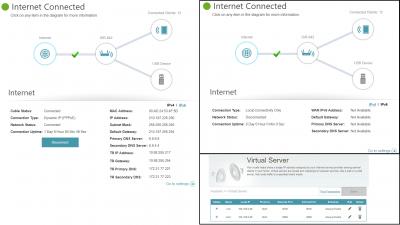
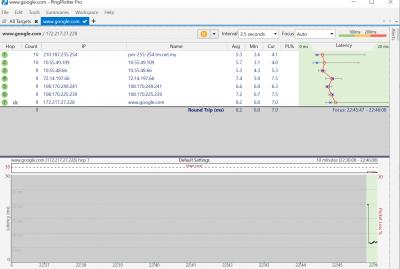
QUOTE(SmallPotato2011 @ Jul 20 2019, 03:13 PM) Disable the IPv6 already. Still cannot... 😕 Hmmm, you sure you on public IP? Log into your router and see what your WAN IP is? Please download Pingplotter and attach a picture of the trace to Google.com here on an Imgur link.This post has been edited by SilentVampire: Jul 20 2019, 04:39 PM |
|
|
Jul 20 2019, 08:45 PM
Show posts by this member only | IPv6 | Post
#413
|
|
Newbie
3 posts Joined: Jan 2011
|
QUOTE(xhakox @ Jul 14 2019, 04:54 AM) Hi sifus, bro, i have the same issue as you. but mine is maxis. i had tried to flashing the stock firmware or ddwrt but still doesnt work. it said "Flashing failed ERROR - the image you uploaded failed to pass verification. Please make sure to use an official update." I’ve recently purchased a 2ndhand D-Link DIR882 router which I believe it’s a TIME fibre set. It’s running on firmware version 3.5.8tt (something like that). However, I’m using TM@Unifi and I couldn’t get it to work. I’ve already tried changing its pppoe to my unifi account login details. And it seemed like the router is not getting any internet connection. What did I miss here? I tried googling around for ways to configure this router but I couldn’t find any guides that actually work. Or simply because it’s outdated. Because I noticed the guides on google show different interface and features than what I’m currently seeing when I wanna set up the router which really makes me confuse. I’m starting to think that I made a wrong purchase. Or perhaps I didn’t properly configure the router for it to work. Could anyone lend me a hand? i think i had purchased a "brick" that cannot be usable to Maxis/Unifi. haha. Any sifu out there able to help? i dont mind bricking the dir 882 since already consider a "brick" to me. |
|
|
|
|
|
Jul 21 2019, 10:49 PM
|
|
Senior Member
1,248 posts Joined: May 2011
|
QUOTE(SilentVampire @ Jul 20 2019, 04:39 PM) Hmmm, you sure you on public IP? Log into your router and see what your WAN IP is? Please download Pingplotter and attach a picture of the trace to Google.com here on an Imgur link. Bro, yes. I am confirm. Enclose the relevant information in attachment. Hopefully can get some clue from you..Attached thumbnail(s) 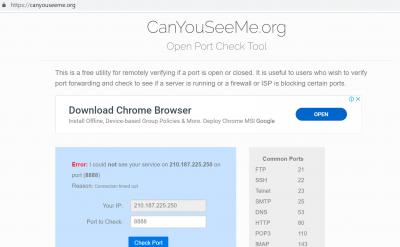
|
|
|
Jul 22 2019, 09:21 AM
|
|
Senior Member
5,714 posts Joined: Mar 2007
|
QUOTE(SmallPotato2011 @ Jul 21 2019, 10:49 PM) Bro, yes. I am confirm. Enclose the relevant information in attachment. Hopefully can get some clue from you.. Looks like everything is configured correctly. I have no idea why you can't access the CCTV. I suggest trying with another router, as it could be a router issue. |
|
|
Jul 22 2019, 10:09 AM
Show posts by this member only | IPv6 | Post
#416
|
|
Senior Member
1,248 posts Joined: May 2011
|
QUOTE(SilentVampire @ Jul 22 2019, 09:21 AM) Looks like everything is configured correctly. I have no idea why you can't access the CCTV. I suggest trying with another router, as it could be a router issue. Thanks a lot bro... |
|
|
Jul 23 2019, 07:01 AM
Show posts by this member only | IPv6 | Post
#417
|
|
Senior Member
1,873 posts Joined: Nov 2010
|
QUOTE(SmallPotato2011 @ Jul 21 2019, 10:49 PM) Bro, yes. I am confirm. Enclose the relevant information in attachment. Hopefully can get some clue from you.. Maybe you are going to the wrong page, try click on the "Port Forwarding" on the left side of "Save" button.And yes, I know that they are similar feature, except Virtual Server allow you to change different port for local and remote. But worth a try.  Also here is the guideline for setting up multiple port forward for single local IP address/machine, don't forgot to remove the config saved on "Virtual Server".  http://support.dlink.com.sg/Downloads/DIR-...ulti-ports..pdf If still unable to access via WAN, try disable the "Enable SPI IPv4" on Firewall settings, some SPI on router is too strict and causing issues to some features. If still unable, well, try upgrade the firmware, it is v3.10 for the latest version, the upgrade page should allow you to "Check for New Firmware" and upgrade to latest version. https://www.dlink.com.my/DIR-842/#firmware --- Just a warning, the DMZ is the last, not recommend method, if after disable SPI and upgrade firmware don't solve your port forward issues, then change your router, or having a CCTV that having better method to bypass the Firewall(like connect to the cloud, but that is another privacy issues la). This post has been edited by BenYeeHua: Jul 23 2019, 07:07 AM |
|
|
Jul 28 2019, 01:06 AM
Show posts by this member only | IPv6 | Post
#418
|
|
Senior Member
1,124 posts Joined: Oct 2004
|
Best adsl modem?
|
|
|
Jul 31 2019, 01:21 AM
|
|
Newbie
1 posts Joined: Jul 2017
|
Hi i bought D-link DIR-895L AC5300 recently and it has some problems that i hope can troubleshoot:
1. Sometimes netflix will not load thumbnails and is often times unplayable in windows 10 app and browsers as well as ipad on the network using this router specifically (i tested other routers and no problems). I will attach pictures. 2. I sometimes cannot access certain websites. For example this one. Sometimes it will work. 3. The wifi speed is not as advertised when in smart connect mode. 4. This is the second d-link router i received after i requested a replacement from the seller for the same problems. I am thinking this is a d-link problem instead of a faulty router. Please advise on how to proceed. 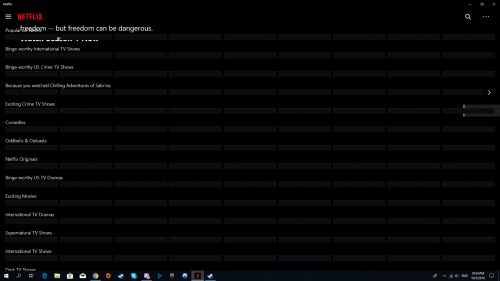 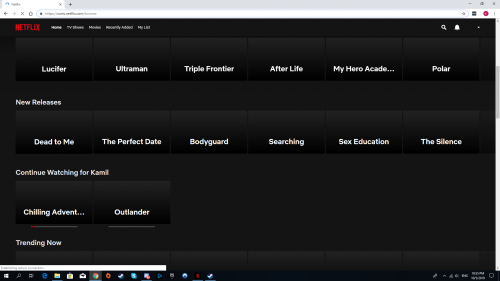 |
|
|
Aug 25 2019, 02:33 PM
|
|
Junior Member
355 posts Joined: Sep 2013
|
is unifi stock router D-Link AC1200 DIR 842 better than TP-Link ARCHER AC1200??
This post has been edited by edisoner90: Aug 25 2019, 02:37 PM |
| Change to: |  0.0293sec 0.0293sec
 0.70 0.70
 6 queries 6 queries
 GZIP Disabled GZIP Disabled
Time is now: 12th December 2025 - 09:38 PM |
 Quote
Quote