

QUOTE(edisoner90 @ Aug 25 2019, 02:33 PM)
is unifi stock router D-Link AC1200 DIR 842 better than TP-Link ARCHER AC1200??

Yes, but both are extremely basic. I recommend that you get your own third party router.D-Link Malaysia Official Thread
|
|
 Aug 25 2019, 03:26 PM Aug 25 2019, 03:26 PM
|
 
Senior Member
5,714 posts Joined: Mar 2007   
|
QUOTE(edisoner90 @ Aug 25 2019, 02:33 PM) is unifi stock router D-Link AC1200 DIR 842 better than TP-Link ARCHER AC1200?? Yes, but both are extremely basic. I recommend that you get your own third party router. |
|
|
|
|
|
Aug 25 2019, 04:33 PM
|

Junior Member
355 posts Joined: Sep 2013
|
QUOTE(SilentVampire @ Aug 25 2019, 03:26 PM) Yes, but both are extremely basic. I recommend that you get your own third party router. thanks bro...i alrdy got a better router.. plan sell this router at garage sales.. hahaha |
|
|
Sep 8 2019, 09:18 AM
|
|
Junior Member
224 posts Joined: Sep 2019
|
Dlink 878 ,can support unifitv? Has the firmware been updated
|
|
|
Sep 9 2019, 03:25 PM
Show posts by this member only | IPv6 | Post
#424
|

Moderator
6,181 posts Joined: Oct 2004 
|
Updated DIR-878 to firmware 1.2 yesterday.
Then captcha become 404 not found and I cannot login to the mgmt GUI anymore. Keep saying the captcha is wrong. 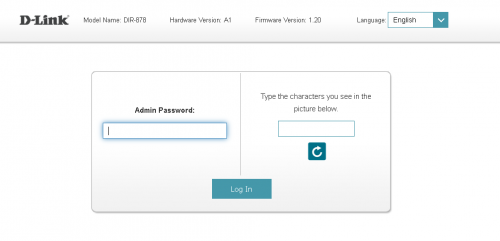 |
|
|
Sep 9 2019, 08:53 PM
|
|
Junior Member
224 posts Joined: Sep 2019
|
Try reset router and try again
|
|
|
Sep 11 2019, 08:04 PM
|

Junior Member
51 posts Joined: Jun 2006 From: another planet
|
hello, im having issue with my Unifi Dlink Router, DIR-842 C2,
everytime i plug in cctv connection to the router, in few hours, sometimes few days, connection is lost, (power button blinking) n i will need to restart the router.. it will be ok n then will lost connection again later on.. repeatitively.. pls help.. this only happen if i plug in the cctv nvr, else no lost of connection happen at all. *no issue with cctv nvr, checked. technician said maybe i need to check or open some port for the cctv, not sure this is done by ISP or a simple configuration on the router.. This post has been edited by ejslayer: Sep 11 2019, 08:11 PM |
|
|
|
|
|
Sep 11 2019, 10:57 PM
|
|
Senior Member
5,714 posts Joined: Mar 2007
|
QUOTE(ejslayer @ Sep 11 2019, 08:04 PM) hello, im having issue with my Unifi Dlink Router, DIR-842 C2, Change to your own router.everytime i plug in cctv connection to the router, in few hours, sometimes few days, connection is lost, (power button blinking) n i will need to restart the router.. it will be ok n then will lost connection again later on.. repeatitively.. pls help.. this only happen if i plug in the cctv nvr, else no lost of connection happen at all. *no issue with cctv nvr, checked. technician said maybe i need to check or open some port for the cctv, not sure this is done by ISP or a simple configuration on the router.. |
|
|
Sep 14 2019, 09:54 AM
|
|
Junior Member
51 posts Joined: Jun 2006 From: another planet
|
QUOTE(SilentVampire @ Sep 11 2019, 10:57 PM) Change to your own router. unifi router not meant for cctv? |
|
|
Sep 14 2019, 11:29 AM
|

Senior Member
1,341 posts Joined: Dec 2016
|
QUOTE(ejslayer @ Sep 11 2019, 08:04 PM) *no issue with cctv nvr, checked. technician said maybe i need to check or open some port for the cctv, not sure this is done by ISP or a simple configuration on the router.. |
|
|
Sep 14 2019, 01:47 PM
|
|
Senior Member
5,714 posts Joined: Mar 2007
|
QUOTE(ejslayer @ Sep 14 2019, 09:54 AM) unifi router not meant for cctv? Unifi router is very basic. I only recommend you get another one as it sounds like it is a router issue. |
|
|
Sep 15 2019, 10:08 AM
|
|
Junior Member
51 posts Joined: Jun 2006 From: another planet
|
QUOTE(Jjuggler @ Sep 14 2019, 11:29 AM) There is your answer. Port forwarding. You can do this by yourself. Unifi provided router is basic, but it should be sufficient enough for general use unless if you wish to opt for a better third party router. QUOTE(SilentVampire @ Sep 14 2019, 01:47 PM) Unifi router is very basic. I only recommend you get another one as it sounds like it is a router issue. thx guys, will try out a diff router n do port forwarding as well.. see what works.. thx |
|
|
Sep 19 2019, 07:56 AM
|

Senior Member
1,705 posts Joined: Jan 2003 From: Sepang - Putrajaya - Cyberjaya
|
i got DLink 842 C2 too after turbo to 300mbps.
it seems that this router not very stable.. if heavy PC downloading (lan), iptv sometimes got laggy. the wifi also seems unstable, my phone always got receive notification of no internet on wifi (2.4ghz).. and on 5ghz it sometimes disconnected.  on the other matter, how much MBps should i expected downloading from unifi 300mbps ?   |
|
|
Sep 29 2019, 10:44 AM
|
|
Junior Member
224 posts Joined: Sep 2019
|
QUOTE(Max @ Sep 19 2019, 08:56 AM) i got DLink 842 C2 too after turbo to 300mbps. Highly recommend u chang your router to something better,try asus/tplink routers.it seems that this router not very stable.. if heavy PC downloading (lan), iptv sometimes got laggy. the wifi also seems unstable, my phone always got receive notification of no internet on wifi (2.4ghz).. and on 5ghz it sometimes disconnected. on the other matter, how much MBps should i expected downloading from unifi 300mbps ? On the other hand, U should be getting 37MB/s download speed |
|
|
|
|
|
Oct 9 2019, 12:00 AM
Show posts by this member only | IPv6 | Post
#434
|
|
Junior Member
55 posts Joined: Sep 2005
|
QUOTE(xhakox @ Jul 14 2019, 09:24 PM) Unfortunately, I can't read Chinese. However, thanks for sharing. I'll find a way to translate the page. Have u solve the problem ??I also have the dir822 from time internet. Still figuring how to do. |
|
|
Oct 9 2019, 12:09 AM
|
|
Junior Member
55 posts Joined: Sep 2005
|
QUOTE(D-Link @ Oct 31 2018, 04:26 PM) No, that is a customized version. Which means this router is useless. Unless I am on the time internet?? |
|
|
Oct 11 2019, 05:39 PM
Show posts by this member only | IPv6 | Post
#436
|

Junior Member
26 posts Joined: Jul 2009
|
hi everyone, Please help..... i m new to networking.. Bought dir 895L but have no idea to connect to maxis.
any sifu can help c whats the problem? 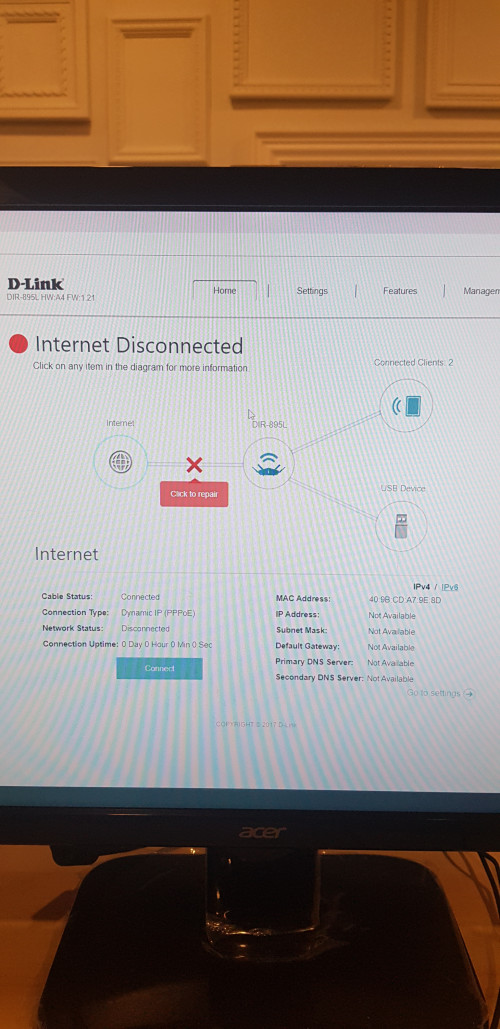 |
|
|
Oct 11 2019, 06:10 PM
|
|
Senior Member
5,714 posts Joined: Mar 2007
|
QUOTE(jiun89 @ Oct 11 2019, 05:39 PM) hi everyone, Please help..... i m new to networking.. Bought dir 895L but have no idea to connect to maxis. You need to configure VLAN tagging or IPTV mode for Maxis. Did you do that already? See here: http://global.dlink.com.sg/faq/faq_pdfs/DI...AN(Singtel).pdfany sifu can help c whats the problem? It is either VLAN 621 or 11 for Internet access. |
|
|
Oct 11 2019, 06:20 PM
Show posts by this member only | IPv6 | Post
#438
|
|
Junior Member
26 posts Joined: Jul 2009
|
QUOTE(SilentVampire @ Oct 11 2019, 06:10 PM) You need to configure VLAN tagging or IPTV mode for Maxis. Did you do that already? See here: http://global.dlink.com.sg/faq/faq_pdfs/DI...AN(Singtel).pdf thanks.. but we dont use iptv, is that a must to do vlan ? the port also ngam ngam enough use for lan connecting cctv, printer, nas, pc..It is either VLAN 621 or 11 for Internet access. |
|
|
Oct 12 2019, 07:18 AM
|
|
Senior Member
1,873 posts Joined: Nov 2010
|
QUOTE(jiun89 @ Oct 11 2019, 06:20 PM) thanks.. but we dont use iptv, is that a must to do vlan ? the port also ngam ngam enough use for lan connecting cctv, printer, nas, pc.. Just follow this until step 6, don't change the interface to IPTV at step 7, and you will having your 4 port for internet use.  And just FYI. CODE For Maxis VLAN Internet: 621 http://support.dlink.com.sg/Downloads/DIR-...-and-TM(MY).pdf |
|
|
Oct 12 2019, 08:25 AM
|
|
Senior Member
5,714 posts Joined: Mar 2007
|
QUOTE(jiun89 @ Oct 11 2019, 06:20 PM) thanks.. but we dont use iptv, is that a must to do vlan ? the port also ngam ngam enough use for lan connecting cctv, printer, nas, pc.. Yes, Maxis and TM use VLAN tagging for Internet. If there are not enough LAN ports, I suggest getting a switch for additional LAN ports. |
| Change to: |  0.0232sec 0.0232sec
 0.40 0.40
 6 queries 6 queries
 GZIP Disabled GZIP Disabled
Time is now: 10th December 2025 - 08:41 AM |
 Quote
Quote