QUOTE(D-Link @ Feb 11 2019, 11:06 AM)
DIR-842 don't have repeater mode...
QUOTE(dannychen @ Jan 30 2019, 10:02 AM)
Any solution on how to setup DIR-842 supplied by Unifi as a repeater?
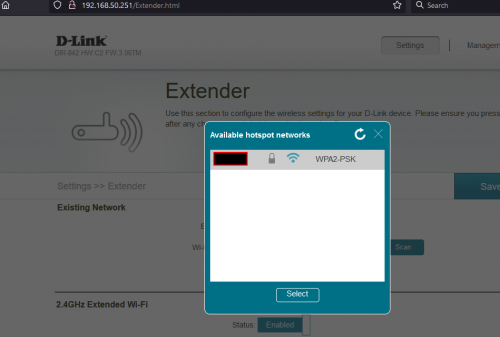
i think i found the hidden function at 'http://yourrouteripaddress/extender.html'
i used the exact unfi model i.e. Model Name: DIR-842 Hardware Version: C2 Firmware Version: 3.06TM
almost give up when i read the comment in here which stated its not supported, but dont know why gave it a last try after hours of trying until 3AM since my ps4 download via wifi too slow.
i pair it with asus RT-AX56U which have the wifi WDS (Wireless Distribution System), add the dlink via asus router admin page as Remote AP List.
it is important for u to adjust your auto DHCP range so u can allocate the Dlink into the same IP range but not within the DHCP auto assign range.
hence i set manual IP for Dlink to 'http://192.168.50.251/' since my asus acting as gateway at 192.168.50.1
auto DHCP range in asus router changed to max 192.168.50.250 and disabled auto DHCP in Dlink.
when i went back to dlink admin page, i set up the manual LAN Ip manually for 100th time and clicked save. the page suddenly went to
http://192.168.50.251/extender.html upon refreshed. it is a different page then usual admin page. screen shot below:
your extended wifi will have that prefix - unifi.. but who cares.
hope no router is wasted or thrown away during this hardtimes...PKP..Covid19 etc...


 May 26 2021, 08:04 PM


 Quote
Quote




 0.0192sec
 0.35
0.35
 6 queries
 GZIP Disabled