Outline ·
[ Standard ] ·
Linear+
D-Link Malaysia Official Thread
|
SmallPotato2011
|
 Jul 17 2019, 11:45 PM Jul 17 2019, 11:45 PM
|

|
I am using an original unifi router below and want to view my DVR thru internet (via IP address). Model Name: DIR-842 Hardware Version: C2 Firmware Version: 3.01TM I have refer some online guideline and setup the virtual server as "port forwarding" to the DVR, e.g 192.168.0.88:88. I can view my DVR within my LAN network but whenever I put the external IP address, I cant view it. Try to using some online open port check tool (e.g: https://canyouseeme.org/ ), the result is negative (error message: Error: I could not see your service on 210.187.XXX.XXX on port (88) Reason: Connection timed out ) Not sure if anyone of you encounter similar problem like mine. Appreciate if you can share me some hints. Thanks in advance. |
|
|
|
|
|
SmallPotato2011
|
Jul 19 2019, 06:14 PM
|
|
|
QUOTE(SilentVampire @ Jul 18 2019, 07:57 AM) You will need a public IP assigned to you. You are probably on private IP now. Call TM and ask to be assigned a public IP. Keep in mind that Unifi Basic 30Mbps are only assigned a private IP and they will not assign a public IP to you. Checked with unifi, they said my IP is under public IP now... bro, how ah? 🤔 any further hint? QUOTE Dear Sir/Madam,
Thank you for contacting unifi.
Referring to your email dated 18th July 2019 on the issue. We regret the inconvenience caused.
Pertaining to the query, upon checking in the system, we found that your current connection is establish under public IP. Therefore, you are advised to refer direct to device vendor for further assistance and feedback. |
|
|
|
|
|
SmallPotato2011
|
Jul 19 2019, 11:16 PM
|
|
|
I have try to Enable Remote Management with a particular port, e.g: 88... (was try to use this port for my DVR), it is viewable thru "https://canyouseeme.org/" . That's mean ISP did not block this port from my public IP....
So, I really dont know how to do now...
While set for Virtual Server thru my router DIR-842 for my DVR with port 88.... but still cannot viewable thru "https://canyouseeme.org/"...
Any brother can help? Please advise...
This post has been edited by SmallPotato2011: Jul 19 2019, 11:17 PM
|
|
|
|
|
|
SmallPotato2011
|
Jul 20 2019, 03:13 PM
|
|
|
QUOTE(SilentVampire @ Jul 20 2019, 08:24 AM) Try disabling IPv6. I can see that IPv6 is active. You should be on public IP according to TM. You should be on public IP, and yes, if your router WAN address is same as whatsmyip, then it is public. Disable the IPv6 already. Still cannot... 😕 |
|
|
|
|
|
SmallPotato2011
|
Jul 21 2019, 10:49 PM
|
|
|
QUOTE(SilentVampire @ Jul 20 2019, 04:39 PM) Hmmm, you sure you on public IP? Log into your router and see what your WAN IP is? Please download Pingplotter and attach a picture of the trace to Google.com here on an Imgur link. Bro, yes. I am confirm. Enclose the relevant information in attachment. Hopefully can get some clue from you.. Attached thumbnail(s)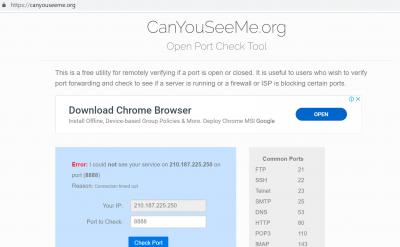
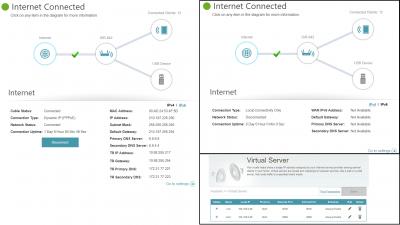
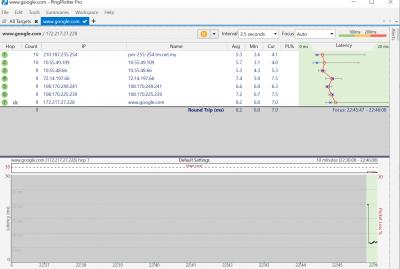
|
|
|
|
|
|
SmallPotato2011
|
Jul 22 2019, 10:09 AM
|
|
|
QUOTE(SilentVampire @ Jul 22 2019, 09:21 AM) Looks like everything is configured correctly. I have no idea why you can't access the CCTV. I suggest trying with another router, as it could be a router issue. Thanks a lot bro... |
|
|
|
|



 Quote
Quote

 0.0267sec
 0.46
0.46
 7 queries
 GZIP Disabled