

any1 experiencing speed degradation ? unifi 30mbps
Unifi Official TM UniFi High Speed Broadband Thread V32, Enjoy Your Speed Upgrade
Unifi Official TM UniFi High Speed Broadband Thread V32, Enjoy Your Speed Upgrade
|
|
 Jan 15 2018, 10:12 PM Jan 15 2018, 10:12 PM
|
 
Senior Member
5,697 posts Joined: Nov 2007 From: A Place Where God And Master Of TroubleMaker Exist   
|
any1 experiencing speed degradation ? unifi 30mbps
|
|
|
|
|
|
Jan 15 2018, 11:38 PM
|

Senior Member
3,410 posts Joined: Jan 2003 From: Wangsa Maju, Kuala Lumpur
|
Hi guys. Am on UniFi 50mbps. Technicians just changed my router to TP-Link Archer C1200. Im getting speeds as shown in the screenshot for speedtest.net but everythjng just seem to be loading so slowly on WiFi. Sorry if this has been discussed before but I couldnt find any noob friendly solutions.
This post has been edited by sayming: Jan 15 2018, 11:38 PM Attached thumbnail(s) 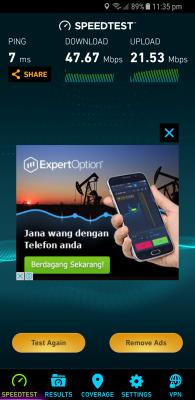
|
|
|
Jan 16 2018, 12:33 AM
|

Senior Member
961 posts Joined: Jan 2016
|
QUOTE(sayming @ Jan 15 2018, 11:38 PM) Hi guys. Am on UniFi 50mbps. Technicians just changed my router to TP-Link Archer C1200. Im getting speeds as shown in the screenshot for speedtest.net but everythjng just seem to be loading so slowly on WiFi. Sorry if this has been discussed before but I couldnt find any noob friendly solutions. how about wired or ethernet? https://forum.lowyat.net/topic/4269752 This post has been edited by Ebony & Ivory: Jan 16 2018, 12:34 AM |
|
|
Jan 16 2018, 01:24 AM
|

Newbie
9 posts Joined: Jun 2012 
|
Uniifi gave me free Hypptv jumbo pack for Dec 2017. They then charged / billed me for Nov and Dec 2017 hypptv jumbo pack.
They are TERRIBLE service providers, really suckers. When I called them cancel my FREE hypptv, because I was afraid they will continue to bill me after free period over, they then charged me PENALY for cancellation!!!!!!!! About rm650 !!!!!!!!!!!!! Anyone got same "beautiful" treatment from Hypptv?????????? |
|
|
Jan 16 2018, 02:06 AM
Show posts by this member only | IPv6 | Post
#7265
|

Senior Member
1,448 posts Joined: Apr 2007
|
QUOTE(sayming @ Jan 15 2018, 11:38 PM) Hi guys. Am on UniFi 50mbps. Technicians just changed my router to TP-Link Archer C1200. Im getting speeds as shown in the screenshot for speedtest.net but everythjng just seem to be loading so slowly on WiFi. Sorry if this has been discussed before but I couldnt find any noob friendly solutions. your wifi using what standard? b,g,n, or AC? old tech sure connected slowly cause not up to date. please update you network card to the latest standard. somemore how big is your house and isit got a lot of walls blocking the signal? your area got lots of people using wifi? also try to change channel if it helps.  |
|
|
Jan 16 2018, 07:39 AM
|

Senior Member
2,466 posts Joined: Nov 2004
|
QUOTE(sayming @ Jan 15 2018, 11:38 PM) Hi guys. Am on UniFi 50mbps. Technicians just changed my router to TP-Link Archer C1200. Im getting speeds as shown in the screenshot for speedtest.net but everythjng just seem to be loading so slowly on WiFi. Sorry if this has been discussed before but I couldnt find any noob friendly solutions. Disable ipv6 |
|
|
|
|
|
Jan 16 2018, 08:25 AM
|

All Stars
65,324 posts Joined: Jan 2003
|
QUOTE(noisedarth @ Jan 16 2018, 01:24 AM) Uniifi gave me free Hypptv jumbo pack for Dec 2017. They then charged / billed me for Nov and Dec 2017 hypptv jumbo pack. post here laThey are TERRIBLE service providers, really suckers. When I called them cancel my FREE hypptv, because I was afraid they will continue to bill me after free period over, they then charged me PENALY for cancellation!!!!!!!! About rm650 !!!!!!!!!!!!! Anyone got same "beautiful" treatment from Hypptv?????????? |
|
|
Jan 16 2018, 10:00 AM
|
 
Elite
8,415 posts Joined: Jul 2008 
|
For those having issues with Archer C1200, please try the following firmware.
Apparently, there is a firmware bug which may cause the system to crash if you use Chromecast or any Android devices on your network. http://www.tp-link.com/us/faq-2050.html |
|
|
Jan 16 2018, 10:35 AM
Show posts by this member only | IPv6 | Post
#7269
|
|
Senior Member
1,448 posts Joined: Apr 2007
|
hypptv or unifi tv where can cancel one? it's tie to triple play, "internet-vobb-hypptv".
|
|
|
Jan 16 2018, 10:38 AM
|
|
Senior Member
1,280 posts Joined: Jan 2003
|
Hypptv is not free n cannot cancel. You only can downgrade or upgrade ur package.
|
|
|
Jan 16 2018, 10:41 AM
Show posts by this member only | IPv6 | Post
#7271
|
|
Junior Member
375 posts Joined: Nov 2017
|
This is call hidden charges and promoters never tell upfront untill you see the bill.
And since when unifi is better before? |
|
|
Jan 16 2018, 10:43 AM
|

Senior Member
5,714 posts Joined: Mar 2007
|
QUOTE(noisedarth @ Jan 16 2018, 01:24 AM) Uniifi gave me free Hypptv jumbo pack for Dec 2017. They then charged / billed me for Nov and Dec 2017 hypptv jumbo pack. You can’t cancel HyppTV and you should have read and understand the contract throughly before you sign for Unifi. Yes, they should have tell you everything upfront but you need to take the initiative and read the contract.They are TERRIBLE service providers, really suckers. When I called them cancel my FREE hypptv, because I was afraid they will continue to bill me after free period over, they then charged me PENALY for cancellation!!!!!!!! About rm650 !!!!!!!!!!!!! Anyone got same "beautiful" treatment from Hypptv?????????? QUOTE(vanillapire @ Jan 16 2018, 10:41 AM) This is call hidden charges and promoters never tell upfront untill you see the bill. True, but he should do his own research before signing up for Unifi. HyppTV is bundled together with the Internet and you have to take it if you want Unifi.And since when unifi is better before? |
|
|
Jan 16 2018, 10:48 AM
|
|
Senior Member
5,714 posts Joined: Mar 2007
|
QUOTE(blacktubi @ Jan 16 2018, 10:00 AM) For those having issues with Archer C1200, please try the following firmware. Hi bro, it is only for US firmware unfortunately and TP Link does have a disclaimer that if there are any warranty issues and your firmware does not correspond on what is released for your local version, it voids the warranty so I wouldn’t update the firmware yet until it is released for the Malaysian website.Apparently, there is a firmware bug which may cause the system to crash if you use Chromecast or any Android devices on your network. http://www.tp-link.com/us/faq-2050.html |
|
|
|
|
|
Jan 16 2018, 11:04 AM
|
|
Junior Member
69 posts Joined: Jun 2017
|
hey sifu, i use my old router as my wireless router (AP) connect to the DIR-850 LAN port. However i notice the ping will become higher 20-40ms when i connect to the second AP. If i connect to the main AP , my ping will below 10ms. Is it normal for the second AP?
|
|
|
Jan 16 2018, 11:24 AM
Show posts by this member only | IPv6 | Post
#7275
|

Senior Member
1,967 posts Joined: Sep 2014
|
QUOTE(KaizokuLuffy @ Jan 16 2018, 11:04 AM) hey sifu, i use my old router as my wireless router (AP) connect to the DIR-850 LAN port. However i notice the ping will become higher 20-40ms when i connect to the second AP. If i connect to the main AP , my ping will below 10ms. Is it normal for the second AP? not normal. it should be same or max 2ms delay. |
|
|
Jan 16 2018, 11:30 AM
|
|
Junior Member
69 posts Joined: Jun 2017
|
QUOTE(stephantsen @ Jan 16 2018, 11:24 AM) not normal. it should be same or max 2ms delay. sifu, can teach me how to troubleshooting ?  |
|
|
Jan 16 2018, 12:22 PM
Show posts by this member only | IPv6 | Post
#7277
|

Senior Member
7,120 posts Joined: Oct 2011 From: Wakanda
|
QUOTE(SilentVampire @ Jan 16 2018, 10:48 AM) Hi bro, it is only for US firmware unfortunately and TP Link does have a disclaimer that if there are any warranty issues and your firmware does not correspond on what is released for your local version, it voids the warranty so I wouldn’t update the firmware yet until it is released for the Malaysian website. Eh?? A few of us are already running the Australian firmware cuz of that silly permanent @unifi suffix.. Some even running beta firmware. I guess for those who bought it outright might have issues claiming warranty directly from TP-Link Malaysia..Else, me thinks TM is quite lenient on such. Or at least the staff who comes over to replace the router. |
|
|
Jan 16 2018, 01:01 PM
|
|
Senior Member
2,508 posts Joined: Jun 2009
|
Hi guys,
I have a noob question. For streaming movies online, does the upload speed plays important role for smooth playback? Or download speed is the important ones? As i just subscribe to 30mbps and they provide 30mbps download and only 10mbps upload. |
|
|
Jan 16 2018, 01:06 PM
|
|
Senior Member
5,714 posts Joined: Mar 2007
|
QUOTE(voncrane @ Jan 16 2018, 12:22 PM) Eh?? A few of us are already running the Australian firmware cuz of that silly permanent @unifi suffix.. Some even running beta firmware. I guess for those who bought it outright might have issues claiming warranty directly from TP-Link Malaysia..Else, me thinks TM is quite lenient on such. Or at least the staff who comes over to replace the router. Just from TP Link directly bro. If you are claiming from TM, they are more lenient and don’t care that much. At the end of the day, if it is a router issue, and not a firmware issue, they still have to honour the warranty. I am just letting people know it could be a potential issue for warranty claims from TP Link directly. |
|
|
Jan 16 2018, 01:09 PM
|
|
Senior Member
5,714 posts Joined: Mar 2007
|
QUOTE(ronn77 @ Jan 16 2018, 01:01 PM) Hi guys, The upload speed doesn’t matter that much as the download speed, which is far more important. It does play a small part in sending the request to the server for the video to load, but after that, it is mainly download speed. Unifi provides asymmetric download/upload speed. Maxis, on the other hand, is symmetric. So 30 down, 30 up.I have a noob question. For streaming movies online, does the upload speed plays important role for smooth playback? Or download speed is the important ones? As i just subscribe to 30mbps and they provide 30mbps download and only 10mbps upload. |
|
Topic ClosedOptions
|
| Change to: |  0.0376sec 0.0376sec
 0.59 0.59
 6 queries 6 queries
 GZIP Disabled GZIP Disabled
Time is now: 13th December 2025 - 12:03 AM |
 Quote
Quote