

This post has been edited by sayming: Jan 15 2018, 11:38 PM
Attached thumbnail(s)
Unifi Official TM UniFi High Speed Broadband Thread V32, Enjoy Your Speed Upgrade
|
|
 Jan 15 2018, 11:38 PM Jan 15 2018, 11:38 PM
Return to original view | Post
#1
|
 
Senior Member
3,410 posts Joined: Jan 2003 From: Wangsa Maju, Kuala Lumpur   
|
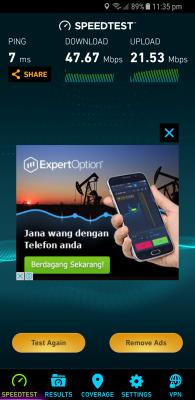
Hi guys. Am on UniFi 50mbps. Technicians just changed my router to TP-Link Archer C1200. Im getting speeds as shown in the screenshot for speedtest.net but everythjng just seem to be loading so slowly on WiFi. Sorry if this has been discussed before but I couldnt find any noob friendly solutions.
This post has been edited by sayming: Jan 15 2018, 11:38 PM Attached thumbnail(s)
|
|
|
Jan 16 2018, 09:42 PM
Return to original view | Post
#2
|
|
Senior Member
3,410 posts Joined: Jan 2003 From: Wangsa Maju, Kuala Lumpur
|
QUOTE(birain @ Jan 16 2018, 02:06 AM) your wifi using what standard? b,g,n, or AC? old tech sure connected slowly cause not up to date. please update you network card to the latest standard. somemore how big is your house and isit got a lot of walls blocking the signal? your area got lots of people using wifi? also try to change channel if it helps.   QUOTE(aneip @ Jan 16 2018, 07:39 AM) Disable ipv6 Hey guys thanks for all the suggestions but I'm a total newbie when it comes to such network terms. How do I check these b, g, n things and how to disable ipv6 or change channels? |
|
|
Jan 18 2018, 09:33 PM
Return to original view | Post
#3
|
|
Senior Member
3,410 posts Joined: Jan 2003 From: Wangsa Maju, Kuala Lumpur
|
Technicians came and changed the Archer C1200 to Netis DL4480V. The WiFi Optimiser Tool shows that I am connected to Channel 9 and recpmmended Channel is 6. How do I change the channel? Kinda need a step by step guide on this.
|
|
Topic ClosedOptions
|
| Change to: |  0.4018sec 0.4018sec
 0.73 0.73
 7 queries 7 queries
 GZIP Disabled GZIP Disabled
Time is now: 13th December 2025 - 11:46 PM |
 Quote
Quote