

Any news on when Archer BE 900 release in malaysia?
TP-LINK Malaysia Official Thread, Technical Enquiries and Support
TP-LINK Malaysia Official Thread, Technical Enquiries and Support
|
|
 Jun 3 2024, 08:04 PM Jun 3 2024, 08:04 PM
Show posts by this member only | IPv6 | Post
#4681
|
 
Junior Member
64 posts Joined: Sep 2018  
|
Any news on when Archer BE 900 release in malaysia?
|
|
|
|
|
|
Jun 4 2024, 03:37 PM
|

Senior Member
6,635 posts Joined: Aug 2008 From: Malaysia 
|
QUOTE(blacktubi @ May 30 2024, 08:04 PM) You can update manually on the webUI if you want  QUOTE(Omochao @ May 31 2024, 12:06 AM) change website region to US, that's what I always do whenever I have free time just to cross check between their website and MY website to see if there's any new releases . Manually downloaded from MY site and update from Web.apparently, it was said that US website will always get new releases every Friday (assuming here local time Saturday ) for routers/decos . but nowadays i just refer to their forum. But those functions not appearing, probably due to i have old x20 connected still  kenak disabled. Still yet to replace those x20 |
|
|
Jun 5 2024, 05:11 AM
Show posts by this member only | IPv6 | Post
#4683
|

Junior Member
835 posts Joined: Nov 2007 From: Land of Forgotten
|
QUOTE(TongCN @ Jun 4 2024, 03:37 PM) Manually downloaded from MY site and update from Web. They silently shelf off Deco X20 from US website and now listed as EOL. once EOL, the updates are slower or either non existent anymore.But those functions not appearing, probably due to i have old x20 connected still kenak disabled. Still yet to replace those x20 I sold off my X20 quickly. TP link is smart, if you want full features, better to get all same model and version, even if same model but different hardware version, you risk of losing the features if mix and match. Now I'm only using 2pcs and wired a free TM router as AP. works wonder. |
|
|
Jun 5 2024, 09:08 AM
Show posts by this member only | IPv6 | Post
#4684
|
|
Senior Member
6,635 posts Joined: Aug 2008 From: Malaysia
|
QUOTE(Omochao @ Jun 5 2024, 05:11 AM) They silently shelf off Deco X20 from US website and now listed as EOL. once EOL, the updates are slower or either non existent anymore. Lol .. 3 years lifespan (x20 v1) eh ? I sold off my X20 quickly. TP link is smart, if you want full features, better to get all same model and version, even if same model but different hardware version, you risk of losing the features if mix and match. Now I'm only using 2pcs and wired a free TM router as AP. works wonder. Now still monitoring BE65 or XE75 and make it 2 pcs also. |
|
|
Jun 5 2024, 02:10 PM
|

Senior Member
1,447 posts Joined: Jan 2008
|
 not sure when is TPlink m'sia bringing this models in |
|
|
Jun 5 2024, 10:38 PM
Show posts by this member only | IPv6 | Post
#4686
|
|
Junior Member
835 posts Joined: Nov 2007 From: Land of Forgotten
|
QUOTE(TongCN @ Jun 5 2024, 09:08 AM) Lol .. 3 years lifespan (x20 v1) eh ? Better get back same range. dont mix and match, base on my experience.Now still monitoring BE65 or XE75 and make it 2 pcs also. Unless you know that particular version hardware has the same hardware as your main node, then you can bet on it the updates of new features will get release to it. As I know X20 V4 X50 V1 Shares the same hardware chip, which is either broadcom or qualcomm, which explains why their release of new features can match faster. X20 V3 is MTK chip set...and sadly, not much support on it. QUOTE(wyh @ Jun 5 2024, 02:10 PM) not sure when is TPlink m'sia bringing this models in |
|
|
|
|
|
Jun 6 2024, 11:00 AM
|

Senior Member
2,074 posts Joined: Sep 2021 From: nowhere
|
QUOTE(wyh @ Jun 5 2024, 02:10 PM) not sure when is TPlink m'sia bringing this models in for archer counterpart maybe they will launch lower models of wifi 7 at least second half this year https://www.tp-link.com/us/home-networking/...r/archer-be230/ This post has been edited by MyProLife: Jun 6 2024, 11:02 AM |
|
|
Jun 6 2024, 02:06 PM
|
|
Senior Member
1,447 posts Joined: Jan 2008
|
QUOTE(MyProLife @ Jun 6 2024, 11:00 AM) keep in mind TP china is actually seperate from global team now. there zero chance these china domestic models will go global and also if you buy directly 99% will not work with unifi vlan implementation. the link you shown , if not mistaken was launched in Philippinesfor archer counterpart maybe they will launch lower models of wifi 7 at least second half this year https://www.tp-link.com/us/home-networking/...r/archer-be230/ |
|
|
Jun 6 2024, 08:43 PM
Show posts by this member only | IPv6 | Post
#4689
|
|
Newbie
1 posts Joined: Dec 2007
|
Hi, I am trying to set up the ER707-m2 router for my 1Gbps Home Unifi, to replace my existing asus router.
Because I am not familiar with the custom setting, and lack of guide from google to set up the tmnet & IPTV in the OMADA router. I seeking your help and advice if the below setting is alright or missed out. 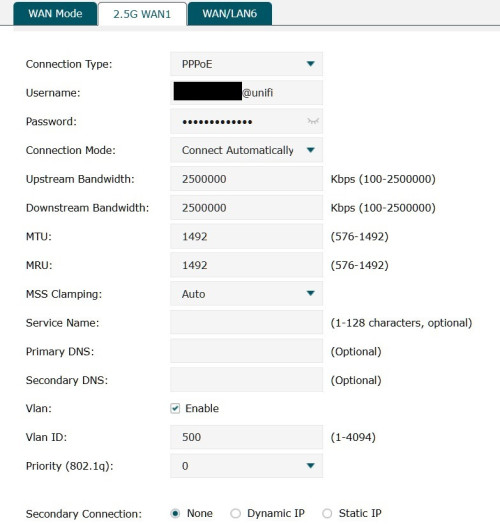 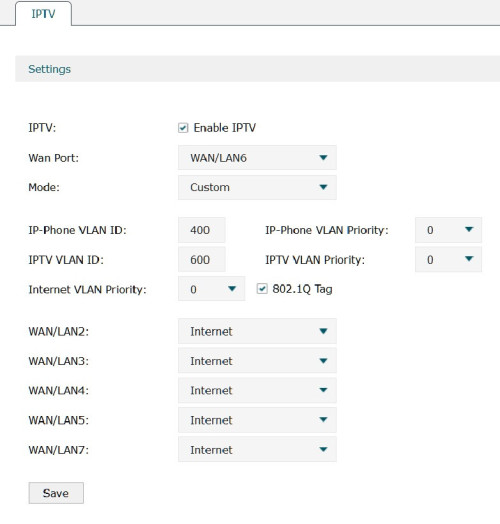 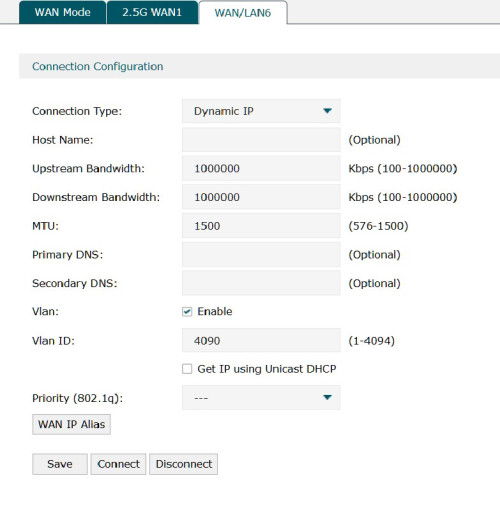 |
|
|
Jun 11 2024, 12:00 PM
|

Senior Member
1,635 posts Joined: May 2005
|
Hi, I am using 3 units of Deco M5, and would like to replace the main node with X50 and relocated the existing M5 to another floor. Any cons if I mixed the model?
|
|
|
Jun 11 2024, 06:02 PM
Show posts by this member only | IPv6 | Post
#4691
|

Senior Member
2,729 posts Joined: Oct 2005 From: Gotham City 
|
QUOTE(loonsave @ Jun 11 2024, 12:00 PM) Hi, I am using 3 units of Deco M5, and would like to replace the main node with X50 and relocated the existing M5 to another floor. Any cons if I mixed the model? im using x50 as my main node paired with m9. works fine. just that you won't get wifi 6 thru out but that is expected. so over time maybe upgrade the others slowly. |
|
|
Jun 11 2024, 06:17 PM
|
|
Senior Member
1,635 posts Joined: May 2005
|
QUOTE(harmeet15 @ Jun 11 2024, 06:02 PM) im using x50 as my main node paired with m9. OK, thank you for the clarification.works fine. just that you won't get wifi 6 thru out but that is expected. so over time maybe upgrade the others slowly. |
|
|
Jun 11 2024, 09:18 PM
Show posts by this member only | IPv6 | Post
#4693
|
|
Senior Member
2,608 posts Joined: Nov 2020
|
QUOTE(loonsave @ Jun 11 2024, 12:00 PM) Hi, I am using 3 units of Deco M5, and would like to replace the main node with X50 and relocated the existing M5 to another floor. Any cons if I mixed the model? I think software features will be reduced to the lowest that all of them support, I remember some posts here about connecting a less featured model resulted in some stuff disappearing from the deco app |
|
|
|
|
|
Jun 12 2024, 09:54 AM
|
|
Senior Member
1,635 posts Joined: May 2005
|
QUOTE(PRSXFENG @ Jun 11 2024, 09:18 PM) I think software features will be reduced to the lowest that all of them support, I remember some posts here about connecting a less featured model resulted in some stuff disappearing from the deco app Actually I am asking on behalf of my friend. He doesn't really care much on features. As long as decent wifi coverage for whole house, and able to connect to the 2 PC via LAN cable. Thus, I think X50 is the suitable model to expand current network. |
|
|
Jun 13 2024, 10:20 PM
|

Junior Member
175 posts Joined: May 2008
|
QUOTE(tzer_yin @ Jun 6 2024, 08:43 PM) Hi, I am trying to set up the ER707-m2 router for my 1Gbps Home Unifi, to replace my existing asus router. I using the same router with omada controller. The setting seems good. I'm not using the iptv so no idea on the iptv setup.Because I am not familiar with the custom setting, and lack of guide from google to set up the tmnet & IPTV in the OMADA router. I seeking your help and advice if the below setting is alright or missed out. |
|
|
Jun 14 2024, 04:00 PM
Show posts by this member only | IPv6 | Post
#4696
|

Senior Member
4,034 posts Joined: Dec 2019
|
is Omada EAP613 ethernet port VLAN-capable?
-- i'm divided whether to go with ER7212PC (3-in-1, with vlan), with ER7206, or with ER706W. i read the vlan tag handling is simplistic accessible on all ports, instead on making each port only deal with certain vlan(s). that means it is possible that a 1Gbps traffic on any port will be visible as 1Gbps on each and every other port. |
|
|
Jun 19 2024, 05:56 AM
Show posts by this member only | IPv6 | Post
#4697
|
|
Junior Member
835 posts Joined: Nov 2007 From: Land of Forgotten
|
yes, pairing Deco with another range other than same model will have this effect:
1) some features might be missing, due to nodes having a base firmware which does not have the features released for it yet or maybe none as TP link does not really release firmware updates like how ASUS does it and the firmware of TP link differs from all of it with its different hardware revision. Asus is based on Asuswrt-merlin and is standardised to work across most of its hardware unless specified . 2) you'll get random outcomes at times with mixing WiFi5 and 6, or even on a same model but different hardware revisions , ie; X50(V1) + X50(V1.3) the best way for less headache, get the same range, same hardware revision. just need to ask the seller to check for the hardware revision first before buying. if you just want to use it for simple LAN, or even mesh network with stability , get a used cheap wifi 6 router with easy mesh, then pair it to your main deco node, no need to get another deco. |
|
|
Jun 19 2024, 07:28 AM
Show posts by this member only | IPv6 | Post
#4698
|
|
Senior Member
2,608 posts Joined: Nov 2020
|
QUOTE(Omochao @ Jun 19 2024, 05:56 AM) Asus is based on Asuswrt-merlin and is standardised to work across most of its hardware unless specified . Hi there just want to correct thisAsusWRT is the software that runs on Asus Routers, it is loosely based on Tomato firmware from long long ago but Asus has made many changes to it over the years AsusWRT-Merlin is a custom modified version of it by RMerlin that adds features, fixes bugs, etc AiMesh is Asus's branding for their mesh system, and they basically allow you to mesh any Asus AiMesh Compatible router together |
|
|
Jun 19 2024, 08:38 AM
Show posts by this member only | IPv6 | Post
#4699
|
|
Junior Member
835 posts Joined: Nov 2007 From: Land of Forgotten
|
QUOTE(PRSXFENG @ Jun 19 2024, 07:28 AM) Hi there just want to correct this my bad then, not a user of ASUS device, but what I read is that when ASUS releases a new firmware, most of its devices even back to WiFi5 gen is able to support unless they specificied that it is not compatible for certain devices. which i think is very good as their firmware is more on software side, rather than hardware side, and standardized.AsusWRT is the software that runs on Asus Routers, it is loosely based on Tomato firmware from long long ago but Asus has made many changes to it over the years AsusWRT-Merlin is a custom modified version of it by RMerlin that adds features, fixes bugs, etc AiMesh is Asus's branding for their mesh system, and they basically allow you to mesh any Asus AiMesh Compatible router together Tp Link, has too many revisions, broadcom,qualcomm,media tek, which makes it too fragmented like Xiaomi devices. PRSXFENG liked this post
|
|
|
Jun 20 2024, 01:13 PM
|

Newbie
6 posts Joined: Jul 2005
|
I just subscribed to Unifi 2Gbps plan. It came with D-Link AX3000 DPN-FX3060V Combo Box. I wanted to use TP-Link Deco BE85 with this setup. Should I use it as router or access point? Can any expert guide me step by step how to setup Deco BE85 to this Unifi 2Gbps plan?
Thank you in advanced Sifu!!  |
| Change to: |  0.0292sec 0.0292sec
 0.56 0.56
 6 queries 6 queries
 GZIP Disabled GZIP Disabled
Time is now: 4th December 2025 - 06:53 PM |
 Quote
Quote