

Any idea where can get custom made or third party ceiling mount for Deco M4 or M5?
TP-LINK Malaysia Official Thread, Technical Enquiries and Support
TP-LINK Malaysia Official Thread, Technical Enquiries and Support
|
|
 Aug 25 2020, 02:46 PM Aug 25 2020, 02:46 PM
Return to original view | Post
#1
|
 
Senior Member
1,635 posts Joined: May 2005  
|
Any idea where can get custom made or third party ceiling mount for Deco M4 or M5? nazman liked this post
|
|
|
|
|
|
Aug 26 2020, 10:40 AM
Return to original view | Post
#2
|
|
Senior Member
1,635 posts Joined: May 2005
|
QUOTE(nazman @ Aug 25 2020, 07:34 PM) Thank you.  |
|
|
May 13 2021, 12:18 PM
Return to original view | Post
#3
|
|
Senior Member
1,635 posts Joined: May 2005
|
Hi Sifu,
I have 2 units of Deco M5, the main unit at second floor, and slave unit at first floor living room. I can't find the "feng shui" place for the slave unit to get optimum connection despite change different location. Given that M5 do not have dedicated wireless backhaul. Do M9 and X60 can solve the weak signal between units? Ethernet backhaul is not an option because there is no cable between floors. 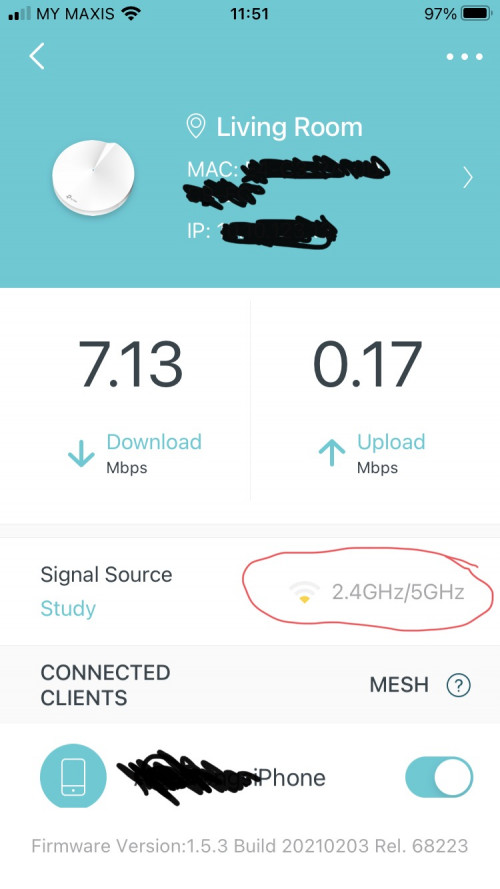 |
|
|
May 13 2021, 06:18 PM
Return to original view | Post
#4
|
|
Senior Member
1,635 posts Joined: May 2005
|
QUOTE(blacktubi @ May 13 2021, 05:05 PM) A common misunderstanding of mesh WiFi system is to put the mesh node at the signal dead spot I do not sure how the beam forming work, but technically the slave is not far from the master unit, and most probably block by 1 wall/floor only.The proper way is to put the mesh node at somewhere with reasonably good signal to the main unit and rely on the signal from the mesh node to reach the dead spot. A good rule of thumb is to keep it less than 3 walls.  |
|
|
May 13 2021, 07:10 PM
Return to original view | Post
#5
|
|
Senior Member
1,635 posts Joined: May 2005
|
QUOTE(blacktubi @ May 13 2021, 06:21 PM) Make sure they are not behind a shelf or hidden in some metal box. No, it's not. The master unit on table, and the slave unit on tv cabinet. Although no direct line of sight, I just don't get it why the mesh signal so low.So I wonder if a mesh with wireless dedicated backhaul can improve it. And any way to find out speed between mesh unit? |
|
|
May 14 2021, 11:06 AM
Return to original view | Post
#6
|
|
Senior Member
1,635 posts Joined: May 2005
|
QUOTE(blacktubi @ May 13 2021, 10:32 PM) What is the speed you're getting from the second unit now? I am subscribing to UniFi 300Mbps.This is the average 3 speedtest to Internet via slave deco WiFi.  This is the average 3 speedtest to Internet via master deco WiFi.  This is the average 3 speedtest to Internet via master deco ethernet.  =================================================================== This is the speedtest to internal speedtest server via slave deco WiFi. 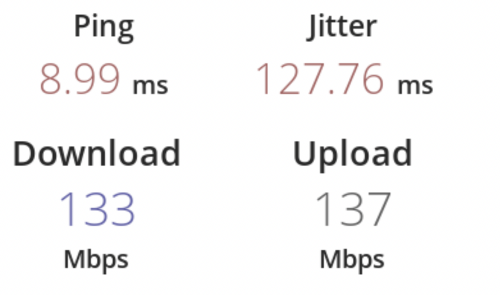 This is the speedtest to internal speedtest server via master deco WiFi. 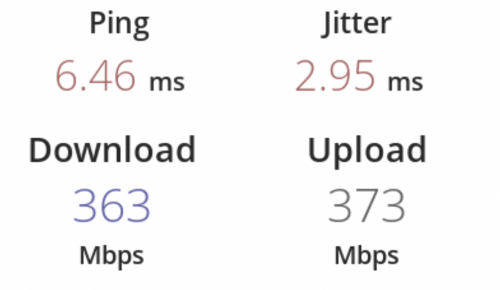 This is the speedtest to internal speedtest server via master deco ethernet. 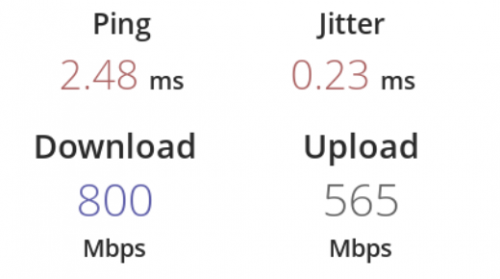 I can get decent speed when connect to Master Deco. But my speed limit to 130Mbps when connect to Slave Deco. Other than relocating M5 deco location, do TP-Link model (eg: M9 and X60) with dedicated wireless backhaul help to get better speed? If it won't help, then I can only try to find the "feng shui" spot for both Deco. |
|
|
|
|
|
May 14 2021, 02:42 PM
Return to original view | Post
#7
|
|
Senior Member
1,635 posts Joined: May 2005
|
QUOTE(blacktubi @ May 14 2021, 11:35 AM) loonsave So the current Deco that has dedicated backhaul is M9?Yup, getting a mesh WiFi with dedicated backhaul will definitely improve performance by a significant margin. The Deco X60 does not come with dedicated backhaul. FusionXY liked this post
|
|
|
May 15 2021, 03:15 PM
Return to original view | Post
#8
|
|
Senior Member
1,635 posts Joined: May 2005
|
QUOTE(JadenFongV @ May 14 2021, 09:06 PM) Hi, stupid question here, if i bought Deco M4 with 2 units, can i just take 1 unit and share another 1 unit with my family member's house ? A Deco M4 work as a standalone unit. But do your family member stay next door? If not I suggest you get normal wireless router instead of Deco Mesh system. |
|
|
May 15 2021, 10:06 PM
Return to original view | Post
#9
|
|
Senior Member
1,635 posts Joined: May 2005
|
QUOTE(JadenFongV @ May 15 2021, 09:26 PM) Not staying next door, house not big one. Wifi working well with TM router in 1st floor, i get 3-30mbps (2.4ghz) max in 2nd floor with unifi 100mbps plan, sometimes very unstable, keep disconnected. kindly advice But what is your plan to give them a unit of Deco? You need at least a pair to get the Mesh service. A single unit just don't extend the wireless coverage. If you can't get a good signal at second floor, the best way is to use a pair of Deco. |
|
|
Jul 16 2021, 10:51 AM
Return to original view | Post
#10
|
|
Senior Member
1,635 posts Joined: May 2005
|
Anyone have problem with TP-Link that have problem to access to Internet until reboot the router/deco mesh WiFi today?
Both my friend and I can connect to the WiFi, but can't ping the gateway until reboot the router. LAN got no problem though. And we are not in the same house. |
|
|
Jul 16 2021, 11:29 AM
Return to original view | Post
#11
|
|
Senior Member
1,635 posts Joined: May 2005
|
QUOTE(aniq8676 @ Jul 16 2021, 11:09 AM) If you are a Unifi user, It's not Internet problem. It's WiFi problem. Devices connected to WiFi, obtained IP via DHCP, but cannot ping the default gateway until restart my Deco. Similar to my friend, he had to restart his Archer C1200. Both happened this morning.Unifi experienced internet outage late last night. |
|
|
Jun 11 2024, 12:00 PM
Return to original view | Post
#12
|
|
Senior Member
1,635 posts Joined: May 2005
|
Hi, I am using 3 units of Deco M5, and would like to replace the main node with X50 and relocated the existing M5 to another floor. Any cons if I mixed the model?
|
|
|
Jun 11 2024, 06:17 PM
Return to original view | Post
#13
|
|
Senior Member
1,635 posts Joined: May 2005
|
QUOTE(harmeet15 @ Jun 11 2024, 06:02 PM) im using x50 as my main node paired with m9. OK, thank you for the clarification.works fine. just that you won't get wifi 6 thru out but that is expected. so over time maybe upgrade the others slowly. |
|
|
Jun 12 2024, 09:54 AM
Return to original view | Post
#14
|
|
Senior Member
1,635 posts Joined: May 2005
|
QUOTE(PRSXFENG @ Jun 11 2024, 09:18 PM) I think software features will be reduced to the lowest that all of them support, I remember some posts here about connecting a less featured model resulted in some stuff disappearing from the deco app Actually I am asking on behalf of my friend. He doesn't really care much on features. As long as decent wifi coverage for whole house, and able to connect to the 2 PC via LAN cable. Thus, I think X50 is the suitable model to expand current network. |
| Change to: |  0.0284sec 0.0284sec
 0.91 0.91
 7 queries 7 queries
 GZIP Disabled GZIP Disabled
Time is now: 6th December 2025 - 05:20 AM |
 Quote
Quote