Outline ·
[ Standard ] ·
Linear+
TP-LINK Malaysia Official Thread, Technical Enquiries and Support
|
jacktiew
|
 Jan 2 2023, 12:45 PM Jan 2 2023, 12:45 PM
|
Getting Started


|
QUOTE(kevchinyl @ Jan 1 2023, 11:14 PM) Hi, need some advice/recommendations. Am running unifi 300 mbps with a deco m5 as my main router with 2 units of m4r for wifi coverage. However I now need more then 2 Ethernet ports which the m5 provides. What TP link router is compatible with the deco mesh network that has the standard 4 Ethernet ports which is optimal for 300mbps?Thank you Buy a gigabit network switch instead. |
|
|
|
|
|
kevchinyl
|
Jan 2 2023, 01:27 PM
|
Getting Started
|
QUOTE(jacktiew @ Jan 2 2023, 12:45 PM) Buy a gigabit network switch instead. Thanks. Was thinking of that as well. Will do |
|
|
|
|
|
GBP56
|
Jan 6 2023, 11:41 AM
|
Getting Started
|
Hi all, I’m using a Tenda mesh Wi-Fi and the router settings through the app sucks, and no default gateway webpage is available.
I’m planning to get a separate router to manage my router settings there, and the mesh will be in bridge mode only.
Can TP-link router owners help confirm there’s a default gateway webpage I can use to manageme my router settings instead of the app? I’m planning to get the TP-link Archer C1200 (cheapest router I can find with Gigabit port)
|
|
|
|
|
|
PRSXFENG
|
Jan 6 2023, 02:31 PM
|
|
|
QUOTE(GBP56 @ Jan 6 2023, 11:41 AM) Hi all, I’m using a Tenda mesh Wi-Fi and the router settings through the app sucks, and no default gateway webpage is available. I’m planning to get a separate router to manage my router settings there, and the mesh will be in bridge mode only. Can TP-link router owners help confirm there’s a default gateway webpage I can use to manageme my router settings instead of the app? I’m planning to get the TP-link Archer C1200 (cheapest router I can find with Gigabit port) Yes it has a webpage but why that router? its pretty old and is known for some overheating issues |
|
|
|
|
|
GBP56
|
Jan 6 2023, 04:32 PM
|
Getting Started
|
QUOTE(PRSXFENG @ Jan 6 2023, 02:31 PM) Yes it has a webpage but why that router? its pretty old and is known for some overheating issues I was just looking for a cheap router with a gigabit port to be honest, since my actual Wi-Fi will be from the mesh. I think from Shopee I found one that’s just RM125. Im open to other models too actually if you have suggestions |
|
|
|
|
|
MyProLife
|
Jan 7 2023, 10:49 PM
|
|
|
QUOTE(GBP56 @ Jan 6 2023, 04:32 PM) I was just looking for a cheap router with a gigabit port to be honest, since my actual Wi-Fi will be from the mesh. I think from Shopee I found one that’s just RM125. Im open to other models too actually if you have suggestions Get at least Archer C6/A6 v4 then |
|
|
|
|
|
kevyeoh
|
Jan 11 2023, 08:32 PM
|
|
|
Dear tplink support,
I plan to use Deco mesh from tplink and i also plan to use switch for LAN connection. Which switch is best for home use? I am looking at 8 port or 16 port max.
Thank you.
|
|
|
|
|
|
kevyeoh
|
Jan 11 2023, 08:34 PM
|
|
|
Got recommendation which model to get? Thanks! QUOTE(jacktiew @ Jan 2 2023, 12:45 PM) Buy a gigabit network switch instead. |
|
|
|
|
|
jacktiew
|
Jan 12 2023, 06:53 PM
|
Getting Started
|
QUOTE(kevyeoh @ Jan 11 2023, 08:34 PM) Got recommendation which model to get? Thanks! Any brand will do. If economic one, just get tp link. |
|
|
|
|
|
iZuDeeN
|
Jan 12 2023, 09:16 PM
|
|
|
Guys who can help??
I have Deco P9 (3 pcs) ;
My setup
BTU --> Deco P9
Problem : After upgrade to unifi 800Mbps.. the speed capped @ 250Mbps
already disabled QoS, SIP ALG and no go
previously was on 300Mbps i can get full speed
Now 250Mbps.. even on wired
|
|
|
|
|
|
MyProLife
|
Jan 13 2023, 01:52 AM
|
|
|
QUOTE(kevyeoh @ Jan 11 2023, 08:32 PM) Dear tplink support, I plan to use Deco mesh from tplink and i also plan to use switch for LAN connection. Which switch is best for home use? I am looking at 8 port or 16 port max. Thank you. TL-SG108 or SG116 |
|
|
|
|
|
netmatrix
|
Jan 14 2023, 07:16 PM
|
|
|
I am using Mercusys MR70X for about a year now. Just now only noticed that LAN port 3 is set to VOIP and you cannot enable it with the Mode: Malaysia-Unifi. So inside Mercusys settings page, go to Advanced - IPTV/VLAN And the settings is below 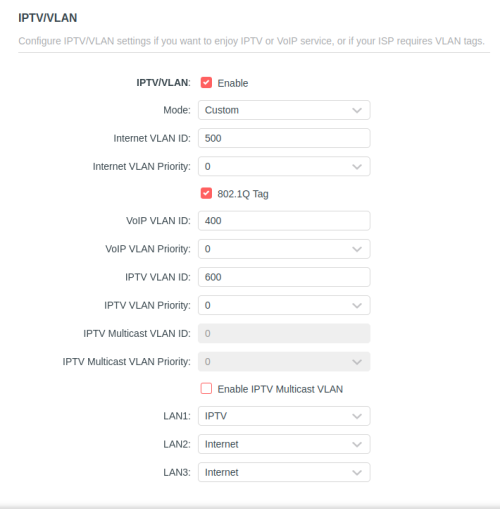 You can use all the LAN ports as internet if you use this method. But in this case i have HyppTV. So i retained LAN 1 for IPTV. |
|
|
|
|
|
syahpian
|
Jan 14 2023, 11:37 PM
|
|
|
hello using ax20 here i having issue with QOS 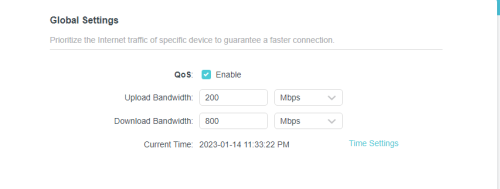 i set QOS on router to 800Mbps download and 200Mbps upload but speedtest only got 689 Mbps download  |
|
|
|
|
|
hunterlala
|
Jan 17 2023, 05:38 PM
|
Getting Started
|
Hi all sifus, just subscribed unifi for my house.
tm gave me a dlink wifi6 router model dir-x1860z
because upstair cant get wifi signal, i bought a pair of deco x20
can anyone give some insight on how to install it? Because it keeps appearing red light after almost finish setup using the deco app
is it deco is not compatible with dlink?
|
|
|
|
|
|
Vincent6596
|
Jan 17 2023, 05:53 PM
|
|
|
QUOTE(hunterlala @ Jan 17 2023, 05:38 PM) Hi all sifus, just subscribed unifi for my house. tm gave me a dlink wifi6 router model dir-x1860z because upstair cant get wifi signal, i bought a pair of deco x20 can anyone give some insight on how to install it? Because it keeps appearing red light after almost finish setup using the deco app is it deco is not compatible with dlink? what mode do u select on your deco x20 ?? Wi-Fi Router mode ? Access point mode ? how do you link deco x20 to you dlink router ? |
|
|
|
|
|
sadlyfalways
|
Jan 19 2023, 11:32 PM
|
|
|
QUOTE(syahpian @ Jan 14 2023, 11:37 PM) hello using ax20 here i having issue with QOS i set QOS on router to 800Mbps download and 200Mbps upload but speedtest only got 689 Mbps download why do you need qos in this day and age? as for you speedtest, it is doing exactly as you set it to do. it is preventing one client from hogging all of the bandwidth. just diabled qos no one person is going to be able to saturate your 800mbps connection, |
|
|
|
|
|
sadlyfalways
|
Jan 19 2023, 11:35 PM
|
|
|
I am a bit dissapinted that tp link deco's still dont have some of the features high end router do even at such a high price. i paid 1300 for my x90 and it doesnt even have basic vpn features and it really disappointing.
i had to revert back to my old rm400 asus to be able to use vpn for whole home because i want to access uk content on apple tv
hope the new wifi 7 deco will have many many more features, similar to the xt12 or basically any asus router.
|
|
|
|
|
|
syahpian
|
Jan 20 2023, 10:34 AM
|
|
|
QUOTE(sadlyfalways @ Jan 19 2023, 11:32 PM) why do you need qos in this day and age? as for you speedtest, it is doing exactly as you set it to do. it is preventing one client from hogging all of the bandwidth. just diabled qos no one person is going to be able to saturate your 800mbps connection, 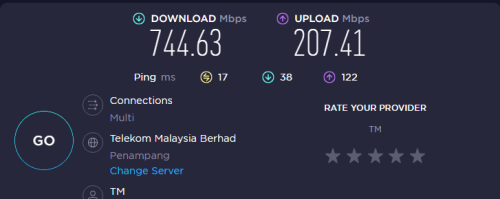 without qos, upload latency so high. |
|
|
|
|
|
blacktubi
|
Jan 20 2023, 09:07 PM
|
-

|
QUOTE(sadlyfalways @ Jan 19 2023, 11:35 PM) I am a bit dissapinted that tp link deco's still dont have some of the features high end router do even at such a high price. i paid 1300 for my x90 and it doesnt even have basic vpn features and it really disappointing. i had to revert back to my old rm400 asus to be able to use vpn for whole home because i want to access uk content on apple tv hope the new wifi 7 deco will have many many more features, similar to the xt12 or basically any asus router. I believe the only mesh WiFi system in the market that offered VPN client feature is ASUS. But, you need to deal with AiMesh in exchange. Anyways, TP-Link recently added beta OpenVPN client support for Deco X50 model. Not sure if they gonna release it to other models eventually. https://community.tp-link.com/en/home/forum/topic/594350 |
|
|
|
|
|
blacktubi
|
Jan 20 2023, 09:15 PM
|
-
|
QUOTE(syahpian @ Jan 20 2023, 10:34 AM) without qos, upload latency so high. 122ms is not the upload latency. It's referring to the latency of your network when the entire upload traffic is saturated. It won't be 122ms on a normal use case scenario. And it shouldn't impact you unless you frequently upload big files on your network. As for why the speed is 689Mbps when QoS is enabled, that's because on Broadcom BCM675x/BCM490x based routers, enabling speed limiter QoS feature will disable NAT acceleration. And, without NAT acceleration, it is unable to reach 800Mbps. There's no way to fix this unless buying a much better router. It's the same on other brands as well. |
|
|
|
|



 Quote
Quote








 0.0292sec
 1.03
1.03
 6 queries
 GZIP Disabled