Welcome Guest ( Log In | Register )

249 Pages « < 166 167 168 169 170 > » Bottom

Outline · [ Standard ] · Linear+

 TP-LINK Malaysia Official Thread, Technical Enquiries and Support

views
     
ksuuk
post May 16 2021, 12:25 AM

Getting Started
**
Junior Member
56 posts

Joined: May 2012


QUOTE(jchong @ May 15 2021, 04:29 PM)
In terms of heat, I thought only AX50 has that problem? U mean the others also have a heat problem?
*
For example AX21 is AX20 with bigger heatsink for the specific (warmer) market. Some say, that AX routers with homeshield pro subscription are also overheating.

Eisenmeteor
post May 17 2021, 08:48 AM

Night Ghost
******
Senior Member
1,484 posts

Joined: Aug 2005
From: Kuala Lumpur


Hi. So I am on time 500mbps plan. Huawei as Modem with a pair of Deco M5. Been using for a year and the lights on both M5 are green. Today, i realised my M5 led light on red but the wifi is working. The deco app also shows that internet not working as well. This is very strange. Any advice?

Solved. Turns out I input a different DNS and it somehow didnt work. Set back to DNS automatically and it works now


This post has been edited by Eisenmeteor: May 17 2021, 12:59 PM
Noname99887 P
post May 17 2021, 09:01 PM

New Member
*
Probation
16 posts

Joined: Oct 2019
Hi all, using tplink archer ax73 with unifi 300mbps. This morning the connection through wifi 5ghz very unstable even not usable(0.29mbps) and 2.4ghz still able to use but the speed also getting 10mbps only.
I have change back to my old router and everything works fine. Anyone know what happening?
jchong
post May 18 2021, 08:47 AM

****************
*******
Senior Member
5,989 posts

Joined: Nov 2005
QUOTE(Noname99887 @ May 17 2021, 09:01 PM)
Hi all, using tplink archer ax73 with unifi 300mbps. This morning the connection through wifi 5ghz very unstable even not usable(0.29mbps) and 2.4ghz still able to use but the speed also getting 10mbps only.
I have change back to my old router and everything works fine. Anyone know what happening?
*
Try restarting the AX73 and see if the performance is restored.
Noname99887 P
post May 18 2021, 09:01 AM

New Member
*
Probation
16 posts

Joined: Oct 2019
QUOTE(jchong @ May 18 2021, 08:47 AM)
Try restarting the AX73 and see if the performance is restored.
*
Tried restart and reset but problem still exist.
yuanyuen
post May 18 2021, 09:42 PM

Getting Started
**
Junior Member
52 posts

Joined: Sep 2008


Hi Sifu-sifu,

I recently bought a TL-PA4010P powerline adapter to extend my network to the room upstairs but then I found out the model does not have wifi function.

Can I connect a router to the powerline adapter in the room to extend the wireless connection?
ISP ---> Modem ---> Powerline adapter ---> Wireless router ---> Phone/PC
musteck
post May 19 2021, 12:30 AM

Getting Started
**
Junior Member
91 posts

Joined: Nov 2005


EDIT: Nvm problem solved sweat.gif

This post has been edited by musteck: May 19 2021, 04:02 AM
Alpha_Tay
post May 19 2021, 07:39 AM

Beware The Spammer Star!
******
Senior Member
1,725 posts

Joined: Jan 2003
AX20(US)_V1.2_210514

Published Date: 2021-05-17 Language: English File Size: 33.32 MB
Bug Fixed:

Fixed the FragAttacks vulnerabilities.

AX20(US)_V2_210514

Published Date: 2021-05-17 Language: English File Size: 33.37 MB
Bug Fixed:

1. Fixed the FragAttacks vulnerabilities.

AX20(US)_V1_210514

Published Date: 2021-05-17 Language: English File Size: 33.31 MB
Bug Fixed:

Fixed the FragAttacks vulnerabilities.

https://www.tp-link.com/my/support/download...20/v2/#Firmware

This website presents FragAttacks (fragmentation and aggregation attacks) which is a collection of new security vulnerabilities that affect Wi-Fi devices. An adversary that is within range of a victim's Wi-Fi network can abuse these vulnerabilities to steal user information or attack devices. Three of the discovered vulnerabilities are design flaws in the Wi-Fi standard and therefore affect most devices. On top of this, several other vulnerabilities were discovered that are caused by widespread programming mistakes in Wi-Fi products. Experiments indicate that every Wi-Fi product is affected by at least one vulnerability and that most products are affected by several vulnerabilities.

https://www.fragattacks.com/

https://www.howtogeek.com/728260/how-to-pro...om-fragattacks/

https://blog.avast.com/what-are-fragattacks-avast

This post has been edited by Alpha_Tay: May 19 2021, 07:39 AM
SUStru.shyne
post May 19 2021, 09:18 AM

Getting Started
**
Junior Member
175 posts

Joined: Jan 2020
recently just installed 300Mbps fibre internet.
TM contractor came afternoon and due to time concern, he pulled the cable from pole and install the modem&router at 2nd floor (double storey house)
also the reason pulling the cable to 2nd floor is because less cost & faster installation.

but the thing is, most of the my devices like TV Box, CCTV, smart home all downstairs living room. I watch TV box sometime wifi not stable and laggy I prefer plug in LAN cable. Plus my CCTV (going to install in future) also need LAN cable to connect

so how do I improve this?
should I ask wireman come pull a fibre optic cable over the celling so I can install the router at living room?
or use TP-link mesh wifi with LAN ports or anything

thanks

This post has been edited by tru.shyne: May 19 2021, 09:23 AM
rajlesta00
post May 19 2021, 11:42 AM

Lfcywna
***
Junior Member
463 posts

Joined: May 2008
From: Cyberjaya


QUOTE(tru.shyne @ May 19 2021, 09:18 AM)
recently just installed 300Mbps fibre internet.
TM contractor came afternoon and due to time concern, he pulled the cable from pole and install the modem&router at 2nd floor (double storey house)
also the reason pulling the cable to 2nd floor is because less cost & faster installation.

but the thing is, most of the my devices like TV Box, CCTV, smart home all downstairs living room. I watch TV box sometime wifi not stable and laggy I prefer plug in LAN cable. Plus my CCTV (going to install in future) also need LAN cable to connect

so how do I improve this?
should I ask wireman come pull a fibre optic cable over the celling so I can install the router at living room?
or use TP-link mesh wifi with LAN ports or anything

thanks
*
Bro, it is your house and you have to decide where your devices should be. My kind advice, You dont let people decide for you. If you are willing to pay for the extra distance to pull the cables then why not tell him your requirement. Remember it is one-time cost so I would rather fix it at the place I wanted it to be than regret later.
Since the cabling work has been completed, you can opt for

redo the wiring

or

Yes Mesh wifi that would solve the issues in most situations. Pull a Cat 6 Lan cable from the main deco (1st floor) to slave at ground floor if you want a stable connection.
Deco has two ports for you to use.

Or here is my setup

1st floor
Fiber>modem>Deco M9 plus

Ground floor
Deco M9 plus slave (placed at the centre of the house)
Dect phone

Wireless between decos. No lan cable.

I get full speed even while connected to slave deco.
100mbps, probably because of M9 Plus has better coverage.

My modem and router are placed in 1st floor as well (same like you) because I wanted it to be there. I do not want my hall / tv console looks messy with many devices and cables.


This post has been edited by rajlesta00: May 19 2021, 12:18 PM

sadlyfalways
post May 19 2021, 12:51 PM

Regular
******
Senior Member
1,185 posts

Joined: Nov 2020
Guys I have a question about the new ai driven mesh system.

I now have a single deco x20 which is still able to give my whole home stable WiFi. Now I want to add on a deco x90 2 pack, with one in each area of the home, hardwired.

My question is, will all the new features of the x90 mainly this ai mesh thing work even if my node is the x20? Or do I loose some functionality if everything is not the same model?
harmeet15
post May 19 2021, 04:20 PM

Winners don't make excuses
*******
Senior Member
2,729 posts

Joined: Oct 2005
From: Gotham City


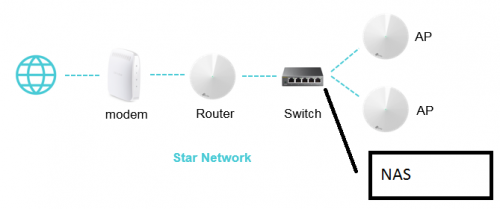
hi guys,
I am thinking of setting up a NAS at home.
Can NAS be attached to a switch?

user posted image
ray8426
post May 19 2021, 04:30 PM

Casual
***
Junior Member
334 posts

Joined: Jul 2011
QUOTE(sadlyfalways @ May 19 2021, 12:51 PM)
Guys I have a question about the new ai driven mesh system.

I now have a single deco x20 which is still able to give my whole home stable WiFi. Now I want to add on a deco x90 2 pack, with one in each area of the home, hardwired.

My question is, will all the new features of the x90 mainly this ai mesh thing work even if my node is the x20? Or do I loose some functionality if everything is not the same model?
*
I remember TP Link recommend main Deco must higher spec to get better performance.

You can use x90 as your main deco. Other 1 x90 and x20 as sub..... rclxm9.gif
sadlyfalways
post May 19 2021, 05:00 PM

Regular
******
Senior Member
1,185 posts

Joined: Nov 2020
QUOTE(ray8426 @ May 19 2021, 04:30 PM)
I remember TP Link recommend main Deco must higher spec to get better performance.

You can use x90 as your main deco. Other 1 x90 and x20 as sub.....  rclxm9.gif
*
Thank you!!
sadlyfalways
post May 19 2021, 05:01 PM

Regular
******
Senior Member
1,185 posts

Joined: Nov 2020
QUOTE(harmeet15 @ May 19 2021, 04:20 PM)
hi guys,
I am thinking of setting up a NAS at home.
Can NAS be attached to a switch?

user posted image
*
Yes you can. For me the deco second port only worked with the switch after I manually disabled iptv vlan
captainwifi
post May 22 2021, 12:15 PM

Getting Started
**
Junior Member
72 posts

Joined: Apr 2011
Does the Tp-link m4 work with the Maxis kaon wifi 6 easymesh router?

I saw somewhere the m4 might be easymesh. So am hoping to pair it the new maxis router.

Also does the ethernet backhaul work on the m4?
PRSXFENG
post May 22 2021, 02:00 PM

Look at all my stars!!
*******
Senior Member
2,615 posts

Joined: Nov 2020


QUOTE(captainwifi @ May 22 2021, 12:15 PM)
Does the Tp-link m4 work with the Maxis kaon wifi 6 easymesh router?

I saw somewhere the m4 might be easymesh. So am hoping to pair it the new maxis router.

Also does the ethernet backhaul work on the m4?
*
Not sure but the TP-Link seems to be its own proprietary mesh protocol and not WiFi Alliance EasyMesh
blacktubi
post May 22 2021, 02:34 PM

-
Group Icon
Elite
8,424 posts

Joined: Jul 2008

QUOTE(captainwifi @ May 22 2021, 12:15 PM)
Does the Tp-link m4 work with the Maxis kaon wifi 6 easymesh router?

I saw somewhere the m4 might be easymesh. So am hoping to pair it the new maxis router.

Also does the ethernet backhaul work on the m4?
*
Directly replacing the Maxis router with the Deco M4 will provide a better total performance.
captainwifi
post May 22 2021, 03:04 PM

Getting Started
**
Junior Member
72 posts

Joined: Apr 2011
QUOTE(blacktubi @ May 22 2021, 02:34 PM)
Directly replacing the Maxis router with the Deco M4 will provide a better total performance.
*
The Kaon has wifi 6 and has newer feature than the Deco M4. Would be nice if can use it together with M4.
captainwifi
post May 22 2021, 03:53 PM

Getting Started
**
Junior Member
72 posts

Joined: Apr 2011
QUOTE(blacktubi @ May 22 2021, 02:34 PM)
Directly replacing the Maxis router with the Deco M4 will provide a better total performance.
*
Does the Ethernet Backhaul works for the M4?

249 Pages « < 166 167 168 169 170 > » Top
 

Change to:
| Lo-Fi Version
0.0351sec    0.59    6 queries    GZIP Disabled
Time is now: 23rd December 2025 - 07:15 AM