Outline ·
[ Standard ] ·
Linear+
TP-LINK Malaysia Official Thread, Technical Enquiries and Support
|
ray8426
|
 Jul 23 2020, 02:24 PM Jul 23 2020, 02:24 PM
|

|
I buy deco m5 when last sale offer to connect my modem which only support up 300mbps. Recently i have change new router TP-Link A6 and now speed stable. But some of my house area still unable cover by A6 wifi. Questions;- 1. Can i add-on deco M5 to connect A6 via wifi? 2. M5 must connect via cable to router? 3. can we expand wifi signal via deco M5?  |
|
|
|
|
|
ray8426
|
Jul 23 2020, 08:58 PM
|
|
|
QUOTE(FusionXY @ Jul 23 2020, 03:05 PM) Hello, Deco M5 not stable with 300Mbps? 1. Connect each router wirelessly? Not possible. 2. Yes, can connect via Cable to the Router. 3. Yes, need to use Deco M5 as access point but different SSID. I heard that M5 uses single SSID. Thanks. Hello, Deco M5 not stable with 300Mbps? > Problem is unable fully coverage my house...  3. > Can use A6 as main connect point? because i only have 2 Deco M5.... |
|
|
|
|
|
ray8426
|
Feb 8 2021, 02:54 PM
|
|
|
Hi just to ask sifu here, AX50 really have minor issue? Recommend for this router?  This post has been edited by ray8426: Feb 8 2021, 04:12 PM This post has been edited by ray8426: Feb 8 2021, 04:12 PM |
|
|
|
|
|
ray8426
|
Feb 9 2021, 09:02 AM
|
|
|
QUOTE(szecheng @ Feb 8 2021, 04:46 PM) i heard the intel chipset is a bit hot, just buy a fan put below it other than AX50, what router recommend wide coverage router? |
|
|
|
|
|
ray8426
|
Feb 9 2021, 01:07 PM
|
|
|
QUOTE(FusionXY @ Feb 9 2021, 10:37 AM) You can get the latest TP-Link Arc5her AX73. It is very affordable with that price. Thanks. AX73 and Deco, which more recommend ? |
|
|
|
|
|
ray8426
|
Feb 9 2021, 01:55 PM
|
|
|
QUOTE(jacktiew @ Feb 9 2021, 01:13 PM) Depending you have big house or not. If you do, I would recommend you get Deco series. Deco series comes with mesh and fast roaming, which will allow you to have seemless wifi experience when moving around the house. Nearly 3k sq (Office + House).... but 1 storey only.... 3-4 CCTV need wifi connect this case i possible need 3 unit deco to cover all..... This post has been edited by ray8426: Feb 9 2021, 02:32 PM |
|
|
|
|
|
ray8426
|
Feb 9 2021, 03:35 PM
|
|
|
QUOTE(FusionXY @ Feb 9 2021, 03:01 PM) In that case, I may recommend you to get the Deco Mesh Series. Get M5 if your plan is 100Mbps and 300Mbps. Get M9 Plus if your plan is 500Mbps and above. Or X20/X60 for future proofing. What's your budget actually? Thanks. My budget below RM600 and now use 100mbps. May upgrade 300mbps future. I have 2pcs M5 deco before. should get 1pcs M4 connect for my TV box? because deco route will be far from my TV, This post has been edited by ray8426: Feb 9 2021, 03:37 PM |
|
|
|
|
|
ray8426
|
Feb 9 2021, 04:10 PM
|
|
|
QUOTE(FusionXY @ Feb 9 2021, 03:41 PM) Since you have 2 Deco M5. You can buy another two M5 Node and join together as one SSID. Thanks. Thanks for your suggestion, will look for that  |
|
|
|
|
|
ray8426
|
Mar 5 2021, 04:09 PM
|
|
|
Hi Guy, AX20 can link with M5? AX20 as router, then M5 as ap to extend the wifi range. |
|
|
|
|
|
ray8426
|
Mar 6 2021, 11:08 AM
|
|
|
QUOTE(blacktubi @ Mar 5 2021, 09:07 PM) Main unit of M5 must be connected to AX20 with Ethernet LAN cable. Can use X20 as main then M5 connect to AX20?  |
|
|
|
|
|
ray8426
|
Mar 6 2021, 11:45 AM
|
|
|
QUOTE(blacktubi @ Mar 6 2021, 11:13 AM) Not possible wirelessly The deco is a superior mesh technology thus it cannot be linked to their router series Eh... actually is Deco AX20 not Acher AX1800 (AX20)  |
|
|
|
|
|
ray8426
|
Mar 10 2021, 02:13 PM
|
|
|
QUOTE(lumixman @ Mar 9 2021, 05:41 PM) Hi support Just installed Deco M4 Now satellite unit is flashing yellow amber quick flash Tried reset...still same Pls help... Did you select correct Vlan profile? I have similar issue before when setup.... after select Vlan profile then working already. This post has been edited by ray8426: Mar 10 2021, 04:51 PM |
|
|
|
|
|
ray8426
|
Apr 7 2021, 02:20 PM
|
|
|
QUOTE(jonsalam @ Apr 7 2021, 08:01 AM) Morning n hello. I like to ask y'all opinion. Is it possible to setup like this? If yes any pro n con? 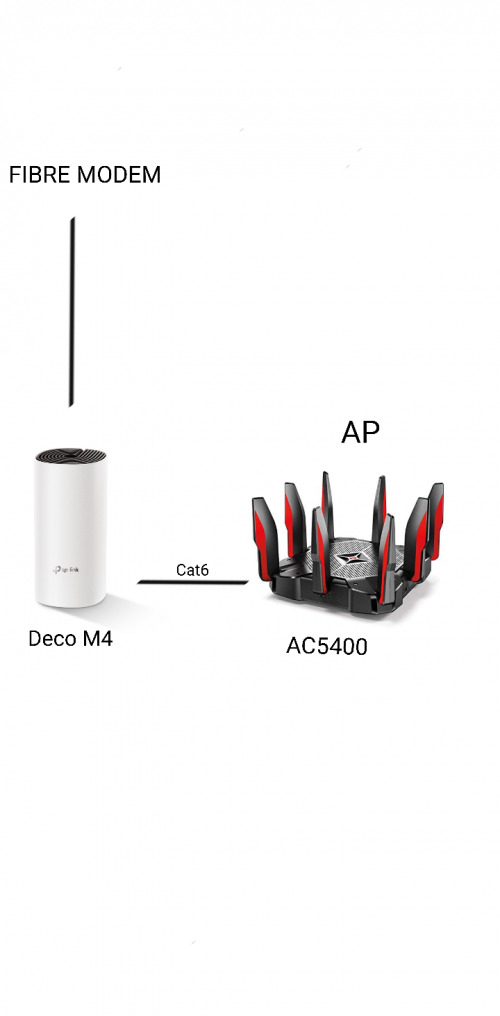 why still need Deco M4 then only connect AP? Reason with Deco M4? This post has been edited by ray8426: Apr 7 2021, 02:20 PM |
|
|
|
|
|
ray8426
|
Apr 8 2021, 10:56 AM
|
|
|
QUOTE(jonsalam @ Apr 7 2021, 11:19 PM) So its not possible? Deco M4 downstairs. AC5400 upstair with all lan port occupied. So 1 lan cable to upstairs better than 5 cable i think. Correct me if I'm wrong. I'm currently planning of this. None of this setup happening yet. TQ Logic is work on that way. But normally recommend high end AC5400 as main router. Your way may cause your wifi wont auto switch when you move from upstairs to downstairs. This post has been edited by ray8426: Apr 8 2021, 10:57 AM |
|
|
|
|
|
ray8426
|
Apr 8 2021, 12:20 PM
|
|
|
QUOTE(GuyM @ Apr 8 2021, 11:26 AM) Lets assume this... My modem on 1st floor living area, one M4 placed here then another M4 placed on ground floor living area which is approx 15m apart divided by the stairway with no partition in-between. Would M4 on ground floor gets good connection with main m4 upper floor? Reason thinking of M4 cos got old devices ie laptop/spare phones which is not WPA3 compliant etc Kindly adv, thankS! Just to ask, before you use M4, current wifi signal (M4 will placed location) weak or strong? |
|
|
|
|
|
ray8426
|
Apr 8 2021, 03:44 PM
|
|
|
QUOTE(GuyM @ Apr 8 2021, 03:32 PM) Both spot based on current gear ok Current unit are AC1200 or ? From my own setup, as long similar signal then no issue for connection |
|
|
|
|
|
ray8426
|
May 19 2021, 04:30 PM
|
|
|
QUOTE(sadlyfalways @ May 19 2021, 12:51 PM) Guys I have a question about the new ai driven mesh system. I now have a single deco x20 which is still able to give my whole home stable WiFi. Now I want to add on a deco x90 2 pack, with one in each area of the home, hardwired. My question is, will all the new features of the x90 mainly this ai mesh thing work even if my node is the x20? Or do I loose some functionality if everything is not the same model? I remember TP Link recommend main Deco must higher spec to get better performance. You can use x90 as your main deco. Other 1 x90 and x20 as sub..... |
|
|
|
|
|
ray8426
|
Jun 10 2021, 02:21 PM
|
|
|
QUOTE(spreeeee @ Jun 10 2021, 01:46 PM) Weird, mine do not have the isolate option. Possible need restart and clear cache from your apps? |
|
|
|
|
|
ray8426
|
Jun 15 2021, 03:37 PM
|
|
|
QUOTE(nanabasiang @ Jun 15 2021, 03:19 PM) Hi sifus, I have a set of tp-link deco x20 (2pack) and used it in router mode. I connected the 2nd lan port of the main deco to the EVPAD 3s via lan cable but the evpad cannot receive internet connection. I already turned off the iptv setting for the second lan port and my laptop can receive internet connection via lan cable. Anyone here have the same problem? Any solution to fix this problem? Thank you. 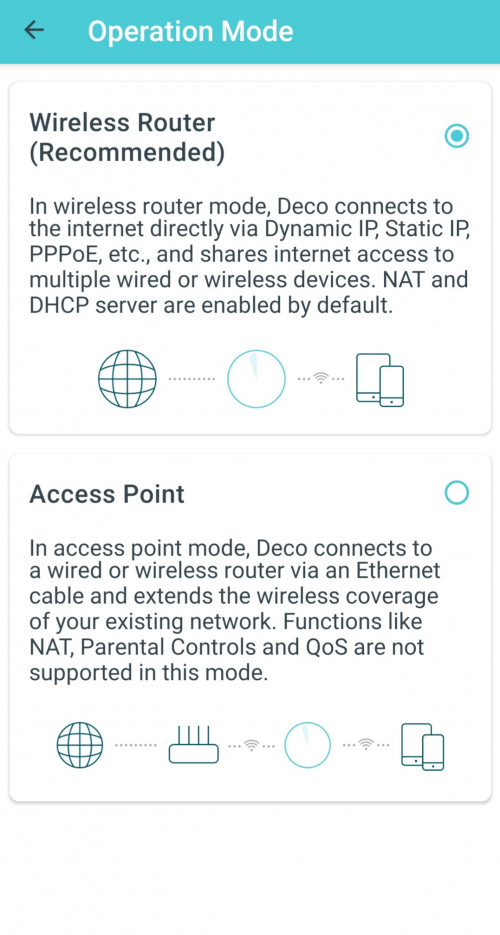 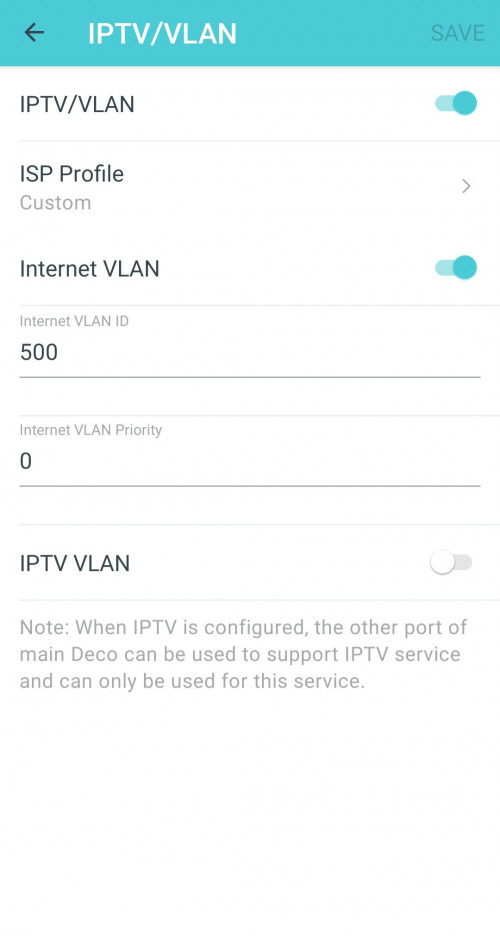 That days i try restart then my port only up. |
|
|
|
|
|
ray8426
|
Jun 16 2021, 04:58 PM
|
|
|
QUOTE(nanabasiang @ Jun 16 2021, 12:06 PM) You mean i need restart / reboot the router and the evpad only can receive internet connection? Maybe.... Because that day after configure setting Vlan, still unable up..... similar issue same to you, i need use port 2 to connect my device. configure the Vlan setting. I just try restart then only able to connect. I no sure will help or not.....  i also try and error. This post has been edited by ray8426: Jun 16 2021, 05:00 PM |
|
|
|
|



 Quote
Quote

 0.1298sec
 0.72
0.72
 7 queries
 GZIP Disabled