Welcome Guest ( Log In | Register )

249 Pages « < 167 168 169 170 171 > » Bottom

Outline · [ Standard ] · Linear+

 TP-LINK Malaysia Official Thread, Technical Enquiries and Support

views
     
PRSXFENG
post May 22 2021, 04:07 PM

Look at all my stars!!
*******
Senior Member
2,615 posts

Joined: Nov 2020


QUOTE(captainwifi @ May 22 2021, 03:04 PM)
The Kaon has wifi 6 and has newer feature than the Deco M4. Would be nice if can use it together with M4.
*
WiFi 6 doesn't matter too much if your devices don't support WiFi 6, or you have slower speeds plans.

Replacing would be a better option but if you really want you could use the M4 as an AP but not sure how that will work out in terms of roaming, interference and compatability between the 2.
blacktubi
post May 22 2021, 04:49 PM

-
Group Icon
Elite
8,423 posts

Joined: Jul 2008

QUOTE(captainwifi @ May 22 2021, 03:04 PM)
The Kaon has wifi 6 and has newer feature than the Deco M4. Would be nice if can use it together with M4.
*
The main unit of Deco M4 must be connected to the Maxis router if you want to expand your coverage with mesh WiFi.

Mesh WiFI systems are not inter-operable between different brands.
keong8867
post May 23 2021, 01:17 AM

Casual
***
Junior Member
348 posts

Joined: Nov 2013
100mbps unifi . Do you recommend me to get Tplink Mesh E4 or M4 better?
aniq8676
post May 23 2021, 01:09 PM

Regular
******
Senior Member
1,524 posts

Joined: Dec 2020
From: Perak


QUOTE(keong8867 @ May 23 2021, 01:17 AM)
100mbps unifi . Do you recommend me to get Tplink Mesh E4 or M4 better?
*
M4
keong8867
post May 24 2021, 12:25 AM

Casual
***
Junior Member
348 posts

Joined: Nov 2013
QUOTE(aniq8676 @ May 23 2021, 01:09 PM)
M4
*
Why M4?
aniq8676
post May 24 2021, 02:11 AM

Regular
******
Senior Member
1,524 posts

Joined: Dec 2020
From: Perak


QUOTE(keong8867 @ May 24 2021, 12:25 AM)
Why M4?
*
The M4 uses a Gigabit port

if you choose E4, then your 100mbps speed will capped up to 94mbps only.

usually for 100mbps plan, unifi will open speeds up to 110-115mbps
shaktiv8
post May 24 2021, 10:36 PM

Casual
***
Junior Member
366 posts

Joined: Sep 2014


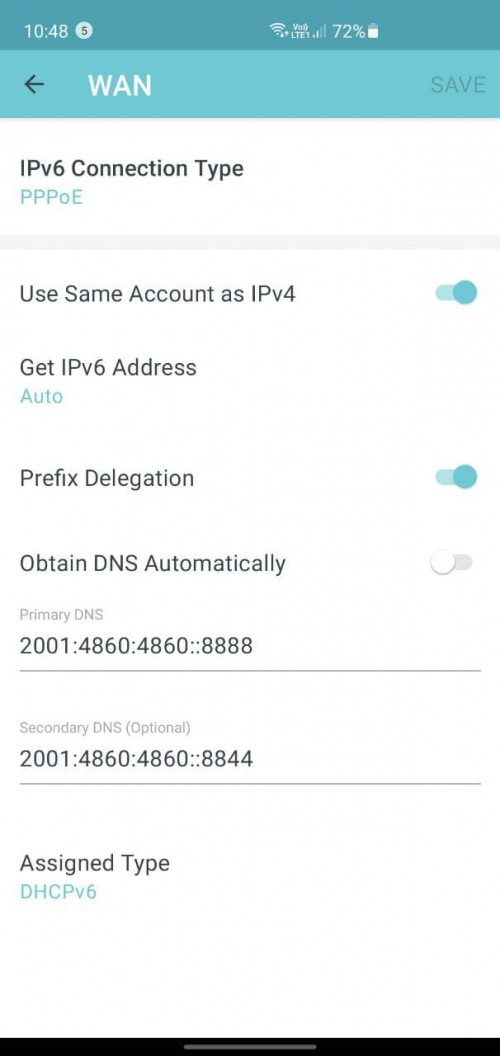
Guys I got a question for ipv6 and deco. When I set my ipv6 to slaac and stateless dcph, along with obtain dns automatically, I do not get any ipv6

If I set my own ipv6 dns everything works

Can anybody tell me why this is? Or how I can overcome it ?
xVentrusx
post May 24 2021, 10:52 PM

Getting Started
**
Junior Member
233 posts

Joined: Nov 2011
From: Malaysia


Hello there. I’ve been meaning to change my celcom fibre stock router which is a tplink ac1200.

Called their customer service and she said can change but need to ask the manufacturer like tplink if they support celcom fibre or not. So now i got two option

1. TPLINK Archer AX73 + RE605X (Modem > AX73 > RE605X)
2. Deco AX20 (Modem > Deco Main > Deco Slave)

Which one is better and do both support celcom fibre? Sorry for the long question but i dont know where to ask since not a lot of info about celcom fibre and even the CS cant help me
aniq8676
post May 24 2021, 10:54 PM

Regular
******
Senior Member
1,524 posts

Joined: Dec 2020
From: Perak


QUOTE(shaktiv8 @ May 24 2021, 10:36 PM)
Guys I got a question for ipv6 and deco. When I set my ipv6 to slaac and stateless dcph, along with obtain dns automatically, I do not get any ipv6

If I set my own ipv6 dns everything works

Can anybody tell me why this is? Or how I can overcome it ?
*
maybe a problem from the ISP itself? hmm.gif

I use a third party DNS
user posted image

shaktiv8
post May 24 2021, 11:31 PM

Casual
***
Junior Member
366 posts

Joined: Sep 2014


QUOTE(aniq8676 @ May 24 2021, 10:54 PM)
maybe a problem from the ISP itself?  hmm.gif

I use a third party DNS
user posted image
*
Does it only work with a custom dns ?


When I changed the dns to google ipv6 and v4 dns, the ipv6 address came up instantly. Why is this haha, am I doing something wrong ? Does tm not have an ipv6 dns? Am I supposed to input it myself ??


Edit again hahah: if I set the ipv4 to google dns, I am able to enable ipv6 and it obtains an ipv6 dns automatically

If ipv4 is set to auto dns ™, internet does not connect if ipv6 auto dns is enabled. So no internet at all, and no dns for both

Very weird


Is anyone here able to get an internet connection if both ipv4 and ipv6 are set to obtain dns automatically


This post has been edited by shaktiv8: May 24 2021, 11:57 PM
aniq8676
post May 25 2021, 12:06 AM

Regular
******
Senior Member
1,524 posts

Joined: Dec 2020
From: Perak


QUOTE(shaktiv8 @ May 24 2021, 11:31 PM)
Does it only work with a custom dns ?
When I changed the dns to google ipv6 and v4 dns, the ipv6 address came up instantly. Why is this haha, am I doing something wrong ? Does tm not have an ipv6 dns? Am I supposed to input it myself ??
Edit again hahah: if I set the ipv4 to google dns, I am able to enable ipv6 and it obtains an ipv6 dns automatically

If ipv4 is set to auto dns ™, internet does not connect if ipv6 auto dns is enabled. So no internet at all, and no dns for both

Very weird
Is anyone here able to get an internet connection if both ipv4 and ipv6 are set to obtain dns automatically
*
if you use DNS from the ISP, it should not be a problem to activate ipv4 and ipv6. Yes, TM also has ipv6.

May I know, why do you still want to use the DNS provided by the ISP?
shaktiv8
post May 25 2021, 12:11 AM

Casual
***
Junior Member
366 posts

Joined: Sep 2014


QUOTE(aniq8676 @ May 25 2021, 12:06 AM)
if you use DNS from the ISP, it should not be a problem to activate ipv4 and ipv6. Yes, TM also has ipv6.

May I know, why do you still want to use the DNS provided by the ISP?
*
Hello! Actually I just wanted to test it out and see if it’s faster, but I am unable to use ipv6 if I set both ipv4 and ipv6 to obtain dns automatically

Sometimes ipv4 connects by itself with both set to automatic, but I will have no public ipv6 address and the ipv6 tests all fail
shaktiv8
post May 25 2021, 11:24 AM

Casual
***
Junior Member
366 posts

Joined: Sep 2014


QUOTE(JohnLai @ Apr 20 2019, 07:37 PM)
For Telekom Malaysia Unifi Fibre, seem like only IPv6 PPPoE SLAAC is supported at Internet Connection Type.
PPPoE DHCPv6 --> No connectivity, can't get public IPv6 address from TM ISP.
If Dynamic IP (SLAAC/DHCPv6) is selected at Internet Connection Type, the IPv6 connectivity will never be established either.
Same with the IPv6 LAN Section, DHCPv6 never work while ( SLAAC+Stateless DHCP ) and ( SLAAC + RDNSS ) will result in IPv6 connectivity.
Either way = IPv6 firewall doesn't work.
*
Hello! Have you found the reason for this and how to fix it? For me nothing seems to work on ipv6 unless I have a custom dns. Why should it be like this ?
Alpha_Tay
post May 25 2021, 07:01 PM

Beware The Spammer Star!
******
Senior Member
1,725 posts

Joined: Jan 2003
» Click to show Spoiler - click again to hide... «


Today TP-Link Tether App pop up Firmware update announcement, for malaysia local distributor official stock AX20(US) Ver:1.20 , but the firmware version, release date, build, change log, was for different version of hardware AX21(US) Ver:1.20, the firmware version, release date, change log, was the same from firmware release at TP-Link US website, but the Build version 16262 vs 12099 was different from firmware release at TP-Link US website.

UPDATE: the router local web pages 192.168.x receive this update too, with the same firmware version, release date, build, change log, as in TP-Link Tether App. those that have default setting Auto Update Enabled would probably getting the update, does it work? would it brick the router? not idea.

still using 1.2.0 Build 20201023 rel.69987(5553) firmware, while receive this, haven't manually update to Fixed the FragAttacks vulnerabilities. firmware that just released recently yet.

Note: You cannot downgrade to the previous firmware after you install this version of firmware.

https://www.tp-link.com/us/support/download...-ax21/#Firmware

https://www.tp-link.com/my/support/download...v1.20/#Firmware

AX20 1.3.0 Build 20210304 rel. 16262

ax21v1.20-up-ver1-3-0-P3[20210304-rel12099]_sign_2021-03-04_16.23.47.bin

QUOTE(Alpha_Tay @ May 19 2021, 07:39 AM)
AX20(US)_V1.2_210514

Published Date: 2021-05-17 Language: English File Size: 33.32 MB
Bug Fixed:

Fixed the FragAttacks vulnerabilities.

AX20(US)_V2_210514

Published Date: 2021-05-17 Language: English File Size: 33.37 MB
Bug Fixed:

1. Fixed the FragAttacks vulnerabilities.

AX20(US)_V1_210514

Published Date: 2021-05-17 Language: English File Size: 33.31 MB
Bug Fixed:

Fixed the FragAttacks vulnerabilities.

https://www.tp-link.com/my/support/download...20/v2/#Firmware

This website presents FragAttacks (fragmentation and aggregation attacks) which is a collection of new security vulnerabilities that affect Wi-Fi devices. An adversary that is within range of a victim's Wi-Fi network can abuse these vulnerabilities to steal user information or attack devices. Three of the discovered vulnerabilities are design flaws in the Wi-Fi standard and therefore affect most devices. On top of this, several other vulnerabilities were discovered that are caused by widespread programming mistakes in Wi-Fi products. Experiments indicate that every Wi-Fi product is affected by at least one vulnerability and that most products are affected by several vulnerabilities.

https://www.fragattacks.com/

https://www.howtogeek.com/728260/how-to-pro...om-fragattacks/

https://blog.avast.com/what-are-fragattacks-avast
*
This post has been edited by Alpha_Tay: May 26 2021, 06:01 PM
Alpha_Tay
post May 25 2021, 07:27 PM

Beware The Spammer Star!
******
Senior Member
1,725 posts

Joined: Jan 2003
Fragment and Forge vulnerabilities(FragAttacks) Statement

Security AdvisoryUpdated 05-18-2021 06:19:18 AM 537

This Article Applies to:
RE603X( V1 ) , RE605X( V1 ) , Archer AX20( V1 V1.20 ) , Archer AX10( V1 V1.20 ) , Archer AX1500( V1 V1.20 ) , Deco X68( V1 ) , Archer AX90( V1 ) , Deco X90( V1 )

For additional information, see: https://www.wi-fi.org/security-update-fragmentation

TP-Link is aware that researchers have disclosed a set of vulnerabilities about Wi-Fi named FragAttacks.

As soon as we became aware of the details, we immediately launched an investigation. As the investigation progresses, TP-Link will update this advisory with information about affected products.

According to the investigation, the following conditions are required to exploit the wireless vulnerability:

Someone knows your Wi-Fi password and connects to your Wi-Fi network
Someone needs to intercept communication between your router and devices on your Wi-Fi.
In order to achieve the purpose of obtaining private information, an attacker would need to trick a user on the network to visit the attacker's server (Phishing Email, malicious ads, etc.).
Workarounds

Set a strong Wi-Fi password and change it regularly. Being careful not to share your Wi-Fi password.
Periodically check the devices connected to your network. If you see any unknown device, block these devices and change your Wi-Fi password.
We recommend that you use HTTPS protocol to access the website. Don't click on emails from unknown recipients or visit suspicious websites.
Affected

TP-Link will update this advisory as new information emerges.

SOHO Router

Model number

Date

Fixed in Firmware Version

Archer AX90(US)_V1.0

2021/04/29

Archer AX90(US)_V1_210312

Archer AX90(EU)_V1.0

2021/04/29

Archer AX90(EU)_V1_210312

Archer AX10(EU)_V1.0

2021/05/14

Archer AX10(EU)_V1_210420

Archer AX10(US)_V1.0

2021/05/14

Archer AX10(US)_V1_210420

Archer AX10(US)_V1.2

2021/05/14

Archer AX10(US)_V1.2_210421

Archer AX20(EU)_V1.0

2021/05/17

Archer AX20(EU)_V1.0_210514

Archer AX20(US)_V1.0

2021/05/17

Archer AX20(US)_V1.0_210514

Archer AX20(US)_V1.2

2021/05/17

Archer AX20(US)_V1.2_210514

Archer AX20(EU)_V2.0

2021/05/17

Archer AX20(EU)_V2.0_210514

Archer AX20(US)_V2.0

2021/05/17

Archer AX20(US)_V2.0_210514

Archer AX1500(EU)_V1.0

2021/05/17

Archer AX1500(EU)_V1.0_210514

Archer AX1500(US)_V1.0

2021/05/17

Archer AX1500(US)_V1.0_210514

Archer AX1500(US)_V1.2

2021/05/17

Archer AX1500(US)_V1.2_210514


Range Extender

Model number

Date

Fixed in Firmware Version

RE505X_V1

2021/05/17

RE505X_V1_210514

RE603X_V1

2021/05/17

RE603X_V1_210514

RE605X_V1

2021/05/17

RE605X_V1_210514


Deco

Model number

Date

Fixed in Firmware Version

Deco X90_V1

2021/05/17

Deco X90_V1_20210514

Deco X68_V1

2021/05/17

Deco X68_V1_20210514


Revision History

2021-05-14 Published advisory

Disclaimer

FragAttacks vulnerabilities will remain if you do not take all recommended actions. TP-Link cannot bear any responsibility for consequences that could have been avoided by following the recommendations in this statement.

https://www.tp-link.com/en/support/faq/3056/

PRSXFENG
post May 25 2021, 07:40 PM

Look at all my stars!!
*******
Senior Member
2,615 posts

Joined: Nov 2020


Isn't AX21 just a AX20 in an AX73 chassis?
Alpha_Tay
post May 25 2021, 07:43 PM

Beware The Spammer Star!
******
Senior Member
1,725 posts

Joined: Jan 2003
QUOTE(PRSXFENG @ May 25 2021, 07:40 PM)
Isn't AX21 just a AX20 in an AX73 chassis?
*
sorf of, until there is open chassis mainboard photo for more confirmation.
JohnLai
post May 25 2021, 08:06 PM

Skeptical Cat
*******
Senior Member
3,669 posts

Joined: Apr 2006
QUOTE(shaktiv8 @ May 25 2021, 11:24 AM)
Hello! Have you found the reason for this and how to fix it? For me nothing seems to work on ipv6 unless I have a custom dns. Why should it be like this ?
*
Just use SLAAC + RDNSS.
Plus, I don't recommend you to use our ISPs DNS anyway.

I don't have good experience with TP-Link. dry.gif

First, the legendary Archer C1200 random reboot that never get fixed. C1200 IPv6 takes 5 - 10 minutes to "propagate" to client devices.

Second, Archer A6 Ipv6 firewall doesn't work on latest firmware (Archer A6(US)_V2_201010) and beta (ArcherA6v2_us_tw_c6us-up-ver1-1-8-P1[20201110-rel52599]) as for today.
I got multiple port 445 login attempts for all of my devices from external IPv6 attackers. Don't get me started with other port attempts.
Reported the security issue to TP-Link multiple times = never resolved. Oh, seem like TP-Link already abandoned the support for A6 V2 since April 2021.

Third, Archer AX50 which supposedly marketed with WPA3 support, had the WPA3 feature rescinded (which is my main purpose in buying it), OneMESS support rescinded too and the router firmware support basically abandoned immediately after 4 months in the market. IPv6 seems to work flawlessly with proper IPv6 firewall. Disabling the Homecare (Malicious Content Filter) doesn't seem to disable it at all. It still send my DNS request to TrendMicro. doh.gif Reported to TP-Link too. You guys know the "expected" outcome. puke.gif

edit: Originally, since A6 IPv6 firewall will never get fixed, I bought AX50 for its WPA3 and OneMesh functionally to link A6 (extender) with A50 as primary router. Guess how that turned out. puke.gif

This post has been edited by JohnLai: May 25 2021, 08:08 PM
ktek
post May 25 2021, 08:36 PM

小喇叭
********
All Stars
13,217 posts

Joined: Jul 2006
boss/ ts no longer online ?
Alpha_Tay
post May 26 2021, 06:07 PM

Beware The Spammer Star!
******
Senior Member
1,725 posts

Joined: Jan 2003
Archer AX10(US)_V1.2_210421

ax10v1.20-up-ver1-2-0-P1[20210421-rel64516]_2021-04-21_17.56.44.bin

Archer AX10(US)_V1_210420

ax10v1-up-ver1-2-0-P1[20210420-rel39951]_2021-04-20_11.06.54.bin

Published Date: 2021-05-14 Language: Multi-language File Size: 15.56 MB

New Features/Enhancement:

1. Added OneMesh feature;

2. Added QoS Schedule feature;

3. Added a prompt when the negotiation rate of the WAN port is 100Mbps;

4. Added configuration items and display items on Tether APP;

5. Optimized the Parental Control feature;

6. Optimized the Client List;

7. Maximum number of clients on the single-band network increased to 128;

8. The wireless default encryption method is modified to WPA2+AES.


Bug Fixed:

1. Fixed the FragAttacks vulnerabilities;

2. Fixed some bugs that could cause the router to reboot;

3. Fixed the bug that the router incorrectly blocked Internet requests;

4. Fixed the bug of failed to save system log in AP mode;

5. Fixed the bug that TKIP encryption was not supported in 11ax only mode;

6. Fixed the bug that Web UI cannot synchronize the operation of deleting UPNP entries;

7. Fixed the bug that the client type cannot be changed on the Tether App.

https://www.tp-link.com/my/support/download...v1.20/#Firmware

https://www.tp-link.com/my/support/download...10/v1/#Firmware


249 Pages « < 167 168 169 170 171 > » Top
 

Change to:
| Lo-Fi Version
0.0310sec    0.51    6 queries    GZIP Disabled
Time is now: 22nd December 2025 - 09:08 PM