Welcome Guest ( Log In | Register )

249 Pages « < 165 166 167 168 169 > » Bottom

Outline · [ Standard ] · Linear+

 TP-LINK Malaysia Official Thread, Technical Enquiries and Support

views
     
loonsave
post May 13 2021, 12:18 PM

Regular
******
Senior Member
1,635 posts

Joined: May 2005


Hi Sifu,

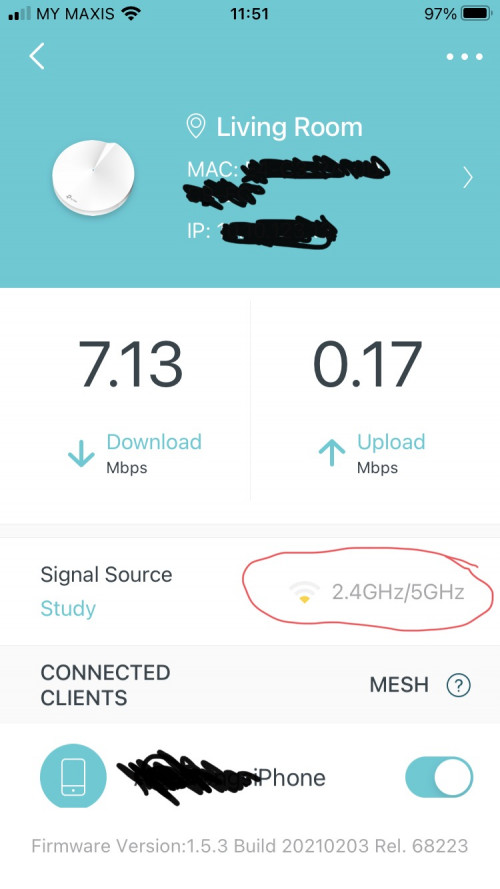
I have 2 units of Deco M5, the main unit at second floor, and slave unit at first floor living room. I can't find the "feng shui" place for the slave unit to get optimum connection despite change different location.

Given that M5 do not have dedicated wireless backhaul. Do M9 and X60 can solve the weak signal between units? Ethernet backhaul is not an option because there is no cable between floors.

user posted image
aniq8676
post May 13 2021, 04:42 PM

Regular
******
Senior Member
1,524 posts

Joined: Dec 2020
From: Perak


QUOTE(loonsave @ May 13 2021, 12:18 PM)
Hi Sifu,

I have 2 units of Deco M5, the main unit at second floor, and slave unit at first floor living room. I can't find the "feng shui" place for the slave unit to get optimum connection despite change different location.

Given that M5 do not have dedicated wireless backhaul. Do M9 and X60 can solve the weak signal between units? Ethernet backhaul is not an option because there is no cable between floors.

user posted image
*
the best way is "Ethernet backhaul", since you do not want to use this method, then you need to install 1-2 more deco units
Vincent6596
post May 13 2021, 05:02 PM

Casual
***
Junior Member
472 posts

Joined: Apr 2019
From: Penang


QUOTE(loonsave @ May 13 2021, 12:18 PM)
Hi Sifu,

I have 2 units of Deco M5, the main unit at second floor, and slave unit at first floor living room. I can't find the "feng shui" place for the slave unit to get optimum connection despite change different location.

Given that M5 do not have dedicated wireless backhaul. Do M9 and X60 can solve the weak signal between units? Ethernet backhaul is not an option because there is no cable between floors.

user posted image
*
mine also having same issue with you, but when i do speedtest, the speed i can get still full speed when connect to the main unit.
blacktubi
post May 13 2021, 05:05 PM

-
Group Icon
Elite
8,421 posts

Joined: Jul 2008

QUOTE(loonsave @ May 13 2021, 12:18 PM)
Hi Sifu,

I have 2 units of Deco M5, the main unit at second floor, and slave unit at first floor living room. I can't find the "feng shui" place for the slave unit to get optimum connection despite change different location.

Given that M5 do not have dedicated wireless backhaul. Do M9 and X60 can solve the weak signal between units? Ethernet backhaul is not an option because there is no cable between floors.

*
A common misunderstanding of mesh WiFi system is to put the mesh node at the signal dead spot

The proper way is to put the mesh node at somewhere with reasonably good signal to the main unit and rely on the signal from the mesh node to reach the dead spot.

A good rule of thumb is to keep it less than 3 walls.
loonsave
post May 13 2021, 06:18 PM

Regular
******
Senior Member
1,635 posts

Joined: May 2005


QUOTE(blacktubi @ May 13 2021, 05:05 PM)
A common misunderstanding of mesh WiFi system is to put the mesh node at the signal dead spot

The proper way is to put the mesh node at somewhere with reasonably good signal to the main unit and rely on the signal from the mesh node to reach the dead spot.

A good rule of thumb is to keep it less than 3 walls.
*
I do not sure how the beam forming work, but technically the slave is not far from the master unit, and most probably block by 1 wall/floor only.
blacktubi
post May 13 2021, 06:21 PM

-
Group Icon
Elite
8,421 posts

Joined: Jul 2008

QUOTE(loonsave @ May 13 2021, 06:18 PM)
I do not sure how the beam forming work, but technically the slave is not far from the master unit, and most probably block by 1 wall/floor only.
*
Make sure they are not behind a shelf or hidden in some metal box.
loonsave
post May 13 2021, 07:10 PM

Regular
******
Senior Member
1,635 posts

Joined: May 2005


QUOTE(blacktubi @ May 13 2021, 06:21 PM)
Make sure they are not behind a shelf or hidden in some metal box.
*
No, it's not. The master unit on table, and the slave unit on tv cabinet. Although no direct line of sight, I just don't get it why the mesh signal so low.

So I wonder if a mesh with wireless dedicated backhaul can improve it. And any way to find out speed between mesh unit?
blacktubi
post May 13 2021, 10:32 PM

-
Group Icon
Elite
8,421 posts

Joined: Jul 2008

QUOTE(loonsave @ May 13 2021, 07:10 PM)
No, it's not. The master unit on table, and the slave unit on tv cabinet. Although no direct line of sight, I just don't get it why the mesh signal so low.

So I wonder if a mesh with wireless dedicated backhaul can improve it. And any way to find out speed between mesh unit?
*
What is the speed you're getting from the second unit now?
loonsave
post May 14 2021, 11:06 AM

Regular
******
Senior Member
1,635 posts

Joined: May 2005


QUOTE(blacktubi @ May 13 2021, 10:32 PM)
What is the speed you're getting from the second unit now?
*
I am subscribing to UniFi 300Mbps.

This is the average 3 speedtest to Internet via slave deco WiFi.

user posted image

This is the average 3 speedtest to Internet via master deco WiFi.

user posted image

This is the average 3 speedtest to Internet via master deco ethernet.

user posted image

===================================================================

This is the speedtest to internal speedtest server via slave deco WiFi.
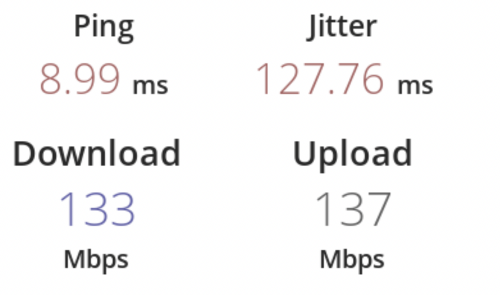
user posted image

This is the speedtest to internal speedtest server via master deco WiFi.
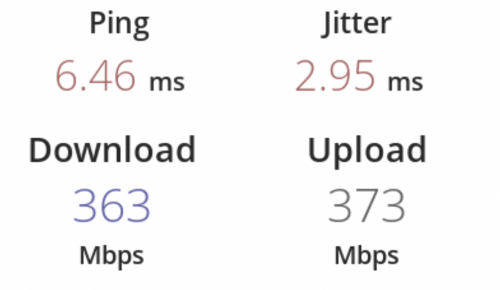
user posted image

This is the speedtest to internal speedtest server via master deco ethernet.
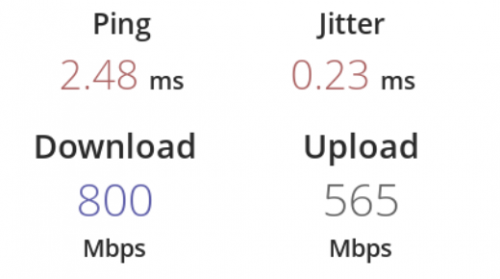
user posted image

I can get decent speed when connect to Master Deco. But my speed limit to 130Mbps when connect to Slave Deco. Other than relocating M5 deco location, do TP-Link model (eg: M9 and X60) with dedicated wireless backhaul help to get better speed?
If it won't help, then I can only try to find the "feng shui" spot for both Deco.


blacktubi
post May 14 2021, 11:35 AM

-
Group Icon
Elite
8,421 posts

Joined: Jul 2008

loonsave

Yup, getting a mesh WiFi with dedicated backhaul will definitely improve performance by a significant margin.

The Deco X60 does not come with dedicated backhaul.
harmeet15
post May 14 2021, 01:14 PM

Winners don't make excuses
*******
Senior Member
2,729 posts

Joined: Oct 2005
From: Gotham City


hi guys,
I have a single unit of deco x60 to let go.
do let me know if anyone would be interested.
x60 mesh


cheers


Attached thumbnail(s)
Attached Image
loonsave
post May 14 2021, 02:42 PM

Regular
******
Senior Member
1,635 posts

Joined: May 2005


QUOTE(blacktubi @ May 14 2021, 11:35 AM)
loonsave

Yup, getting a mesh WiFi with dedicated backhaul will definitely improve performance by a significant margin.

The Deco X60 does not come with dedicated backhaul.
*
So the current Deco that has dedicated backhaul is M9?
blacktubi
post May 14 2021, 02:58 PM

-
Group Icon
Elite
8,421 posts

Joined: Jul 2008

QUOTE(loonsave @ May 14 2021, 02:42 PM)
So the current Deco that has dedicated backhaul is M9?
*
Deco M9 Plus and Deco X90
ckwhy
post May 14 2021, 08:05 PM

Casual
***
Junior Member
367 posts

Joined: Jun 2005


If anyone is looking for Tplink AX20 review, this should help

https://youtu.be/yRLlAVS1tgw
JadenFongV
post May 14 2021, 09:06 PM

Getting Started
**
Junior Member
278 posts

Joined: May 2017
From: Selangor


Hi, stupid question here, if i bought Deco M4 with 2 units, can i just take 1 unit and share another 1 unit with my family member's house ?
loonsave
post May 15 2021, 03:15 PM

Regular
******
Senior Member
1,635 posts

Joined: May 2005


QUOTE(JadenFongV @ May 14 2021, 09:06 PM)
Hi, stupid question here, if i bought Deco M4 with 2 units, can i just take 1 unit and share another 1 unit with my family member's house ?
*
A Deco M4 work as a standalone unit. But do your family member stay next door? If not I suggest you get normal wireless router instead of Deco Mesh system.
ksuuk
post May 15 2021, 08:19 PM

Getting Started
**
Junior Member
56 posts

Joined: May 2012


QUOTE(ckwhy @ May 14 2021, 03:05 PM)
If anyone is looking for Tplink AX20 review, this should help

https://youtu.be/yRLlAVS1tgw
*
This is mostly unbox and visual, not technical review. And for me the whole AX series is a big mistake - coverage, speed, heat, stability and operational issues.

This post has been edited by ksuuk: May 15 2021, 08:19 PM
JadenFongV
post May 15 2021, 09:26 PM

Getting Started
**
Junior Member
278 posts

Joined: May 2017
From: Selangor


QUOTE(loonsave @ May 15 2021, 03:15 PM)
A Deco M4 work as a standalone unit. But do your family member stay next door? If not I suggest you get normal wireless router instead of Deco Mesh system.
*
Not staying next door, house not big one. Wifi working well with TM router in 1st floor, i get 3-30mbps (2.4ghz) max in 2nd floor with unifi 100mbps plan, sometimes very unstable, keep disconnected. kindly advice
jchong
post May 15 2021, 09:29 PM

****************
*******
Senior Member
5,989 posts

Joined: Nov 2005
QUOTE(ksuuk @ May 15 2021, 08:19 PM)
And for me the whole AX series is a big mistake - coverage, speed, heat, stability and operational issues.
*
In terms of heat, I thought only AX50 has that problem? U mean the others also have a heat problem?

This post has been edited by jchong: May 15 2021, 09:29 PM
loonsave
post May 15 2021, 10:06 PM

Regular
******
Senior Member
1,635 posts

Joined: May 2005


QUOTE(JadenFongV @ May 15 2021, 09:26 PM)
Not staying next door, house not big one. Wifi working well with TM router in 1st floor, i get 3-30mbps (2.4ghz) max in 2nd floor with unifi 100mbps plan, sometimes very unstable, keep disconnected. kindly advice
*
But what is your plan to give them a unit of Deco? You need at least a pair to get the Mesh service. A single unit just don't extend the wireless coverage.

If you can't get a good signal at second floor, the best way is to use a pair of Deco.


249 Pages « < 165 166 167 168 169 > » Top
 

Change to:
| Lo-Fi Version
0.0276sec    0.46    6 queries    GZIP Disabled
Time is now: 22nd December 2025 - 12:31 PM