Outline ·
[ Standard ] ·
Linear+
TP-LINK Malaysia Official Thread, Technical Enquiries and Support
|
afif92
|
 Mar 14 2021, 11:20 PM Mar 14 2021, 11:20 PM
|

|
QUOTE(Matchy @ Mar 14 2021, 11:13 PM) Currently using archer c6, but wifi signal a bit weak at certain location. Can I add 2 deco unit that will act as an satellite unit? Can the mesh wifi work? (Will be using gigabit ethernet backhaul that connect the c6 to the deco unit) deco series cant be mixed up with router series if all need wireless. If you want to turn off wifi for c6 and using ethernet cable from c6 to 1st deco, of course it can work as the mesh run between 1st deco to 2nd deco. This post has been edited by afif92: Mar 15 2021, 12:51 AM |
|
|
|
|
|
VeeJay
|
Mar 15 2021, 12:40 AM
|
|
|
QUOTE(Matchy @ Mar 14 2021, 11:13 PM) Currently using archer c6, but wifi signal a bit weak at certain location. Can I add 2 deco unit that will act as an satellite unit? Can the mesh wifi work? (Will be using gigabit ethernet backhaul that connect the c6 to the deco unit) do you mean, modem->archer(router)->wiredDeco1->wifiDeco2 right, then it should be fine |
|
|
|
|
|
Matchy
|
Mar 15 2021, 02:03 PM
|
|
|
QUOTE(afif92 @ Mar 14 2021, 11:20 PM) deco series cant be mixed up with router series if all need wireless. If you want to turn off wifi for c6 and using ethernet cable from c6 to 1st deco, of course it can work as the mesh run between 1st deco to 2nd deco. From tplink website, seems possible if use AP mode... but havent see any real life example yet. QUOTE(VeeJay @ Mar 15 2021, 12:40 AM) do you mean, modem->archer(router)->wiredDeco1->wifiDeco2 right, then it should be fine Looking for option 2 below:- 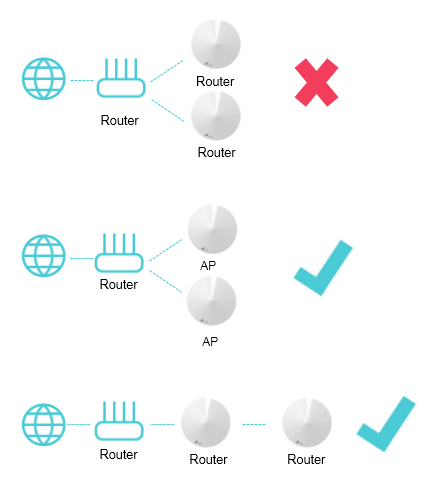 My main router/modem will be at the house entrance (due to the location, the wifi is weak in other part of the house). Pulled 2 cables to my living room and study room from the house entrace. so i'll put the deco unit at the living room and study room for better wifi signal. |
|
|
|
|
|
wilson1149
|
Mar 15 2021, 11:31 PM
|
|
|
Guys, need help.
My archer c6 with randomly disconnected and unable to use at all, after streaming movie or download. But it resume back after overnight.
So this is overheating issue?
Lousy C6 .. even the old maxis router better and no such issue before. If you are planning to buy C6, Please think twice.
This post has been edited by wilson1149: Mar 15 2021, 11:33 PM
|
|
|
|
|
|
FusionXY
|
Mar 15 2021, 11:32 PM
|
|
|
QUOTE(wilson1149 @ Mar 15 2021, 11:31 PM) Guys, need help. My archer c6 with randomly disconnected and unable to use at all, after streaming movie or download. But it resume back after overnight. So this is overheating issue? Lousy C6 .. even the old maxis router better and no such issue before. Which plan that you are using? Thanks |
|
|
|
|
|
wilson1149
|
Mar 15 2021, 11:34 PM
|
|
|
QUOTE(FusionXY @ Mar 15 2021, 11:32 PM) Which plan that you are using? Thanks Maxis 300, any idea? |
|
|
|
|
|
FusionXY
|
Mar 15 2021, 11:36 PM
|
|
|
QUOTE(wilson1149 @ Mar 15 2021, 11:34 PM) How long have you been using that router? How many devices connected? Thanks |
|
|
|
|
|
wilson1149
|
Mar 15 2021, 11:40 PM
|
|
|
QUOTE(FusionXY @ Mar 15 2021, 11:36 PM) How long have you been using that router? How many devices connected? Thanks Around 6 month old, at that time only 2 devices. |
|
|
|
|
|
JasonTheGreat
|
Mar 15 2021, 11:41 PM
|
|
|
Hi.
I want to setup mesh. Is it recommended to get 2 unit of Deco or 2 unit of AX20? What are the PTO and cons?
Thanks
|
|
|
|
|
|
FusionXY
|
Mar 15 2021, 11:43 PM
|
|
|
QUOTE(wilson1149 @ Mar 15 2021, 11:40 PM) Around 6 month old, at that time only 2 devices. Try to update to latest firmware. Thanks. QUOTE(JasonTheGreat @ Mar 15 2021, 11:41 PM) Hi. I want to setup mesh. Is it recommended to get 2 unit of Deco or 2 unit of AX20? What are the PTO and cons? Thanks To setup Mesh, best to get DECO Mesh. As Routers cannot work in mesh way with another router. AX20 can pair with repeater but with routers for the OneMesh System. Thanks. |
|
|
|
|
|
wilson1149
|
Mar 15 2021, 11:46 PM
|
|
|
QUOTE(FusionXY @ Mar 15 2021, 11:43 PM) Try to update to latest firmware. Thanks. To setup Mesh, best to get DECO Mesh. As Routers cannot work in mesh way with another router. AX20 can pair with repeater but with routers for the OneMesh System. Thanks. Ok thanks , i try and update again. |
|
|
|
|
|
VeeJay
|
Mar 16 2021, 01:04 AM
|
|
|
QUOTE(Matchy @ Mar 15 2021, 02:03 PM) From tplink website, seems possible if use AP mode... but havent see any real life example yet. Looking for option 2 below:- My main router/modem will be at the house entrance (due to the location, the wifi is weak in other part of the house). Pulled 2 cables to my living room and study room from the house entrace. so i'll put the deco unit at the living room and study room for better wifi signal. Should be fine, pretty close to what I have setup. Mine is Modem (wired)->DLINK (wired) -> Deco1 (wifi) ->Deco2 |
|
|
|
|
|
DabLRT P
|
Mar 16 2021, 09:19 AM
|
New Member

|
Guys, I asked this question in my own thread as well but just in case some router expert missed out my original thread. Below is the question.
I tried to configure TP-Link Deco M4 as router mode by putting in PPPoE and enabled VLAN with TM Unifi. The WiFi works but the LAN port will not work. I tried plugging in straight to 2 different Computers and a Tp-Link gigabit network switch.
I called TM and they told me to use custom VLAN by disabling IPTV VLAN. However, the LAN port will only work for my computer. It will not work for my Printer (only support LAN Cable, no wifi) and TP-Link gigabit network switch.
Is there anyone encountered this issue before?
What I want to achieve is like this:
Modem -> Tp-Link Deco M4 (primary) -> Network Switch -> Tp-Link Deco M4 (Slave)
|
|
|
|
|
|
wilson1149
|
Mar 16 2021, 08:42 PM
|
|
|
QUOTE(FusionXY @ Mar 15 2021, 11:43 PM) Try to update to latest firmware. Thanks. To setup Mesh, best to get DECO Mesh. As Routers cannot work in mesh way with another router. AX20 can pair with repeater but with routers for the OneMesh System. Thanks. 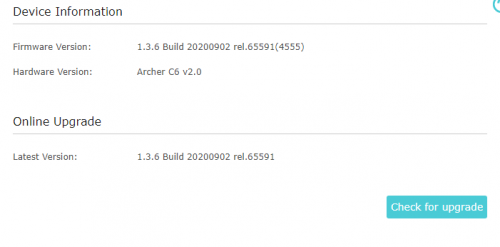 Latest version already.   Router is working now after rest overnight.  How to prevent this "overheat" issue? This post has been edited by wilson1149: Mar 16 2021, 08:43 PM |
|
|
|
|
|
FusionXY
|
Mar 16 2021, 09:25 PM
|
|
|
QUOTE(wilson1149 @ Mar 16 2021, 08:42 PM) Latest version already. Router is working now after rest overnight. How to prevent this "overheat" issue? Try to put fan below the router. Thanks. |
|
|
|
|
|
blacktubi
|
Mar 16 2021, 10:02 PM
|
-

|
QUOTE(wilson1149 @ Mar 16 2021, 08:42 PM) Latest version already. Router is working now after rest overnight. How to prevent this "overheat" issue? Dont expect too much from an entry level Wireless AC router. It's free for a reason.  |
|
|
|
|
|
JohnLai
|
Mar 16 2021, 10:24 PM
|
|
|
QUOTE(wilson1149 @ Mar 16 2021, 08:42 PM) Latest version already. Router is working now after rest overnight. How to prevent this "overheat" issue? That firmware has issue with wifi disconnection. Try the beta firmware QUOTE Update on 2020-12-24: For those Onemesh routers, there is currently no switch on/off feature for the hidden SSID, we will soon release a new official firmware to add this option to allow you to disable/enable the Onemesh. The good news is this feature has been available for the Archer A7 and Archer C7, you can update your router firmware to the latest then confirm. For others models, such as Archer C6/A6, if you don't want to have the hidden SSID as well, the current workaround is upgrading to the below beta firmware: For Archer C6EU V2: https://static.tp-link.com/2020/202010/2020...-up-ver1-3-6-P1[20201030-rel60104].zip For Archer A6EU V2: https://static.tp-link.com/2020/202010/2020...-up-ver1-3-6-P1[20201030-rel60104].zip For Archer C6/A6US V2: https://static.tp-link.com/2020/202011/2020...-up-ver1-1-8-P1[20201110-rel52599].zip For other models, we will add this feature in the near future. This will take some time, however, we hope you could wait patiently. Note: We as always strongly recommend our customer upgrade their TP-Link devices to the latest official firmware, you can try the beta firmware posted by our TP-Link Admins/Officials unless the official firmware doesn't resolve the issue you experience. Thanks a lot. Remember to disable that ONEMESS "hidden" wireless SSD broadcast. |
|
|
|
|
|
Jase
|
Mar 17 2021, 10:38 AM
|
Getting Started
|
Hi all,
I just setup a new AX73 using Malaysia-Unifi profile. I just realised somehow HyppTV is on LAN1 instead of the usual LAN4. However, another odd thing is, LAN4 became VoIP????? I connected my laptop directly to LAN4 and could not get any connectivity - does this mean my AX73 is now effectively a 2 port router (minus IPTV)? Anyone else having the same situation?
I did check for firmware updates, it stated firmware is the latest.
Another funny thing possibly not related to AX73 - happen after switching to the new AX73, my HyppTV can watch VOD but the normal channels somehow only showing blank screen - nothing streaming but the time and progress bar all there just no show. Tried almost all channels the same thing. I am missing something here? Its the very old big grey box.
Thanks.
|
|
|
|
|
|
szecheng
|
Mar 17 2021, 03:21 PM
|
|
|
QUOTE(Jase @ Mar 17 2021, 10:38 AM) Hi all, I just setup a new AX73 using Malaysia-Unifi profile. I just realised somehow HyppTV is on LAN1 instead of the usual LAN4. However, another odd thing is, LAN4 became VoIP????? I connected my laptop directly to LAN4 and could not get any connectivity - does this mean my AX73 is now effectively a 2 port router (minus IPTV)? Anyone else having the same situation? I did check for firmware updates, it stated firmware is the latest. Another funny thing possibly not related to AX73 - happen after switching to the new AX73, my HyppTV can watch VOD but the normal channels somehow only showing blank screen - nothing streaming but the time and progress bar all there just no show. Tried almost all channels the same thing. I am missing something here? Its the very old big grey box. Thanks. you can manually set the LAN port to use hypptv advance >network > iptv/vlan - enabled |
|
|
|
|
TSTP-LINK MY
|
Mar 17 2021, 03:34 PM
|
Getting Started
|
QUOTE(Jase @ Mar 17 2021, 11:38 AM) Hi all, I just setup a new AX73 using Malaysia-Unifi profile. I just realised somehow HyppTV is on LAN1 instead of the usual LAN4. However, another odd thing is, LAN4 became VoIP????? I connected my laptop directly to LAN4 and could not get any connectivity - does this mean my AX73 is now effectively a 2 port router (minus IPTV)? Anyone else having the same situation? I did check for firmware updates, it stated firmware is the latest. Another funny thing possibly not related to AX73 - happen after switching to the new AX73, my HyppTV can watch VOD but the normal channels somehow only showing blank screen - nothing streaming but the time and progress bar all there just no show. Tried almost all channels the same thing. I am missing something here? Its the very old big grey box. Thanks. Hi Jase, Thank you for choosing TP-Link. Kindly replicate your VLAN settings as per screenshot below in order to enable LAN4 for normal connection and improve the compatibility for certain model of HyppTV channels. Best, TP-LINK MY Team Attached thumbnail(s)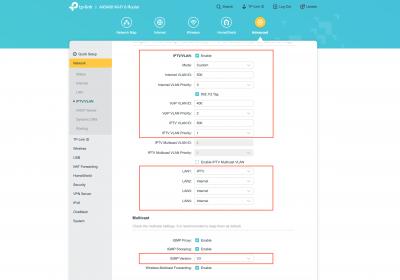
|
|
|
|
|



 Quote
Quote


 0.0264sec
 0.83
0.83
 6 queries
 GZIP Disabled