Welcome Guest ( Log In | Register )

249 Pages « < 156 157 158 159 160 > » Bottom

Outline · [ Standard ] · Linear+

 TP-LINK Malaysia Official Thread, Technical Enquiries and Support

views
     
aaz2082
post Mar 17 2021, 09:38 PM

New Member
*
Junior Member
43 posts

Joined: Sep 2013


QUOTE(TP-LINK MY @ Mar 17 2021, 03:34 PM)
Hi Jase,

Thank you for choosing TP-Link.

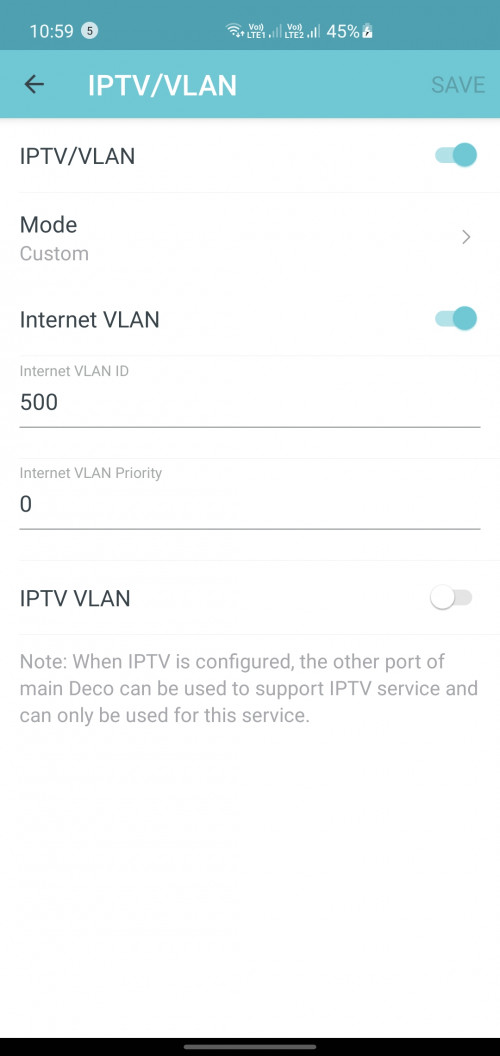
Kindly replicate your VLAN settings as per screenshot below in order to enable LAN4 for normal connection and improve the compatibility for certain model of HyppTV channels.
Best,
TP-LINK MY Team
*
Hi,

I have the same issues of not being able to use my LAN4 on my AX20 router. Can I use the same settings as per the screenshot above on my AX20 router?

Thank you.


FusionXY
post Mar 17 2021, 09:52 PM

LAZZIE ON VACATION
*******
Senior Member
3,836 posts

Joined: Aug 2016

QUOTE(aaz2082 @ Mar 17 2021, 09:38 PM)
Hi,

I have the same issues of not being able to use my LAN4 on my AX20 router. Can I use the same settings as per the screenshot above on my AX20 router?

Thank you.
*
Yes, you can.

You can try on custom VLAN.

Thanks.
ONGEDWIN
post Mar 18 2021, 06:57 AM

Getting Started
**
Junior Member
257 posts

Joined: Nov 2009


Anyone knows when TP link Archer AX90 will be available in Malaysia ?
moiskyrie
post Mar 18 2021, 07:01 AM

Look at all my stars!!
*******
Senior Member
3,217 posts

Joined: Dec 2006
From: City of Neko~~Nyaa~
Want to know AX10 future update will got QOS for limit bandwidth for certain MAC/IP address?
dayojah
post Mar 19 2021, 07:31 AM

Regular
******
Senior Member
1,276 posts

Joined: Sep 2018
From: Ampang
QUOTE(Hwoarang45 @ Mar 11 2021, 09:51 AM)
same thing just got the 100mbps unifi plan, my speed test with cat5e keep getting 94mbps only, then i swap with a thicker cat6 cable instant 10mbps boost, average is 104mbps speedtest, was using elcheapo 15meters cat5e, swap to 20meters cat6.
*
It was the cable, I changed to a 5 m long 5e and I get >100 Mbps now.
Cat 5e is good for at least 50 m at 1 Gbps
quanonly90
post Mar 20 2021, 03:38 AM

Getting Started
**
Junior Member
90 posts

Joined: Jun 2009
Hi, Im currently using the TP-Link AC1200 free router from unifi running 300mbps. Recently i discover that the router performance deteriorate especially on the wifi range. So i decide to buy a new router but couldn't decide which router to buy. I'm eyeing on the Ax 20, Ax 73, and also Asus Rt-Ax55. I already have one Tplink RE305 v3 which is onemesh compatible so would prefer to go to tplink onemesh router. Double Storey house where main router will be on first floor. About 11-14 devices connected to wifi and mostly without wifi6. Please advise which router should I go for
Nando's
post Mar 22 2021, 11:40 AM

Casual
***
Junior Member
431 posts

Joined: Dec 2012
From: Kitchen
Hi, does Deco M9 Plus support DDNS?
TSTP-LINK MY
post Mar 22 2021, 01:14 PM

Getting Started
**
Junior Member
78 posts

Joined: May 2017


QUOTE(Nando's @ Mar 22 2021, 12:40 PM)
Hi, does Deco M9 Plus support DDNS?
*
Hi,

Thank you for choosing TP-Link.

Deco M9 Plus comes with free TP-Link DDNS. Please be informed your Deco must be used in router mode which is direct connection to modem for DDNS to be working properly.

Your ISP will also need to provide you with a public IP.

Best,
TP-LINK MY Team

Exeunt
post Mar 23 2021, 11:01 PM

Enthusiast
*****
Senior Member
828 posts

Joined: Nov 2010


Hi, does Ax20 good budget router for unifi 300mb?
FusionXY
post Mar 24 2021, 01:24 AM

LAZZIE ON VACATION
*******
Senior Member
3,836 posts

Joined: Aug 2016

QUOTE(Exeunt @ Mar 23 2021, 11:01 PM)
Hi, does Ax20 good budget router for unifi 300mb?
*
Yes, it is.

If you stretch your budget to buy AX73 via OOKAS in Lazada on the 27th March.

Thanks
Hwoarang45
post Mar 25 2021, 09:22 PM

Hardcore Gamer
******
Senior Member
1,848 posts

Joined: Jan 2003
From: Boleh Land


i just brought a TP-Link Archer AX20, nearby me there is a few 2.4ghz wifi using channel 1 , i change mine to channel 11, to avoid overlap, but has to disable the smartconnect, is it recommend to use it and let it uses it or set to manual?
aniq8676
post Mar 26 2021, 10:02 PM

Regular
******
Senior Member
1,524 posts

Joined: Dec 2020
From: Perak


QUOTE(Hwoarang45 @ Mar 25 2021, 09:22 PM)
i just brought a TP-Link Archer AX20, nearby me there is a few 2.4ghz wifi using channel 1 , i change mine to channel 11, to avoid overlap, but has to disable the smartconnect, is it recommend to use it and let it uses it or set to manual?
*
up to you. The function of smartconnect is to combine two SSIDs of 2.4Ghz & 5GHz into one.
jackytiong
post Mar 27 2021, 05:49 PM

On my way
****
Junior Member
581 posts

Joined: Jun 2008


QUOTE(FusionXY @ Mar 24 2021, 02:24 AM)
Yes, it is.

If you stretch your budget to buy AX73 via OOKAS in Lazada on the 27th March.

Thanks
*
Only less than RM300.
FusionXY
post Mar 27 2021, 05:59 PM

LAZZIE ON VACATION
*******
Senior Member
3,836 posts

Joined: Aug 2016

QUOTE(jackytiong @ Mar 27 2021, 05:49 PM)
Only less than RM300.
*
AX20 suitable for your budget.

This post has been edited by FusionXY: Mar 27 2021, 05:59 PM
dopp
post Mar 27 2021, 10:45 PM

Regular
******
Senior Member
1,733 posts

Joined: Jan 2003
From: Penang


QUOTE(DabLRT @ Mar 16 2021, 09:19 AM)
Guys, I asked this question in my own thread as well but just in case some router expert missed out my original thread. Below is the question.

I tried to configure TP-Link Deco M4 as router mode by putting in PPPoE and enabled VLAN with TM Unifi. The WiFi works but the LAN port will not work. I tried plugging in straight to 2 different Computers and a Tp-Link gigabit network switch.

I called TM and they told me to use custom VLAN by disabling IPTV VLAN. However, the LAN port will only work for my computer. It will not work for my Printer (only support LAN Cable, no wifi) and TP-Link gigabit network switch.

Is there anyone encountered this issue before?

What I want to achieve is like this:
Modem -> Tp-Link Deco M4 (primary) -> Network Switch -> Tp-Link Deco M4 (Slave)
*
Have you found the solution ?

I too configured M series one as router to replace the TM black AC1200.

However if I disabled VLAN on Deco, my LAN/Wireless/and Internet cannot work

If enable VLAN and select unifi , Wifi will work second M's lan port to switch , that entire Lan cannot work.

goldfries
post Mar 27 2021, 10:56 PM

40K Club
Group Icon
Forum Admin
44,415 posts

Joined: Jan 2003


QUOTE(dopp @ Mar 27 2021, 10:45 PM)
Have you found the solution ?

I too configured M series one as router to replace the TM black AC1200.

However if I disabled VLAN on Deco, my LAN/Wireless/and Internet cannot work

If enable VLAN and select unifi , Wifi will work second M's lan port to switch , that entire Lan cannot work.
*
Here's what I did.

--------------------

In the APP do this

MORE (the lower right icon with 9 boxes) > Advanced > IPTV / VLAN >

Mode change to CUSTOM, Internet VLAN enabled. VLAN ID 500.

IPTV VLAN disabled.
dopp
post Mar 27 2021, 10:57 PM

Regular
******
Senior Member
1,733 posts

Joined: Jan 2003
From: Penang


I have same situation, what do i set in Custom VLAN ID?
Internet VLAN on
VLAN id 500
Vlan priority 0

untick 802.1q Tag
disable IPTV VLAN?

QUOTE(FusionXY @ Jan 29 2021, 09:47 PM)
Hello, you can use custom VLAN Tag ID Mode.

Thanks.
*
dopp
post Mar 27 2021, 11:00 PM

Regular
******
Senior Member
1,733 posts

Joined: Jan 2003
From: Penang


Thanks man, life saver.

QUOTE(goldfries @ Mar 27 2021, 10:56 PM)
Here's what I did.

--------------------

In the APP do this

MORE (the lower right icon with 9 boxes) > Advanced > IPTV / VLAN >

Mode change to CUSTOM, Internet VLAN enabled. VLAN ID 500.

IPTV VLAN disabled.
*
aniq8676
post Mar 27 2021, 11:01 PM

Regular
******
Senior Member
1,524 posts

Joined: Dec 2020
From: Perak


QUOTE(dopp @ Mar 27 2021, 10:45 PM)
Have you found the solution ?

I too configured M series one as router to replace the TM black AC1200.

However if I disabled VLAN on Deco, my LAN/Wireless/and Internet cannot work

If enable VLAN and select unifi , Wifi will work second M's lan port to switch , that entire Lan cannot work.
*
user posted image
alexwsk
post Mar 28 2021, 10:32 AM

Look at all my stars!!
*******
Senior Member
4,095 posts

Joined: Jan 2003
From: USJ


Pull the trigger yesterday during LZD bday sale, AX20 checkout at RM167

by the way, does it support print server on the usb port? I have a printer currently hooked to TP-Link C2100 (default unifi router)

249 Pages « < 156 157 158 159 160 > » Top
 

Change to:
| Lo-Fi Version
0.0312sec    0.67    6 queries    GZIP Disabled
Time is now: 17th December 2025 - 05:35 PM