Welcome Guest ( Log In | Register )

31 Pages « < 16 17 18 19 20 > » Bottom

Outline · [ Standard ] · Linear+

 UniFi's TP-Link Routers C5, C7 & C1200, Newer is not better.

views
     
lyt25_1234
post Jan 8 2018, 01:22 PM

Regular
******
Senior Member
1,152 posts

Joined: Jul 2011
QUOTE(ivanchin99 @ Jan 7 2018, 01:26 PM)
I'm on the beta firmware for C1200v1 EU and it is rock solid for almost 24 hours now.

No disconnect / loss of internet that requires a router reboot
No broken wifi (Wifi is turned on but some devices cannot connect)
Memory usage is currently @ 27%
Cpu usage fluctuates between 20-ish% to 100% - and I'm seeing lower low with this new firmware.

Interesting how this performs over the next few days.
*
You will face problem with accessing local devices with this beta firmware...
JohnLai
post Jan 8 2018, 01:57 PM

Skeptical Cat
*******
Senior Member
3,669 posts

Joined: Apr 2006
QUOTE(lyt25_1234 @ Jan 8 2018, 01:22 PM)
You will face problem with accessing local devices with this beta firmware...
*
No issue with network share between PCs/laptops/TV/smartphone. blink.gif

How is your setup look like? hmm.gif Draw a diagram?
lyt25_1234
post Jan 8 2018, 02:57 PM

Regular
******
Senior Member
1,152 posts

Joined: Jul 2011
QUOTE(JohnLai @ Jan 8 2018, 01:57 PM)
No issue with network share between PCs/laptops/TV/smartphone. blink.gif

How is your setup look like? hmm.gif  Draw a diagram?
*
SSH to your local linux box works?
JohnLai
post Jan 8 2018, 03:44 PM

Skeptical Cat
*******
Senior Member
3,669 posts

Joined: Apr 2006
QUOTE(lyt25_1234 @ Jan 8 2018, 02:57 PM)
SSH to your local linux box works?
*
SSH from desktop Windows (through Putty) to my laptop (it's dual boot system) works, but I don't use default port 22. hmm.gif


lyt25_1234
post Jan 8 2018, 04:08 PM

Regular
******
Senior Member
1,152 posts

Joined: Jul 2011
QUOTE(JohnLai @ Jan 8 2018, 03:44 PM)
SSH from desktop Windows (through Putty) to my laptop (it's dual boot system) works, but I don't use default port 22.  hmm.gif
*
Aha, that's why you don't see the problem...
shamsay
post Jan 8 2018, 05:24 PM

On my way
****
Senior Member
606 posts

Joined: Jan 2003
From: Deep Beach


QUOTE(ivanchin99 @ Jan 7 2018, 10:12 PM)
For reference purposes i am running :
Firmware Version: 1.1.1. Build 20180101 rel.66049 (EU)        Hardware Version: Archer C1200 v1.0
*
So hows the results.after running a few days on beta firmware
Ckmwpy0370
post Jan 8 2018, 05:38 PM

Look at all my stars!!
*******
Senior Member
3,821 posts

Joined: May 2016
QUOTE(JohnLai @ Jan 8 2018, 03:44 PM)
SSH from desktop Windows (through Putty) to my laptop (it's dual boot system) works, but I don't use default port 22.  hmm.gif
*
SSH in Putty is one of the alternative.
teen08
post Jan 9 2018, 05:13 PM

Getting Started
**
Junior Member
297 posts

Joined: Sep 2006


QUOTE(JohnLai @ Jan 7 2018, 12:54 PM)
Desperate time calls for desperate measure.  brows.gif
*
QUOTE(ivanchin99 @ Jan 7 2018, 01:26 PM)
I'm on the beta firmware for C1200v1 EU and it is rock solid for almost 24 hours now.

No disconnect / loss of internet that requires a router reboot
No broken wifi (Wifi is turned on but some devices cannot connect)
Memory usage is currently @ 27%
Cpu usage fluctuates between 20-ish% to 100% - and I'm seeing lower low with this new firmware.

Interesting how this performs over the next few days.
*
QUOTE(lyt25_1234 @ Jan 8 2018, 01:22 PM)
You will face problem with accessing local devices with this beta firmware...
*
Is the beta software stable for you guys? Running EU beta for 24hours now. Same old. Devices get kicked. Perhaps maybe the cpu loaf is more reasonable right now. When I updated. My setting was still there. I didn’t have to restore. Is that way ok? Or hard reset?

This post has been edited by teen08: Jan 9 2018, 08:13 PM
teen08
post Jan 9 2018, 08:11 PM

Getting Started
**
Junior Member
297 posts

Joined: Sep 2006


Beta update- also cant use tplink tether app(wasnt even working with a astable firmware) on my iphone and also cant login using the ip on iphone. only on wired.
JohnLai
post Jan 9 2018, 08:24 PM

Skeptical Cat
*******
Senior Member
3,669 posts

Joined: Apr 2006
QUOTE(teen08 @ Jan 9 2018, 05:13 PM)
Is the beta software stable for you guys? Running EU beta for 24hours now. Same old. Devices get kicked. Perhaps maybe the cpu loaf is more reasonable right now. When I updated. My setting was still there. I didn’t have to restore. Is that way ok? Or hard reset?
*
Stable enough for me.
None of my family smartphones wifi have issue.

Weird thing, the beta update WILL reset everything. But you said your setting isn't reset at all? confused.gif
teen08
post Jan 9 2018, 11:38 PM

Getting Started
**
Junior Member
297 posts

Joined: Sep 2006


QUOTE(JohnLai @ Jan 9 2018, 08:24 PM)
Stable enough for me.
None of my family smartphones wifi have issue.

Weird thing, the beta update WILL reset everything. But you said your setting isn't reset at all? :confused:
*
EU? 01012018? Yes wasn’t reset at all when I updated. But I just reset it. Still not as good as my ASUS n12hp. For far wireless coverage. Nearby is fine. My router is upstairs at the back. My tv is in front downstairs.

This post has been edited by teen08: Jan 9 2018, 11:41 PM
JohnLai
post Jan 9 2018, 11:42 PM

Skeptical Cat
*******
Senior Member
3,669 posts

Joined: Apr 2006
QUOTE(teen08 @ Jan 9 2018, 11:38 PM)
EU? 01012018?
*
Yes, probably something is wrong with your update progress.
Updating to the beta firmware will reset all the settings.
Perhaps you should consider doing a full factory reset? Or reflash again? hmm.gif

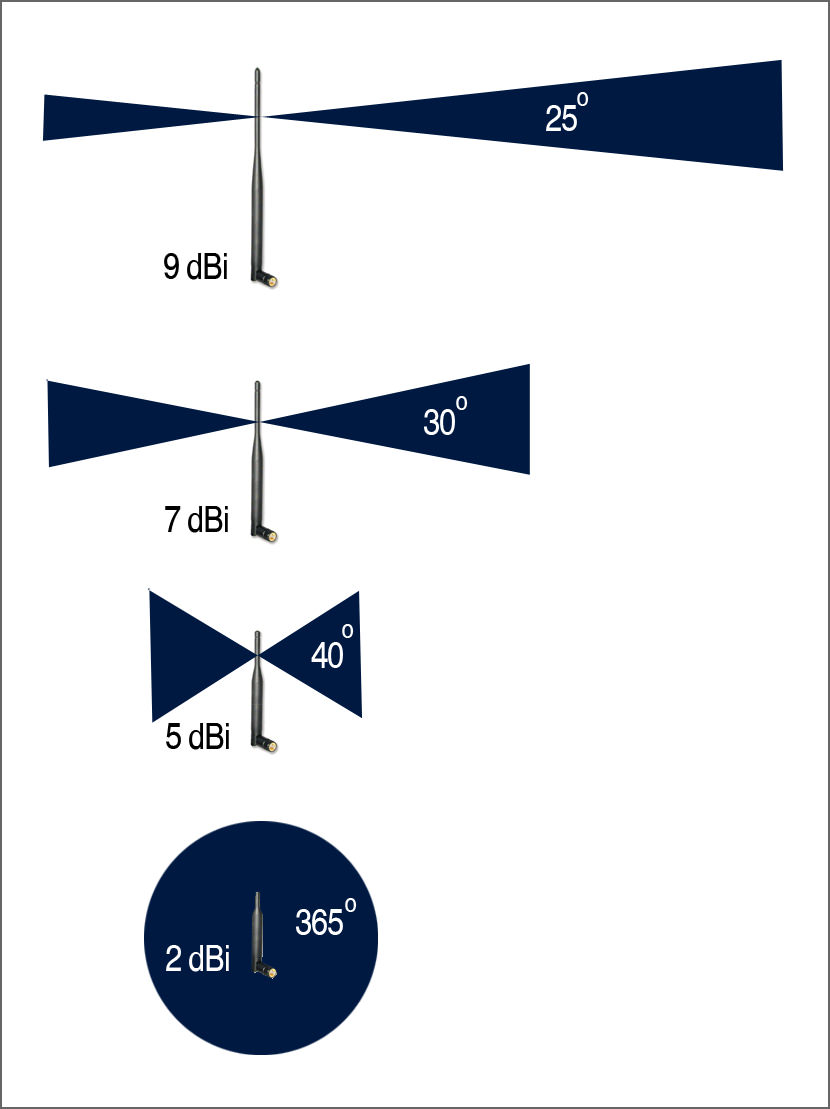
EDIT: N12HP? -.- I think you should understand how antenna works.
user posted image

This post has been edited by JohnLai: Jan 9 2018, 11:44 PM
teen08
post Jan 9 2018, 11:55 PM

Getting Started
**
Junior Member
297 posts

Joined: Sep 2006


QUOTE(JohnLai @ Jan 9 2018, 11:42 PM)
Yes, probably something is wrong with your update progress.
Updating to the beta firmware will reset all the settings.
Perhaps you should consider doing a full factory reset? Or reflash again?  hmm.gif

EDIT: N12HP? -.- I think you should understand how antenna works.
user posted image
*
So what’s the best way I should put my router? I can remove n12hp antennas if that helps. They have 9dbi. Not sure about c1200

Shitty diagram of my house. lol. 22x75

This post has been edited by teen08: Jan 9 2018, 11:58 PM


Attached thumbnail(s)
Attached Image
Jjuggler
post Jan 10 2018, 12:02 AM

Narcissistic Genius
******
Senior Member
1,341 posts

Joined: Dec 2016
QUOTE(teen08 @ Jan 9 2018, 08:11 PM)
Beta update- also cant use tplink tether app(wasnt even working with a astable firmware) on my iphone and also cant login using the ip on iphone. only on wired.
*
When i install tplink tether app in my iphone, the app kenot detect my c1200. You are not alone bro. Haha
JohnLai
post Jan 10 2018, 12:09 AM

Skeptical Cat
*******
Senior Member
3,669 posts

Joined: Apr 2006
QUOTE(teen08 @ Jan 9 2018, 11:55 PM)
So what’s the best way I should put my router? I can remove n12hp antennas if that helps.

Shitty diagram of my house. lol. 22x75
*
.....that is the worst possible location to put your router. Plus....no, you can't connect N12HP antenna to C1200. doh.gif
Ideally, the router should be put at the middle of your house.

As for the C1200 antenna.
https://fccid.io/TE7C1200/Internal-Photos/A...6-08-31-3117781

Antenna orientation matter.
Recommend you to orient left and right antenna in perpendicular mode.
user posted image

Don't forge to enable 5ghz beamforming.
Ckmwpy0370
post Jan 10 2018, 09:53 AM

Look at all my stars!!
*******
Senior Member
3,821 posts

Joined: May 2016
By the way, any experts here have use Parental Control features in TP Link AC1200?
I have tested restricted by time access.
for example from 11pm to 6am restricted access internet.
but when on the gadgets in the morning at 8am, browser is black page display
any ideal?

teen08
post Jan 10 2018, 02:10 PM

Getting Started
**
Junior Member
297 posts

Joined: Sep 2006


QUOTE(JohnLai @ Jan 10 2018, 12:09 AM)
.....that is the worst possible location to put your router. Plus....no, you can't connect N12HP antenna to C1200.  doh.gif
Ideally, the router should be put at the middle of your house.

As for the C1200 antenna.
https://fccid.io/TE7C1200/Internal-Photos/A...6-08-31-3117781

Antenna orientation matter.
Recommend you to orient left and right antenna in perpendicular mode.
user posted image

Don't forge to enable 5ghz beamforming.
*
I know. I regret it now. 10 years ago when they did, I just thought of my pc not many wireless gadgets last time if any. So my pc is wired now but others suffer. 😂 but I can’t change the location now. Anyways it was all good with the n12hp. But that’s was 9db antennas. I’m looking at ac1330uhp ASUS for my next buy if this doesn’t works.

Thanks for the suggestion on the antennas. smile.gif


biloxee
post Jan 10 2018, 04:36 PM

On my way
****
Senior Member
561 posts

Joined: Jul 2015
QUOTE(teen08 @ Jan 9 2018, 05:13 PM)
Is the beta software stable for you guys? Running EU beta for 24hours now. Same old. Devices get kicked. Perhaps maybe the cpu loaf is more reasonable right now. When I updated. My setting was still there. I didn’t have to restore. Is that way ok? Or hard reset?
*
Stable for 3 days with no reboot. No Wifi problems with any of my devices, ipads, iphones, notebooks, andriod box.

Try resetting your router. Mine was automatically factory reset after I installed the new beta firmware.

biloxee
post Jan 10 2018, 04:37 PM

On my way
****
Senior Member
561 posts

Joined: Jul 2015
QUOTE(Jjuggler @ Jan 10 2018, 12:02 AM)
When i install tplink tether app in my iphone, the app kenot detect my c1200. You are not alone bro. Haha
*
Same.
Jjuggler
post Jan 10 2018, 05:30 PM

Narcissistic Genius
******
Senior Member
1,341 posts

Joined: Dec 2016
QUOTE(biloxee @ Jan 10 2018, 04:36 PM)
Stable for 3 days with no reboot. No Wifi problems with any of my devices, ipads, iphones, notebooks, andriod box.

Try resetting your router. Mine was automatically factory reset after I installed the new beta firmware.
*
The settings will be reset automatically when the firmware were upgraded to beta. I flash the router on 4th Jan 2018 and my router reboots today morning around 4.56am. Because I monitor the logs and public ip everyday so when there is a change in public ip, then i know the router reboots by itself. The thing i like in this router running on beta is, the wireless signal. Beast. Even transmission power were set to middle, i can get 5GHz from my parents house gate. Note that im living in 20 X 70 Double storey. rclxms.gif

31 Pages « < 16 17 18 19 20 > » Top
 

Change to:
| Lo-Fi Version
0.0261sec    0.44    6 queries    GZIP Disabled
Time is now: 8th December 2025 - 05:19 PM