

But C7 has V1, V2 and V3........TM normally provide which version for C7?
UniFi's TP-Link Routers C5, C7 & C1200, Newer is not better.
UniFi's TP-Link Routers C5, C7 & C1200, Newer is not better.
|
|
 Apr 19 2017, 01:37 PM Apr 19 2017, 01:37 PM
Return to original view | Post
#1
|
 
Senior Member
3,669 posts Joined: Apr 2006 
|
But C7 has V1, V2 and V3........TM normally provide which version for C7?
|
|
|
|
|
|
May 8 2017, 10:13 PM
Return to original view | Post
#2
|
|
Senior Member
3,669 posts Joined: Apr 2006
|
QUOTE(myandylai @ May 8 2017, 09:17 PM) All 3 of the Archer C1200 CPU usage now working with lower CPU usage after disabling SPI firewall and USB Sharing. Lazy to check which one is the cause of high CPU load problem. But I don't need any of those feature anyway. It would be better if you telnet/ssh into the router and run 'top' command, then sort it by cpu usage by pressing "SHIFT + F", next press 'k' (small letter, not capital letter).TP-Link Archer C1200 CPU Usage (YouTube) Best regard.  Then we can discover which process causes high cpu usage. |
|
|
Nov 30 2017, 10:28 PM
Return to original view | IPv6 | Post
#3
|
|
Senior Member
3,669 posts Joined: Apr 2006
|
QUOTE(playoff90 @ Nov 30 2017, 03:27 PM) May i ask for suggestion staying at a 5000 sq feet place… currently using TPLINK AC1750… half of the place couldnt get any wifi. Building with rebar often causes wifi signal drop. It acts as a Faraday cageWould like to ask does wifi extender affect the speed? Would prefer to have full speed as i would like to stream HD videos. Thank you. Also there will be at least 8 users as well. or should just get a power router. Btw, each room upstairs got ethernet port as well. Need suggestion for it. Usually just use wifi and now need to google all this as just shifted place. I prefer those old building with brick and cement. Conclusion, use LAN cable or Homeplug. Don't bother with WIFI if your building is constructed using rebar.  |
|
|
Dec 11 2017, 12:03 AM
Return to original view | IPv6 | Post
#4
|
|
Senior Member
3,669 posts Joined: Apr 2006
|
QUOTE(Ben Ling @ Dec 10 2017, 10:59 PM) seems like DIR850L is way more better than C1200. c1200 = upgrade to EU firmware 1.1.1 Build 20170706 rel.65715 (EU). Enable 5ghz beamforming at System Tools, System Parameters. That build fixes packet fragmentation/MTU issue which is the reason why some website can't load. As for 5Ghz, double check channel 80Mhz bandwidth and channel congestion. Yes, channel congestion can happen even at 5Ghz.C1200 WiFi 5GHz not able to achieve more than 85Mbps but 850L does. Also, it does not load up some certain website or app , but mobile data works perfectly and on previous 850L works too. QUOTE(shamsay @ Dec 10 2017, 11:35 PM) I know la dynamic keep changing.means this router not stable lor..always restarting/reconnect..with dir 850L.. 30day without single reboot..nvm.ill log report to tm.i ask them to change other router.. About that reboot issue....disable SPI firewall and problem solved. But you are left without firewall..... |
|
|
Dec 16 2017, 02:34 PM
Return to original view | IPv6 | Post
#5
|
|
Senior Member
3,669 posts Joined: Apr 2006
|
QUOTE(Jjuggler @ Dec 16 2017, 02:11 PM) When browsing through internet, i came across with this forum. Do have a look at it. Attached a link to look whats inside the Archer C1200 . Apparently, the c1200 we always complained does comes with heat-sink. Not bad.  Move over. Go over here https://wikidevi.com/wiki/TP-LINK_Archer_C1200_v1.x instead. edit: Opps, wrong link This post has been edited by JohnLai: Dec 16 2017, 02:34 PM |
|
|
Dec 21 2017, 09:59 AM
Return to original view | Post
#6
|
|
Senior Member
3,669 posts Joined: Apr 2006
|
About C1200 V1......I noticed one weird stuff.
I decided to unplug the motorolla dect phone (due to ah long issue).....and I noticed C1200 seem to hang less often.... Anyone can verify? |
|
|
|
|
|
Dec 23 2017, 01:38 PM
Return to original view | IPv6 | Post
#7
|
|
Senior Member
3,669 posts Joined: Apr 2006
|
QUOTE(shamsay @ Dec 23 2017, 11:12 AM) Nice performance on AU firmware..no disconnection after 2 days.. It will auto restart on 3rd day. If you are lucky, then 4th day. |
|
|
Dec 23 2017, 11:48 PM
Return to original view | IPv6 | Post
#8
|
|
Senior Member
3,669 posts Joined: Apr 2006
|
Hmm.....starting to think C1200 random restart might be hardware issue instead of firmware....
https://amigotechnotes.wordpress.com/2017/0...-automatically/ The article is about Asus RT AC1200G, but SOC is similar/same as TPLink C1200 (with C1200 SOC being slightly tweaked new silicon) https://wikidevi.com/wiki/ASUS_RT-AC1200GP https://wikidevi.com/wiki/TP-LINK_Archer_C1200_v1.x |
|
|
Dec 26 2017, 08:56 PM
Return to original view | IPv6 | Post
#9
|
|
Senior Member
3,669 posts Joined: Apr 2006
|
QUOTE(rhytion @ Dec 26 2017, 08:22 PM) Seems like someone is trying to build LEDE for C1200, maybe some sifu here can give him some help? First, it is broadcom = now broadcom is really anti open-source and only its proprietary firmware/blob can make use of the SOC true capability.https://forum.lede-project.org/t/build-for-...-ac1200/2547/14 Second, 16Mb of flash storage is really cutting it close. Conclusion = give it up. |
|
|
Jan 4 2018, 12:56 AM
Return to original view | IPv6 | Post
#10
|
|
Senior Member
3,669 posts Joined: Apr 2006
|
K, lady and gentleman....who is willing to test BETA firmware that might fix C1200 V1 (EU) random restart issue?
http://forum.tp-link.com/showthread.php?10...ll=1#post227255 Archer C1200 (US) V1: http://support.tp-link.com/f/ff5667e274/?dl=1 Archer C1200 (EU) V1: http://support.tp-link.com/f/83ec721f22/?dl=1 edit: Official for C1200 (US) V2 is out http://www.tp-link.com/us/download/Archer-...2.html#Firmware Archer C1200(US)_V2_180103 http://forum.tp-link.com/showthread.php?10...ll=1#post227408 Archer C1200 (EU) V2: C1200v2_eu-up-2.0.1 Build 20180101 rel.59123(Beta) http://support.tp-link.com/f/afccc09878/?dl=1 EditV3: Note: All router settings will reset after updating to new firmware, please backup the configuration at Advanced, Sytem Tools, Backup&Restore, update the the new correct firmware and restore the configuration later. Much less trouble. This post has been edited by JohnLai: Jan 5 2018, 10:49 AM |
|
|
Jan 7 2018, 12:54 PM
Return to original view | IPv6 | Post
#11
|
|
Senior Member
3,669 posts Joined: Apr 2006
|
QUOTE(Ckmwpy0370 @ Jan 7 2018, 12:41 PM) r u keen to test on beta firmware? Desperate time calls for desperate measure. not me   |
|
|
Jan 8 2018, 01:57 PM
Return to original view | IPv6 | Post
#12
|
|
Senior Member
3,669 posts Joined: Apr 2006
|
QUOTE(lyt25_1234 @ Jan 8 2018, 01:22 PM) You will face problem with accessing local devices with this beta firmware... No issue with network share between PCs/laptops/TV/smartphone.  How is your setup look like?  Draw a diagram? Draw a diagram? |
|
|
Jan 8 2018, 03:44 PM
Return to original view | IPv6 | Post
#13
|
|
Senior Member
3,669 posts Joined: Apr 2006
|
QUOTE(lyt25_1234 @ Jan 8 2018, 02:57 PM) SSH to your local linux box works? SSH from desktop Windows (through Putty) to my laptop (it's dual boot system) works, but I don't use default port 22. |
|
|
|
|
|
Jan 9 2018, 08:24 PM
Return to original view | IPv6 | Post
#14
|
|
Senior Member
3,669 posts Joined: Apr 2006
|
QUOTE(teen08 @ Jan 9 2018, 05:13 PM) Is the beta software stable for you guys? Running EU beta for 24hours now. Same old. Devices get kicked. Perhaps maybe the cpu loaf is more reasonable right now. When I updated. My setting was still there. I didn’t have to restore. Is that way ok? Or hard reset? Stable enough for me.None of my family smartphones wifi have issue. Weird thing, the beta update WILL reset everything. But you said your setting isn't reset at all?  |
|
|
Jan 9 2018, 11:42 PM
Return to original view | IPv6 | Post
#15
|
|
Senior Member
3,669 posts Joined: Apr 2006
|
QUOTE(teen08 @ Jan 9 2018, 11:38 PM) EU? 01012018? Yes, probably something is wrong with your update progress.Updating to the beta firmware will reset all the settings. Perhaps you should consider doing a full factory reset? Or reflash again? EDIT: N12HP? -.- I think you should understand how antenna works. 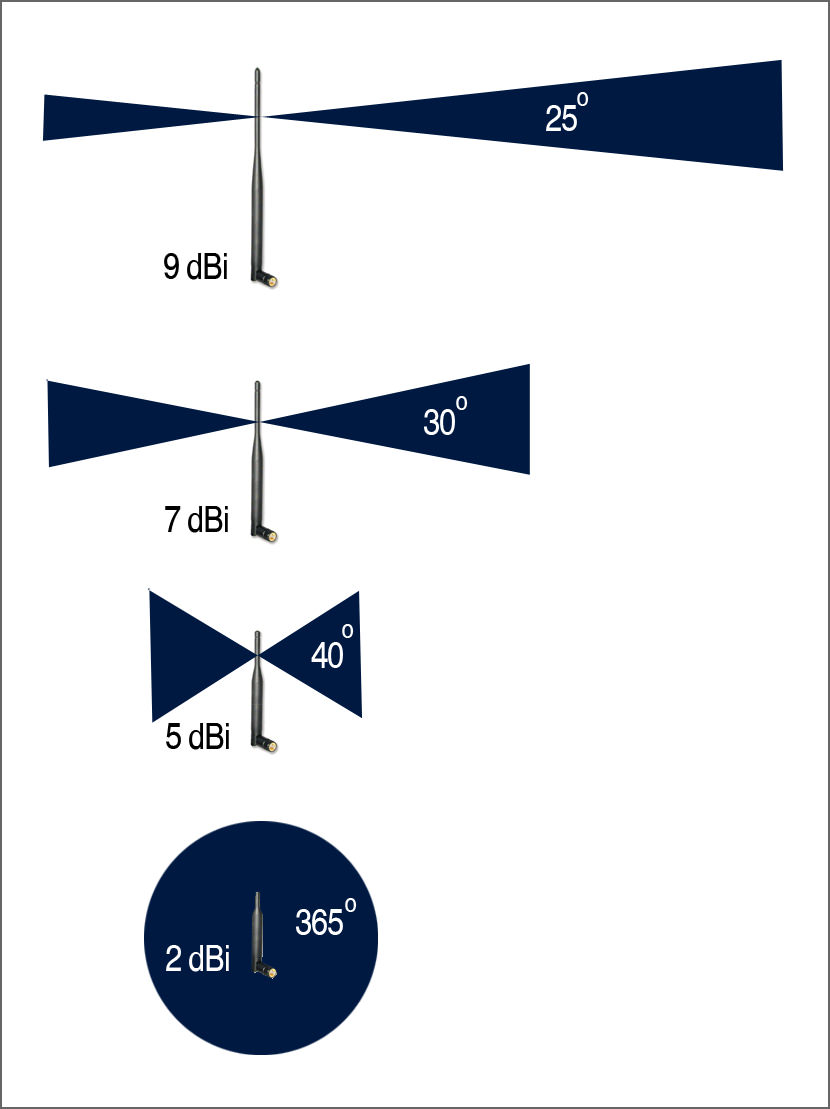 This post has been edited by JohnLai: Jan 9 2018, 11:44 PM |
|
|
Jan 10 2018, 12:09 AM
Return to original view | IPv6 | Post
#16
|
|
Senior Member
3,669 posts Joined: Apr 2006
|
QUOTE(teen08 @ Jan 9 2018, 11:55 PM) So what’s the best way I should put my router? I can remove n12hp antennas if that helps. .....that is the worst possible location to put your router. Plus....no, you can't connect N12HP antenna to C1200. Shitty diagram of my house. lol. 22x75 Ideally, the router should be put at the middle of your house. As for the C1200 antenna. https://fccid.io/TE7C1200/Internal-Photos/A...6-08-31-3117781 Antenna orientation matter. Recommend you to orient left and right antenna in perpendicular mode.  Don't forge to enable 5ghz beamforming. |
|
|
Jan 10 2018, 06:15 PM
Return to original view | IPv6 | Post
#17
|
|
Senior Member
3,669 posts Joined: Apr 2006
|
QUOTE(teen08 @ Jan 10 2018, 02:10 PM) I know. I regret it now. 10 years ago when they did, I just thought of my pc not many wireless gadgets last time if any. So my pc is wired now but others suffer. 😂 but I can’t change the location now. Anyways it was all good with the n12hp. But that’s was 9db antennas. I’m looking at ac1330uhp ASUS for my next buy if this doesn’t works. .....Why don't you plug N12HP to the C1200?Thanks for the suggestion on the antennas. |
|
|
Jan 11 2018, 11:03 AM
Return to original view | IPv6 | Post
#18
|
|
Senior Member
3,669 posts Joined: Apr 2006
|
QUOTE(DeFaeco @ Jan 11 2018, 09:42 AM) Does anyone know if the Unifi archer c1200 is capable of wireless bridging/WDS? Nope. No such functionality. |
|
|
Jan 11 2018, 08:42 PM
Return to original view | IPv6 | Post
#19
|
|
Senior Member
3,669 posts Joined: Apr 2006
|
QUOTE(teen08 @ Jan 11 2018, 04:14 PM) Sorry what did u mean by don’t forge to enable 5ghz beamforming? U mean do not enable TxBF? aik....missing 't' there.I mean you should enable TxBF. It will improve 5Ghz signal strength. |
|
|
Jan 12 2018, 08:07 PM
Return to original view | IPv6 | Post
#20
|
|
Senior Member
3,669 posts Joined: Apr 2006
|
Jjuggler.....so, about that TM BETA firmware posted by mmrd2 at your site........I would really suggest people NOT to install it.
There are few questionable content in that firmware. edit: About your backdoor comment....yes, tr069 is enabled by default for TM BETA firmware. Something is fishy about plugin_config too. Didn't check them all yet. And our most hated unifi ssid prefix   This post has been edited by JohnLai: Jan 12 2018, 09:02 PM |
| Change to: |  0.0218sec 0.0218sec
 0.54 0.54
 7 queries 7 queries
 GZIP Disabled GZIP Disabled
Time is now: 8th December 2025 - 07:54 PM |
 Quote
Quote