Hi does anyone use this ram before Geil Pristine 8gb ddr4? I was quoted with this ram but never heard of it. Does the brand of ram a major factor for performance?
[OFFICIAL]Rig Suggestion Q&A Thread V13!
[OFFICIAL]Rig Suggestion Q&A Thread V13!
|
|
 Oct 16 2018, 10:14 PM Oct 16 2018, 10:14 PM
|
 
Junior Member
157 posts Joined: Oct 2006  
|
Hi does anyone use this ram before Geil Pristine 8gb ddr4? I was quoted with this ram but never heard of it. Does the brand of ram a major factor for performance?
|
|
|
|
|
|
Oct 17 2018, 08:59 AM
|

Junior Member
286 posts Joined: Jan 2013 From: CatCity Sarawak
|
QUOTE(TristanX @ Oct 16 2018, 05:19 PM) No OC: bro forgot to ask u..i read the spec for thishttps://www.lelong.com.my/asus-motherboard-...7-01-Sale-I.htm With OC: https://www.lelong.com.my/asrock-z270-gamin...0-01-Sale-P.htm  LG 24MK430H 24" monitor - 439 it has amd free sync..but not g sync for gtx..am i right? |
|
|
Oct 17 2018, 09:27 AM
|
 
Elite
24,351 posts Joined: Nov 2004 From: Setapak, Kuala Lumpur
|
QUOTE(qaa7705d @ Oct 17 2018, 08:59 AM) bro forgot to ask u..i read the spec for this And G-Sync monitors are very expensive.LG 24MK430H 24" monitor - 439 it has amd free sync..but not g sync for gtx..am i right? |
|
|
Oct 17 2018, 10:25 AM
|
|
Junior Member
157 posts Joined: Oct 2006
|
QUOTE(Kristal.S @ Oct 17 2018, 09:18 AM) Yes I had that ram before and they work just fine. Geil is actually a pretty well known brand for rams. thats great. thanks a lot Kristal.S for your input. http://www.geil.com.tw/product_series?v=01:17:34am&id=3  |
|
|
Oct 17 2018, 11:42 AM
|

Junior Member
57 posts Joined: Aug 2012
|
Budjet 2k (to upgrade)
Current system -Intel I5 4460 with asus B85Mg-pro (need to upgrade this?) -MSI radeon 580 8gb -HyperXFury DDR3 4gbX2 -Samsung Evo Pro 128gb -1TB x 2 (1 WD blue,1 WD black) -620wt seasonic s12ii -Tecware Nexus M -Dell S2340l monitor (thinking to upgrade this as well) I'm thinking to upgrade my monitor to freesync since im using 580 and do I need to change the proc and mobo too? because I heard my current will slightly bottleneck. If yes, please suggest. Anyway, please suggest a good monitor 144hz, 1ms, freesync. if possible, 27". I only had 1 choice right now.it's AOC C27G1. This one ok or not? Thanks in advance. This post has been edited by IzAniki: Oct 17 2018, 11:43 AM |
|
|
Oct 17 2018, 12:08 PM
|

Junior Member
138 posts Joined: Aug 2012
|
[Budget] 5k max
[Purpose] Purely gaming for upcoming AAA titles at max graphic setting [Hardwares that will be re-use] None [Monitor resolution] 1080. prefer 27inch [Games & softwares that use frequently] Mostly rpg and first person shooter titles [Personal preferences] Able to run at max graphic setting @1080p with high fps [Location] Kl |
|
|
|
|
|
Oct 17 2018, 12:23 PM
|
|
Junior Member
286 posts Joined: Jan 2013 From: CatCity Sarawak
|
QUOTE(TristanX @ Oct 17 2018, 09:27 AM) And G-Sync monitors are very expensive. yaa mostly all 1k plus 😭 |
|
|
Oct 17 2018, 12:27 PM
|
|
Junior Member
286 posts Joined: Jan 2013 From: CatCity Sarawak
|
QUOTE(Kristal.S @ Oct 17 2018, 09:19 AM) That is correct. This monitor supports Free Sync, not G Sync. if im about to use this monitor..then the sync will not active right cause of the gtx not amd? if u know what i mean hard to explain lol |
|
|
Oct 17 2018, 01:06 PM
|
|
Junior Member
57 posts Joined: Aug 2012
|
QUOTE(Kristal.S @ Oct 17 2018, 12:15 PM) You may refer to this video for similar comparison: Thanks sir !! btw, this monitor is 4ms right ?is it noticeable while gaming? i read some review saying above 3ms can facing a ghosting issue.sorry if im wrong.https://www.youtube.com/watch?v=N8M8Uhfy7M0 TL:DR - You can still use it for another generation perhaps if you want to save money cause to upgrade to i5 8400 + mobo + 8GB DDR4 will cost you more than 2k but you can always sell off your current set if you're planning to upgrade  See below for suggestion: CPU: INTEL CORE I5-8400 RM795.00 MOBO: GIGABYTE H310M-S2 RM230.00 RAM: KLEVV BOLT 8GB (1X8GB) DDR4 2400MHZ RM309.00 MONITOR: ACER 27' ED273A FULL HD 144HZ CURVE MONITOR RM920.00 Total: RM2,254 (E Tech PC prices) |
|
|
Oct 17 2018, 01:59 PM
|
|
Junior Member
138 posts Joined: Aug 2012
|
QUOTE(Kristal.S @ Oct 17 2018, 12:27 PM) What about these: Thanks for the reply sir. Btw, how if we put a 1080 in this system with mob (2 pcie lane) and get a flat monitor 27inch. Extra budget 500 -1000 is ok. Reason for another mobo is because want to have rooms for improvement in future. If you have a better idea, please recommend. Thank youCPU: INTEL CORE I5-8400 PROCESSOR RM795.00 MOBO: GIGABYTE H310M-S2 RM230.00 RAM: KLEVV BOLT 8GB (1X8GB) DDR4 2400MHZ RM309.00 GPU: GALAX GTX 1070 TI EX 8GB GDDR5 RM1,949.00 SSD: CORSAIR 120GB FORCE SERIES LE200 2.5' RM139.00 HDD: SEAGATE 3.5' BARRACUDA 1TB RM185.00 PSU: SUPER FLOWER 500W SILVER ECO 80+ SILVER RM259.00 CASE: TECWARE M1 TG WHITE M-ATX RM189.00 MONITOR: ACER 27' ED273A FULL HD 144HZ CURVE MONITOR RM920.00 TOTAL: RM4,975 (E Tech PC prices) |
|
|
Oct 17 2018, 02:11 PM
Show posts by this member only | IPv6 | Post
#5291
|

Senior Member
2,834 posts Joined: Feb 2006 
|
QUOTE(GIVEMEABREAK @ Oct 17 2018, 01:59 PM) Thanks for the reply sir. Btw, how if we put a 1080 in this system with mob (2 pcie lane) and get a flat monitor 27inch. Extra budget 500 -1000 is ok. Reason for another mobo is because want to have rooms for improvement in future. If you have a better idea, please recommend. Thank you At 1080p, upgrading GPU from 1070Ti to 1080 will not give as big a boost compared to changing CPU from i5-8400 to i7-8700 and getting a good CPU cooler. |
|
|
Oct 17 2018, 02:18 PM
|
|
Junior Member
138 posts Joined: Aug 2012
|
QUOTE(mbr @ Oct 17 2018, 02:11 PM) At 1080p, upgrading GPU from 1070Ti to 1080 will not give as big a boost compared to changing CPU from i5-8400 to i7-8700 and getting a good CPU cooler. Thanks for the advice sir. Can we have a system build with i7-8700 and a gtx 1080 within the budget....  |
|
|
Oct 17 2018, 02:28 PM
Show posts by this member only | IPv6 | Post
#5293
|
|
Senior Member
2,834 posts Joined: Feb 2006
|
QUOTE(GIVEMEABREAK @ Oct 17 2018, 02:18 PM) Thanks for the advice sir. Can we have a system build with i7-8700 and a gtx 1080 within the budget.... I would recommend increase budget to around 7.5k++, as you would want to have better motherboard and CPU cooling system. Also better SSD. |
|
|
|
|
|
Oct 17 2018, 03:52 PM
|
|
Junior Member
138 posts Joined: Aug 2012
|
QUOTE(Kristal.S @ Oct 17 2018, 02:29 PM) See below for the revised specs: Thanks for the advice sir....CPU: INTEL I7 8700 (6C/12T) RM1270.00 (Czone) COOLER: COOLER MASTER HYPER 212 LED TURBO BLACK RM139.00 MOBO: MSI B360M MORTAR RM368.00 RAM: KLEVV BOLT 8GB (1X8GB) DDR4 2400MHZ RM309.00 GPU: GALAX GeForce® GTX 1080 EXOC-SNPR WHITE 8GB GDDR5X RM2,299.00 (Techview lelong) SSD: CORSAIR 120GB FORCE SERIES LE200 2.5' RM139.00 HDD: SEAGATE 3.5' BARRACUDA 1TB RM185.00 PSU: SUPER FLOWER 500W SILVER ECO 80+ SILVER RM259.00 CASE: TECWARE M1 TG WHITE M-ATX RM189.00 MONITOR: ACER 27' ED273A FULL HD 144HZ CURVE MONITOR RM920.00 TOTAL: RM6,077 (E Tech PC prices unless stated otherwise) If you can push your budget to around 6.5k, can get better PSU and SSD. FYI, if you're gaming on 1080p, the performance between i5 8400 vs i7 8700 isnt too far off. Only 1440p onwards will have significant improvement for 8700. I'd personally stick with 8400 if you're gonna game on 1080p. https://www.youtube.com/watch?v=7UT08uUJdJM https://www.youtube.com/watch?v=RXrnmTR2qcg |
|
|
Oct 17 2018, 04:12 PM
|

Junior Member
288 posts Joined: Nov 2013 From: Autonomous State of Sarawak 
|
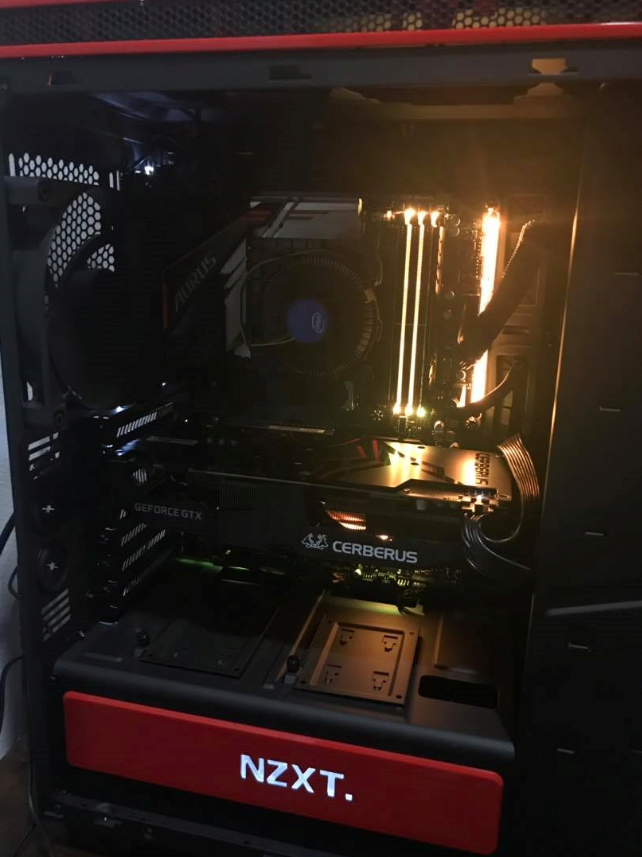
» Click to show Spoiler - click again to hide... « how to make my pc looks more badass? do i need to replace the stock cooler? add more rgb?  This post has been edited by TheDeadlySins420: Oct 17 2018, 04:12 PM |
|
|
Oct 17 2018, 05:04 PM
|

Senior Member
1,633 posts Joined: Oct 2008
|
QUOTE(Kristal.S @ Oct 17 2018, 04:15 PM) Yeahhh replace that stock cooler, add rgb fans, rgb led strips and rgb rams if you have the budget. It'll look much better. + RGB SSD   |
|
|
Oct 17 2018, 05:12 PM
Show posts by this member only | IPv6 | Post
#5297
|
|
Senior Member
2,834 posts Joined: Feb 2006
|
QUOTE(TheDeadlySins420 @ Oct 17 2018, 04:12 PM) how to make my pc looks more badass? do i need to replace the stock cooler? add more rgb? 1. LED strip2. watercooling (ask ntct) 3. Add a theme (eg iron man colours, star wars, etc) 4. SLI This post has been edited by mbr: Oct 17 2018, 05:13 PM |
|
|
Oct 17 2018, 11:10 PM
|

Senior Member
1,794 posts Joined: Feb 2016 From: Bikini Bottom
|
QUOTE(TheDeadlySins420 @ Oct 17 2018, 04:12 PM) » Click to show Spoiler - click again to hide... « how to make my pc looks more badass? do i need to replace the stock cooler? add more rgb?  |
|
|
Oct 17 2018, 11:14 PM
|
|
Senior Member
1,794 posts Joined: Feb 2016 From: Bikini Bottom
|
QUOTE(mbr @ Oct 17 2018, 05:12 PM) 1. LED strip Don't forget those RGB cable sleeves.2. watercooling (ask ntct) 3. Add a theme (eg iron man colours, star wars, etc) 4. SLI Easily +30 FPS while gaming. This post has been edited by derthvadar: Oct 17 2018, 11:14 PM |
|
|
Oct 18 2018, 07:11 AM
|

Junior Member
93 posts Joined: Jul 2018
|
QUOTE(TheDeadlySins420 @ Oct 17 2018, 04:12 PM) » Click to show Spoiler - click again to hide... « how to make my pc looks more badass? do i need to replace the stock cooler? add more rgb?  |
| Change to: |  0.0268sec 0.0268sec
 1.74 1.74
 6 queries 6 queries
 GZIP Disabled GZIP Disabled
Time is now: 17th December 2025 - 01:45 PM |
 Quote
Quote