Welcome Guest ( Log In | Register )

Outline · [ Standard ] · Linear+

 [OFFICIAL]Rig Suggestion Q&A Thread V13!

views
     
calvincty
post Dec 29 2023, 12:18 AM

Getting Started
**
Junior Member
226 posts

Joined: Sep 2007
From: PJ


user posted image

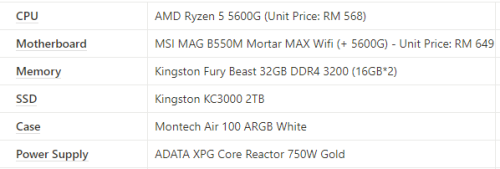
Just purchased this spec last week and was thinking of having APU for the first few months and upgrading with GPU later. While I'm looking around for a used card and comes to RX6600 & RX660XT, I have been told that the CPU will be the bottleneck of the GPU due to the PCIE3 connectivity compared to the PCIE4 connectivity on 5600/x.

I wasn't aware of this, while I thought 5600G was the exact version of 5600 but with an additional iGPU.

Is that true? If so, then I might be sticking with it for longer period and only do upgrade once together with the CPU and GPU. sad.gif
TristanX
post Dec 29 2023, 12:35 AM

Where is my stars?
Group Icon
Elite
24,342 posts

Joined: Nov 2004
From: Setapak, Kuala Lumpur


QUOTE(calvincty @ Dec 29 2023, 12:18 AM)
user posted image

Just purchased this spec last week and was thinking of having APU for the first few months and upgrading with GPU later. While I'm looking around for a used card and comes to RX6600 & RX660XT, I have been told that the CPU will be the bottleneck of the GPU due to the PCIE3 connectivity compared to the PCIE4 connectivity on 5600/x.

I wasn't aware of this, while I thought 5600G was the exact version of 5600 but with an additional iGPU.

Is that true? If so, then I might be sticking with it for longer period and only do upgrade once together with the CPU and GPU.  sad.gif
*
Yeah, go for at least PCIe X8 cards to avoid bottleneck.

calvincty
post Dec 29 2023, 12:50 AM

Getting Started
**
Junior Member
226 posts

Joined: Sep 2007
From: PJ


QUOTE(TristanX @ Dec 29 2023, 12:35 AM)
Yeah, go for at least PCIe X8 cards to avoid bottleneck.
*
In this case, RX6600 is a PCIe X8 card, right? is it fine to pair with 5600G?
babylon52281
post Dec 29 2023, 12:50 AM

Look at all my stars!!
*******
Senior Member
2,686 posts

Joined: Apr 2017
QUOTE(calvincty @ Dec 29 2023, 12:18 AM)
user posted image

Just purchased this spec last week and was thinking of having APU for the first few months and upgrading with GPU later. While I'm looking around for a used card and comes to RX6600 & RX660XT, I have been told that the CPU will be the bottleneck of the GPU due to the PCIE3 connectivity compared to the PCIE4 connectivity on 5600/x.

I wasn't aware of this, while I thought 5600G was the exact version of 5600 but with an additional iGPU.

Is that true? If so, then I might be sticking with it for longer period and only do upgrade once together with the CPU and GPU.  sad.gif
*
Keep the system then upgrade GPU to 6600XT / 6700XT. Yes if use as it is will CPU bottleneck but I doubt will be anything much noticeable (Gen3 & Gen4 speeds really not that much difference, only 4090 can fully saturate Gen4 bandwidth). Then later 1 year or so can upgrade CPU to 5800X3D or 5000GT series.
AMD has uncanceled AM4 EOL. LOL!
TristanX
post Dec 29 2023, 01:11 AM

Where is my stars?
Group Icon
Elite
24,342 posts

Joined: Nov 2004
From: Setapak, Kuala Lumpur


QUOTE(calvincty @ Dec 29 2023, 12:50 AM)
In this case, RX6600 is a PCIe X8 card, right? is it fine to pair with 5600G?
*
Yes. Should not have issue. Its a low end card.
babylon52281
post Dec 29 2023, 09:45 AM

Look at all my stars!!
*******
Senior Member
2,686 posts

Joined: Apr 2017
QUOTE(calvincty @ Dec 29 2023, 12:50 AM)
In this case, RX6600 is a PCIe X8 card, right? is it fine to pair with 5600G?
*
Yeah nope dont get that. Ady bad enuff ur CPU is limited to PCIE Gen3 bandwidth, then ur gonna cripple it further to x8 lanes. Effectively maxed at 8GB/s. Even if its fine for ur CPU currently it will bottleneck any future upgrades.
rexus
post Dec 29 2023, 10:12 AM

Bruh
****
Junior Member
614 posts

Joined: Aug 2008


[B][Budget] Below RM10k (including monitor)

[Purpose] Gaming

[Hardwares that will be re-use] keyboard & mouse lol

[Monitor resolution] 4k

[Games & softwares that use frequently] AAA games

[Personal preferences] N/A

[Location] KL

Hi all,

Wanted to get the gaming pc that I never had growing up.

Don't need to be top of the line tech but I do want something that's enough to last me years.

Budget allocated is RM10k including a monitor but of course can save more then better la.

Thanks all.

babylon52281
post Dec 29 2023, 10:27 AM

Look at all my stars!!
*******
Senior Member
2,686 posts

Joined: Apr 2017
QUOTE(rexus @ Dec 29 2023, 10:12 AM)
» Click to show Spoiler - click again to hide... «

RM 10k inc monitor is quite tough as it depends how much ur spending for that monitor will dictate whatever is left for your system. Rule of thumb is that for 4k 120-144Hz would ady eat up RM 9-10k just the system alone.

I would suggest you shop for the preferred monitor first then see how much is left for the sifus here to reco a build cuz even 4k monitor (& TV as monitor) got so many price range choices like; 32"? 36"? 49"? 60-75Hz? 120Hz? 144Hz? 200+Hz? Need Gsync? Need Ultrawide? Need KVM? Curve or Flat? True HDR?

You need to make sure you know what monitor you want cuz at the extreme end of scale some monitors can ady cost RM 10k itself!

You can use these as a starter guide to better understand monitor selection
https://www.techspot.com/bestof/gaming-monitors-23-24/
https://www.techspot.com/bestof/gaming-monitors-in-100-v2/
https://www.cgdirector.com/best-4k-monitors/
https://www.cgdirector.com/curved-vs-flat-monitors/
https://www.cgdirector.com/monitor-brands-guide/
https://www.cgdirector.com/monitor-guide-re...response-times/
https://www.cgdirector.com/what-is-an-hdr-monitor/

This post has been edited by babylon52281: Dec 29 2023, 10:34 AM
rexus
post Dec 29 2023, 10:36 AM

Bruh
****
Junior Member
614 posts

Joined: Aug 2008


QUOTE(babylon52281 @ Dec 29 2023, 10:27 AM)
[/spoiler]
RM 10k inc monitor is quite tough as it depends how much ur spending for that monitor will dictate whatever is left for your system. Rule of thumb is that for 4k 120-144Hz would ady eat up RM 9-10k just the system alone.

I would suggest you shop for the preferred monitor first then see how much is left for the sifus here to reco a build cuz even 4k monitor (& TV as monitor) got so many price range choices like; 32"? 36"? 49"? 60-75Hz? 120Hz? 144Hz? 200+Hz? Need Gsync? Need Ultrawide? Need KVM? Curve or Flat? True HDR?

You need to make sure you know what monitor you want cuz at the extreme end of scale some monitors can ady cost RM 10k itself!

You can use these as a starter guide to better understand monitor selection
https://www.techspot.com/bestof/gaming-monitors-23-24/
https://www.techspot.com/bestof/gaming-monitors-in-100-v2/
https://www.cgdirector.com/best-4k-monitors/
https://www.cgdirector.com/curved-vs-flat-monitors/
https://www.cgdirector.com/monitor-brands-guide/
https://www.cgdirector.com/monitor-guide-re...response-times/
https://www.cgdirector.com/what-is-an-hdr-monitor/
*
Woah ya ka I got no concept cause simply googling 4k monitor it's returning like around RM1.5k.

Thanks for the links.
kingkingyyk
post Dec 29 2023, 10:59 AM

10k Club
Group Icon
Elite
15,694 posts

Joined: Mar 2008
QUOTE(rexus @ Dec 29 2023, 10:12 AM)
[B][Budget] Below RM10k (including monitor)

[Purpose] Gaming

[Hardwares that will be re-use] keyboard & mouse lol

[Monitor resolution] 4k

[Games & softwares that use frequently] AAA games

[Personal preferences] N/A

[Location] KL

Hi all,

Wanted to get the gaming pc that I never had growing up.

Don't need to be top of the line tech but I do want something that's enough to last me years.

Budget allocated is RM10k including a monitor but of course can save more then better la.

Thanks all.
*
Ryzen 7 5800X3D RM1449
Thermalright PA120 Cooler RM159
MSI B550 Gaming Plus RM709
Kingston Fury Beast DDR4-3200MHz 16GB RAM x2 RM318
Sapphire RX7900XT Pulse 20GB GDDR6 RM4299
WD SN580 2TB SSD RM539
LianLi 205 Mesh Casing RM329
Silverstone DA 750W PSU RM399
Viewsonic VX2882-4KP (28"+4K+150Hz) RM1799

Total : RM10000

This post has been edited by kingkingyyk: Dec 29 2023, 11:00 AM
babylon52281
post Dec 29 2023, 11:02 AM

Look at all my stars!!
*******
Senior Member
2,686 posts

Joined: Apr 2017
QUOTE(rexus @ Dec 29 2023, 10:36 AM)
Woah ya ka I got no concept cause simply googling 4k monitor it's returning like around RM1.5k.

Thanks for the links.
*
At 4k you will want exact expectations cuz then its what the system will able to drive that monitor. Also whether okay with VA? Or IPS? Or OLED? Or miniLED?
Im no monitor expert so you can ask more from this subforum https://forum.lowyat.net/MonitorDiscussions
AthrunIJ
post Dec 29 2023, 11:03 AM

Look at all my stars!!
*******
Senior Member
2,992 posts

Joined: Feb 2015

QUOTE(rexus @ Dec 29 2023, 10:36 AM)
Woah ya ka I got no concept cause simply googling 4k monitor it's returning like around RM1.5k.

Thanks for the links.
*
Ma suggestion.

Grab a good rig with that budget first then save up for better monitor.

Like me. I got ma rih first and still using good o LG 24 fullhd monitor.

Planning to get mini led monitor soon next year. Monitor market going to get interesting next year

👀🍷🍟🤤
babylon52281
post Dec 29 2023, 11:06 AM

Look at all my stars!!
*******
Senior Member
2,686 posts

Joined: Apr 2017
QUOTE(kingkingyyk @ Dec 29 2023, 10:59 AM)
Ryzen 7 5800X3D RM1449
Thermalright PA120 Cooler RM159
MSI B550 Gaming Plus RM709
Kingston Fury Beast DDR4-3200MHz 16GB RAM x2 RM318
Sapphire RX7900XT Pulse 20GB GDDR6 RM4299
WD SN580 2TB SSD RM539
LianLi 205 Mesh Casing RM329
Silverstone DA 750W PSU RM399
Viewsonic VX2882-4KP (28"+4K+150Hz) RM1799

Total : RM10000
*
Imho 28" is pretty small for 4k resolution but again its to the OP decide his comfort level.

Except for that DRAMless SSD this is a well balanced spec tho. thumbsup.gif
kingkingyyk
post Dec 29 2023, 11:10 AM

10k Club
Group Icon
Elite
15,694 posts

Joined: Mar 2008
QUOTE(babylon52281 @ Dec 29 2023, 11:06 AM)
Imho 28" is pretty small for 4k resolution but again its to the OP decide his comfort level.

Except for that DRAMless SSD this is a well balanced spec tho.  thumbsup.gif
*
DRAM-less SSD isn't a monster when it comes with HMB.
babylon52281
post Dec 29 2023, 11:18 AM

Look at all my stars!!
*******
Senior Member
2,686 posts

Joined: Apr 2017
For a 9-10k build, modified from Myway reco
i7-14700k RM1,999.00
z790 msi p wifi RM1,099.00
32gb 3600mhz kingston fury RM360.00
1tb kc3000 RM???
Tier A 900-1000W Gold PSU RM???
azza hive 450 RM259.00
thermalright FC/FS140 RM???
RX7900XT / RTX 4080 / 4080Super (launching in Q1 2024) - whichever budget fits
calvincty
post Dec 29 2023, 11:27 AM

Getting Started
**
Junior Member
226 posts

Joined: Sep 2007
From: PJ


QUOTE(babylon52281 @ Dec 29 2023, 09:45 AM)
Yeah nope dont get that. Ady bad enuff ur CPU is limited to PCIE Gen3 bandwidth, then ur gonna cripple it further to x8 lanes. Effectively maxed at 8GB/s. Even if its fine for ur CPU currently it will bottleneck any future upgrades.
*
oh? The 6600XT isn't the same as 6600? thought you are suggesting me to keep the CPU and upgrade to 6600XT for now.

This post has been edited by calvincty: Dec 29 2023, 12:11 PM
babylon52281
post Dec 29 2023, 11:35 AM

Look at all my stars!!
*******
Senior Member
2,686 posts

Joined: Apr 2017
QUOTE(kingkingyyk @ Dec 29 2023, 11:10 AM)
DRAM-less SSD isn't a monster when it comes with HMB.
*
As a OS boot drive, my advice better not. Constant drive swaps will prematurely wear out the NAND cycles. HMB only useful to mitigate the other DRAMless drawbacks (long/big writes).
myway1985
post Dec 29 2023, 11:45 AM

10k Club
********
All Stars
12,089 posts

Joined: Jun 2014
From: Kuchai Lama


QUOTE(rexus @ Dec 29 2023, 10:12 AM)
[B][Budget] Below RM10k (including monitor)

[Purpose] Gaming

[Hardwares that will be re-use] keyboard & mouse lol

[Monitor resolution] 4k

[Games & softwares that use frequently] AAA games

[Personal preferences] N/A

[Location] KL

Hi all,

Wanted to get the gaming pc that I never had growing up.

Don't need to be top of the line tech but I do want something that's enough to last me years.

Budget allocated is RM10k including a monitor but of course can save more then better la.

Thanks all.
*
i7-14700K 1899
z790 colorful cvn gaming frozen v20 wifi D4 1149
32gb 3200mhz kingston fury beast white RGB 450
adata legend 960 max 1TB 415
Sapphire Pure RTX 7800XT 16G 2999
1st player steampunk 850 gold 399
1st player mi8 white 259
thermalright frozen vision 360 white 699
THERMALRIGHT TL-C12W-S X 3 ARGB FAN WHITE x2 319

DELL G3223Q 4k 144hz 2199
TOTAL RM10787

i5-14600K RM1,479.00
B760m colorful frozen wifi v20 d4 RM739.00
32gb 3200mhz kingston fury beast white RGB RM450.00
adata legend 960 max 1TB RM415.00
Sapphire Pure RTX 7800XT 16G RM2,999.00
1st player steampunk 850 gold RM399.00
1st player mi8 white RM259.00
thermalright frozen vision 360 white RM699.00
THERMALRIGHT TL-C12W-S X 3 ARGB FAN WHITE x2 RM319.00


DELL G3223Q 4k 144hz RM2,199.00
RM9,957.00



kingkingyyk
post Dec 29 2023, 12:17 PM

10k Club
Group Icon
Elite
15,694 posts

Joined: Mar 2008
QUOTE(babylon52281 @ Dec 29 2023, 11:35 AM)
Constant drive swaps
*
That happens when you have insufficient amount of RAM and with 32GB RAM, what use case you think will cause the issue?

HMB simply lets the SSD to borrow the system memory as it's DRAM. It does have a memory portion to work with during the operation, except with some data round-trips. The general issue with DRAM-less SSDs are those usually paired with cheaper NANDs / less-tuned write/load-balancing algorithms / weaker controller. Not the case for SN570/SN580.

https://documents.westerndigital.com/conten...70-nvme-ssd.pdf
https://documents.westerndigital.com/conten...50-nvme-ssd.pdf

Both are rated same. WD Green SN350? That is indeed something to avoid.

If you think otherwise, please share your findings.

This post has been edited by kingkingyyk: Dec 29 2023, 12:26 PM
babylon52281
post Dec 29 2023, 12:46 PM

Look at all my stars!!
*******
Senior Member
2,686 posts

Joined: Apr 2017
QUOTE(calvincty @ Dec 29 2023, 11:27 AM)
oh? The 6600XT isn't the same as 6600? thought you are suggesting me to keep the CPU and upgrade to 6600XT for now.
*
Quite similar XT just faster clocked. Yeah my mistake actually when I recheck the 6600/XT both are x8 so either is poor choice. Better to go with 6700XT /6750XT as these are at least x16.

1384 Pages « < 1188 1189 1190 1191 1192 > » Top
 

Change to:
| Lo-Fi Version
0.0351sec    0.54    6 queries    GZIP Disabled
Time is now: 12th December 2025 - 04:21 AM