Outline ·
[ Standard ] ·
Linear+
AMD Ryzen, AM4 / AM5 Platform
|
xxboxx
|
 Aug 14 2019, 12:23 AM Aug 14 2019, 12:23 AM
|

|
QUOTE(Joseph Hahn @ Aug 13 2019, 02:32 PM) Eh it does detect as DTS just fine if i enable passthrough from VLC.  TV optical audio setting set to auto and it does support it (LG UK6300). So everything working as expected.  If i want to game in surround i just need to put back my analog cable but can't be bothered for now. Anyway, i tried poking around my RAM settings. I had doubts it would work at this setting but it does. Apparently, Hynix CJR is a good chip? 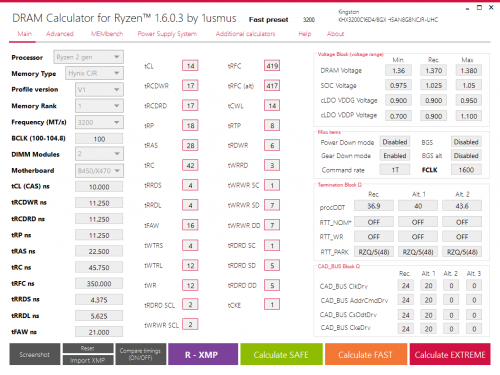  Ryzen 3000 series less fussy with timing, I have same CJR chip but pair with Ryzen 2000, not stable even with Safe preset 16-18-18-19-36 Do test it with TestMem5 to make sure no error detected. |
|
|
|
|
|
xxboxx
|
Aug 15 2019, 11:00 PM
|
|
|
QUOTE(Joseph Hahn @ Aug 15 2019, 09:26 PM) Seems stable at 1.39V but if cold boot, PC won't start and automatically reset to 2400. I apply back 3200MHz CL14 in BIOS, boot windows and PC works just fine. Memtest also no error. Weird. Any advice? Well at least got shop willing to do it unlike me haha...  Gigabyte mobo? I also experiencing same issue, when boot have to go in bios first then save and exit to restart with OC RAM speed. Else it will boot with default RAM speed. This issue started when Gigabyte release bios update with Ryzen 3000 support. Latest F42a bios still does not fix this issue. |
|
|
|
|
|
xxboxx
|
Aug 22 2019, 08:54 AM
|
|
|
QUOTE(TristanX @ Aug 21 2019, 11:38 PM) My Windows with my stuffs installed nets me 4.35Ghz boost My other Windows with only drivers installed can get 4.4Ghz boost. Ryzen 9 3900X Noctua NT-H2 Corsair H115i Pro Gigabyte X570 Aorus Master ( AGESA 1.0.0.3 ABB ) G.Skill Trident Z 16GB X2 DDR4-3200 CL16 Setting my AIO to Extreme can pull 4.4Ghz What is the "stuffs" installed? Instead of optimizing, it's limiting the CPU potential  |
|
|
|
|
|
xxboxx
|
Aug 23 2019, 05:42 PM
|
|
|
QUOTE(lavenzo @ Aug 22 2019, 08:54 AM) anyone tried this? so tempting to buy the 6 pipe for 3700x will it hold better than hyper 212? RM 60 only, just buy it. Reviewer also it is good. QUOTE(TristanX @ Aug 23 2019, 10:32 AM) Gonna try slapping a fan behind the motherboard later. X570 motherboard is hot. Run open case will give maximum cooling  Just one fan I think only able to lower by 2 to 3 celcius QUOTE(edministrator @ Aug 23 2019, 04:57 PM) from i7 3770K (4.6ghz oc) to ryzen 7 3700x, the frametime improvements in games is awesome. Means still using same GPU? |
|
|
|
|
|
xxboxx
|
Aug 24 2019, 04:09 PM
|
|
|
QUOTE(shirohamada @ Aug 24 2019, 09:36 AM) Ynless you're buying 3900x, just get a b450 Waiting for anyone that will buy 3200G and pair with X570 board QUOTE(Sky.Live @ Aug 24 2019, 02:25 PM) Because it's already good enough. |
|
|
|
|
|
xxboxx
|
Aug 25 2019, 08:48 PM
|
|
|
QUOTE(sai86 @ Aug 25 2019, 08:23 PM) any MATX board to recommend to pair with 3700X? i only came across the few boards below Gigabyte B450 AORUS M 2nd Gen AM4 <- leaning towards this due to 6 Sata and the m2 come with a heatsink. MSI B450M Bazooka Plus. (4 Sata only) Asrock B450M Pro4 (4 sata only) ASRock X570M PRO4 AM4 Micro ATX (on the high side) <-$140 sgd price different compare the above. I read the board only support 3200 (OC) mode, hence no point going 3600mhz ram, correct? any ram suitable to recommend for 16gb / 32gb setup? Can't be only 3200mhz. Plenty of people have run 3600mhz or higher. |
|
|
|
|
|
xxboxx
|
Aug 30 2019, 08:07 PM
|
|
|
QUOTE(shirohamada @ Aug 30 2019, 07:53 PM) https://shopee.com.my/product/35804662/2384671638?smtt=0.0.9Hyperx ddr4 2666 cl16 8gb. Rm95 per stick. Buy buy buy. Oc it to 3000 yourself. RM95 is for 4GB. 8GB OOS, I guess is RM200 |
|
|
|
|
|
xxboxx
|
Sep 2 2019, 08:20 AM
|
|
|
QUOTE(chrischiang @ Sep 2 2019, 12:42 AM) hello,i got some question, just got my 3700x last weekend.. i paired with x470 gaming pro carbon.. i got pbo set to auto.. i check it stay 4.2Ghz even on idle when i do nothing.. is this normal?? i using wraith prism and my idle temp 50-55 is this normal? how well will it be if i switch to 240 aio?? thanks Go to Power Option > Advance and check Minimum Processor State 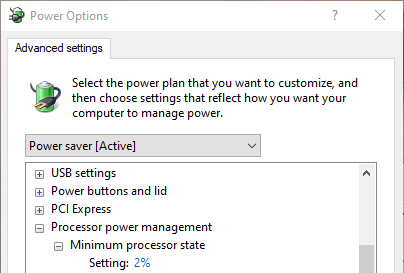 Mine got changed to 100% recently by Windows or other program. If you want it stay the lowest use Power Saver, else use Balanced. 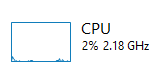 Mine 2700X with good airflow case and 240mm AIO in non air conditioning room it idle at 40 Celsius. |
|
|
|
|
|
xxboxx
|
Sep 3 2019, 07:56 PM
|
|
|
QUOTE(chrischiang @ Sep 3 2019, 01:40 PM) i checked on the power plan, mine set min to 2% and max to 99% idle at around 50-55.. im on phanteks enthoo pro case with 5 fans should have enough airflow but the wraith prism fans just ramp up and down frequently and quite noisy sometimes... This temp you got it from hwmonitor? I read it somewhere Ryzen 3000 have compatibility issue where third party monitoring software showing inaccurate reading and might cause the CPU to keep spiking. Use Ryzen Master software to see what's the CPU GHz speed idle and it's temp. Close the third party monitoring software before you do this. Check at Task Manager is your CPU stay at 2% when idle or the % keep fluctuating a lot. If keep fluctuating then check at Processes which program causing it. If cooler fans ramps up and down too fast then use mobo software to adjust fan curve. mine 30c till 55c the fan will go from 30% to 40% only so that it won't ramp up and down. Sometimes the temp will spike for short period because heavy processing such as when open program or processing big file, so the adjusted fan curve will make the fan not ramp up and down together. |
|
|
|
|
|
xxboxx
|
Sep 9 2019, 04:19 PM
|
|
|
QUOTE(lavenzo @ Sep 9 2019, 02:32 PM) hi there, planning to buy new ryzen 3700x and looking for ram now can advise which one is better? Hyper x fury 16gb x2 (3200Mhz) C18 or Hyper x predator 8gb x2 (3600mhz)C17 Thanks. 3600mhz CL17 will be better for Ryzen 3000 I doubt you need until 32GB unless you're power user |
|
|
|
|
|
xxboxx
|
Jan 12 2020, 05:41 PM
|
|
|
QUOTE(edmund_yung @ Jan 9 2020, 08:51 AM) My 2700X is always hovering around 1.45V. Took me a long time getting use to this kind of numbers coming from an Intel. My 2700X is about 0.8V when idle. I use Power Saver in Power Options. Closing unnecessary backgroud apps also does help. |
|
|
|
|
|
xxboxx
|
Jan 14 2020, 09:41 AM
|
|
|
QUOTE(edmund_yung @ Jan 13 2020, 11:32 PM) Wow that’s very low idle voltage. I’m using the Ryzen balance, I know the idle clock is set never go down below 90% not sure how useful is that. I’ll try undervolting it some day... My CPU idle at 2.13Ghz, CPU temp 38c in non air-conditioning room, if in air cond it's 33c. But it takes a few seconds for it to kick into using all 16 threads to max boost so there's a trade off. Only when doing very high demanding processing will encounter such situation, such as encoding video. Normal usage don't feel any difference, even when editing picture or decode/encode audio files it doesn't need to fully boost. The issue is a lot of background programs that is constantly monitoring or keep processing every few seconds that causes the CPU to spike. When using Balanced I noticed the CPU speed keep going up and down between 2.4Ghz and 3.0Ghz even when I'm not doing anything. This also causes my fans speed to keep going up and down. When using Power Saver the CPU wait for few seconds even when busy before boosting so those background programs usually just take 1 second or less already finish process before needed for the CPU to kick into boosting. |
|
|
|
|
|
xxboxx
|
Jan 14 2020, 10:59 AM
|
|
|
QUOTE(edmund_yung @ Jan 14 2020, 09:57 AM) That’s the problem with my temp right now as well, it spike up and down 10C when I’m not doing anything. So far I’ve set the CPU fan to delay 5 sec before spooling up or down to avoid the annoying noise. I’ll also try resetting the cooler soon, and if that doesn’t work, I’ll try the Power Saving plan like yours. Try close not important apps that running in the background. Even apps like HWinfo and Crystaldiskmark will causes the CPU to keep running process, and may result in boosting when there's too many running at same time. If you okay with temp and CPU speed up and down you also can change the fans to only spin faster after the 10c temp, eg. if it goes from 40c to 50c when idle then set the fan to increase speed only when reach 55c Personally I think Ryzen too trigger happy to boost plus some apps that's badly encoded it request high priority from CPU all the time. |
|
|
|
|
|
xxboxx
|
Jan 27 2020, 03:14 PM
|
|
|
QUOTE(UserU @ Jan 24 2020, 11:22 AM) I see, just plug and play? Mine's a B75 (Ivy Bridge) No problem, Win 10 is smart enough to still run and install all appropriate drivers even if you changed the whole system. I also from Ivy Bridge to Ryzen without reinstall Windows. |
|
|
|
|
|
xxboxx
|
May 4 2020, 01:08 PM
|
|
|
QUOTE(MrRaiden @ May 4 2020, 05:09 AM) Now I know who is the culprit behind this. It is a malware actually. As I realized when I open task manager, my cpu usage drop to 1-2% when idle. When not open, the cpu usage as high as 25% eventhough on idle. Now my temp on idle around 40. Im happy with it How you found out it's malware? When open task manager the malware stop? |
|
|
|
|
|
xxboxx
|
May 4 2020, 07:37 PM
|
|
|
QUOTE(viruz @ May 4 2020, 06:10 PM) 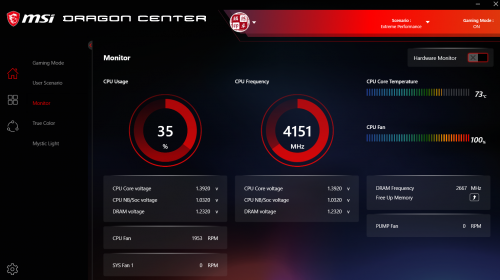 Is this temp ok for Ryzen 5 3600 running on stock cooler? That is high for running half load. Not just the cooler, also depends on case and ambient temperature. QUOTE(MrRaiden @ May 4 2020, 06:19 PM) Yeah, like that. The malware just stop using cpu usage. Btw at first I dont even think it is a malware. I just google it. "when open task manager cpu usage drop significantly" and I found at the top of the google search is malwarebyte forum. This guy have the same problem with me. The moderator ask to install the malwarebyte software and do the cleaning. What's the malware name? You got use Windows Defender? |
|
|
|
|
|
xxboxx
|
May 4 2020, 10:55 PM
|
|
|
QUOTE(MrRaiden @ May 4 2020, 10:24 PM) I use windows defender. But I read online, they said windows defender cant detect malware. Idk its true or not. The malware name? Emm, trojan" something like that. Maybe it got installed as part of the program when you install something. |
|
|
|
|
|
xxboxx
|
May 5 2020, 04:02 PM
|
|
|
QUOTE(viruz @ May 5 2020, 12:20 AM) 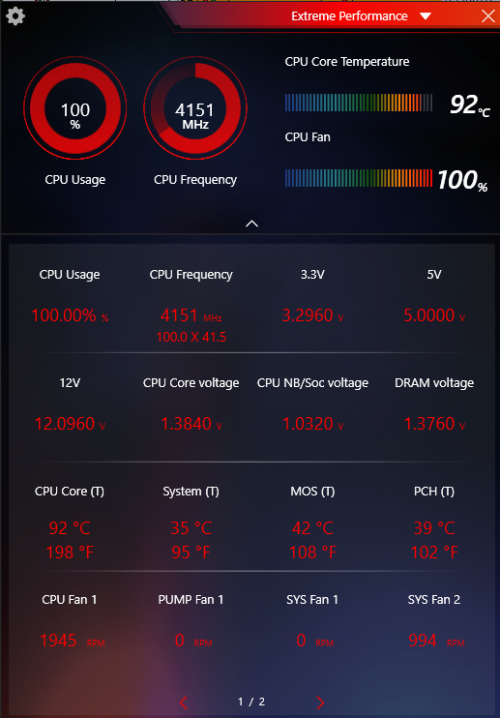 When set to extreme performance, it almost hit boiling point, I run for few sec then stop, scare my brand new CPU will burnt. What case you using? And how many fans installed on the case? This post has been edited by xxboxx: May 5 2020, 04:03 PM |
|
|
|
|
|
xxboxx
|
May 5 2020, 04:07 PM
|
|
|
QUOTE(h11g @ May 5 2020, 03:47 PM) guys if i was to use an 280mm AIO cpu cooler how many degrees cooler will my CPU run? im currently on scythe mugen 5 rev.b and max temp 89 celcius You can google the AIO that you want with your CPU model and hopefully someone also using same configuration and posted their readings. |
|
|
|
|
|
xxboxx
|
May 5 2020, 06:05 PM
|
|
|
QUOTE(viruz @ May 5 2020, 05:03 PM) I am using NZXT H510, with 1 rear and 1 top fan sucking air out. The not Elite model? Without the front case opening and fans I assume this case will not have fast airflow. You can try open the side panel when you stress test and see if the temperature different a lot. |
|
|
|
|





 Quote
Quote
 0.2140sec
 0.29
0.29
 7 queries
 GZIP Disabled