Welcome Guest ( Log In | Register )

9 Pages < 1 2 3 4 > » Bottom

Outline · [ Standard ] · Linear+

 AMD Ryzen, AM4 / AM5 Platform

views
     
xxboxx
post May 24 2019, 12:23 AM

The mind is for having ideas, not holding them
*******
Senior Member
5,261 posts

Joined: Oct 2004
From: J@Y B33


QUOTE(wong_86 @ May 23 2019, 08:34 PM)
Confirm there is issue on XMP in bios, if i power on the pc first time, it show 2400mhz, then need to restart again to show the correct frequency which is 3200mhz.

Now i disable xmp profile, tweak it manually and testing.

[attachmentid=10252990]
*

Use testmem to see if there's any error, if nothing then your system is good.
https://www.overclock.net/forum/27577522-post2594.html

xmp overrated anyway. Best is still manually overclock your RAM.
xxboxx
post May 25 2019, 03:28 PM

The mind is for having ideas, not holding them
*******
Senior Member
5,261 posts

Joined: Oct 2004
From: J@Y B33


QUOTE(miyakochan89 @ May 25 2019, 01:33 PM)
Hey all. For those using Ryzen 5 2600 (without the X), what is the normal temperature that you all get when you are gaming? With only normal fans and room temperature (no air cond in the room). Sames goes to your GPU?
What is the average temperature you all get? I googled it and most of the answers come from colder countries where they are able to maintain lower temperate naturally, but how about in the tropical country?
*

From what I remember those using 2600 write is normally the CPU around 65 to 75 C while GPU is 75 to 85 C.
It very much depends on your casing, cooler, airflow, and room temperature.

My Gigabyte mobo recently updated to F40 bios, now idle temp drop about 2 to 3 C compared to old bios. hmm.gif
I guess it also depends what manufacturer want the temp be shown too.
xxboxx
post Jul 9 2019, 11:32 PM

The mind is for having ideas, not holding them
*******
Senior Member
5,261 posts

Joined: Oct 2004
From: J@Y B33


QUOTE(cyclone2 @ Jul 9 2019, 01:29 PM)
Agreed with you, but if I can sell off my current processor and fork out few hundreds only, still ok to me...

You may check the review below.

AMD 3700X
*

3700X only gaining 10 to 20% over 2700X
If using X470 mobo I wonder will the result still the same.
Feels like too small improvement to justify the cost of few hundreds ringgit to upgrade.
xxboxx
post Jul 13 2019, 03:29 PM

The mind is for having ideas, not holding them
*******
Senior Member
5,261 posts

Joined: Oct 2004
From: J@Y B33


QUOTE(shirohamada @ Jul 13 2019, 01:29 AM)
my hyperx 2666 16-18-18-36 only goes to 2866 1.2V.
no point buying a hynix c-die.
*

I got same RAM and it stable at 3200 18-19-19-46 1.25v
Maybe it depends on mobo compatibility.


QUOTE(chocobo7779 @ Jul 13 2019, 11:45 AM)
Actually Ryzen favors higher frequency rather than timings:
user posted image
*

Isn't that show 3600 and 3200 better than 4000 because they have better timings?
xxboxx
post Jul 14 2019, 12:51 AM

The mind is for having ideas, not holding them
*******
Senior Member
5,261 posts

Joined: Oct 2004
From: J@Y B33


QUOTE(ipohps3 @ Jul 13 2019, 04:02 PM)
Beyond 3733. The infinity fabric runs at quarter of the ram speed instead of half.
*

So going beyond it does not bring benefits?


QUOTE(shirohamada @ Jul 13 2019, 04:02 PM)
Actually that timing is pretty similar performance what you'll get on 2866 16-18-18-36.
Mine goes 2933 16-18-18-36 1.24V.
*

How you measure the performance?
I use aida64 memory benchmark, 3200mhz give me 72.9ns latency while 2666mhz give me 77.8ns latency
Choose to stay with 3200mhz since everything feels much snappier.
Didn't try 2866mhz or 2933mhz


QUOTE(goldfries @ Jul 13 2019, 09:44 PM)
I got same RAM and it stable at 3200 18-19-19-46 1.25v
Maybe it depends on mobo compatibility.

2666 at CL 16 = 12 nanoseconds
3200 at CL 18 = 11.25 nanoseconds
3200 at CL 16 (typical 3200Mhz kit) = 10 nanoseconds

Also how do you guys get your RAM settings? Just hentam only or try bit by bit?

smile.gif

How far you get your RAM depends on 3 factors
1. the RAM itself (not all are equal, even if it's the same kit with exact same product number)
2. CPU IMC
3. Motherboard
*

I use DRAM Calculator to get the starting point and slowly adjust from there.
I tried 1.35v can reduce the timing some more but finally decide to stay at 1.25v as don't want it's lifespan shorten.
xxboxx
post Jul 15 2019, 01:10 PM

The mind is for having ideas, not holding them
*******
Senior Member
5,261 posts

Joined: Oct 2004
From: J@Y B33


QUOTE(nymerine @ Jul 14 2019, 11:23 PM)
Nothing really make sense right now, I have the exact configurations before I changed my CPU. Only difference is the BIOS ver and CPU.
I'm talking w/ Gigabyte supports as well right now.
*

You using the latest F40 bios?

I think this bios version have a lot of problem. Someone before mention the bios boot to default RAM frequency whenever starting the PC, only by entering bios and choose save and reboot will it use the saved OC RAM frequency. After I update my bios to F40 I also encounter exact same problem. Every time have to enter bios when start the computer. Now after I flash back to older bios ver no more issue with wrong RAM frequency.
xxboxx
post Jul 16 2019, 07:05 AM

The mind is for having ideas, not holding them
*******
Senior Member
5,261 posts

Joined: Oct 2004
From: J@Y B33


Saw this thread on reddit, could be incompatibility with new CPU or Win 10 latest update issue

WARNING! Samsung NVME SSDs also subject to WHEA errors on Ryzen 3000 / X570
EDIT: Seems Intel SSDs are also affected. It's perhaps probable that all data storage devices that interface via PCI-E are affected.
EDIT2: There are reports that "putting an NVMe SSD in an m.2 slot that supports both PCIe and SATA (even if you're running in PCIe mode) eliminates the issue."
EDIT3: A Windows 10 bug from July 10th could also be the culprit: https://www.bleepingcomputer.com/news/micro...s-after-update/
xxboxx
post Jul 20 2019, 09:44 PM

The mind is for having ideas, not holding them
*******
Senior Member
5,261 posts

Joined: Oct 2004
From: J@Y B33


QUOTE(Thrust @ Jul 20 2019, 08:33 AM)
Guys, is it the best to use the AMD Ryzen "High Performance Power Settings" instead of the "Balanced Power Settings" to maximise the cpu performance and get the max boost?

Which power settings are you guys on?
*

High performance when I use get better benchmark than balanced, but only small difference. This is on 2700X

On daily usage I just use power saving, it only run on half of the cores which is enough, there's no feel of lags. When there's full load continuously for few seconds only it will activate the remaining half of the cores.
xxboxx
post Jul 24 2019, 11:06 PM

The mind is for having ideas, not holding them
*******
Senior Member
5,261 posts

Joined: Oct 2004
From: J@Y B33


QUOTE(PowerGadget @ Jul 24 2019, 11:01 PM)
Currently my cpu stock cooler for 3700x keep spin at high speed then low speed then high speee. So strange
*

Install HWINFO64 to see your CPU temperature. It usually fluctuate between idle and some load.

Usually mobo manufacturer got program to control the fan speed. Set the fan speed so that idle and some load temperatures the fan spin speed % not too far away.
xxboxx
post Jul 25 2019, 06:07 AM

The mind is for having ideas, not holding them
*******
Senior Member
5,261 posts

Joined: Oct 2004
From: J@Y B33


QUOTE(PowerGadget @ Jul 24 2019, 11:20 PM)
My Ryzen idle at 38-50. That seemed crazy with ambient temperature at 20-23.

Did I install the heat sink wrong way?
*

I don't think can install the heat sink wrong way. You maybe have bad airflow case. Are you using m-atx case?

If you want to prevent the idle temp from fluctuate too much you can change the windows power option to use power saver plan. This slow down the CPU from boosting too early, so your idle temp remain more consistent. For my case it fluctuate around 2 Celsius when idle. Don't feel any slowdown on daily usage, when there's heavy load it still can boost to max speed just fine. If you need faster boost from the CPU such as when playing games then only change back to balance or performance plan.

This post has been edited by xxboxx: Jul 25 2019, 06:36 AM
xxboxx
post Jul 26 2019, 08:10 AM

The mind is for having ideas, not holding them
*******
Senior Member
5,261 posts

Joined: Oct 2004
From: J@Y B33


QUOTE(Joseph Hahn @ Jul 25 2019, 08:46 AM)
While researching, i was also itchy for R5 2600 (~RM600) + RX570 (~RM400 refurb). This combo is good enough for 1080p at even Ultra setting in most games. But then i realised my budget is kinda tight and i'm building a low power HTPC to use with my cheap 4K TV. Maybe play Overwatch a little. Seems the 3200G should be good enough for now. laugh.gif
*

4k tv should be able to play even h265 video using it's own video player. If got WiFi it can just stream the video file from your network.


QUOTE(PowerGadget @ Jul 25 2019, 01:08 PM)
Tgabjs xxboxx for your reply.
I am using NZST S340 with NZXT FN V2 fans installed.

What's your idling temperature when using balance/performance mode?
*

I think because your matx case and ryzen heatsink fan combination that lead to bad air flow.

If using balance mode it fluctuate a lot, 45 to 55 celcius. In non air conditioning room. The CPU keep boosting for every slight process. You can see your CPU current speed and graph on task manager. When in power saving mode it's only 38 to 40 celcius.

I recommend you try power saving mode first to see does it fix your fluctuate issue.


QUOTE(PowerGadget @ Jul 25 2019, 01:11 PM)
Would it be still safe if I manually adjust the fan profile for the fan to kick in only after 65? Because it fluctuate too much until I felt annoyed with the fan.

Felt like return the 3700x and get myself a 3900x instead  cry.gif
*

You can adjust the fan to be on small linear increment from 40 to 55 celcius. So on these range the fan will not spinning too fast. 65 I think a bit high already.


QUOTE(xSean @ Jul 25 2019, 05:13 PM)
i'm not really a hardcore user, so not much time to playing around to find solution.

btw, 2700 got Unable to boost to advertise speed, high temp and voltage issue?
*

It all come back to does the system have good components, good vrm, good cooling. Failing on any of these will resulted on the CPU not able to boost or sustain at max speed.

xxboxx
post Jul 27 2019, 10:18 AM

The mind is for having ideas, not holding them
*******
Senior Member
5,261 posts

Joined: Oct 2004
From: J@Y B33


QUOTE(vandar59 @ Jul 27 2019, 03:56 AM)
tumpang tanya
how to check ram speed?

i try command below and seems like i don't get full speed
wmic memorychip get speed
Speed
2400
2400

i have a hyperx predator 3200mhz 8gbx2
msi b450 tomahawk
ryzen 5 3600

in cpuz i get this
[attachmentid=10291894]
*

You need to go into bios.

If you want default max speed 3200mhz, choose the XMP profile and change the RAM voltage to 1.35v

If you want to OC the RAM then more things need to do.
xxboxx
post Jul 28 2019, 06:34 PM

The mind is for having ideas, not holding them
*******
Senior Member
5,261 posts

Joined: Oct 2004
From: J@Y B33


QUOTE(llk @ Jul 28 2019, 04:35 PM)
It is always frustrated from 40++ to 50++.
*

Try changing Power Options to use Power Saver.
xxboxx
post Aug 1 2019, 12:13 AM

The mind is for having ideas, not holding them
*******
Senior Member
5,261 posts

Joined: Oct 2004
From: J@Y B33


QUOTE(PowerSlide @ Jul 31 2019, 11:10 PM)
dude..i get your point but upgrade every 4 to 5 years of course first thing i go for the latest if you get what i mean
*

Then better get the 3700X instead.
xxboxx
post Aug 2 2019, 08:50 AM

The mind is for having ideas, not holding them
*******
Senior Member
5,261 posts

Joined: Oct 2004
From: J@Y B33


QUOTE(Joseph Hahn @ Aug 2 2019, 08:36 AM)
If return i don't think there's a new batch yet that supports 3000 out of the box. Mine seems to be Dec 2018 batch. So better just get (cheapest) supported CPU and flash the BIOS myself.
Same thing. Will get the same CPU anyway. Free but slower. Too much hassle lah.
Gigabyte B450M-DS3H.
*

Or ask any seller or shop that can flash the bios using their CPU, for a fee of course.
Faster and less hassle of buying and sell back the CPU
xxboxx
post Aug 2 2019, 05:57 PM

The mind is for having ideas, not holding them
*******
Senior Member
5,261 posts

Joined: Oct 2004
From: J@Y B33


QUOTE(Joseph Hahn @ Aug 2 2019, 04:24 PM)
I'm in Melaka. If i could, it would've been done already. No shop want to take the risk lalala...
*

Those shop that also do a lot repairing sure willing to do bios flashing.
PC shop that's more like boutique shop one no need to waste time asking them.
xxboxx
post Aug 4 2019, 06:44 PM

The mind is for having ideas, not holding them
*******
Senior Member
5,261 posts

Joined: Oct 2004
From: J@Y B33


QUOTE(Joseph Hahn @ Aug 4 2019, 06:17 PM)
This is painfully true. Just because you buy online, they don't want to help you. But then if i'm looking for some stuffs, they don't have it anyway. Waste time. =x
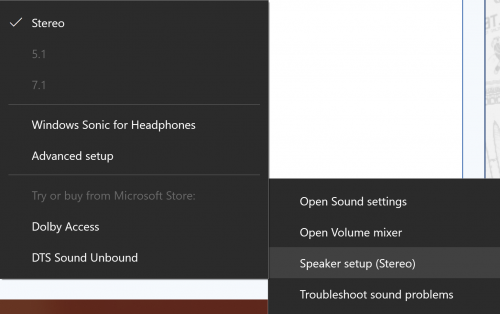
Anyway, anybody using their Ryzen connected to TV via HDMI. It's working nicely at 4K60 but sound only stereo no surround available. I'm still using my old trusty Z5500 and surround works just fine with my PS4. Is it a Windows problem?
user posted image
*

Your player in PC need to support bit streaming. Then your receiver need to support the sound format. This if using HDMI.

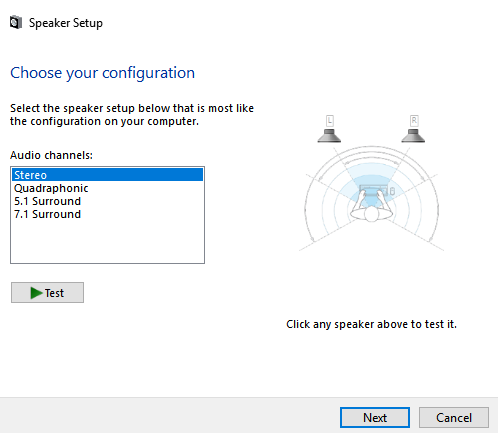
If your speaker are those that have those front/rear/center&sub 3 plugs then your sound card need to support surround sound, then Sound setting change to your preferable number of speaker.
user posted image

Your PC player of course have to set to mixing the audio to how many speaker you have.
xxboxx
post Aug 5 2019, 07:52 PM

The mind is for having ideas, not holding them
*******
Senior Member
5,261 posts

Joined: Oct 2004
From: J@Y B33


QUOTE(Joseph Hahn @ Aug 5 2019, 03:47 PM)
I use VLC. Not sure if it supports it. The receiver obviously supports it since it works just fine with the PS4. It's the same connection as the PS4 which is HDMI to TV and optical to speaker. I'm sure the analog realtek sound output will work just fine in surround but i'm trying to simplify by just using HDMI.
*

Then check your PS4 what is the format it output, whether PCM or DTS or Dolby Digital. Then match it on VLC.

Another thing is your video source the audio format must be supported by your speaker or VLC must be able to convert it to format that your speaker support it.

If the format is PCM then your PC audio setting need to change the speaker number to 5.1 like my earlier picture.
xxboxx
post Aug 11 2019, 02:06 AM

The mind is for having ideas, not holding them
*******
Senior Member
5,261 posts

Joined: Oct 2004
From: J@Y B33


QUOTE(Joseph Hahn @ Aug 10 2019, 11:59 AM)
Sold already lol.
Untungla haha. tongue.gif
Anyway, regarding my question about my Windows 10 only detecting stereo, turns out it's the limitation of optical cable as it can only transfer Bitstream (compressed) surround sound or PCM (uncompressed) stereo. My PC is connected to TV via HDMI and TV is connected to my Z5500 via optical. PS4 surround works because there's a Bitstream option. VLC also works because (downloaded) videos with surround sound are also compressed and there's an option to passthrough the Windows driver. Windows detects my optical connection so it only gives me Stereo in PCM. Games are also in PCM in Stereo or surround. So if i want to play games in surround, i still need to use analog cable which connects my PC directly to speaker. But since i don't game much, i'll stick with HDMI only for now. Less cable mess. biggrin.gif
*

What is the downloaded video's sound format is? Your speaker only support DTS and Dolby Digital. If it's DTS:X or ATMOS or AAC/AC3 then the bitstream won't work.
One way to get around this is by using filter that will convert the audio to DTS or Dolby Digital 5,1. I'm not sure if VLC have such function, last time I use MPC with AC3 filter to do the conversion.
xxboxx
post Aug 12 2019, 04:38 PM

The mind is for having ideas, not holding them
*******
Senior Member
5,261 posts

Joined: Oct 2004
From: J@Y B33


QUOTE(Joseph Hahn @ Aug 12 2019, 12:22 PM)
DTS i guess since my speaker detects it.
*

Direct from pc the speaker detect it as DTS but go through hdmi>TV>optical>speaker, speaker doesn't detect it as DTS?
Maybe your tv doesn't enable the bitstream passthrough or doesn't support that format for passthrough.
QUOTE
Note that some TVs can only pass 5.1 through over a certain connection (either digital optical or HDMI ARC), and some can only pass through certain signal types (DTS or Dolby Digital)
https://www.rtings.com/tv/tests/inputs/5-1-...dio-passthrough

9 Pages < 1 2 3 4 > » Top
 

Change to:
| Lo-Fi Version
0.0256sec    0.35    7 queries    GZIP Disabled
Time is now: 6th December 2025 - 05:18 PM