Welcome Guest ( Log In | Register )

16 Pages « < 10 11 12 13 14 > » Bottom

Outline · [ Standard ] · Linear+

 AMD Ryzen, AM4 / AM5 Platform

views
     
SSJBen
post May 1 2021, 03:05 PM

Stars deez nuts.
*******
Senior Member
4,522 posts

Joined: Apr 2006


QUOTE(John Chaser @ May 1 2021, 12:34 PM)
So....um.....I caved in and bought the following:
AMD RYZEN 9 5950X
ASUS  X570 ROG Crosshair VIII Dark Hero

Total damage RM6300
*
Beautiful.
SSJBen
post Jun 9 2021, 04:46 PM

Stars deez nuts.
*******
Senior Member
4,522 posts

Joined: Apr 2006


QUOTE(Bonchi @ Jun 8 2021, 08:20 PM)
yeap, and generally gaming wont go 100% cpu so power consumption is actually very identical or even lower if compared with 10th gen. Not everyone render 24/7 anyways so in the end it's actually not a concern for everyday usage but AMD's high idle power consumption is a concern.

yeah so flac may cause higher cpu usage on the decompression and somehow it causes my AMD to go full out 4.0ghz all core 88w PPT roaring at 80C++.. which is pretty facepalm  doh.gif . Thanks to that my whole audio storage has been converted to ALAC doh.gif And that was why I use full memory buffering and kernel streaming to my USB audio DAC buuuuut, bump into alot of issues with ryzen. Which is one of the many reason why I switched to intel.

meanwhile, now my intel cpu package power while playing flac files on foobar2K with the same encoding options is 8w and below. that's 10 times lower laugh.gif
*
I also don't know or understand how FLAC causes your system to boost all out 4ghz, 88w PPT and melting itself at 80c lol. doh.gif

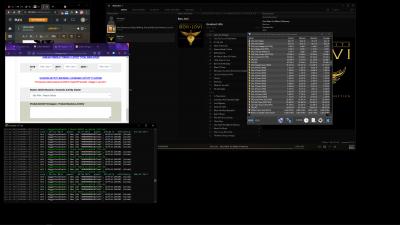
Here is my typical usage when I'm using the PC, 9 tabs, split between Chrome and FF, FLAC playing on musicbee, mining from GPU -

Attached Image

50c idle is spot on. But as you can see, idle power on CPU and SOC isn't THAT bad.
No special power plan, just using Windows balanced default.

*EDIT - someone may or may not be streaming from my Plex server also which is causing the spike in max temps.

This post has been edited by SSJBen: Jun 9 2021, 05:01 PM
SSJBen
post Jun 9 2021, 07:31 PM

Stars deez nuts.
*******
Senior Member
4,522 posts

Joined: Apr 2006


QUOTE(Bonchi @ Jun 9 2021, 06:37 PM)
well, probably foobar2K and wasapi plugin and perhaps also reading files from rar. Well I dont know why it happened also. can only point it to being AMD's problem  doh.gif ive even set my CPU min state to 0% and undervolted to the point it randomly bsod but still it gets to 4ghz all core whenever a song is played. So i converted all to ALAC and used itunes (ewwwwww)

well, 40w+ idle vs less than 9w idle is still quite a big difference in the longterm especially I believe you also leave your PC on almost 24/7. as you know, room temp slowly increase by delta from the exhaust and being 50C idle especially when you close window, close door, off aircond and go to work..... you will come home to an oven. I had this experience with my 3600. Kinda made me shut down my PC often with AMD but now, my intel is only 1-2C above ambient during idle. I kinda leave it on 24/7 again biggrin.gif .
*
I'm using WASAPI output on musicbee also, basically all settings are identical to foobar. I switched to MB because its interface scales better on a 4k screen.

Yes in the long term it's noticeable difference for idle power consumption. But it isn't as bad as it's made out to be considering it's a 24 threads CPU, just like how Intel's thermo nuclear consumption is also hyped out of proportion. The PC is in the HT room, AC auto turns on at 3pm and off at 7pm then there's a ceiling fan that turns on after that. When I'm in the room, I'll always have the AC turned on. Personally don't feel the heat at all.
SSJBen
post Jun 10 2021, 12:15 AM

Stars deez nuts.
*******
Senior Member
4,522 posts

Joined: Apr 2006


QUOTE(yimingwuzere @ Jun 9 2021, 09:50 PM)
It doesn't look like you're pushing the SoC that much with your RAM speeds. I see higher SoC power usage on my 5800X using RAM at 3733 speeds and 1:1 IF clock, even at idle. Even Rocket Lake capped at 65W can show a disparity when running Gear 1 speeds at 3200+ due to power pulled away from the cores.
*
I paired back the IF and ram speed from 4000mhz to 3600mhz because no point for me lol... I play at 4k res. 0.42069% faster than 3600mhz with very tight timings if you want a number I guess.

When I do my vid rendering and remuxing work, then can see a difference. But that time saved I can go take a piss and come back, it still won't be done compared to just 3600mhz with tight timings. Just keep at 3600mhz for worry free experience, haven't had a single system blip for the last 4 months. laugh.gif


QUOTE(BOTAK_WAI @ Jun 9 2021, 11:19 PM)
i see audiophiles here…hehe

out of topic a bit…

for those who like to customize everything then use foobar2k

for those who like everything works out of the box then musicbee

for those want to keep it simple, i will recommend Sony Music Center for PC
https://www.sony.com.my/electronics/support...les/MC4PC020001
*
Cannot use foobar2k with my TV, projector and monitor set up. The problem is like this, when I turn off the monitor and turn on the TV then musicbee will scale its interface automatically to the TV's res (4k). Foobar however will still be stuck on my monitor's resolution, 1440p. Need a system reboot for it to scale to 4k, then same case also if I switch from TV/projector back to monitor, foobar will be stuck in 4k. All the text and icons will be super huge. Damn mafan.

Since my settings is identical to foobar on musicbee, I just use the latter.

This post has been edited by SSJBen: Jun 10 2021, 12:16 AM
SSJBen
post Jun 14 2021, 01:01 PM

Stars deez nuts.
*******
Senior Member
4,522 posts

Joined: Apr 2006


user posted image

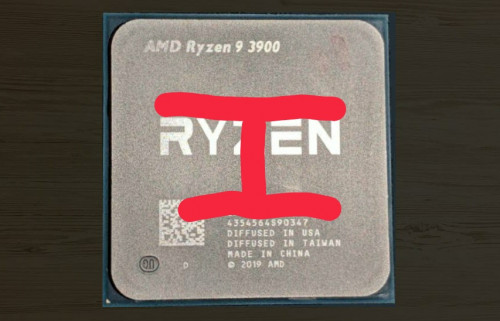
Lol I just do this.

The chiplets are under the Ryzen and the IO is under the serials. Just do a H spread and call it a day. Did this on a 3900x, did the same on a 5900x. Tried with D15s, tried with asetek AIOs, tried with EK blocks, they've always produced the best results.

Temps has never been an issue on my system.

And also to sai, please revert BIOS back to 3401. Latest BIOS has a nasty bug, been reported numerous times on OCN.
SSJBen
post Jun 14 2021, 06:07 PM

Stars deez nuts.
*******
Senior Member
4,522 posts

Joined: Apr 2006


QUOTE(sai86 @ Jun 14 2021, 05:59 PM)
revert to 3401 no longer hit 90C during steam/origin download.  rclxm9.gif
thanks alot to all sifu that gave advice as well. now i really need to open up as temp is not to my liking or ryzen 5900X is just that hot/warm even under water 70C+ is a norm??
*
Glad to hear that.
Best not to update any BIOS for now, until AGESA 1.3.0.0 releases at least.

70c spike is normal, but if sustain there then something may be wrong else where.

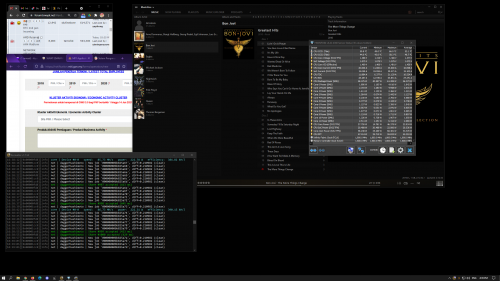
user posted image

As you can see mine pushing 66c spikes but idling around 50c.
SSJBen
post Jun 17 2021, 12:33 AM

Stars deez nuts.
*******
Senior Member
4,522 posts

Joined: Apr 2006


Once again I repeat, don't update BIOS until AGESA 1.3.0 is out.
SSJBen
post Jun 19 2021, 04:39 PM

Stars deez nuts.
*******
Senior Member
4,522 posts

Joined: Apr 2006


More or less normal.

In msia ambient, high 40s and low 50s as idle temp is normal for Zen 2 and 3.
SSJBen
post Jun 19 2021, 09:13 PM

Stars deez nuts.
*******
Senior Member
4,522 posts

Joined: Apr 2006


QUOTE(Lineage @ Jun 19 2021, 08:30 PM)
If i would like to go for maximum cooling, with 360mm AIO, what temp I'm expecting?

CORSAIR iCUE H150i Elite Capellix 360MM
NZXT Kraken X73
Lian Li Galahad 360-X ARGB 360MM
ID-Cooling Zoomflow 360X ARGB
Cooler Master MasterLiquid ML360R RGB
*
Mid 40s. You won't get below 40s with Zen 2/3 on idle, not in Msia weather at least even if it's raining almost everyday now.
SSJBen
post Jun 19 2021, 09:26 PM

Stars deez nuts.
*******
Senior Member
4,522 posts

Joined: Apr 2006


QUOTE(TristanX @ Jun 19 2021, 09:16 PM)
My ambient around 28-32C. H150i Elite Capellix can hit 75-78C on 5900X. Higher when gaming.

https://forum.lowyat.net/index.php?showtopi...ost&p=101276275
*
5900x dual chiplets.

3700x hotspot on just one chiplet....
SSJBen
post Jun 30 2021, 03:30 AM

Stars deez nuts.
*******
Senior Member
4,522 posts

Joined: Apr 2006


QUOTE(BOTAK_WAI @ Jun 30 2021, 01:22 AM)
yea…the pcie config we discussed before…not sure is in this thread or nvidia thread. those who are interested can find back.

i saw some ppl reported the usb disconnected intermittently after raise the flck above 1900.
*
I've tried every FCLK strap from 1600mhz to 2000mhz over the last 6 months on Zen 3, not a single time USB has dropped. Don't only read the bad news, because the bad news are always the ones that make the most noise.
SSJBen
post Jul 8 2021, 02:42 PM

Stars deez nuts.
*******
Senior Member
4,522 posts

Joined: Apr 2006


QUOTE(coolkwc @ Jul 8 2021, 02:13 PM)
Yeah, but the idle power consumption is quite crappy compare to my previous i9-9900KS.
The i9 actively lower the clock until 800MHz with 0.8Vcore during light use like desktop work, the power is only hover around ~10W (can see as low as 6W occasionally). Whereas this 5900X lowest clock 3.3GHz, idle power around 25-30W. This is not what i expected from a latest architecture CPU based on more advanced 7nm node.

But of course the full load consumption is better in AMD. By this undervolt setting, the average package power during Cinebench/AIDA64 FPU is around 170W only.
*
Monolithic die vs chiplets+huge IOD, that's the trade off for both designs.

Also understand that 5900x has 50% more cores and threads than the 9900k. Idle power consumption is bound to be higher.
SSJBen
post Jul 8 2021, 03:54 PM

Stars deez nuts.
*******
Senior Member
4,522 posts

Joined: Apr 2006


QUOTE(coolkwc @ Jul 8 2021, 03:27 PM)
I will say not that bad considering lowest clock only down to 3.3GHz in idle. Would be better if can lower to sub 1GHz in idle, for sure that is going to help on idle power.

My swap from Intel to AMD decision happened within 12 hours last week without really keep up with AMD Zen design since 2 years ago, let alone those in depth details. All i known was AMD rule the high end segment now without answer from Intel.
So basically i left no choice when my motherboard dead on me suddenly (I thought is motherboard end up is 1 of 4 RAM stick fault after swapped to AMD, what a costly mistake tongue.gif ).

I try to pickup everything within a week, PBO, curve optimizer, architecture etc. and start to learn there are quite alot of drawbacks of AMD platform as well, both on the processor and chipset as well, especially memory latency side and memory clock limitation wise.

Currently my rig looks stable in everything, all/single core boost is satisfying, except a crappy cold boot issue of my board, and this is a famous issue online for Asus Rog Strix B550-E series with DOCP enable, consequences of not doing enough homework before land for this board. shakehead.gif
*
Zen3 (or any Zen generations) cannot idle at 1ghz. The CPU will simply cease and BSOD. You can further lower clock down state by lowering the minimum CPU state in Windows power plan. But if you ask me, there really isn't that much of difference because the CPU will keep boosting to beyond 4ghz anyway the moment you do something on the desktop, even as much as opening a folder.

As for cold boot issue, you have 2 choices:
1) Flash to an older known working BIOS.
or
2) Tweak the LLC and voltages + RAM timings manually.

Zen 2 and 3 has great so far for me too. The kind of multi core perf that simply can't be had with Intel atm, yeah - few minor irritating issues here and there that plagues some users (touch wood I don't have them) outweighs it. I save time doing work and earn more with it to buy the next best thing, be it Intel or AMD.

SSJBen
post Jul 18 2021, 07:52 PM

Stars deez nuts.
*******
Senior Member
4,522 posts

Joined: Apr 2006


That's why they're going to LGA next. Took them long enough.
SSJBen
post Jul 22 2021, 11:30 PM

Stars deez nuts.
*******
Senior Member
4,522 posts

Joined: Apr 2006


QUOTE(coolkwc @ Jul 22 2021, 08:28 PM)
Damn, i just use Kryonaut on my CPU cooler :lol
*
Kryonaut also degrades quite quickly in comparison to other pastes. 1 year is about its lifespan.

Usually just use NT-H2 now a days. More expensive, but doesn't suffer from degradation and pump out issue like Kryonaut does yet performs just as well.
SSJBen
post Jul 26 2021, 01:26 PM

Stars deez nuts.
*******
Senior Member
4,522 posts

Joined: Apr 2006


QUOTE(BOTAK_WAI @ Jul 24 2021, 06:01 AM)
want long lasting can try Honeywell PTM7950SP or PTM7900SP too.

https://item.taobao.com/item.htm?spm=a230r....id=631006993629
*
Why use that when Noctua NTH2 exists?
SSJBen
post Jul 26 2021, 04:33 PM

Stars deez nuts.
*******
Senior Member
4,522 posts

Joined: Apr 2006


QUOTE(yimingwuzere @ Jul 26 2021, 01:42 PM)
How well do other thermal pastes fare against NT-H2 if I wanted to avoid using Kryonaut? E.g. Gelid GC Extreme, Arctic MX-5, etc. Planning to swap coolers with an AIO on my end.
*
I have both, have used both.

NTH2 is better because it doesn't degrade as quickly as Kryonaut, also won't suffer from pump out issue (this is an issue for Zen CPUs because the IHS is convex). I have used Kryonaut since 2014 and my experience is that you need to change them out in about ~1 year or so. NTH2 has been more than 1 year in my 3900x system, still hasn't suffered any degradation. On my 5900x system, I'm still using the Kryonaut on it but these few weeks I have noticed higher peak temps. No, it's not because of weather affecting ambient temp either because my room temp is always controlled at 22c whenever PC is turned on.

That said, they both perform exactly the same temps wise when both are freshly applied. 0.5c difference is NOT a difference ya. wink.gif
SSJBen
post Aug 21 2021, 05:27 PM

Stars deez nuts.
*******
Senior Member
4,522 posts

Joined: Apr 2006


QUOTE(WillSmith @ Aug 21 2021, 11:48 AM)
Thanks Sifu for quick reply. That mean downgrading less core 5600x really hurt some real performance of application (not gaming) and waste money. Upgrading 5700G same core the improvement is not so noticeable in real application can benefic right? As for 5800x maybe some review the number is  drool.gif  but this actual not a big performance which can rclxm9.gif .
*
inb4 some people come in and tell you to go intel instead.

rolleyes.gif
SSJBen
post Aug 23 2021, 04:11 PM

Stars deez nuts.
*******
Senior Member
4,522 posts

Joined: Apr 2006


QUOTE(Mavik @ Aug 23 2021, 02:59 PM)
Hi all, pretty much a noob here with hardware. Currently, I am using a Ryzen 7 3700X CPU and pairing it with a GALAX 3080 TI SG. Just want to check if this CPU is bottlenecking the performance of the GPU (especially with games like COD Black Ops and Warzone). Am tempted to upgrade the CPU to a Zen 3 architecture CPU but not too sure.
*
Below 1440p yes, significant bottlenecking for sure. Even bottlenecking at up to 1600p actually.

Zen 3 upgrade only makes sense if you're playing at lower resolutions and you want to hit very high framerates consistently (>120fps).
SSJBen
post Aug 24 2021, 02:24 PM

Stars deez nuts.
*******
Senior Member
4,522 posts

Joined: Apr 2006


60fps vs 120fps on a monitor is significant, but the former is still playable and enjoyable.

However 60fps in VR is next to unplayable. So that's where 120fps as a minimum is mandatory.

It's all relative, you can't make a blanket judgment.

16 Pages « < 10 11 12 13 14 > » Top
 

Change to:
| Lo-Fi Version
0.0425sec    0.34    7 queries    GZIP Disabled
Time is now: 5th December 2025 - 02:08 AM