Welcome Guest ( Log In | Register )

69 Pages « < 33 34 35 36 37 > » Bottom

Outline · [ Standard ] · Linear+

 [OFFICIAL] Ubiquiti Networks, Home/SOHO/Enterprise Networking

views
     
lencent
post Mar 25 2019, 10:14 AM

Regular
******
Senior Member
1,719 posts

Joined: Oct 2004
From: Third rock from the sun


QUOTE(MX510 @ Mar 25 2019, 09:02 AM)
How many users will be using it ? Data load ? What is ur package do you subscribe for your fibre line?
*
2 Users, assume at least 10 devices connected at all time.
Light data, just typical home usage, with streaming of videos and music. Occasional conference calls, this is crucial for me.
will be using unifi 100mbps package.

I have checked out a couple of routerboard, wondering if Gigabit ethernet is a must or i can live without it? hmm.gif

Thanks : )
TSpandera999
post Mar 25 2019, 12:03 PM

모든 것​에는 정해진 때​가 있으니
*******
Senior Member
6,214 posts

Joined: Sep 2010
From: Busan, Kr | Kuching, Swk


QUOTE(lencent @ Mar 25 2019, 10:14 AM)
2 Users, assume at least 10 devices connected at all time.
Light data, just typical home usage, with streaming of videos and music. Occasional conference calls, this is crucial for me.
will be using unifi 100mbps package.

I have checked out a couple of routerboard, wondering if Gigabit ethernet is a must or i can live without it?  hmm.gif

Thanks : )
*
my pov..gigabit ethernet always give u advantages... especially streaming between 2 devices... not talking about internet backbone...
because occasional conference calls... gigabit definetly help.
me myself also occasional conference calls user.. i had experienced using just megabit tot gigabit is not necessary.. but hey.. im alone the user 🤣
lencent
post Mar 25 2019, 01:06 PM

Regular
******
Senior Member
1,719 posts

Joined: Oct 2004
From: Third rock from the sun


QUOTE(pandera999 @ Mar 25 2019, 12:03 PM)
my pov..gigabit ethernet always give u advantages... especially streaming between 2 devices... not talking about internet backbone...
because occasional conference calls... gigabit definetly help.
me myself also occasional conference calls user.. i had experienced using just megabit tot gigabit is not necessary.. but hey.. im alone the user 🤣
*
Thank you for the feedback, however, isnt the ISP the bottleneck for conference call? gigabit would be helpful for transferring of data within the network right?
Sorry, not really a IT geek blush.gif read abit but totally cannot understand most of it.
wanttotree
post Mar 25 2019, 01:34 PM

On my way
****
Junior Member
677 posts

Joined: Apr 2008
QUOTE(lencent @ Mar 24 2019, 04:29 PM)
Thank you for the suggestion.
Which mikrotik would you recommend?
Checkout sublime lazada page and there are too many models, cant even tell whats the difference.
Im mainly using for home usage but need to use conference call regularly, ie: skype.
*
I think the new hex will handle it no sweat. Its mikrotik, even their sub 1ghz single core can handle gigabit easy.
lencent
post Mar 25 2019, 01:51 PM

Regular
******
Senior Member
1,719 posts

Joined: Oct 2004
From: Third rock from the sun


QUOTE(wanttotree @ Mar 25 2019, 01:34 PM)
I think the new hex will handle it no sweat. Its mikrotik, even their sub 1ghz single core can handle gigabit easy.
*
Are you referring to this? Thanks.

https://www.lazada.com.my/products/mikrotik...nrj5Ji&search=1

This post has been edited by lencent: Mar 25 2019, 01:52 PM
wanttotree
post Mar 25 2019, 02:19 PM

On my way
****
Junior Member
677 posts

Joined: Apr 2008
QUOTE(lencent @ Mar 25 2019, 01:51 PM)
Thats hex s, which comes with sfp port if u need one. Theres one called hex(also known as rb750gr3) and it has the same exact internal without sfp port. And also its a boring white. Ultimately its the same thing but cheaper without the sfp port. Hex is arnd rm30-rm40 cheaper than hex s. So basically its your call. Cheers
FollowMeRogerThat
post Mar 25 2019, 04:00 PM

Getting Started
**
Junior Member
236 posts

Joined: Aug 2010
From: PLANT


Hi Sifu,

I'm interested to buy Ubiquiti NanoHD and have someone install it for me.

This will be for home usage and I will ask the technician to pull some wire.

Question is where and what does the technician need to pull? Is it from the port that Unifi installed for the Fibre optics?

Also, do I need to buy any POE Switch in advance to power up the POE line?

Sorry for noobie question as I've been reading up but still have these few questions before purchasing one.
amyhs99
post Mar 25 2019, 04:11 PM

Look at all my stars!!
*******
Senior Member
3,807 posts

Joined: Jan 2003


QUOTE(FollowMeRogerThat @ Mar 25 2019, 04:00 PM)
Hi Sifu,

I'm interested to buy Ubiquiti NanoHD and have someone install it for me.

This will be for home usage and I will ask the technician to pull some wire.

Question is where and what does the technician need to pull? Is it from the port that Unifi installed for the Fibre optics?

Also, do I need to buy any POE Switch in advance to power up the POE line?

Sorry for noobie question as I've been reading up but still have these few questions before purchasing one.
*
You need to plug into your current router.
Eg: Fiber > CPE > Router > PoE Injector > Nano HD

Ubiquiti NanoHD should come with the PoE injector, so PoE switch is not a must.

Hope it helps. icon_rolleyes.gif
TSpandera999
post Mar 25 2019, 06:43 PM

모든 것​에는 정해진 때​가 있으니
*******
Senior Member
6,214 posts

Joined: Sep 2010
From: Busan, Kr | Kuching, Swk


QUOTE(FollowMeRogerThat @ Mar 25 2019, 04:00 PM)
Hi Sifu,

I'm interested to buy Ubiquiti NanoHD and have someone install it for me.

This will be for home usage and I will ask the technician to pull some wire.

Question is where and what does the technician need to pull? Is it from the port that Unifi installed for the Fibre optics?

Also, do I need to buy any POE Switch in advance to power up the POE line?

Sorry for noobie question as I've been reading up but still have these few questions before purchasing one.
*
why not just ask the technician to mount and terminate it for you? laugh.gif much easier.... if 1 or 2 units... just use poe adapter that comes with it..
Gaara92
post Mar 25 2019, 06:50 PM

Herald
****
Junior Member
612 posts

Joined: Mar 2008


QUOTE(wanttotree @ Mar 25 2019, 02:19 PM)
Thats hex s, which comes with sfp port if u need one. Theres one called hex(also known as rb750gr3) and it has the same exact internal without sfp port. And also its a boring white. Ultimately its the same thing but cheaper without the sfp port. Hex is arnd rm30-rm40 cheaper than hex s. So basically its your call. Cheers
*
hex s is quite good. I am using hex s for connecting site to site ipsec vpn connection from my home to my office. not to say it has 256mb ram quite good for caching.

QUOTE(FollowMeRogerThat @ Mar 25 2019, 04:00 PM)
Hi Sifu,

I'm interested to buy Ubiquiti NanoHD and have someone install it for me.

This will be for home usage and I will ask the technician to pull some wire.

Question is where and what does the technician need to pull? Is it from the port that Unifi installed for the Fibre optics?

Also, do I need to buy any POE Switch in advance to power up the POE line?

Sorry for noobie question as I've been reading up but still have these few questions before purchasing one.
*
have that technician install the NanoHD for you also. if you around cyberjaya I can come help configure your nanoHD but I think you also can configure it using guides from youtube. nod.gif
TSpandera999
post Mar 25 2019, 07:30 PM

모든 것​에는 정해진 때​가 있으니
*******
Senior Member
6,214 posts

Joined: Sep 2010
From: Busan, Kr | Kuching, Swk


QUOTE(lencent @ Mar 25 2019, 01:06 PM)
Thank you for the feedback, however, isnt the ISP the bottleneck for conference call? gigabit would be helpful for transferring of data within the network right?
Sorry, not really a IT geek blush.gif  read abit but totally cannot understand most of it.
*
last time maybe.. these days.. so far no issue.. more upload... even much better.... yes... very helpful transferring data..
MX510
post Mar 26 2019, 07:14 AM

Love Me Sin Hate Me Sinner
*******
Senior Member
4,038 posts

Joined: Aug 2005
From: Earth


QUOTE(lencent @ Mar 25 2019, 10:14 AM)
2 Users, assume at least 10 devices connected at all time.
Light data, just typical home usage, with streaming of videos and music. Occasional conference calls, this is crucial for me.
will be using unifi 100mbps package.

I have checked out a couple of routerboard, wondering if Gigabit ethernet is a must or i can live without it?  hmm.gif

Thanks : )
*
If money is not and issue go for RB 4011 with the wifi otherwise hap ac2 would be sufficient
FollowMeRogerThat
post Mar 26 2019, 08:35 AM

Getting Started
**
Junior Member
236 posts

Joined: Aug 2010
From: PLANT


QUOTE(amyhs99 @ Mar 25 2019, 04:11 PM)
You need to plug into your current router.
Eg: Fiber > CPE > Router > PoE Injector > Nano HD

Ubiquiti NanoHD should come with the PoE injector, so PoE switch is not a must.

Hope it helps.  icon_rolleyes.gif
*
Thanks buddy. I've not used a PoE injector before but your flow does help.

Now to the part about laying cables. Anyone by any chance with contacts that can help pull from the 2nd floor of a 2-storey house to the middle point of ground floor? in Johor Bahru area.

Thanks.


FollowMeRogerThat
post Mar 26 2019, 08:36 AM

Getting Started
**
Junior Member
236 posts

Joined: Aug 2010
From: PLANT


QUOTE(Gaara92 @ Mar 25 2019, 06:50 PM)
hex s is quite good. I am using hex s for connecting site to site ipsec vpn connection from my home to my office. not to say it has 256mb ram quite good for caching.
have that technician install the NanoHD for you also. if you around cyberjaya I can come help configure your nanoHD but I think you also can configure it using guides from youtube. nod.gif

*
Thanks for the offer buddy!

Unfortunately I'm from Johor Bahru biggrin.gif

Let's see how we go when I get it.
bryanyz
post Mar 30 2019, 12:06 AM

Getting Started
**
Junior Member
292 posts

Joined: Aug 2005
From: Sunway


Hi all, im planning to upgrade my wifi due to the pingstrike to my mobile game. currently on time 100mbps plan & using the tplink c1200 as router and 5g ap and a asus rt-n18u as 2.4g ap.
if i change to edge router x + ap ac pro will it solve the pingstrike issue? is the sqm useful? i found the qos on the tplink router is shit. kinda useless.


wanttotree
post Mar 30 2019, 12:15 AM

On my way
****
Junior Member
677 posts

Joined: Apr 2008
QUOTE(bryanyz @ Mar 30 2019, 12:06 AM)
Hi all, im planning to upgrade my wifi due to the pingstrike to my mobile game. currently on time 100mbps plan & using the tplink c1200 as router and 5g ap and a asus rt-n18u as 2.4g ap.
if i change to edge router x + ap ac pro will it solve the pingstrike issue? is the sqm useful? i found the qos on the tplink router is shit. kinda useless.
*
Sqm is definitely a work of magic. Not really, but it really is work of art. In this case, u look like u need a better ap more than router. But ofcourse the combination of both will definitely be better. Qos on tp-link or any consumer branded router are incomparable with sqm imo.
TSpandera999
post Mar 30 2019, 09:31 AM

모든 것​에는 정해진 때​가 있으니
*******
Senior Member
6,214 posts

Joined: Sep 2010
From: Busan, Kr | Kuching, Swk


QUOTE(bryanyz @ Mar 30 2019, 12:06 AM)
Hi all, im planning to upgrade my wifi due to the pingstrike to my mobile game. currently on time 100mbps plan & using the tplink c1200 as router and 5g ap and a asus rt-n18u as 2.4g ap.
if i change to edge router x + ap ac pro will it solve the pingstrike issue? is the sqm useful? i found the qos on the tplink router is shit. kinda useless.
*
even vpn doesnt work stable on those tplink or dlink... talk about qos... laugh.gif far beyond their quality... only good for normal2 use... nod.gif
bryanyz
post Mar 30 2019, 12:02 PM

Getting Started
**
Junior Member
292 posts

Joined: Aug 2005
From: Sunway


QUOTE(wanttotree @ Mar 30 2019, 12:15 AM)
Sqm is definitely a work of magic. Not really, but it really is work of art. In this case, u look like u need a better ap more than router. But of course the combination of both will definitely be better. Qos on tp-link or any consumer branded router are incomparable with sqm imo.
*
so is the edge router x + ap ac pro, a good combination?
how about comparing unifi nano hd & ap ac pro, which is better?
can i put the ap on the shelf? i cant mount it on the ceiling as I'm renting this place.

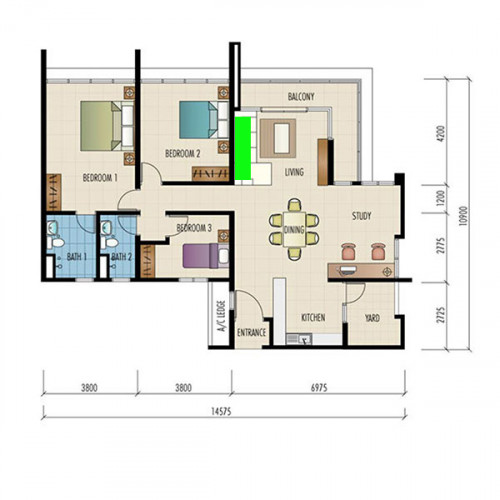
my home is 1400sqf condo, the green color area is the current location that i put my router, if i put the ap at this same area. can the 5g cover the whole house?
user posted image
bryanyz
post Mar 30 2019, 12:03 PM

Getting Started
**
Junior Member
292 posts

Joined: Aug 2005
From: Sunway


QUOTE(pandera999 @ Mar 30 2019, 09:31 AM)
even vpn doesnt work stable on those tplink or dlink... talk about qos...  laugh.gif  far beyond their quality... only good for normal2 use...  nod.gif
*
haha, sometimes normal use also hard. the wifi speed is very unstable. cant even load youtube smoothly.
TSpandera999
post Mar 30 2019, 12:13 PM

모든 것​에는 정해진 때​가 있으니
*******
Senior Member
6,214 posts

Joined: Sep 2010
From: Busan, Kr | Kuching, Swk


QUOTE(bryanyz @ Mar 30 2019, 12:03 PM)
haha, sometimes normal use also hard. the wifi speed is very unstable. cant even load youtube smoothly.
*
true.... archer C7 tplink... monitor it for 9hours... there is unstable packet and suddenly lost packet between this hours... geez..

69 Pages « < 33 34 35 36 37 > » Top
 

Change to:
| Lo-Fi Version
0.0190sec    0.37    6 queries    GZIP Disabled
Time is now: 5th December 2025 - 10:38 AM