Welcome Guest ( Log In | Register )

69 Pages « < 31 32 33 34 35 > » Bottom

Outline · [ Standard ] · Linear+

 [OFFICIAL] Ubiquiti Networks, Home/SOHO/Enterprise Networking

views
     
waihoe
post Feb 6 2019, 12:14 PM

New Member
*
Junior Member
19 posts

Joined: Nov 2005
QUOTE(teohes @ Feb 6 2019, 10:48 AM)
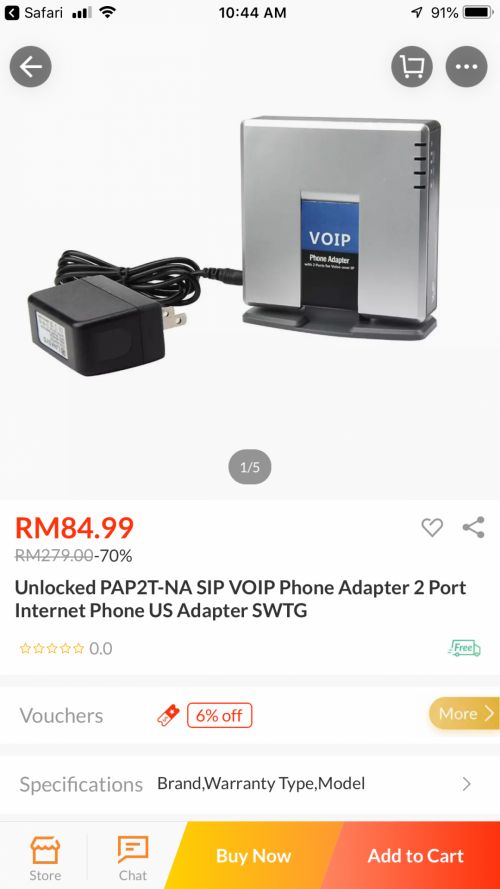
@wanttotree,  I am trying to get my head around your use of the words  “smart switch”.  Is this like an ATA ? (I been reading abt FXO/FXS etc and just trying to work out the exact piece of hw I need to get to do this. Can you help with some examples of devices ?  For example , will something like this do what I want?
Am new to this thread...
I believe what @wanttotree meant by a smart switch is a managed switch.
Meaning a switch that supports VLANs (with all the necessary VLAN tagging, etc). wink.gif

This post has been edited by waihoe: Feb 6 2019, 12:15 PM
teohes
post Feb 6 2019, 06:13 PM

New Member
*
Junior Member
17 posts

Joined: Jan 2010


@waihoe .... I think you may be right.

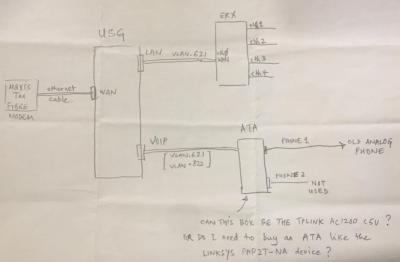
Let me try to be more precise in my wording and attach a diagram of what I am trying to do. Will the following attached diagram work ? If possible, can I reconfigure the TP-Link AC1200 C5v to act only as an ATA ? (ie. turn off dhcp, off wifi etc)

OR do I need to buy something like the Linksys ATA mentioned a few posts earlier ?

This post has been edited by teohes: Feb 6 2019, 06:14 PM


Attached thumbnail(s)
Attached Image
TSpandera999
post Feb 6 2019, 06:46 PM

모든 것​에는 정해진 때​가 있으니
*******
Senior Member
6,214 posts

Joined: Sep 2010
From: Busan, Kr | Kuching, Swk


QUOTE(teohes @ Feb 6 2019, 10:48 AM)
@wanttotree,  I am trying to get my head around your use of the words  “smart switch”.  Is this like an ATA ? (I been reading abt FXO/FXS etc and just trying to work out the exact piece of hw I need to get to do this. Can you help with some examples of devices ?  For example , will something like this do what I want?

user posted image
*
A managed switch offers significantly more advanced control features at a higher cost. A smart switch is an entry-level managed switch, providing the best of both worlds. In general, a business network hosting less than 100 active users will do just fine with a smart switch.

I was thinking that each vlan have their own dhcp server.. because.. these vlan for sure will separate and isolate your network (guest vlan and personal vlan).
wanttotree
post Feb 6 2019, 07:22 PM

On my way
****
Junior Member
677 posts

Joined: Apr 2008
QUOTE(teohes @ Feb 6 2019, 10:48 AM)
@wanttotree,  I am trying to get my head around your use of the words  “smart switch”.  Is this like an ATA ? (I been reading abt FXO/FXS etc and just trying to work out the exact piece of hw I need to get to do this. Can you help with some examples of devices ?  For example , will something like this do what I want?

user posted image
*
Unfortunately that device (voip phone adapter) wont work on maxis home fibre. Smart switch is something like mikrotik rb260gs or tp-link tl-sg105e. This switch enable u to segment the vlan so both your usg and tp-link connected to the internet and the tp-link to work with the analogue phone.

Most people dont do this because lack of importance for voip on home use, for me i use it because of the free calls. If u r not familiar with this setup, dont hesitate to contact me personally via pm. My previous message has a simple text schematic of the setup. But being limited to text on forum box, it might not be too clear compared to image based schematic.

Basically,

1) your fibre cable fibre will connect to one of the smart switch port. Eg : port 1

2) your usg will connect to one of the port on smart switch. Eg : port 2 connected to usg WAN port.

3) your maxis tp-link router will connect to one of the port on the smart switch. Eg : port 3 connected to tp-link router WAN port.

4) u will configure the smart switch to;
i) tag vlan 621 to port 1, port 2 and port 3
ii) tag vlan 822 to port 1 and port 3

Now you are using two routers to go online, usg to handle your internet traffic, then your existing tp-link router to handle the analogue voip. It works perfectly for almost 2 years now.

This post has been edited by wanttotree: Feb 6 2019, 07:25 PM
teohes
post Feb 7 2019, 11:13 AM

New Member
*
Junior Member
17 posts

Joined: Jan 2010


Thanks @pandera999, @wanttotree.

OK, I think I understand what I need to do. @wanttotree, Is my latest attached diagram here correct?

From @wanttotree's description, I understand both routers (ie, the USG and the TP-Link AC1200) will need to establish their own PPPoE connection to MAXIS.

QUESTION: Does Maxis allow 2 simultaneous PPPoE logins from the same account ?


Attached thumbnail(s)
Attached Image
wanttotree
post Feb 7 2019, 11:43 AM

On my way
****
Junior Member
677 posts

Joined: Apr 2008
QUOTE(teohes @ Feb 7 2019, 11:13 AM)
Thanks @pandera999, @wanttotree.

OK, I think I understand what I need to do.  @wanttotree, Is my latest attached diagram here correct?

From @wanttotree's description,  I understand both routers (ie, the USG and the TP-Link AC1200) will need to establish their own PPPoE connection to MAXIS.

QUESTION:  Does Maxis allow 2 simultaneous PPPoE logins from the same account ?
*
That schematic is spot on! And yes multiple pppoe connections are allowed, as long as its the same exact account. It will be capped to yr subbed speed if ur wondering(lol). Good luck. Cheers.
pokchik
post Feb 7 2019, 11:49 AM

I'm getting too old for this sh*t
******
Senior Member
1,304 posts

Joined: Mar 2010


QUOTE(Gaara92 @ Feb 4 2019, 04:08 PM)
no malaysia dont have CK Gen2, most of distri only imported Gen2 Plus since it is integrated with NVR.
*
which means that the Gen2 Plus no longer require NVR if we want to setup surveillance system?
TSpandera999
post Feb 7 2019, 11:52 AM

모든 것​에는 정해진 때​가 있으니
*******
Senior Member
6,214 posts

Joined: Sep 2010
From: Busan, Kr | Kuching, Swk


QUOTE(pokchik @ Feb 7 2019, 11:49 AM)
which means that the Gen2 Plus no longer require NVR if we want to setup surveillance system?
*
Gen2+ have build in hdd up to 5Tb. you can see my previous post. a gen2+ and some login interface
TSpandera999
post Feb 7 2019, 11:53 AM

모든 것​에는 정해진 때​가 있으니
*******
Senior Member
6,214 posts

Joined: Sep 2010
From: Busan, Kr | Kuching, Swk


QUOTE(teohes @ Feb 7 2019, 11:13 AM)
Thanks @pandera999, @wanttotree.

OK, I think I understand what I need to do.  @wanttotree, Is my latest attached diagram here correct?

From @wanttotree's description,  I understand both routers (ie, the USG and the TP-Link AC1200) will need to establish their own PPPoE connection to MAXIS.

QUESTION:  Does Maxis allow 2 simultaneous PPPoE logins from the same account ?
*
yes... correct.. it can be done in that way which is much easier... less hassle..
Gaara92
post Feb 8 2019, 11:45 PM

Herald
****
Junior Member
612 posts

Joined: Mar 2008


QUOTE(wanttotree @ Feb 7 2019, 11:43 AM)
That schematic is spot on! And yes multiple pppoe connections are allowed, as long as its the same exact account. It will be capped to yr subbed speed if ur wondering(lol). Good luck. Cheers.
*
I didnt know that you can dial same pppoe account at the same time. Well I did use my friend streamyx pppoe few years back, he got billed way too much lol. so bad of me. sweat.gif
quasi
post Feb 9 2019, 09:00 AM

Getting Started
**
Junior Member
67 posts

Joined: Dec 2013
QUOTE(teohes @ Feb 7 2019, 11:13 AM)
Thanks @pandera999, @wanttotree.

OK, I think I understand what I need to do.  @wanttotree, Is my latest attached diagram here correct?

From @wanttotree's description,  I understand both routers (ie, the USG and the TP-Link AC1200) will need to establish their own PPPoE connection to MAXIS.

QUESTION:  Does Maxis allow 2 simultaneous PPPoE logins from the same account ?
*
if your router can handle vlans, would it be right to say you don't need a smart switch? even a dumb switch can be used as all vlan can be forwarded to maxis router and usg
wanttotree
post Feb 9 2019, 02:46 PM

On my way
****
Junior Member
677 posts

Joined: Apr 2008
QUOTE(quasi @ Feb 9 2019, 09:00 AM)
if your router can handle vlans, would it be right to say you don't need a smart switch? even a dumb switch can be used as all vlan can be forwarded to maxis router and usg
*
It would be nice and interesting to hear your setup recommendation instead. =)
Gaara92
post Feb 12 2019, 11:27 AM

Herald
****
Junior Member
612 posts

Joined: Mar 2008


QUOTE(wanttotree @ Feb 9 2019, 02:46 PM)
It would be nice and interesting to hear your setup recommendation instead. =)
*
basically what he is saying is since the voip need both vlans to work why not put a layer2 switch let all the vlan go thru, just need to assign vlan in the voip router and the usg only.
teohes
post Feb 13 2019, 05:16 PM

New Member
*
Junior Member
17 posts

Joined: Jan 2010


@gaara92 @quasi @wanttotree

I have read that there are no formal specifications for the behaviour of "unmanaged L2 switches that are VLAN un-aware" when they encounter tagged VLAN frames. Apparently some switches will just drop them whilst others will faithfully pass them along. (I guess others could just collide and keep trying ?)

OK ...curiousity got the better of me and I just tried the following setup to see if this particular L2 switch I happen to have (D-LINK DGS-1008MP) will just "pass thru'" the tagged frames or drop them.

As per diagram (sorry... rough quick draw) , I connected my wired PC to the ER-X and my iPhone to the WIFI on the TP-Link AC1200.

-----------------------------------------------------------------------------------------------------
Test 1: with both the USG and the TP-Link AC1200 Routers ON

Ran Maxis Speed test on my wired PC (5 times) ....averaged about 91Mbps Download Speed
I have tried ringing the analog phone whilst the test I running too. Phone seem to work ok.
-------------------------------------------------------------------------------------------------------

Test 2: with the USG powered ON and the TP-Link AC1200 OFF

Ran Maxis Speed test on my wired PC (5 times) ....averaged about 94Mbps Download Speed
--------------------------------------------------------------------------------------------------------

Test 3: with both the USG and the TP-Link AC1200 Routers ON

Ran 2 you-tube videos on my PC and 1 you-tube video on my iPhone 6.
Ran all 3 videos streaming for about 30 minutes, no gliches.
--------------------------------------------------------------------------------------------------------------

Not an exhaustive test I know, but it does look like a viable setup if one already has a spare L2 switch
and do not wish to spend more for a smart switch. (For my setup, I am buying a TL-SG105e cos I
want my setup to be VLAN aware and cannot afford to depend on an L2 switch that happen to be well behaved).

This post has been edited by teohes: Feb 13 2019, 05:17 PM


Attached thumbnail(s)

Attached Image
wanttotree
post Feb 13 2019, 06:08 PM

On my way
****
Junior Member
677 posts

Joined: Apr 2008
QUOTE(teohes @ Feb 13 2019, 05:16 PM)
@gaara92  @quasi @wanttotree

I have read that there are no formal specifications for the behaviour of "unmanaged L2 switches that are VLAN un-aware" when they encounter tagged VLAN frames.  Apparently some switches will just drop them whilst others will faithfully pass them along. (I guess others could just collide and keep trying ?)

OK ...curiousity got the better of me and I just tried the following setup to see if this particular L2 switch I happen to have (D-LINK DGS-1008MP) will just "pass thru'" the tagged frames or drop them.

As per diagram (sorry... rough quick draw) , I connected my wired PC to the ER-X and my iPhone to the WIFI on the TP-Link AC1200.

-----------------------------------------------------------------------------------------------------
Test 1:  with both the USG and the TP-Link AC1200 Routers ON

Ran Maxis Speed test on my wired PC (5 times) ....averaged about 91Mbps Download Speed
I have tried ringing the analog phone whilst the test I running too. Phone seem to work ok.
-------------------------------------------------------------------------------------------------------

Test 2:  with the USG powered ON and the TP-Link AC1200 OFF

Ran Maxis Speed test on my wired PC (5 times) ....averaged about 94Mbps Download Speed
--------------------------------------------------------------------------------------------------------

Test 3: with both the USG and the TP-Link AC1200 Routers ON

Ran 2 you-tube videos on my PC and 1 you-tube video on my iPhone 6. 
Ran all 3 videos streaming for about 30 minutes, no gliches.
--------------------------------------------------------------------------------------------------------------

Not an exhaustive test I know, but it does look like a viable setup if one already has a spare L2 switch
and do not wish to spend more for a smart switch.  (For my setup, I am buying a TL-SG105e cos I
want my setup to be VLAN aware and cannot afford to depend on an L2 switch that happen to be well behaved).
*
Thanx for this experiment, i now learned that l2 switch can pass over tagged vlan. Maybe useful sooner or later. Cheers.
MX510
post Feb 19 2019, 11:38 AM

Love Me Sin Hate Me Sinner
*******
Senior Member
4,038 posts

Joined: Aug 2005
From: Earth


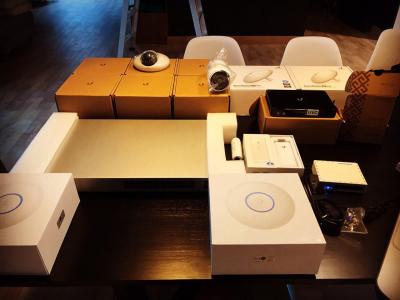
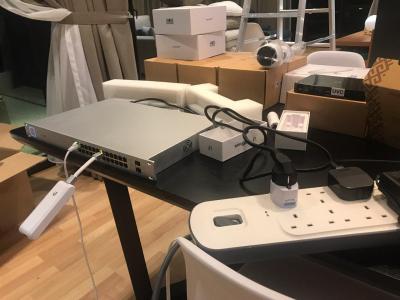
This week project

Attached Image

Attached Image
Gaara92
post Feb 19 2019, 12:38 PM

Herald
****
Junior Member
612 posts

Joined: Mar 2008


QUOTE(MX510 @ Feb 19 2019, 11:38 AM)
This week project

Attached Image

Attached Image
*
I see subtel hehe
TSpandera999
post Feb 19 2019, 02:42 PM

모든 것​에는 정해진 때​가 있으니
*******
Senior Member
6,214 posts

Joined: Sep 2010
From: Busan, Kr | Kuching, Swk


whoaaa... big2 project... rclxms.gif

This post has been edited by pandera999: Feb 19 2019, 02:43 PM
MX510
post Feb 21 2019, 09:25 AM

Love Me Sin Hate Me Sinner
*******
Senior Member
4,038 posts

Joined: Aug 2005
From: Earth


QUOTE(pandera999 @ Feb 19 2019, 02:42 PM)
whoaaa... big2 project... rclxms.gif
*
Yesterday finish everything

9 x point cat 6 cabling
6 x UVC G3 Cameras Dome
1 x UVC G3 Camera Outdoor
2 x UAP NanoHD
1 x 24 ports POE Switch Ubiquiti
1 x 9u ST rack
1 x P2P Nano HD AC Gen 2

To be continue another point at second house

user posted image


user posted image

This post has been edited by MX510: Feb 21 2019, 09:25 AM
TSpandera999
post Feb 21 2019, 10:33 AM

모든 것​에는 정해진 때​가 있으니
*******
Senior Member
6,214 posts

Joined: Sep 2010
From: Busan, Kr | Kuching, Swk


QUOTE(MX510 @ Feb 21 2019, 09:25 AM)
Yesterday finish everything

9 x point cat 6 cabling
6 x UVC G3 Cameras Dome
1 x UVC G3 Camera Outdoor
2 x UAP NanoHD
1 x 24 ports POE Switch Ubiquiti
1 x 9u ST rack
1 x P2P Nano HD AC Gen 2

To be continue another point at second house

user posted image
user posted image
*
that was nice.... wish can do something like that cloud key.. laugh.gif even my ck was left hanging like dat as well... laugh.gif

69 Pages « < 31 32 33 34 35 > » Top
 

Change to:
| Lo-Fi Version
0.0209sec    0.40    6 queries    GZIP Disabled
Time is now: 6th December 2025 - 12:30 PM