I finally managed to test it yesterday. Just a cheap rm 80 tp link 8 port switch connected to port 2 of btu then one to USG and another to Maxis Armenia 131 router. Disabled Ethernet wan in the Armenia router.
Works like a charm.
I also connected to Armenia router Lan to Wan 2 of the USG to do failover as the Armenia has a 4g SIM card.
@gaara92 @quasi @wanttotree
I have read that there are no formal specifications for the behaviour of "unmanaged L2 switches that are VLAN un-aware" when they encounter tagged VLAN frames. Apparently some switches will just drop them whilst others will faithfully pass them along. (I guess others could just collide and keep trying ?)
OK ...curiousity got the better of me and I just tried the following setup to see if this particular L2 switch I happen to have (D-LINK DGS-1008MP) will just "pass thru'" the tagged frames or drop them.
As per diagram (sorry... rough quick draw) , I connected my wired PC to the ER-X and my iPhone to the WIFI on the TP-Link AC1200.
-----------------------------------------------------------------------------------------------------
Test 1: with both the USG and the TP-Link AC1200 Routers ON
Ran Maxis Speed test on my wired PC (5 times) ....averaged about 91Mbps Download Speed
I have tried ringing the analog phone whilst the test I running too. Phone seem to work ok.
-------------------------------------------------------------------------------------------------------
Test 2: with the USG powered ON and the TP-Link AC1200 OFF
Ran Maxis Speed test on my wired PC (5 times) ....averaged about 94Mbps Download Speed
--------------------------------------------------------------------------------------------------------
Test 3: with both the USG and the TP-Link AC1200 Routers ON
Ran 2 you-tube videos on my PC and 1 you-tube video on my iPhone 6.
Ran all 3 videos streaming for about 30 minutes, no gliches.
--------------------------------------------------------------------------------------------------------------
Not an exhaustive test I know, but it does look like a viable setup if one already has a spare L2 switch
and do not wish to spend more for a smart switch. (For my setup, I am buying a TL-SG105e cos I
want my setup to be VLAN aware and cannot afford to depend on an L2 switch that happen to be well behaved).


 Feb 9 2019, 09:00 AM


 Quote
Quote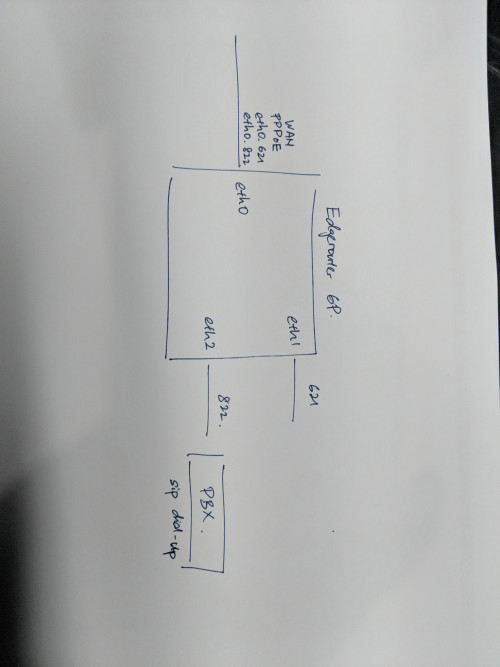

 0.0505sec
 0.71
0.71
 7 queries
 GZIP Disabled