Welcome Guest ( Log In | Register )

Outline · [ Standard ] · Linear+

 Cheap Asus Wifi Router Alternative, Huawei WS880 & Others

views
     
Momo33
post Dec 1 2020, 10:04 AM

Regular
******
Senior Member
1,448 posts

Joined: Oct 2019
QUOTE(LostAndFound @ Dec 1 2020, 09:59 AM)
Nope, never use surge protector unfortunately. The devices lasted a long time so it was time to replace anyway, both premises now using Mesh wifi (TP-Link Deco M9 Plus)
*
Ok Thanks..
Best to get some form of protection from lightning surges to protect your investment /electronics beside avoid downtime . nod.gif
you never know when you will be hit next.
it does not cost much .


Gregar Forte
post Dec 10 2020, 11:31 PM

Getting Started
**
Junior Member
238 posts

Joined: Aug 2011
From: Bachok,Kelantan


Hi guys. Im currently on Merlin 380.70 WS880 that was bought used. I wish to flash to Tomato firmware. Do I flash directly or using CFE? TQ

This post has been edited by Gregar Forte: Dec 11 2020, 12:09 AM
allcwk
post Dec 11 2020, 12:28 AM

Getting Started
**
Junior Member
73 posts

Joined: Jan 2003
From: Malaysia


QUOTE(Gregar Forte @ Dec 10 2020, 11:31 PM)
Hi guys. Im currently on Merlin 380.70 WS880 that was bought used. I wish to flash to Tomato firmware. Do I flash directly or using CFE? TQ
*
Flash directly, refer here Link
Gregar Forte
post Dec 11 2020, 12:50 AM

Getting Started
**
Junior Member
238 posts

Joined: Aug 2011
From: Bachok,Kelantan


QUOTE(allcwk @ Dec 11 2020, 12:28 AM)
Flash directly, refer here Link
*
Thanks boss for the reply. Will do that. Ill update here afterwards
alucard89
post Dec 19 2020, 10:55 AM

Look at all my stars!!
*******
Senior Member
4,454 posts

Joined: Apr 2006
QUOTE(Gregar Forte @ Dec 11 2020, 12:50 AM)
Thanks boss for the reply. Will do that. Ill update here afterwards
*
May i know which tomato firmware version you flashed?
Doesn’t seem like it’s been updated in a while
Gregar Forte
post Dec 19 2020, 03:24 PM

Getting Started
**
Junior Member
238 posts

Joined: Aug 2011
From: Bachok,Kelantan


QUOTE(alucard89 @ Dec 19 2020, 10:55 AM)
May i know which tomato firmware version you flashed?
Doesn’t seem like it’s been updated in a while
*
i used fresh tomato. didnt remember which version but definely newer than shibby one. tried it but really unstable. long time taken to connect pppoe then reverted back to xwrt
alucard89
post Dec 27 2020, 12:39 AM

Look at all my stars!!
*******
Senior Member
4,454 posts

Joined: Apr 2006
QUOTE(Gregar Forte @ Dec 19 2020, 03:24 PM)
i used fresh tomato. didnt remember which version but definely newer than shibby one. tried it but really unstable. long time taken to connect pppoe then reverted back to xwrt
*
Hi, may i how you did it?
I tried uploading the freshtomato from xwrt but i just bricks the router. Had to go back to cfe method

So i’ve been stuck almost 1 hour trying to boot to cfe page. Had no issues last time, but this time repeatedly pressing power + reset button 15-20 sec just doesn’t bring that page anymore.
Any ideas guys?

This post has been edited by alucard89: Dec 27 2020, 01:16 AM
Gregar Forte
post Dec 27 2020, 04:15 PM

Getting Started
**
Junior Member
238 posts

Joined: Aug 2011
From: Bachok,Kelantan


QUOTE(alucard89 @ Dec 27 2020, 12:39 AM)
Hi, may i how you did it?
I tried uploading the freshtomato from xwrt but i just bricks the router. Had to go back to cfe method

So i’ve been stuck almost 1 hour trying to boot to cfe page. Had no issues last time, but this time repeatedly pressing power + reset button 15-20 sec just doesn’t bring that page anymore.
Any ideas guys?
*
I just flashed it from XWRT directly. Working fine however with slow WAN reconnect and have to reset WAN connection upon BW Limiter, I went back to XWRT lol
alucard89
post Dec 27 2020, 11:02 PM

Look at all my stars!!
*******
Senior Member
4,454 posts

Joined: Apr 2006
QUOTE(Gregar Forte @ Dec 27 2020, 04:15 PM)
I just flashed it from XWRT directly. Working fine however with slow WAN reconnect and have to reset WAN connection upon BW Limiter, I went back to XWRT lol
*
Had to reset nvram then i was able to access cfe properly
Btw, on freshtomato, how to setup as wireless repeater?
Basically like this

4g usb modem —> freshtomato ws880

On wxrt there’s a repeater option for that, which makes it easy to setup.

I also noticed on xwrt, if i try to set 4g modem as WAN
I get really slow download speed (0.5mbps) but high upload speed 🤔


Gregar Forte
post Dec 28 2020, 11:05 AM

Getting Started
**
Junior Member
238 posts

Joined: Aug 2011
From: Bachok,Kelantan


QUOTE(alucard89 @ Dec 27 2020, 11:02 PM)
Had to reset nvram then i was able to access cfe properly
Btw, on freshtomato, how to setup as wireless repeater?
Basically like this

4g usb modem —> freshtomato ws880

On wxrt there’s a repeater option for that, which makes it easy to setup.

I also noticed on xwrt, if i try to set 4g modem as WAN
I get really slow download speed (0.5mbps) but high upload speed 🤔
*
Maybe u can try this boss
https://learntomato.flashrouters.com/setup-...20bridge%20link.
alucard89
post Dec 29 2020, 06:43 PM

Look at all my stars!!
*******
Senior Member
4,454 posts

Joined: Apr 2006
QUOTE(Gregar Forte @ Dec 28 2020, 11:05 AM)
Still not working for me it seems
The guide seems to be for 2 routers running on tomato

Looks like the usb modem (oem) was at fault
Even on freshtomato and xwrt i was still getting 0.3-0.5mbps download speed. Oddly enough connect directly the usb modem’s hotspot i was getting normal download speed.
Switched to huawei e8372 wingle modem (setup as wan on xwrt) and everything is smooth sailing.
Might need to reconsider getting oem modem after this

This post has been edited by alucard89: Dec 29 2020, 06:43 PM
alucard89
post Mar 18 2021, 06:43 PM

Look at all my stars!!
*******
Senior Member
4,454 posts

Joined: Apr 2006
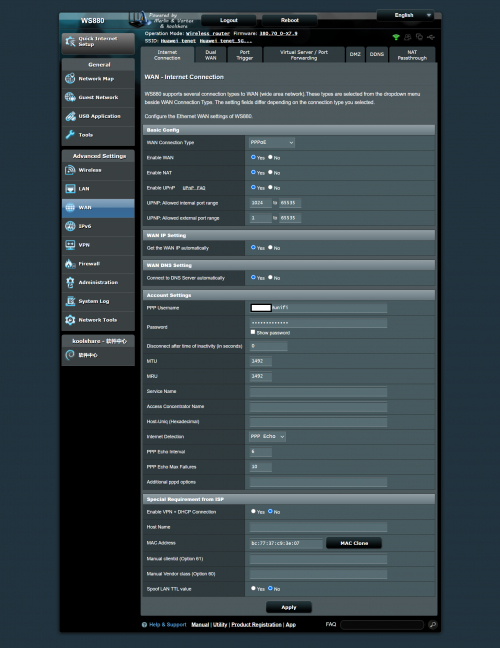
Hi guys, how do you configure pppoe settings to connect unifi?
I already key in username (@unifi) and password but it’s still unsuccessful to connect

This post has been edited by alucard89: Mar 18 2021, 06:43 PM
Gregar Forte
post Mar 18 2021, 08:32 PM

Getting Started
**
Junior Member
238 posts

Joined: Aug 2011
From: Bachok,Kelantan


QUOTE(alucard89 @ Mar 18 2021, 06:43 PM)
Hi guys, how do you configure pppoe settings to connect unifi?
I already key in username (@unifi) and password but it’s still unsuccessful to connect
*
Already check for Unifi Home Profile?
alucard89
post Mar 19 2021, 12:08 AM

Look at all my stars!!
*******
Senior Member
4,454 posts

Joined: Apr 2006
QUOTE(Gregar Forte @ Mar 18 2021, 08:32 PM)
Already check for Unifi Home Profile?
*
I flashed mine with xwrt Merlin 380.70
Is unifi home profile still there in the settings?

user posted image

This post has been edited by alucard89: Mar 19 2021, 12:37 AM
muncheno
post Mar 19 2021, 06:21 AM

Enthusiast
*****
Senior Member
736 posts

Joined: Jun 2006
From: Ipoh
QUOTE(alucard89 @ Mar 19 2021, 12:08 AM)
I flashed mine with xwrt Merlin 380.70
Is unifi home profile still there in the settings?

user posted image
*
You need set vlan tagging settings for unifi also. This is located in LAN - > IPTV.
Choose Unifi profile or manually set it.
» Click to show Spoiler - click again to hide... «

Gregar Forte
post Mar 19 2021, 11:31 AM

Getting Started
**
Junior Member
238 posts

Joined: Aug 2011
From: Bachok,Kelantan


QUOTE(muncheno @ Mar 19 2021, 06:21 AM)
You need set vlan tagging settings for unifi also. This is located in LAN - > IPTV.
Choose Unifi profile or manually set it.
» Click to show Spoiler - click again to hide... «

*
Yeah this settings. Thank you bro. Havent used WS880 for a while since it hanged with 500GB usage daily.
alucard89
post Mar 19 2021, 11:29 PM

Look at all my stars!!
*******
Senior Member
4,454 posts

Joined: Apr 2006
QUOTE(muncheno @ Mar 19 2021, 06:21 AM)
You need set vlan tagging settings for unifi also. This is located in LAN - > IPTV.
Choose Unifi profile or manually set it.
» Click to show Spoiler - click again to hide... «

*
Thanks, gonna try this out
alucard89
post Mar 19 2021, 11:32 PM

Look at all my stars!!
*******
Senior Member
4,454 posts

Joined: Apr 2006
QUOTE(Gregar Forte @ Mar 19 2021, 11:31 AM)
Yeah this settings. Thank you bro. Havent used WS880 for a while since it hanged with 500GB usage daily.
*
How do you even reach that daily use 😅
Gregar Forte
post Mar 20 2021, 01:07 AM

Getting Started
**
Junior Member
238 posts

Joined: Aug 2011
From: Bachok,Kelantan


QUOTE(alucard89 @ Mar 19 2021, 11:32 PM)
How do you even reach that daily use 😅
*
haha im renting it out to 7 different houses lol. now my internet is free and i got some income out of it. at first the ws880 was doing good until a month its suddenly hanged once a day lol
andrekua2
post Mar 22 2021, 01:45 PM

10k Club
********
All Stars
13,470 posts

Joined: Jan 2012


QUOTE(Gregar Forte @ Mar 20 2021, 01:07 AM)
haha im renting it out to 7 different houses lol. now my internet is free and i got some income out of it. at first the ws880 was doing good until a month its suddenly hanged once a day lol
*
Thermal pad gone...

Also had two WS880. Given up after almost daily hang. Refused to buy thermal pad and I just used a lot of thermal paste and it was good for few months then start to hang again. Change to Tenda AC18 and it boosted my parents house Unifi speed. I already cracked open the case and install a fan to cool it but still hang.

119 Pages « < 116 117 118 119 >Top
 

Change to:
| Lo-Fi Version
0.0406sec    0.40    6 queries    GZIP Disabled
Time is now: 4th December 2025 - 03:04 AM