Welcome Guest ( Log In | Register )

Bump Topic Topic Closed RSS Feed
139 Pages « < 64 65 66 67 68 > » Bottom

Outline · [ Standard ] · Linear+

 Official TM ÜniFi High Speed Broadband Thread V26

views
     
fruitie
post Jul 24 2016, 02:18 AM

Rise and Shine
Group Icon
Staff
72,806 posts

Joined: Sep 2005
From: KUL

QUOTE(G K Lai @ Jul 24 2016, 01:26 AM)
Oh...! Many thanks fruitie  icon_rolleyes.gif
I saved the thread for future reference.

By the way, I also saved this page (in Chinese) because I think this is the same box that TM provided?
*
It's very easy to get it done. I have been watching using the box non-stop since Friday's evening. laugh.gif

Yes, same box and I have Shafa installed too. laugh.gif
Lineage
post Jul 24 2016, 08:22 AM

the Chaotic Throne
*******
Senior Member
4,524 posts

Joined: Oct 2007
From: ~Still finding the place~


QUOTE(Kokokrunch_1 @ Jul 23 2016, 09:07 PM)
If i'm at the living room downstairs the speed is at it's max
It's a different story if i'm at my room. Getting about average 6 to 8mbps
My unifi is the 30mbps package btw
*
U using which frequency? if your house is big, 2.4GHz is your choice, but it wont reach 30mbps, mostly 20mbps..
To reach 30mbps with Wifi, you need to use 5GHz, but the signal coverage is smaller compared to 2.4GHz.. wink.gif

SUSraynman
post Jul 24 2016, 08:53 AM

Look at all my stars!!
*******
Senior Member
4,333 posts

Joined: Jan 2003


QUOTE(wuszhtag @ Jul 23 2016, 11:43 PM)
hi guys,

just received Tenda F3 and i went to the official website, downloaded the latest firmware and bammmmm, i lost my unifi connectivity setup. apparently the latest firmware doesn't support unifi setup.

if anyone using tenda right now managed to get their hands on firmware that support unifi, can help pass to me?

or let me know the firmware you are using right now that works with unifi? i forgot to screenshot the firmware version. the last digit.

latest firmware F3 Firmware V11.13.01.23_EN below didnt support unifi/maxis/iptv.

[attachmentid=7161417]
*
You should open a new thread detailing your problem instead of posting it in this Unifi-specific thread.

That way, you will get noticed by people who can help you.

Kokokrunch_1
post Jul 24 2016, 10:49 AM

Getting Started
**
Junior Member
55 posts

Joined: Nov 2015
QUOTE(Lineage @ Jul 24 2016, 08:22 AM)
U using which frequency? if your house is big, 2.4GHz is your choice, but it wont reach 30mbps, mostly 20mbps..
To reach 30mbps with Wifi, you need to use 5GHz, but the signal coverage is smaller compared to 2.4GHz..  wink.gif
*
both frequency is enabled
my house not that big. haven't tried disabling one of them
Kokokrunch_1
post Jul 24 2016, 10:50 AM

Getting Started
**
Junior Member
55 posts

Joined: Nov 2015
QUOTE(mztang52 @ Jul 23 2016, 09:30 PM)
Please place the router in the middle of your house and put it on a table, do not put it in cardboard/wardrobe.
*
haha i don't think that setup is gonna work sweat.gif
Lineage
post Jul 24 2016, 11:59 AM

the Chaotic Throne
*******
Senior Member
4,524 posts

Joined: Oct 2007
From: ~Still finding the place~


QUOTE(Kokokrunch_1 @ Jul 24 2016, 10:49 AM)
both frequency is enabled
my house not that big. haven't tried disabling one of them
*
No, dont disable..for dual band, both SSID cannot be the same, otherwise will be conflict.. wink.gif
mztang52
post Jul 24 2016, 12:11 PM

Before you quit, TRY
*******
Senior Member
2,807 posts

Joined: Jun 2015


QUOTE(Kokokrunch_1 @ Jul 24 2016, 11:50 AM)
haha i don't think that setup is gonna work  sweat.gif
*
Never say it doesnt work when you never try it before. I helped a lot of people with this method and guess what? It works.
soyusa
post Jul 24 2016, 02:08 PM

On my way
****
Junior Member
575 posts

Joined: Jan 2003
From: KL KL KL
QUOTE(soyusa @ Jul 18 2016, 11:33 AM)
Follow-up my case... TM technician came over to look over my problem, although my connection already back to normal.

At first he suspected the DNS I changed some time ago (Google DNS) could be one of the root cause for my problem. I told him that I have been using it more than a year and only last Tue/Thu not able to access internet, which later I found no IPv4 from TM stock wifi router.

After numerous check, he deciced to replace both BTU (Alcatel-Lucent I-240G-P) and wifi router (RG-DLINK-WBR2300) , then informed me to monitor for next few days to observe is there any bad connection appear.

TM CS called an hour later and told me that the problem should have been solved as their technician already replaced both BTU and wifi-router, should there be any issue please call them back, then close my report.

Hope all good for now... smile.gif
*
Again this problem repeated again three days continuously after TM technician replaced wifi router (RG-DLINK-WBR2300). rclxub.gif

After report to TM for 3rd time... they arranged different technician to come-by in weekend.
He said it could be problem with the wifi-router that I'm using, since he came across similar problem with other Unifi user, the solution: Change to different wifi-router.

He took a new wifi router (DIR-850L) from his car, had it setup and suggested me to keep monitor for next few days, he also said that I can keep my old wifi-router without needed to return to TM.
When I asked him any charges for this new wifi-router, he said it is free, I said: FREE? drool.gif
Well, have to wait for my next bill and check any charges for replacement, hope it is really FREE~ laugh.gif

Also, I hope my unifi connection issue can be solved for good. smile.gif

» Click to show Spoiler - click again to hide... «


**Btw, I'm still with VIP5. whistling.gif

This post has been edited by soyusa: Jul 24 2016, 02:12 PM

fruitie
post Jul 24 2016, 02:20 PM

Rise and Shine
Group Icon
Staff
72,806 posts

Joined: Sep 2005
From: KUL

QUOTE(soyusa @ Jul 24 2016, 02:08 PM)
Again this problem repeated again three days continuously after TM technician replaced wifi router (RG-DLINK-WBR2300).  rclxub.gif

After report to TM for 3rd time... they arranged different technician to come-by in weekend.
He said it could be problem with the wifi-router that I'm using, since he came across similar problem with other Unifi user, the solution: Change to different wifi-router.

He took a new wifi router (DIR-850L) from his car, had it setup and suggested me to keep monitor for next few days, he also said that I can keep my old wifi-router without needed to return to TM.
When I asked him any charges for this new wifi-router, he said it is free, I said: FREEdrool.gif
Well, have to wait for my next bill and check any charges for replacement, hope it is really FREE~  laugh.gif

Also, I hope my unifi connection issue can be solved for good.  smile.gif

» Click to show Spoiler - click again to hide... «


**Btw, I'm still with VIP5.  whistling.gif
*
Replacement is free, no worries. smile.gif
soyusa
post Jul 24 2016, 02:50 PM

On my way
****
Junior Member
575 posts

Joined: Jan 2003
From: KL KL KL
QUOTE(fruitie @ Jul 24 2016, 02:20 PM)
Replacement is free, no worries. smile.gif
*
Then it would be great~ thumbsup.gif
I did not expect to get free upgrade from existing RG-DLINK-WBR2300 to DIR-850L, which is dual-band some more. rclxm9.gif
wongsf
post Jul 24 2016, 03:31 PM

Getting Started
**
Junior Member
187 posts

Joined: Sep 2010
QUOTE(fruitie @ Jul 23 2016, 09:14 PM)
You probably need another router as AP to be placed near to your room. Anyway, will wait for other experts to advise you. biggrin.gif
*
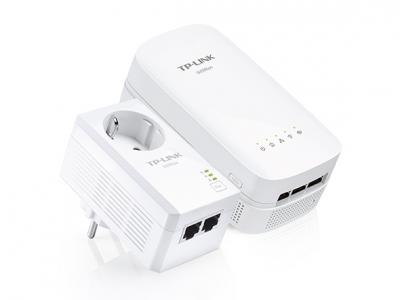
I have the same router as you, although I use 50 mbps. Upstairs room the speed is slow but I solved the problem by using AV500 Powerline ac Wi-Fi Kit TL-WPA4530 KIT.
http://www.tp-link.com/en/products/details...PA4530-KIT.html


Attached thumbnail(s)
Attached Image
fruitie
post Jul 24 2016, 03:37 PM

Rise and Shine
Group Icon
Staff
72,806 posts

Joined: Sep 2005
From: KUL

QUOTE(soyusa @ Jul 24 2016, 02:50 PM)
Then it would be great~  thumbsup.gif
I did not expect to get free upgrade from existing RG-DLINK-WBR2300 to DIR-850L, which is dual-band some more.  rclxm9.gif
*
Many got their router replaced to this model by the way. smile.gif

QUOTE(wongsf @ Jul 24 2016, 03:31 PM)
I have the same router as you, although I use 50 mbps.  Upstairs room the speed is slow but I solved the problem by using AV500 Powerline ac Wi-Fi Kit TL-WPA4530 KIT.
http://www.tp-link.com/en/products/details...PA4530-KIT.html
*
Kokokrunch_1, FYI.
Kokokrunch_1
post Jul 24 2016, 09:56 PM

Getting Started
**
Junior Member
55 posts

Joined: Nov 2015
QUOTE(mztang52 @ Jul 24 2016, 12:11 PM)
Never say it doesnt work when you never try it before. I helped a lot of people with this method and guess what? It works.
*
i'm sure it works. But i don't think the setup works well at my home smile.gif
Kokokrunch_1
post Jul 24 2016, 09:58 PM

Getting Started
**
Junior Member
55 posts

Joined: Nov 2015
QUOTE(fruitie @ Jul 24 2016, 03:37 PM)
Kokokrunch_1, FYI.
*
awesome will definitely have a look thumbsup.gif
mztang52
post Jul 24 2016, 10:15 PM

Before you quit, TRY
*******
Senior Member
2,807 posts

Joined: Jun 2015


QUOTE(Kokokrunch_1 @ Jul 24 2016, 10:56 PM)
i'm sure it works. But i don't think the setup works well at my home  smile.gif
*
Ok. But what is your electricity curcuit phase type? If it is 3 phase circuit, power adapter wont work at all.

This post has been edited by mztang52: Jul 24 2016, 10:16 PM
jayzshadower
post Jul 24 2016, 10:38 PM

Getting Started
**
Junior Member
151 posts

Joined: Apr 2013
Unifi VIP 5 have problem connect to apple appstore and apple server. Normal when using iPhone and iPad. Problem only occur when downloading app and software update. Why ? Help :'(
fruitie
post Jul 24 2016, 11:02 PM

Rise and Shine
Group Icon
Staff
72,806 posts

Joined: Sep 2005
From: KUL

QUOTE(jayzshadower @ Jul 24 2016, 10:38 PM)
Unifi VIP 5 have problem connect to apple appstore and apple server. Normal when using iPhone and iPad. Problem only occur when downloading app and software update. Why ? Help :'(
*
Usually if it happens, it happens for all packages not just VIP 5. UniFi does have issue with Apple Store all the time.
I have just tried updating my iPad, yes slow...
xngjn
post Jul 24 2016, 11:58 PM

Regular
******
Senior Member
1,239 posts

Joined: Sep 2008
hi guys. rm199 per month is it include GST or not yet include?
1 name can register 2 line? currently my home is using my name but i going to rent a house outside can I get new line with my name again?
if i terminate after 1 year, only pay RM500 penalty?
thank you
fruitie
post Jul 25 2016, 12:34 AM

Rise and Shine
Group Icon
Staff
72,806 posts

Joined: Sep 2005
From: KUL

QUOTE(xngjn @ Jul 24 2016, 11:58 PM)
hi guys. rm199 per month is it include GST or not yet include?
1 name can register 2 line? currently my home is using my name but i going to rent a house outside can I get new line with my name again?
if i terminate after 1 year, only pay RM500 penalty?
thank you
*
RM 199 excludes GST.
Can, you can register more than one line.
As for the penalty, I believe it's just RM 500. Others can advise you but why want to terminate? unsure.gif
jayzshadower
post Jul 25 2016, 01:22 AM

Getting Started
**
Junior Member
151 posts

Joined: Apr 2013
**** UNIFI. I not gonna curse or anything. rclxms.gif rclxms.gif

user posted image

139 Pages « < 64 65 66 67 68 > » Top
Topic ClosedOptions
 

Change to:
| Lo-Fi Version
0.0370sec    0.63    6 queries    GZIP Disabled
Time is now: 6th December 2025 - 11:44 AM