Welcome Guest ( Log In | Register )

Bump Topic Topic Closed RSS Feed
534 Pages « < 21 22 23 24 25 > » Bottom

Outline · [ Standard ] · Linear+

TIME [OFFICIAL] TIME Fibre Broadband™ v3.o, 500 Mbps of rocket science

views
     
soonwai
post Apr 17 2016, 02:31 PM


********
All Stars
11,457 posts

Joined: Oct 2007
From: KL


QUOTE(choongkhay @ Apr 17 2016, 01:31 PM)
Hey guys,
Been upgraded to 500Mbps. Installed a mikrotik RB951 router. All working but I never get a connected speed of more than 290mbps. Any solution? Thanks.
*
First ensure you testing on LAN and not Wifi.

RB951 can route around 300mbps and 600mbps with ROS v6.35. But that's with more or less default config, no qos and few firewall rules. Did the person who sold it to you say it was good for 500mbps?

Anyway what version of ROS are you using? If older than 6.35, update and try again.

Are you on default config? Can you post it?
CODE
/export hide-sensitive


This post has been edited by soonwai: Apr 17 2016, 02:47 PM
alch
post Apr 17 2016, 03:23 PM

Getting Started
**
Junior Member
165 posts

Joined: Sep 2005


Is the coverage list in the Timecom exhaustive ?

I will be moving in the Camellia Service Suite which is next of The Park Residence and I am wondering if Camellia is covered as the website shows only The Park Residence Block A and B is covered.
R4yMoNd
post Apr 17 2016, 03:44 PM

Regular
******
Senior Member
1,139 posts

Joined: Aug 2006
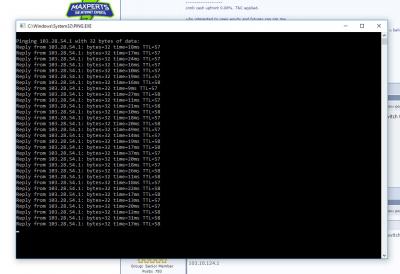
QUOTE(leonongkeko @ Apr 16 2016, 03:38 PM)
Can anyone try to ping these sg servers for steam games? Curious what ping will I get if I switch to time.
Thanks.

103.28.54.1
103.10.124.1
*
my results..

Attached Image

Attached Image
SUSTXSim
post Apr 17 2016, 03:49 PM

TIME Fibre Assistant and Wi-Fi Router Assistant
*******
Senior Member
2,137 posts

Joined: Oct 2015


QUOTE(alch @ Apr 17 2016, 03:23 PM)
Is the coverage list in the Timecom exhaustive ?

I will be moving in the Camellia Service Suite which is next of The Park Residence and I am wondering if Camellia is covered as the website shows only The Park Residence Block A and B is covered.
*
It is not available.

It is not advisable to use fibre cable splitter from another building.

Kindly submit the request form here
http://www.time.com.my/we-hear-you
choongkhay
post Apr 17 2016, 06:18 PM

New Member
*
Junior Member
6 posts

Joined: Dec 2006


QUOTE(soonwai @ Apr 17 2016, 02:31 PM)
First ensure you testing on LAN and not Wifi.

RB951 can route around 300mbps and 600mbps with ROS v6.35. But that's with more or less default config, no qos and few firewall rules. Did the person who sold it to you say it was good for 500mbps?

Anyway what version of ROS are you using? If older than 6.35, update and try again.

Are you on default config? Can you post it?
CODE
/export hide-sensitive

*
Yes its connected via LAN. I just upgraded my RB951G to ROSv6.35. Still the same speed. All my settings are default config straight out of the box. The only thing I adjusted was PPPoE settings. This RB951G should support 500mb bcos it comes with 1GBps ports.
timcook
post Apr 17 2016, 10:58 PM

Getting Started
**
Junior Member
70 posts

Joined: Oct 2011
Hi guys,

please help to see what am i missing here for not getting optimum speed. I subscribed to RM178 package and was told to get 300mb upgrade. But I only get about 30mb max.

below are my settings:

1. TIME Huawei original modem (came with initial registration)

2. Asus RT-N12HP_B1

3. Wireless N300 USB Adapter (Connected to USB3 port currently)

Thanks for help in advance!

R4yMoNd
post Apr 17 2016, 11:17 PM

Regular
******
Senior Member
1,139 posts

Joined: Aug 2006
QUOTE(timcook @ Apr 17 2016, 10:58 PM)
Hi guys,

please help to see what am i missing here for not getting optimum speed. I subscribed to RM178 package and was told to get 300mb upgrade. But I only get about 30mb max.

below are my settings:

1. TIME Huawei original modem (came with initial registration)

2. Asus RT-N12HP_B1

3. Wireless N300 USB Adapter (Connected to USB3 port currently)

Thanks for help in advance!
*
Try use lan cable and see the speed
soonwai
post Apr 18 2016, 12:15 AM


********
All Stars
11,457 posts

Joined: Oct 2007
From: KL


QUOTE(choongkhay @ Apr 17 2016, 06:18 PM)
Yes its connected via LAN. I just upgraded my RB951G to ROSv6.35. Still the same speed. All my settings are default config straight out of the box. The only thing I adjusted was PPPoE settings. This RB951G should support 500mb bcos it comes with 1GBps ports.
*
The routing speed of the RB951G has nothing to do with the GBe ports. It is determined by how fast the CPU can route. Someone in the Mikrotik thread here tested the RB2011 at 680mbps (with PPPoE & NAT). But it's only able to achieve this speed if Fasttrack/Fastpath is active. Without that, about 300mbps max. The CPU is just not fast enough

Without more insight into your router's config, it's difficult to say why you're only getting 290mbps.

Whoever recommended you the RB951G for 500mbps is misinformed. Even if you can get it to run at 680mbps, that doesn't give you much space to work with. A few QOS or firewall rules will push it back down.

Unfortunately I don't have TIME Fibre to fully test it out.

Further reading:
http://wiki.mikrotik.com/wiki/Manual:Wiki/Fasttrack
https://forum.lowyat.net/index.php?showtopi...post&p=79277123


This post has been edited by soonwai: Apr 18 2016, 04:03 AM
jjj2
post Apr 18 2016, 09:25 AM

Look at all my stars!!
*******
Senior Member
3,606 posts

Joined: Feb 2006
QUOTE(timcook @ Apr 17 2016, 10:58 PM)
Hi guys,

please help to see what am i missing here for not getting optimum speed. I subscribed to RM178 package and was told to get 300mb upgrade. But I only get about 30mb max.

below are my settings:

1. TIME Huawei original modem (came with initial registration)

2. Asus RT-N12HP_B1

3. Wireless N300 USB Adapter (Connected to USB3 port currently)

Thanks for help in advance!
*
Hi Bro,

What is the model of the ONU ?

Please test using a Cat5e/Cat6 network cable connected to your Asus Router to see how much actual speed that you can get...
This Router is not a Gigabit router... try to test with one that equipped with GE port.

Thanks.


Ricky300
post Apr 18 2016, 02:17 PM

Regular
******
Senior Member
1,514 posts

Joined: Jan 2003
From: Earth


QUOTE(Ricky300 @ Apr 16 2016, 04:41 PM)
Minor issue frombthe contractor, till now haven't resolved.

Contractor told me that my modem is unable to cope with existing 100mbps package (black huawei)

Any comment on this?
*
Issue with contractor again! Keep postponing....

Luckily bro jjj2 gave a helping hand, settled the connection problem by this morning =)

jjj2 is my saviour.... at least my sis and tenant will not keep mumbling about no connection tonight! tongue.gif tongue.gif tongue.gif
infin
post Apr 18 2016, 03:26 PM

Getting Started
**
Junior Member
274 posts

Joined: Jan 2003
From: Damansara Perdana


Just got my 300mbps package installed today. For my condo they had to pull some fiber from the floor switch to my apartment, extra RM70 charge by the contractor at RM10 per metre for every metre past 15 metres. It took about 4 hours all said and done but the guys did a good job.

Results using my own RT-AC68U as router+APi.

Local
user posted image

San Francisco
user posted image


For some reason my RT-N65U could not dial PPOE - even a Windows machine could connect.
yeapch01
post Apr 18 2016, 04:11 PM

Regular
******
Senior Member
1,916 posts

Joined: Mar 2008


QUOTE(infin @ Apr 18 2016, 04:26 PM)
Just got my 300mbps package installed today. For my condo they had to pull some fiber from the floor switch to my apartment, extra RM70 charge by the contractor at RM10 per metre for every metre past 15 metres. It took about 4 hours all said and done but the guys did a good job.

Results using my own RT-AC68U as router+APi.

Local
user posted image

San Francisco
user posted image
For some reason my RT-N65U could not dial PPOE - even a Windows machine could connect.
*
Dear Bro

Welcome on board . Do let us know if TIME for perform better than UNIFI.

I hope you not regret on the Jump Ship

Thanks
CapKapak
post Apr 18 2016, 04:16 PM

Getting Started
**
Junior Member
240 posts

Joined: Oct 2005
From: Around the World


Those on Time's 500Mb package, what routers are you using to fully achieve the symmetrical speeds? Anyone tested Ubiquiti's ERL with some NAT/Firewall rules on this?
timcook
post Apr 18 2016, 04:18 PM

Getting Started
**
Junior Member
70 posts

Joined: Oct 2011
QUOTE(R4yMoNd @ Apr 17 2016, 11:17 PM)
Try use lan cable and see the speed
*
Bought CAT6 lan cable and tested today. Result came back with improvement but still not getting half of what i subsribed. Only 90mb instead of 300mb.. sad.gif

QUOTE(jjj2 @ Apr 18 2016, 09:25 AM)
Hi Bro,

What is the model of the ONU ?

Please test using a Cat5e/Cat6 network cable connected to your Asus Router to see how much actual speed that you can get...
This Router is not a Gigabit router... try to test with one that equipped with GE port.

Thanks.
*
Sorry bro, whats ONU?
So that means i need i need to change router? doh.gif
tritonite
post Apr 18 2016, 04:23 PM

Casual
***
Junior Member
337 posts

Joined: Feb 2009
QUOTE(infin @ Apr 18 2016, 03:26 PM)
Just got my 300mbps package installed today. For my condo they had to pull some fiber from the floor switch to my apartment, extra RM70 charge by the contractor at RM10 per metre for every metre past 15 metres. It took about 4 hours all said and done but the guys did a good job.
*
Unusual that you were charged extra. 15m is usually enough for most installations dragged to the living room.

If they were counting the 22 metres from the riser, I would have a word with your condo management.

Normally, the 15m is counted from the conduit point right outside your front door. Any cabling between there and the riser/comms point is usually not your responsibility, it being the common area outside your unit.

And from the distance involved, it sounds like you are living at Armanee Terrace?

Anyway, if you're happy with it and don't mind paying the extra, I guess it doesn't matter.

This post has been edited by tritonite: Apr 18 2016, 04:25 PM
djhenry91
post Apr 18 2016, 04:25 PM

Slow and Steady
*******
Senior Member
6,779 posts

Joined: Jan 2009
From: SEGI Heaven


QUOTE(tritonite @ Apr 18 2016, 04:23 PM)
Unusual that you were charged extra. 15m is usually enough for most installations dragged to the living room.

If they were counting the 22 metres from the riser, I would have a word with your condo management.

Normally, the 15m is counted from the conduit point right outside your front door. Any cabling between there and the riser/comms point is usually not your responsibility, it being the common area outside your unit.

Anyway, if you're happy with it and don't mind paying the extra, I guess it doesn't matter.
*
mine kena charge RM30 from my door side to ONU 15metre used up
SUSMatrix
post Apr 18 2016, 04:28 PM

King of Char Siew!
********
Senior Member
15,022 posts

Joined: Jan 2003
From: Damansara Jaya/Bandar Utama


QUOTE(timcook @ Apr 17 2016, 10:58 PM)
Hi guys,

please help to see what am i missing here for not getting optimum speed. I subscribed to RM178 package and was told to get 300mb upgrade. But I only get about 30mb max.

below are my settings:

1. TIME Huawei original modem (came with initial registration)

2. Asus RT-N12HP_B1

3. Wireless N300 USB Adapter (Connected to USB3 port currently)

Thanks for help in advance!
*
You use old WIFI N, sure cannot get full speed. Even latest AC might not get full speed. Test with LAN cable first to confirm.

Just some feedback btw.

After the initial upgrade to 100Mbps for the first 1 week or so. It was quiet patchy with the streaming quality not up to par for NETFLIX/HULU. Maybe it was the underwater cable thingy then...not sure.

But anyway, for the last 2 or 3 weeks, things has being going much better.

Torrent can download almost full speed of 10 MB/s.

Streaming Hulu/Netflix/Xfinity all top notch and in HD where available.

Symantec updates....< 100MB file i think...the download just a few seconds.

Everythings running great. thumbup.gif
SUSTXSim
post Apr 18 2016, 04:29 PM

TIME Fibre Assistant and Wi-Fi Router Assistant
*******
Senior Member
2,137 posts

Joined: Oct 2015


QUOTE(timcook @ Apr 18 2016, 04:18 PM)
Bought CAT6 lan cable and tested today. Result came back with improvement but still not getting half of what i subsribed. Only 90mb instead of 300mb.. sad.gif
Sorry bro, whats ONU?
So that means i need i need to change router?  doh.gif
*
ONU is the modem that connect fibre cable.

For improvements, suggested to change Wi-Fi router.
fireballs
post Apr 18 2016, 04:31 PM

10101
*******
Senior Member
5,648 posts

Joined: Mar 2012
tim have u bypass the router and connect to the modem straight with pc?

tritonite
post Apr 18 2016, 04:32 PM

Casual
***
Junior Member
337 posts

Joined: Feb 2009
QUOTE(djhenry91 @ Apr 18 2016, 04:25 PM)
mine kena charge RM30 from my door side to ONU 15metre used up
*
Your condo must be huge... or you had to snake it up and down walls to make it stay hidden?

I mean I would be ok with it if it actually takes 15m from your doorway, but @infin said it was from the floor switch, for which I feel the cost should have been borne by the condo management. Some of the corridors of these developments are long, and if your unit is the furthest away from the riser, it just sounds unfortunate.


534 Pages « < 21 22 23 24 25 > » Top
Topic ClosedOptions
 

Change to:
| Lo-Fi Version
0.0385sec    0.44    6 queries    GZIP Disabled
Time is now: 6th December 2025 - 04:45 PM