Outline ·
[ Standard ] ·
Linear+
Problem with temperature? Seek consultation here, DO NOT OPEN NEW THREAD
|
remysix
|
 Sep 27 2007, 07:53 PM Sep 27 2007, 07:53 PM
|

|
the mobo sensor and the apps used sometime (or issit most of the time) can be 'crazy' a bit in reporting a normal proc temp, let alone urs is ES which we can say 'double' the misreporting of the temp...other than using a temp probe, there is no way to actually guess the right temp i guess
|
|
|
|
|
|
kmarc
|
Sep 27 2007, 07:54 PM
|
The future is here - Cryptocurrencies!

|
QUOTE(rockmaniac85 @ Sep 20 2007, 10:14 PM) stock cooler IDLE temp 50c LOAD temp 58c Vc : 1.1875 FSB: 430MHz TTBT + MX-2 IDLE temp 43c LOAD temp 51c Vc : 1.225 FSB : 450MHz not much difference ler... so sad...  You can't compare like that as your vcore is higher. Why don't you set the vcore and the speed to the same settings, then only can you see what the difference is. |
|
|
|
|
|
YammieR6
|
Oct 2 2007, 03:07 PM
|
Getting Started

|
My Cpu became sluggish unresponsive and slow overnight one day , So I thought "ah desktop in need of cleaning" and cleaned the entire casing,HSF (it was really dusty) I assumed the dust was clogging up the HSF fan and wind passage (resulting in a hotter processor) so I proceeded to clean dust off. Than I thought since I cleaned everything why not reapply the thermalpaste as well.
I took out , cleaned and reapplied the HSF with AS5 (also wiped it clean with a 70% isopropyl alcohol swabs prior to reapplying AS5) and temperature in Bios read 110C. Reapplied AS5 thinking I Put too much and made very sure the HSF was properly seated / this time the HSF did not move as much when I checked for fit. On load up in Bios the temperature was 60C and 55-57 in a airconditioned room.
Now , my previous Temperature readings from Bios was 44C to 48C in aircondition and sometimes reached 56-58C while continuous gaming.
I downclocked the processor to 2GHZ and the temperature was down to 52C. This eliminates the possibility of the proc being faulty (for its sudden sluggish performance) as it operates smoothly but at 2ghz
Now I focused on the HSF and I noticed some parts on copper Heatpipes of the Bigtyphoon had gone a lil Rusty coloured (not shiny or reflecting light) apart from that nothing out of ordinary.
I was also worried if the Thermal paste I applied has gone bad , since reading alot about AS5's going stale
I ruled out the possibility that it could be a busted heatpipe? What do you guys reckon?
please advice.
Information -
Before overheating problem
- 3.6ghz @ P4 HT
- 44C to 48C
After overheating problem
-downclocked to 3Ghz @ P4 HT ( 80C at 3.6Ghz)
- 57C to 62C
This post has been edited by YammieR6: Oct 2 2007, 03:24 PM
|
|
|
|
|
|
Doom
|
Oct 2 2007, 09:34 PM
|
|
|
I think u really need to reinstall the HSF and make sure it's nicely cleaned before hand ...
It just rediculous to have temperature rises after doing cleaning ...
so good luck ..
|
|
|
|
|
|
YammieR6
|
Oct 4 2007, 12:34 AM
|
Getting Started
|
Just so this point is clear , My CPU became sluggish overnight. I could multitask , open several applications at once than BOOM one morning I woke up and it took forever to startup , Mouse pointer would lag and sometimes became unresponsive for several seconds.
Yes , I agree , will try reinstalling again.
I wonder if the 70% isopropyl alchol swabs I used were too mild and there are some thermal paste residue left on the HSF surface.
Please advice/suggest on a effective cleaner/cleaning method.
This post has been edited by YammieR6: Oct 4 2007, 12:55 AM
|
|
|
|
|
|
Doom
|
Oct 4 2007, 03:55 AM
|
|
|
hmm better use alcohol cleaner that used to clean casette and tape.
It's purer and works well on thermal paste ... besides that grab some cotton that girl uses to remove makeup ..
It could wipe almost all of the thermal paste left over with the application of alchohol in the same time in just few swipe or rub it if the thermal paste persists..
This post has been edited by Doom: Oct 4 2007, 03:58 AM
|
|
|
|
|
|
zeropulse
|
Oct 4 2007, 07:55 PM
|
Getting Started
|
Hi guys..Is it normal for My rams to feel kinda hot? It was kinda warm when i touched them..
I'm using 2x1GB Crucial Ballistix Tracer..
And my 8600GTs feels kinda warm too..
Can this be cause by the CPU cooler i installed ? I got a artic cooling freezer 7..
Need consultation..lol
|
|
|
|
|
|
Doom
|
Oct 4 2007, 08:37 PM
|
|
|
Of course Crucial Ballistix Tracer is really hot coz it's high performance ram //
what do u think the heatsink for ?? without that it would be even hotter ...
Have u consult anyone or did some research before getting the rams.. ??
the only solution is get a ram cooler fan that could be attached to the rams slots... to blow away the heat but don't aspect too much coz the ram itself are hot....
|
|
|
|
|
|
zeropulse
|
Oct 4 2007, 11:23 PM
|
Getting Started
|
I know it's for high performance that's why i bought them..Hehe
Just curious because it's the first time i'm trying out crucial..
So if i leave it like that it won't cause any damage would it ? or can i try any cooling methods..
The ram cooler fan ugly la..LoL
|
|
|
|
|
|
Doom
|
Oct 4 2007, 11:36 PM
|
|
|
hmm if ur case has good ventilation .. the rams shouldn't over heat ... ram cooler is ugly ohh god have u seen one ..??? 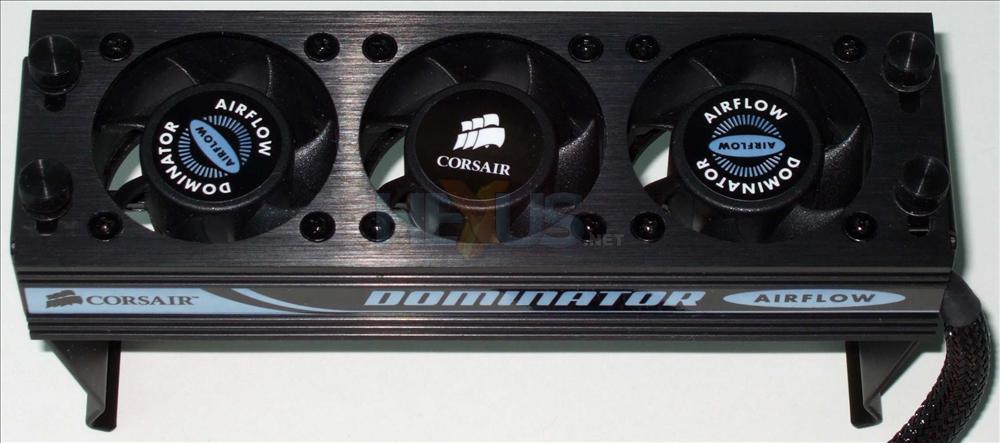 |
|
|
|
|
|
zeropulse
|
Oct 5 2007, 12:28 AM
|
Getting Started
|
haha...i know...that is quite expensive la...i mean the cheaper ones..=)
|
|
|
|
|
|
jamesterlua
|
Oct 5 2007, 02:41 PM
|
Getting Started
|
i m using athlon64 3200 then oc till 2.5GHZ and its running on 41 to 50 C is that normal ?? and my old 7600 normal clock is 400/800 oc till 490/1000 and it running on 50 too 65 is that normal ??? advise plz....
|
|
|
|
|
|
Doom
|
Oct 5 2007, 03:36 PM
|
|
|
QUOTE(zeropulse @ Oct 5 2007, 12:28 AM) haha...i know...that is quite expensive la...i mean the cheaper ones..=) hmm cheaper one ... order from AllandGap he could do some custom type so u could choose the fans and the bracket color QUOTE(jamesterlua @ Oct 5 2007, 02:41 PM) i m using athlon64 3200 then oc till 2.5GHZ and its running on 41 to 50 C is that normal ?? and my old 7600 normal clock is 400/800 oc till 490/1000 and it running on 50 too 65 is that normal ??? advise plz.... Both temperature are normal since u;ve OCked so much ... if u want it cooler than have to get a better after market cooler... |
|
|
|
|
|
jamesterlua
|
Oct 5 2007, 05:41 PM
|
Getting Started
|
doom wanna ask you somthing, i wanna try to oc my 3200 athlon to 3ghz ,, do you think its possible??? should i get my self a water cooling system ??
|
|
|
|
|
|
Najmods
|
Oct 5 2007, 07:22 PM
|
|
|
QUOTE(jamesterlua @ Oct 5 2007, 05:41 PM) doom wanna ask you somthing, i wanna try to oc my 3200 athlon to 3ghz ,, do you think its possible??? should i get my self a water cooling system ?? Try to overclock it first, check the temperature with each 100MHz increment. Not all can reach 3GHz, some can reach without the needs of water cooling while some needs it, some can't even reach that speed no mater what cooling you use |
|
|
|
|
|
Doom
|
Oct 5 2007, 08:29 PM
|
|
|
QUOTE(jamesterlua @ Oct 5 2007, 05:41 PM) doom wanna ask you somthing, i wanna try to oc my 3200 athlon to 3ghz ,, do you think its possible??? should i get my self a water cooling system ?? Basically like what Najmods said .. u could try it by increment stage and monitor the load temperature all the time .. make sure ur chipset could cope up as well ... hitting 3ghz could be reached even with air cooling but must be one of those top end air cooler .. It's easier to achieve with wc for sure as u could do the increment in larger margin and worry less about the temperature .. anyway .. other than cooling , mobo, ram and processor capability is also crucial when comes to extreme OC .. hope this piece of information would help as well .. . |
|
|
|
|
|
Mr.Lonely
|
Oct 6 2007, 03:25 PM
|
|
|
need help with my ultra 120 extreme..... i just change my intel hsf to ultra 120 extreme but i notice tat de temp. din drop as wat i aspected...
i just install de cooler according to de installation guide i apply de thermalpaste as wat de guide say...... but just i leave it without mounting a fan on it.....
my intel stock HSF with 52C at full load
and my Ultra 120 is 47C full load seem not drop too much
|
|
|
|
|
|
Najmods
|
Oct 7 2007, 05:30 AM
|
|
|
QUOTE(Mr.Lonely @ Oct 6 2007, 03:25 PM) need help with my ultra 120 extreme..... i just change my intel hsf to ultra 120 extreme but i notice tat de temp. din drop as wat i aspected... i just install de cooler according to de installation guide i apply de thermalpaste as wat de guide say...... but just i leave it without mounting a fan on it..... my intel stock HSF with 52C at full load and my Ultra 120 is 47C full load seem not drop too much Wait for the thermal paste to 'break in', I think it would be better after that. If you asked me that's already a good temperature if you run passive |
|
|
|
|
|
DaRkSyThE
|
Oct 7 2007, 11:45 AM
|
Look at all my stars!!

|
QUOTE(Najmods @ Oct 7 2007, 05:30 AM) Wait for the thermal paste to 'break in', I think it would be better after that. If you asked me that's already a good temperature if you run passive haha its actually called sinking in  |
|
|
|
|
|
Doom
|
Oct 7 2007, 06:31 PM
|
|
|
QUOTE(Mr.Lonely @ Oct 6 2007, 03:25 PM) need help with my ultra 120 extreme..... i just change my intel hsf to ultra 120 extreme but i notice tat de temp. din drop as wat i aspected... i just install de cooler according to de installation guide i apply de thermalpaste as wat de guide say...... but just i leave it without mounting a fan on it..... my intel stock HSF with 52C at full load and my Ultra 120 is 47C full load seem not drop too much You could just wait for the thermal paste to sink in like DaRkSyThE mentioned and add a low profile fan, such as CM 12cm silent fan, or silverstone FM123 running low RPM... I'm sure the slight noise from the cooler won't added too much of noise to noise produced by the case fans. |
|
|
|
|



 Quote
Quote


 0.0264sec
 1.11
1.11
 6 queries
 GZIP Disabled