

QUOTE(barca96 @ Nov 10 2020, 09:07 AM)
Thanks. But will the quality be the same on my tv?

It should be the same unless your TV is a 8k resolution TVOfficial Microsoft Surface Thread V4
|
|
 Nov 10 2020, 11:18 AM Nov 10 2020, 11:18 AM
|
 
Junior Member
137 posts Joined: Sep 2010 From: Bahau / Sunway  
|
QUOTE(barca96 @ Nov 10 2020, 09:07 AM) Thanks. But will the quality be the same on my tv? It should be the same unless your TV is a 8k resolution TV barca96 liked this post
|
|
|
|
|
|
Nov 10 2020, 12:05 PM
|

Senior Member
980 posts Joined: Apr 2010
|
QUOTE(Foo Mun @ Nov 10 2020, 11:18 AM) It should be the same unless your TV is a 8k resolution TV thanksnah my tv wont be OLED or 8k |
|
|
Nov 12 2020, 09:42 PM
Show posts by this member only | IPv6 | Post
#3463
|

Senior Member
781 posts Joined: Mar 2012 
|
Anything regarding to Surface Extended Warranty in Malaysia? I'm planning on buying a surface device but I am unsure of how long it will last so will want the extended warranty
|
|
|
Nov 13 2020, 10:47 AM
|
|
Junior Member
137 posts Joined: Sep 2010 From: Bahau / Sunway
|
QUOTE(russell612 @ Nov 12 2020, 09:42 PM) Anything regarding to Surface Extended Warranty in Malaysia? I'm planning on buying a surface device but I am unsure of how long it will last so will want the extended warranty Microsoft extended warranty (Microsoft Complete) is not available in Malaysia. Other retailer might have extended warranty like Harvey Norman, Senheng... |
|
|
Nov 14 2020, 12:53 AM
Show posts by this member only | IPv6 | Post
#3465
|
|
Senior Member
781 posts Joined: Mar 2012
|
QUOTE(Foo Mun @ Nov 13 2020, 10:47 AM) Microsoft extended warranty (Microsoft Complete) is not available in Malaysia. Other retailer might have extended warranty like Harvey Norman, Senheng... Will buy from All IT for their student promo, anything there? |
|
|
Nov 14 2020, 09:17 AM
|
|
Junior Member
137 posts Joined: Sep 2010 From: Bahau / Sunway
|
QUOTE(russell612 @ Nov 14 2020, 12:53 AM) Will buy from All IT for their student promo, anything there? You can contact All IT directly for this matter |
|
|
|
|
|
Nov 15 2020, 10:15 AM
Show posts by this member only | IPv6 | Post
#3467
|
|
Senior Member
781 posts Joined: Mar 2012
|
Any experience with Microsoft support in Malaysia? How is it?
|
|
|
Nov 15 2020, 03:27 PM
Show posts by this member only | IPv6 | Post
#3468
|
|
Junior Member
292 posts Joined: Sep 2012
|
QUOTE(russell612 @ Nov 15 2020, 10:15 AM) Any experience with Microsoft support in Malaysia? How is it? Only ever reached out to MS support once years ago for the SP4 screen flickering replacement. Very good experience. Aside from that, no other issue which warranted contacting support |
|
|
Nov 15 2020, 08:57 PM
Show posts by this member only | IPv6 | Post
#3469
|
|
Senior Member
781 posts Joined: Mar 2012
|
How is the quality control of surface devices here? Any opinions on both positive and negative?
|
|
|
Nov 18 2020, 03:41 PM
|
|
Senior Member
980 posts Joined: Apr 2010
|
Hi how do you guys "rename" file name using a shortcut?
On normal Windows keyboars there are F keys. I need to rename hundreds of photos for each job for my work. Usually it works fast as I just press Alt + F2 if I am not mistaken but there are no F keys on Windows so I will need to click and select rename from the pop up box. I bought SP for this reason, to make my workflow faster back to how it was with my Windows laptop but now it doesn't have this function. |
|
|
Nov 18 2020, 03:50 PM
|
|
Junior Member
137 posts Joined: Sep 2010 From: Bahau / Sunway
|
QUOTE(barca96 @ Nov 18 2020, 03:41 PM) Hi how do you guys "rename" file name using a shortcut? If you are using Surface Type Cover, the F2 button is just above number 2. You can toggle Fn button to enable F1 to F12 permanently or press and hold Fn button while pressing other Fnumber key.On normal Windows keyboars there are F keys. I need to rename hundreds of photos for each job for my work. Usually it works fast as I just press Alt + F2 if I am not mistaken but there are no F keys on Windows so I will need to click and select rename from the pop up box. I bought SP for this reason, to make my workflow faster back to how it was with my Windows laptop but now it doesn't have this function. To rename a file, just select the file and press F2 (if Fn is toggle) or Fn+F2 (if Fn is not toggle) barca96 liked this post
|
|
|
Nov 19 2020, 12:22 PM
|

Junior Member
188 posts Joined: Oct 2008 From: Bangi - Proton COE 
|
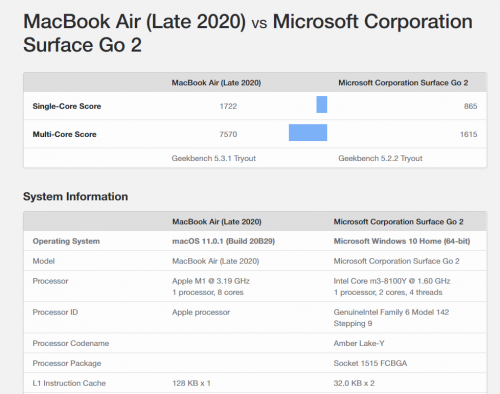
Kalah teruk my SG2 M3 with the new Macbook Air M1.. even the fastest i7 Surface Pro 7 also cannot beat
  |
|
|
Nov 19 2020, 05:46 PM
|
|
Senior Member
980 posts Joined: Apr 2010
|
QUOTE(Foo Mun @ Nov 18 2020, 03:50 PM) If you are using Surface Type Cover, the F2 button is just above number 2. You can toggle Fn button to enable F1 to F12 permanently or press and hold Fn button while pressing other Fnumber key. Thanks but I dont have F keys on my type coverTo rename a file, just select the file and press F2 (if Fn is toggle) or Fn+F2 (if Fn is not toggle) Attached thumbnail(s) 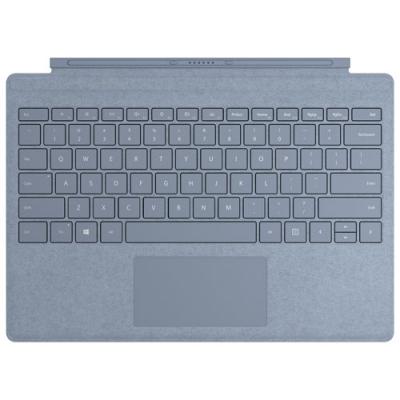
|
|
|
|
|
|
Nov 19 2020, 06:01 PM
|
|
Junior Member
137 posts Joined: Sep 2010 From: Bahau / Sunway
|
QUOTE(barca96 @ Nov 19 2020, 05:46 PM) Thanks but I dont have F keys on my type cover The F1 to F12 keys are same row with Esc key, the word is very small but still can read it.The Fn key is just in between Ctrl and Windows key. The light on Fn key is an indication whether Fn key is toggle ON/OFF same like Caps Lock key. barca96 liked this post
|
|
|
Nov 19 2020, 10:32 PM
Show posts by this member only | IPv6 | Post
#3475
|
|
Senior Member
781 posts Joined: Mar 2012
|
 Hi there is this tiny dent on my new surface book 3 that I just got today, should I contact microsoft about it and will they do anything or just scuff it over. I do not believe it is something that I did but rather a manufacturing defect |
|
|
Nov 20 2020, 12:51 PM
|
|
Senior Member
980 posts Joined: Apr 2010
|
QUOTE(Foo Mun @ Nov 19 2020, 06:01 PM) The F1 to F12 keys are same row with Esc key, the word is very small but still can read it. oh gee... my eyes are really poor.. i guess it is worse than -500 now The Fn key is just in between Ctrl and Windows key. The light on Fn key is an indication whether Fn key is toggle ON/OFF same like Caps Lock key.  thanks |
|
|
Nov 22 2020, 05:36 PM
|

Junior Member
568 posts Joined: Oct 2009
|
just pre-ordered surface laptop go
|
|
|
Nov 23 2020, 11:29 AM
Show posts by this member only | IPv6 | Post
#3478
|

Senior Member
2,366 posts Joined: Jun 2005 From: Not Here Not There...
|
I am welcoming myself to the latest victim of keyboardgate.
My surface pro 4 suddenly unable to detect my surface type keyboard even in uefi. 🥲 |
|
|
Dec 4 2020, 10:50 AM
|

Junior Member
572 posts Joined: Feb 2005
|
Hi folks, i'm considering to purchase a Surface Laptop 3 i5 matte black 13.5 inch model for general productivity (i.e Microsoft Excel/Word/Powerpoint), Video editing (rendering 1080p quality) and light Photoshop/ usage. I find the 3:2 aspect ratio to perfectly fit my needs compared to the wide 16:9/16:10 seen on the Dell XPS 9300.
Can anyone here using a Surface Laptop 3 advise on the following: - Is the automatic adaptive brightness issue fixed by allowing the user to manual set this in the settings or is it something that still exists after firmware updates? - Does anyone's unit suffer from the known screen crack issue that even Microsoft aknowledges to affect some models? (Source: https://support.microsoft.com/en-us/surface...12-9a66c7df6167 & https://www.reddit.com/r/Surface/comments/e...racked_screen/) - How is the average battery life like for basic productivity usage (as per the ones i mentioned above)? Thanks! |
|
|
Dec 4 2020, 01:04 PM
Show posts by this member only | IPv6 | Post
#3480
|
|
Junior Member
292 posts Joined: Sep 2012
|
QUOTE(Kagekiyo @ Dec 4 2020, 10:50 AM) Hi folks, i'm considering to purchase a Surface Laptop 3 i5 matte black 13.5 inch model for general productivity (i.e Microsoft Excel/Word/Powerpoint), Video editing (rendering 1080p quality) and light Photoshop/ usage. I find the 3:2 aspect ratio to perfectly fit my needs compared to the wide 16:9/16:10 seen on the Dell XPS 9300. I don't have a SL3, so cant answer your questions and will leave those to someone else. But just want to highlight that Surface Laptop 4 is estimated to be launching in Jan 2021 - which means possible arrival in Malaysia in Feb/March 2021. Just consider if you can wait, especially if you're into video editing since the SL4 should come with more powerful integrated graphics.Can anyone here using a Surface Laptop 3 advise on the following: - Is the automatic adaptive brightness issue fixed by allowing the user to manual set this in the settings or is it something that still exists after firmware updates? - Does anyone's unit suffer from the known screen crack issue that even Microsoft aknowledges to affect some models? (Source: https://support.microsoft.com/en-us/surface...12-9a66c7df6167 & https://www.reddit.com/r/Surface/comments/e...racked_screen/) - How is the average battery life like for basic productivity usage (as per the ones i mentioned above)? Thanks! |
| Change to: |  0.0452sec 0.0452sec
 0.43 0.43
 6 queries 6 queries
 GZIP Disabled GZIP Disabled
Time is now: 9th December 2025 - 12:56 AM |
 Quote
Quote