Outline ·
[ Standard ] ·
Linear+
Official Microsoft Surface Thread V4
|
barca96
|
 Nov 5 2020, 01:29 AM Nov 5 2020, 01:29 AM
|

|
Hi,
I am currently using MBP13 2017 since 2018. Long story short, I hate working with Mac OS. Love the build quality and speed as it has never lagged since day 1 but I find that the workflow is much slower. I can live with that but not when I spend a lot of time sorting hundreds of photos.
Want to change back to Windows. Would love to have something like Surface Pro or Surface Book as it can be small like a tablet.
Love the design of HP Spectre 360 but I am a bit skeptical about the hinge hence I am leaning towards Surface Pro 6/7 or Surface Book 2. Is SP sufficient or should I get Book 2?
Thanks
|
|
|
|
|
|
barca96
|
Nov 5 2020, 08:48 PM
|
|
|
QUOTE(Foo Mun @ Nov 5 2020, 05:15 PM) Specification wise Surface Pro 6/7/Book 2 is better than MBP 13" 2017. Battery life for Surface Pro 6/7/Book 2 should be able to last at least 6 hours for medium workload, do take note that Surface Book 2 tablet without keyboard can only last about 2 hours. Battery for Surface Pro and Book is very hard to be replaced, fee for out of warranty replacement from Microsoft is quite expensive.this is my main worry.. expensive to fix. |
|
|
|
|
|
barca96
|
Nov 5 2020, 08:50 PM
|
|
|
QUOTE(rhodry @ Nov 5 2020, 06:18 PM) What is your use case? Email, web browser, MS Office? Or you need to cater to more graphic intensive functions? yes. Email, web browser, MS Office, youtube, football matches. not sure if converting 360 video files is considered graphic intensive. something portable like tablet form is important. dont like flip style. |
|
|
|
|
|
barca96
|
Nov 5 2020, 08:59 PM
|
|
|
I saw a Surface Pro 7 256gb online a USA set selling for RM4.5k. with 1 year Microsoft warranty. Is it ok to get a USA set? Besides needing a universal adapter for charging, is there any other issue that I could face?
I also saw Surface pro 6 with 512gb selling for RM2.1k only. Too good to be true right?
|
|
|
|
|
|
barca96
|
Nov 9 2020, 08:13 PM
|
|
|
I watch football matches and Astro through my laptop (Macbook Pro) to my tv. I connect using a HDMI cable to my usb type C hub.
Can Surface Pro 6 which comes with USB3.0 do the same or will the quality of the picture on my tv be less from what's on my laptop?
|
|
|
|
|
|
barca96
|
Nov 10 2020, 09:07 AM
|
|
|
QUOTE(Foo Mun @ Nov 9 2020, 09:37 PM) You need a mini DisplayPort to HDMI cable/converter, you should not use USB 3.0 for video display although you can do it with proper adapter (DisplayLink) Thanks. But will the quality be the same on my tv? |
|
|
|
|
|
barca96
|
Nov 10 2020, 12:05 PM
|
|
|
QUOTE(Foo Mun @ Nov 10 2020, 11:18 AM) It should be the same unless your TV is a 8k resolution TV thanks nah my tv wont be OLED or 8k |
|
|
|
|
|
barca96
|
Nov 18 2020, 03:41 PM
|
|
|
Hi how do you guys "rename" file name using a shortcut?
On normal Windows keyboars there are F keys.
I need to rename hundreds of photos for each job for my work.
Usually it works fast as I just press Alt + F2 if I am not mistaken but there are no F keys on Windows so I will need to click and select rename from the pop up box.
I bought SP for this reason, to make my workflow faster back to how it was with my Windows laptop but now it doesn't have this function.
|
|
|
|
|
|
barca96
|
Nov 19 2020, 05:46 PM
|
|
|
QUOTE(Foo Mun @ Nov 18 2020, 03:50 PM) If you are using Surface Type Cover, the F2 button is just above number 2. You can toggle Fn button to enable F1 to F12 permanently or press and hold Fn button while pressing other Fnumber key. To rename a file, just select the file and press F2 (if Fn is toggle) or Fn+F2 (if Fn is not toggle) Thanks but I dont have F keys on my type cover Attached thumbnail(s)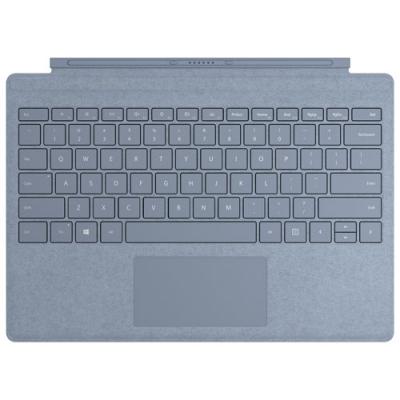
|
|
|
|
|
|
barca96
|
Nov 20 2020, 12:51 PM
|
|
|
QUOTE(Foo Mun @ Nov 19 2020, 06:01 PM) The F1 to F12 keys are same row with Esc key, the word is very small but still can read it. The Fn key is just in between Ctrl and Windows key. The light on Fn key is an indication whether Fn key is toggle ON/OFF same like Caps Lock key. oh gee... my eyes are really poor.. i guess it is worse than -500 now  thanks |
|
|
|
|



 Quote
Quote

 0.0259sec
 0.78
0.78
 7 queries
 GZIP Disabled