Welcome Guest ( Log In | Register )

226 Pages « < 207 208 209 210 211 > » Bottom

Outline · [ Standard ] · Linear+

 Ultrawide monitor fan's club, Ultrawide master race

views
     
quadcube
post May 25 2022, 06:00 PM

Regular
******
Senior Member
1,924 posts

Joined: May 2009
From: Yokohama, JP


QUOTE(Andrewtst @ May 24 2022, 10:33 AM)
Actually local dimming is not that important, I find it is over exaggerated. My monitor now got 2048 local dimming,  it is FALD panel, turn on do look nice to be mimic more like OLED as true black is black but they is some compromise where sometimes it is over black, turn off not means it look bad, sometimes it is even better. Also sometimes I find FALD make the bright area crazy bright and some sort of eye hurt in gaming. Another issue FALD make the desktop unusable especially on dark themes as well the halo effect at mouse cursor is deeply annoying. 😅

Local Dimming is not a good technology, how many dimming zone also not enough  unless they can make every dot is dimming zone.

I am happy now worth local dimming default off and on manually only if plan to watch video especially HDR video content.

For pure black, still only OLED manage to do it.
*
is the halo effect that bad on the FALD panel that you have?
mine seems fine, if the mouse pointer is on full black background, it will just ignore it and dimly light up that area, so the mouse pointer look dim and halo is not noticeable
normally I can't really see the halo unless I purposefully look for them or using a camera to take picture of it

QUOTE(destfull @ May 24 2022, 06:12 PM)
Sold everything, changed to this
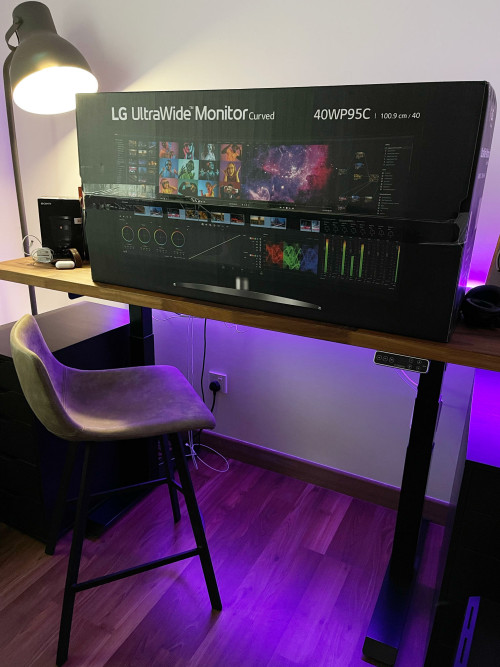
user posted image
*
whew! your previous setup is dope, belanja pic of the new setup thumbup.gif
Andrewtst
post May 25 2022, 06:31 PM

Forgiveness is Happiness
*********
All Stars
29,773 posts

Joined: Jan 2009
From: Johor, Malaysia.


QUOTE(quadcube @ May 25 2022, 06:00 PM)
is the halo effect that bad on the FALD panel that you have?
mine seems fine, if the mouse pointer is on full black background, it will just ignore it and dimly light up that area, so the mouse pointer look dim and halo is not noticeable
normally I can't really see the halo unless I purposefully look for them or using a camera to take picture of it
whew! your previous setup is dope, belanja pic of the new setup thumbup.gif
*
Not very bad, just slightly like those reviewer show but I am using dark themes, so I prefer FALD is off when using Windows. 😅 Just turn on FALD when needed. 😊
quadcube
post May 25 2022, 06:37 PM

Regular
******
Senior Member
1,924 posts

Joined: May 2009
From: Yokohama, JP


QUOTE(Andrewtst @ May 25 2022, 06:31 PM)
Not very bad, just slightly like those reviewer show but I am using dark themes, so I prefer FALD is off when using Windows. 😅 Just turn on FALD when needed. 😊
*
usually those YouTube/picture really jack up the halo effect on FALD panels..
my Pro Display XDR with only 512 zones doesn't look too obvious even when I'm running mostly dark mode applications (software dev, etc.)
Andrewtst
post May 25 2022, 06:40 PM

Forgiveness is Happiness
*********
All Stars
29,773 posts

Joined: Jan 2009
From: Johor, Malaysia.


QUOTE(quadcube @ May 25 2022, 06:37 PM)
usually those YouTube/picture really jack up the halo effect on FALD panels..
my Pro Display XDR with only 512 zones doesn't look too obvious even when I'm running mostly dark mode applications (software dev, etc.)
*
Not obvious but I can seen it, I don't see the need to use FALD on Windows, so I prefer off it. 😅 I hope future they is a better OLED 32:9 aspect ratio monitor. Don't so fast, maybe a year or two later. Haha!
Current that Alienware QD-OLED I not prefer as purple fridge in text will bugging me. 😅

Wow! Pro Display XDR - My dream monitor. Impossible I got money to buy a RM 20k to 26k monitor.

This post has been edited by Andrewtst: May 25 2022, 06:43 PM
quadcube
post May 25 2022, 06:52 PM

Regular
******
Senior Member
1,924 posts

Joined: May 2009
From: Yokohama, JP


QUOTE(Andrewtst @ May 25 2022, 06:40 PM)
Not obvious but I can seen it, I don't see the need to use FALD on Windows, so I prefer off it. 😅 I hope future they is a better OLED 32:9 aspect ratio monitor. Don't so fast, maybe a year or two later. Haha!
Current that Alienware QD-OLED I not prefer as purple fridge in text will bugging me. 😅

Wow! Pro Display XDR - My dream monitor. Impossible I got money to buy a RM 20k to 26k monitor.
*
isn't QD-OLED terrible for text at the moment (due to the pixel layout)? I saw some detailed comparison and the text look really odd

haha, it had also been on my could-never-afford list, for which I got the U3219Q instead..
but due to JPY sharp drop against MYR/USD and some extra income, all the star somehow aligned laugh.gif

now getting used to the retina resolution, it's hard to go back to non-retina resolution display

This post has been edited by quadcube: May 25 2022, 06:53 PM
Andrewtst
post May 25 2022, 06:58 PM

Forgiveness is Happiness
*********
All Stars
29,773 posts

Joined: Jan 2009
From: Johor, Malaysia.


QUOTE(quadcube @ May 25 2022, 06:52 PM)
isn't QD-OLED terrible for text at the moment (due to the pixel layout)? I saw some detailed comparison and the text look really odd

haha, it had also been on my could-never-afford list, for which I got the U3219Q instead..
but due to JPY sharp drop against MYR/USD and some extra income, all the star somehow aligned laugh.gif

now getting used to the retina resolution, it's hard to go back to non-retina resolution display
*
I see, good for you manage to get it due to JPY currency sharp drop.

Ya QD-OLED is not good for text, the purple fridge I seen from review is something I cannot accept, so my plan of purchasing it drop and lastly I am gambling on getting the Samsung Odyssey Neo G9. Lucky the one I get is new batch and those issue in earlier badge is not there, also the latest firmware is usable now. No regret so far, I superb love this 32:9 aspect ratio screen. 😄

Waiting for better OLED or maybe future microLED panel. QD-LED from Samsung cannot as the diamond pattern arrangement is the one cause the purple fringing issue.

This post has been edited by Andrewtst: May 25 2022, 06:59 PM
coolkwc
post May 26 2022, 10:40 PM

Fall in love with audio again.
*******
Senior Member
3,112 posts

Joined: Jul 2006
https://www.guru3d.com/news-story/msi-will-...0)-display.html

MSI the 2nd vendor to make use the Samsung QD-OLED
Andrewtst
post May 28 2022, 12:03 PM

Forgiveness is Happiness
*********
All Stars
29,773 posts

Joined: Jan 2009
From: Johor, Malaysia.


QUOTE(coolkwc @ May 26 2022, 10:40 PM)
https://www.guru3d.com/news-story/msi-will-...0)-display.html

MSI the 2nd vendor to make use the Samsung QD-OLED
*

Actually I had check many review and I notice even LG WOLED also have purple frigging issue in text due to the pattern alignment, but off course WOLED is still much better than QD-OLED alignment.

I think OLED is not for me now until they manage to change to better pattern alignment and remove the purple frigging issue in text. 😅
Probably in microLED ? Haha! But this tech still very far than realistic mass production. 😅😅😅

This post has been edited by Andrewtst: May 28 2022, 12:07 PM
Andrewtst
post May 28 2022, 12:03 PM

Forgiveness is Happiness
*********
All Stars
29,773 posts

Joined: Jan 2009
From: Johor, Malaysia.


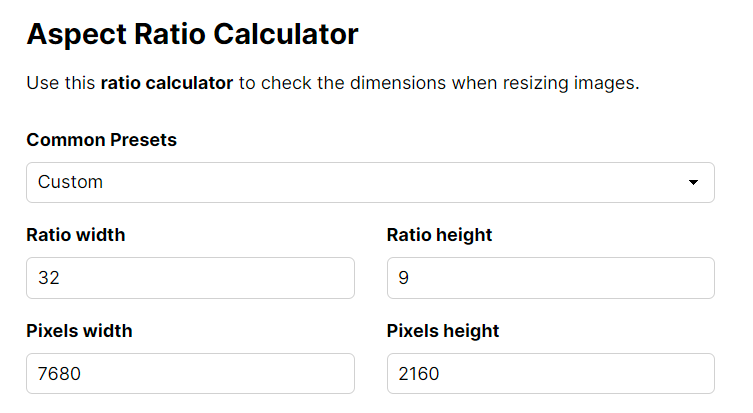
Wonder in future will they be 4K+ resolution for 32:9 aspect ratio gaming monitor.

In 7680x2160 resolution look damn cool! Haha! and off course this crazy resolution needs newer very powerful GPU. 😅

user posted image

This post has been edited by Andrewtst: May 28 2022, 12:08 PM
Andrewtst
post Jun 1 2022, 12:32 AM

Forgiveness is Happiness
*********
All Stars
29,773 posts

Joined: Jan 2009
From: Johor, Malaysia.


Some update on my Samsung Odyssey Neo G9.

Previously I said the HDR games in FALD on (auto) make certain dark scenes too dark and green leaf not green, somehow weird output.

This issue seems solved now and it look brilliant now. Now I am running with FALD on (auto) for games and movie playback. 😄
For desktop wise I still turn it off as I much prefer without it for very eye smooth experience.

The only changes is I had installed latest Nvidia driver 512.95, did Nvidia solved it? because others than Nvidia new GPU driver, they is nothing new update in my PC and they is no new firmware release for this monitor as well, last firmware is 1011 that I already installed since I get this monitor.

Anyway don't care, freaking happy now. 😊

Another thing is VRR control I am off back as I notice it is badly impact to any games if I turn on Nvidia DLSS where it will extremely jittering and lagging when they is a lot moving object until not possible to play condition, when benchmark you can seen minimum FPS drop to 2. This issue is totally gone when I set VRR control to off. No issue though if I not using DLSS. Weird...

This post has been edited by Andrewtst: Jun 1 2022, 02:56 AM
Andrewtst
post Jun 4 2022, 01:27 PM

Forgiveness is Happiness
*********
All Stars
29,773 posts

Joined: Jan 2009
From: Johor, Malaysia.


I think Windows did not do it perfect on HDR.

My Samsung Odyssey Neo G9 actually can make FALD auto switch and only on when in HDR mode if I set my desktop to SDR.
But set desktop to SDR = No HDR for streaming video included YouTube and Netflix.

Gaming and local playback HDR movie do can auto switch.

Another issue, I think Nvidia G-Sync is not perfect in Windows mode, when turn on my monitor from time to time flickering. I though my monitor rosak. lol
Default is only ON in full screen mode. So I set back but this also means if games set Windows Borderless will be not smooth and can happen tearing.

Wonder who should be blame, Windows or Nvidia.

Or Samsung should be the one to be blame. 😅

Also Finally manage put in all the cables inside the monitor leg and closed the monitor back cover. Now it looks very clean and tidy. 🥰

user posted image

This post has been edited by Andrewtst: Jun 4 2022, 01:58 PM
craxors
post Jun 4 2022, 09:04 PM

Look at all my stars!!
*******
Senior Member
2,539 posts

Joined: Dec 2007
QUOTE(Andrewtst @ Jun 4 2022, 01:27 PM)
Another issue, I think Nvidia G-Sync is not perfect in Windows mode, when turn on my monitor from time to time flickering. I though my monitor rosak. lol
Default is only ON in full screen mode. So I set back but this also means if games set Windows Borderless will be not smooth and can happen tearing.

Wonder who should be blame, Windows or Nvidia.

Or Samsung should be the one to be blame. 😅
*
not because of this?

user posted image
Vincent6596
post Jun 4 2022, 11:23 PM

Casual
***
Junior Member
472 posts

Joined: Apr 2019
From: Penang


QUOTE(craxors @ Jun 4 2022, 09:04 PM)
not because of this?

user posted image
*
i set my wit enable for windowed and full screen mode.
Andrewtst
post Jun 4 2022, 11:23 PM

Forgiveness is Happiness
*********
All Stars
29,773 posts

Joined: Jan 2009
From: Johor, Malaysia.


QUOTE(craxors @ Jun 4 2022, 09:04 PM)
not because of this?

user posted image
*
Ya because of that. I set back only Full Screen support G-Sync now instead of Full Screen & Windows as if set for Windows as well, some times the screen will flickering.

This post has been edited by Andrewtst: Jun 4 2022, 11:24 PM
coolkwc
post Jun 9 2022, 03:30 PM

Fall in love with audio again.
*******
Senior Member
3,112 posts

Joined: Jul 2006
The most awaited monitor review from TFTCentral

https://tftcentral.co.uk/reviews/dell-alien...w3423dw-qd-oled
toffy
post Jul 3 2022, 12:07 AM

Getting Started
**
Junior Member
182 posts

Joined: Aug 2017
Deleted

This post has been edited by toffy: Jul 3 2022, 02:05 AM
Andrewtst
post Jul 3 2022, 01:40 AM

Forgiveness is Happiness
*********
All Stars
29,773 posts

Joined: Jan 2009
From: Johor, Malaysia.


QUOTE(toffy @ Jul 3 2022, 12:07 AM)
Hi.

I am not using the latest GPU card but based on my research, it could run 2 units of QuadHD (2560 X 1440) monitors and possibly one more widescreen monitor.

I am planning to use them purely for productivity and office apps only. No gaming at all (maybe light games or old games, but gaming usage is not important here).

I do not have the QuadHD monitors yet but plan to buy them.

Should I future-proof my new monitors for new few years by buying 2 units of 4K monitors, instead of QuadHD ones?

To minimize the load on my GPU, I will downscale the 4K monitors to QuadHD resolution, until I upgrade my GPU in the future.
I read that downscaling from 4K to 1080 is a better ratio at 4:1, while downscaling from 4K to 1440p is almost 2.5:1.

If I downscale it this way, will it cause more work to the GPU and also make the picture quality more blocky/unsharp?

Or just get the QuadHD ones to run at their native resolution?
*
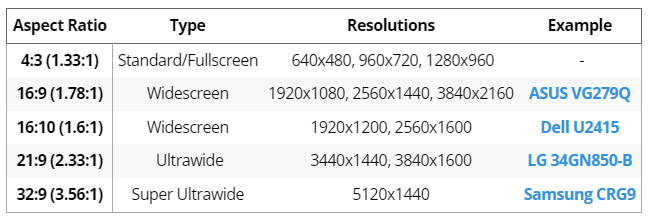
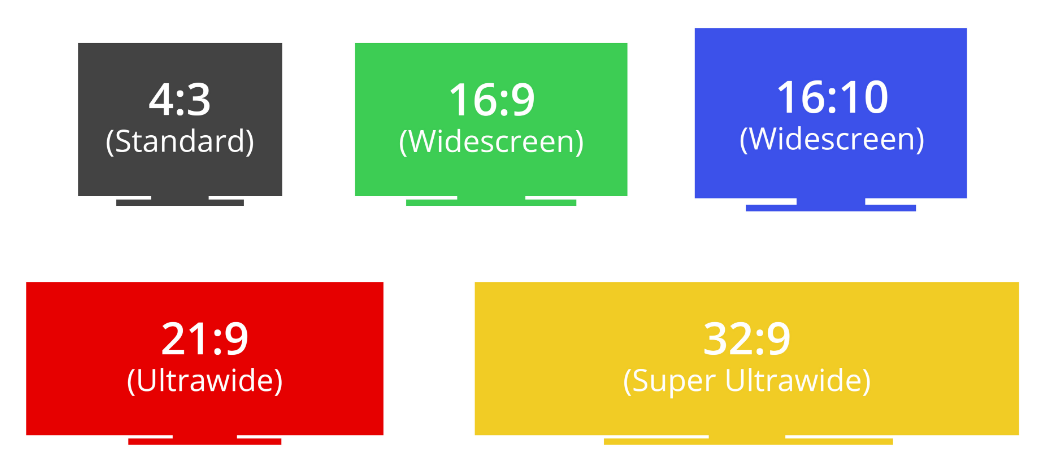
You are posting at wrong thread repeatedly, this thread is about Ultrawide, all monitor you mentioned is normal Widescreen monitor (16:9 aspect ratio). 2560 x 1440 is 16:9 aspect ratio monitor resolution which not belongs to here.
Ultrawide is 21:9 aspect ratio and normally it is only up to 3440 x 1440 and not 4K+ resolution. The only few Ultrawide in 4K+ resolutions is LG 40WP95C-W or Dell U4021QW which is 5120 x 2160 resolution.
This thread is for Ultrawide (21:9 aspect ratio) and Super Ultrawide (32:9 aspect ratio).

Normal Widescreen thread belongs here - https://forum.lowyat.net/topic/3238138/+2540 and stop mess-up the thread and stop posting widescreen question here. Thanks.

More Information - https://www.rtings.com/monitor/tests/inputs/resolution-size

user posted image

user posted image

This post has been edited by Andrewtst: Jul 3 2022, 02:53 AM
toffy
post Jul 3 2022, 02:09 AM

Getting Started
**
Junior Member
182 posts

Joined: Aug 2017
QUOTE(Andrewtst @ Jul 3 2022, 01:40 AM)
You are posting at wrong thread repeatedly, this thread is about Ultrawide, all monitor you mentioned is normal Widescreen monitor (16:9 aspect ratio). 2560 x 1440 is 16:9 aspect ratio monitor resolution which not belongs to here.
Ultrawide is 21:9 aspect ratio and normally it is only up to 3440 x 1440 and not 4K+ resolution. The only Ultrawide in 4K+ resolutions is LG 40WP95C-W which is 5120 x 2160 resolution.
This thread is for Ultrawide (21:9 aspect ratio) and Super Ultrawide (32:9 aspect ratio).

Normal Widescreen thread belongs here - https://forum.lowyat.net/topic/3238138/+2540 and stop mess-up the thread and stop posting widescreen question here. Thanks.

More Information - https://www.rtings.com/monitor/tests/inputs/resolution-size

user posted image

user posted image
*
Thanks for informing me.
I wanted to post it on the 'normal' monitor thread but maybe due to late-night sleepiness, I wrongly posted on this Ultrawide thread, because I was looking for answers on both threads.
My apologies.

I have deleted the original post.

Thanks also for the given additional info to show the differentiation between them. I have better clarity now.

Have a wonderful weekend.

Andrewtst
post Jul 3 2022, 02:19 AM

Forgiveness is Happiness
*********
All Stars
29,773 posts

Joined: Jan 2009
From: Johor, Malaysia.


QUOTE(toffy @ Jul 3 2022, 02:09 AM)
Thanks for informing me.
I wanted to post it on the 'normal' monitor thread but maybe due to late-night sleepiness, I wrongly posted on this Ultrawide thread, because I was looking for answers on both threads.
My apologies.

I have deleted the original post.

Thanks also for the given additional info to show the differentiation between them. I have better clarity now.

Have a wonderful weekend.
*
This is not the first time you post Widesceen question here. I had explained to you previously but you still post it here.

Hope they is no more Widesceen information or questions post again here. Thank you.
toffy
post Jul 3 2022, 06:44 PM

Getting Started
**
Junior Member
182 posts

Joined: Aug 2017
QUOTE(Andrewtst @ Jul 3 2022, 02:19 AM)
This is not the first time you post Widesceen question here. I had explained to you previously but you still post it here.

Hope they is no more Widesceen information or questions post again here. Thank you.
*
Hi. Good day.
I don't wish to complicate this but I wish to clarify what I believed has happened.

I looked back at several posts I shared before that latest incorrect post.

There were 2 posts made in May:
1) one post was about the DFO unit
2) one post was about the horizontal monitor, that you mentioned that it is a QHD, not a WQHD

I wish to clarify that I wasn't aware that these 2 questions shouldn't be asked specifically in this thread, until your latest advice.
Before this, I was not advised that they are in the wrong thread.

I know have much better clarity, especially the difference between widescreen and ultrawide, via the additional insights you shared.
I am now memorizing the ratios and also the resolutions of the ultrawide so that I will not make the same mistakes again.

My apologies once again.

Let us move forward.

Thanks for your understanding and thanks so much for educating me.
Much appreciated.


226 Pages « < 207 208 209 210 211 > » Top
 

Change to:
| Lo-Fi Version
0.0208sec    0.55    6 queries    GZIP Disabled
Time is now: 10th December 2025 - 04:07 PM