

QUOTE(craxors @ Jun 3 2022, 05:01 PM)
i think new one slightly over 1.5k only.
used unit with warranty can get around 1.2-1.3....

Currently hunting at carousel but no luck yet used unit with warranty can get around 1.2-1.3....
haha
LCD Monitor Thread v13.
|
|
 Jun 3 2022, 05:08 PM Jun 3 2022, 05:08 PM
|
 
Junior Member
429 posts Joined: Jan 2003 
|
QUOTE(craxors @ Jun 3 2022, 05:01 PM) i think new one slightly over 1.5k only. Currently hunting at carousel but no luck yet used unit with warranty can get around 1.2-1.3.... haha |
|
|
|
|
|
Jun 3 2022, 05:10 PM
|

Senior Member
2,539 posts Joined: Dec 2007
|
QUOTE(keewah @ Jun 3 2022, 05:08 PM) Currently hunting at carousel but no luck yet can try fb marketplace.haha |
|
|
Jun 3 2022, 05:25 PM
|
|
Junior Member
429 posts Joined: Jan 2003
|
QUOTE(craxors @ Jun 3 2022, 05:10 PM) can try fb marketplace. Oh ya .. FB market place not yet cuba Thanks ya |
|
|
Jun 21 2022, 11:45 PM
Show posts by this member only | IPv6 | Post
#2544
|

Senior Member
5,608 posts Joined: Jan 2010 
|
Any pros and cons for these 2 monitors?
- LG 27UP850 - Dell S2722QC |
|
|
Jul 3 2022, 02:12 AM
|
|
Junior Member
182 posts Joined: Aug 2017
|
Hi.
I am not using the latest GPU card but based on my research, it could run 2 units of QuadHD (2560 X 1440) monitors and possibly one more widescreen monitor. I am planning to use them purely for productivity and office apps only. No gaming at all (maybe light games or old games, but gaming usage is not important here). I do not have the QuadHD monitors yet but plan to buy them. Should I future-proof my new monitors for new few years by buying 2 units of 4K monitors, instead of QuadHD ones? To minimize the load on my GPU, I will downscale the 4K monitors to QuadHD resolution, until I upgrade my GPU in the future. I read that downscaling from 4K to 1080 is a better ratio at 4:1, while downscaling from 4K to 1440p is almost 2.5:1. If I downscale it this way, will it cause more work to the GPU and also make the picture quality more blocky/unsharp? Or just get the QuadHD ones to run at their native resolution? |
|
|
Jul 3 2022, 02:22 AM
Show posts by this member only | IPv6 | Post
#2546
|

All Stars
29,777 posts Joined: Jan 2009 From: Johor, Malaysia.
|
QUOTE(toffy @ Jul 3 2022, 02:12 AM) Hi. LCD should only use in native resolution. I am not using the latest GPU card but based on my research, it could run 2 units of QuadHD (2560 X 1440) monitors and possibly one more widescreen monitor. I am planning to use them purely for productivity and office apps only. No gaming at all (maybe light games or old games, but gaming usage is not important here). I do not have the QuadHD monitors yet but plan to buy them. Should I future-proof my new monitors for new few years by buying 2 units of 4K monitors, instead of QuadHD ones? To minimize the load on my GPU, I will downscale the 4K monitors to QuadHD resolution, until I upgrade my GPU in the future. I read that downscaling from 4K to 1080 is a better ratio at 4:1, while downscaling from 4K to 1440p is almost 2.5:1. If I downscale it this way, will it cause more work to the GPU and also make the picture quality more blocky/unsharp? Or just get the QuadHD ones to run at their native resolution? It is not advice use in not native resolution as it will be not sharp especially text. You will not notice in video and may not obvious in games but it is obvious in text. Running downscale will not cause more heavy load in your GPU as it is running at the resolution you choose. If 4K resolution is something you prefer, suggest only get the monitor after upgrading your GPU. 4K display still got more improvement to go and it is not that value yet, when the time you upgrading your GPU, they probably had more choices, better and much value for 4K monitor. This post has been edited by Andrewtst: Jul 3 2022, 02:40 AM |
|
|
|
|
|
Jul 3 2022, 11:17 AM
|

Senior Member
5,261 posts Joined: Oct 2004 From: J@Y B33
|
QUOTE(toffy @ Jul 3 2022, 02:12 AM) Hi. You didn't state what are the monitor size you aiming for. 27" if 1080p doesn't look as bad as 32" in 1080p.I am not using the latest GPU card but based on my research, it could run 2 units of QuadHD (2560 X 1440) monitors and possibly one more widescreen monitor. I am planning to use them purely for productivity and office apps only. No gaming at all (maybe light games or old games, but gaming usage is not important here). I do not have the QuadHD monitors yet but plan to buy them. Should I future-proof my new monitors for new few years by buying 2 units of 4K monitors, instead of QuadHD ones? To minimize the load on my GPU, I will downscale the 4K monitors to QuadHD resolution, until I upgrade my GPU in the future. I read that downscaling from 4K to 1080 is a better ratio at 4:1, while downscaling from 4K to 1440p is almost 2.5:1. If I downscale it this way, will it cause more work to the GPU and also make the picture quality more blocky/unsharp? Or just get the QuadHD ones to run at their native resolution? Your hardware won't able to run 2 monitor at 4k? Using laptop? Also can consider getting ultra wide instead of 2 16:9 monitor. If getting 2 monitors, better buy from shop and check on the spot for how the color looks side by side. Running dual monitor and seeing different color is annoying for me, if you don't mind then it's ok. |
|
|
Jul 3 2022, 12:32 PM
|
|
Junior Member
182 posts Joined: Aug 2017
|
QUOTE(xxboxx @ Jul 3 2022, 11:17 AM) You didn't state what are the monitor size you aiming for. 27" if 1080p doesn't look as bad as 32" in 1080p. Aiming for 27 inches.Your hardware won't able to run 2 monitor at 4k? Using laptop? Also can consider getting ultra wide instead of 2 16:9 monitor. If getting 2 monitors, better buy from shop and check on the spot for how the color looks side by side. Running dual monitor and seeing different color is annoying for me, if you don't mind then it's ok. Ya, laptop. I think can run both but I am saving the juice for a 3rd monitor, which is an existing ultrawide. |
|
|
Jul 3 2022, 02:54 PM
Show posts by this member only | IPv6 | Post
#2549
|
|
All Stars
29,777 posts Joined: Jan 2009 From: Johor, Malaysia.
|
QUOTE(toffy @ Jul 3 2022, 12:32 PM) Aiming for 27 inches. Laptop? Laptop GPU is fixed and cannot upgrade. Ya, laptop. I think can run both but I am saving the juice for a 3rd monitor, which is an existing ultrawide. Normally older Laptop only have 1 HDMI and 1 VGA, which means 2 monitor maximum and one of it cannot more than 1080p (VGA connection). Even newer laptop also normally came with 1 HDMI and may also came with 1 extra DP. In this case also 2 monitor maximum. Unless the 3rd monitor is connected via USB-C but older laptop not came with USB-C and only USB 2.1 which required converter and it is not enough bandwidth for 4K monitor, unless you accept 30hz which is very lagging even in Windows usage only (not gaming). Since it is laptop, just bring to shop to test it out. In additional, here is the common XX:9 aspect ratio screen resolution, size and type. 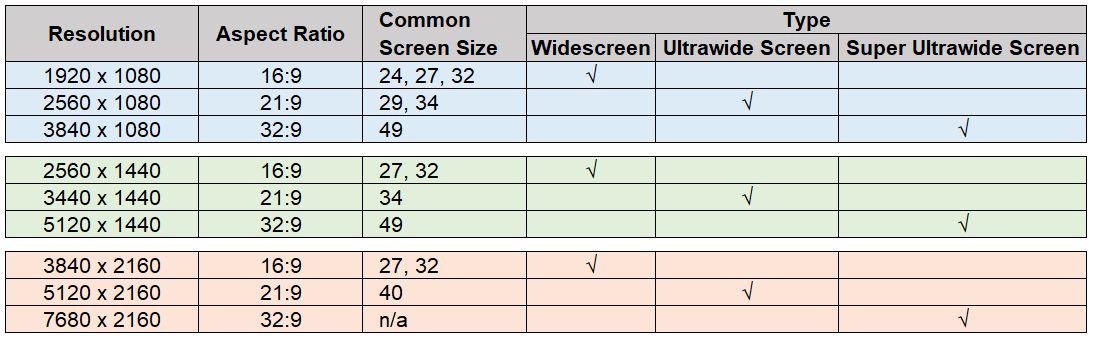 This post has been edited by Andrewtst: Jul 3 2022, 04:18 PM |
|
|
Jul 3 2022, 09:32 PM
|
|
Junior Member
182 posts Joined: Aug 2017
|
QUOTE(xxboxx @ Jul 3 2022, 11:17 AM) You didn't state what are the monitor size you aiming for. 27" if 1080p doesn't look as bad as 32" in 1080p. Thanks for your feedback.Your hardware won't able to run 2 monitor at 4k? Using laptop? Also can consider getting ultra wide instead of 2 16:9 monitor. If getting 2 monitors, better buy from shop and check on the spot for how the color looks side by side. Running dual monitor and seeing different color is annoying for me, if you don't mind then it's ok. For the sake of completion, on top of my previous reply, I need to give one more input. I do agree that it is better to check the new 2 monitors side-by-side at a physical shop selling them. Hope the colour issues happen rarely? At the moment, I am trying to save by buying online. I guess I have to risk it a bit, haha. QUOTE(Andrewtst @ Jul 3 2022, 02:22 AM) LCD should only use in native resolution. Thanks for the insights.It is not advice use in not native resolution as it will be not sharp especially text. You will not notice in video and may not obvious in games but it is obvious in text. Running downscale will not cause more heavy load in your GPU as it is running at the resolution you choose. If 4K resolution is something you prefer, suggest only get the monitor after upgrading your GPU. 4K display still got more improvement to go and it is not that value yet, when the time you upgrading your GPU, they probably had more choices, better and much value for 4K monitor. In short, you are saying that it is best to use native resolutions and to hold on to the 4k monitors for now? And to get the 4k ones once I have upgraded my GPU? I don't have immediate plans to upgrade the GPU yet. With the above said, I was thinking that 4k monitors are much cheaper now and are slightly more expensive than 1440p monitors of the same size for a similar config (27 inches). So my initial thought was to future-proof it, just in case I am getting a new PC/laptop end of the year (with RTX 30 series) or early next year, making me ready by having my 'new' 4k monitors. Otherwise, my 'new' 1440p may become obsolete? The choice of whether to upgrade to the soon-to-be-released RTX 40 series as my GPU, will be another story. Your feedback about the current 4k monitors being not 'matured' yet and not of value yet, is indeed good feedback. I am considering these seriously. QUOTE(Andrewtst @ Jul 3 2022, 02:54 PM) Laptop? Laptop GPU is fixed and cannot upgrade. Yes, fully agree. The GPU of a laptop cannot be upgraded. Not for typical end-users unless one is a hardcore person or professional that tinkers with the soldering and has access to mobile components to break the supported factory configuration... a super-risky thing that shouldn't be done. Better to upgrade those on a desktop one instead.Normally older Laptop only have 1 HDMI and 1 VGA, which means 2 monitor maximum and one of it cannot more than 1080p (VGA connection). Even newer laptop also normally came with 1 HDMI and may also came with 1 extra DP. In this case also 2 monitor maximum. Unless the 3rd monitor is connected via USB-C but older laptop not came with USB-C and only USB 2.1 which required converter and it is not enough bandwidth for 4K monitor, unless you accept 30hz which is very lagging even in Windows usage only (not gaming). Since it is laptop, just bring to shop to test it out. In additional, here is the common XX:9 aspect ratio screen resolution, size and type. Another way is to use a eGPU, right? But that's more expensive and the return of investment may not be worth it because of the limited bandwidth of the connection (maybe TB4 or TB5 connectivity may address it) and the expensive eGPU case. When I mentioned upgrading my GPU, I meant to say either I buy a new lappy or a desktop. The laptop in discussion is a 2018 version with GTX 1060 6GB that comes with a mini dual-mode DP, an HDMI 2.0 port, and a USB Type-C Thunderbolt that provides DP output. I hope that means it can connect to 3 external monitors via 1 HDMI port and 2 DPs? Both the DPs are of version 1.2. I am going for a minimum of 60Hz for all my external monitors. To clarify, I have an existing 34-inch 3440X1440 UW as the main external monitor. I am thinking of getting 2 units of 27-inch 1440p as 2nd and 3rd external monitors (portrait) for productivity reasons (or is this overkill?). Then it dawned on me that, maybe I should get 4k monitors instead of 1440p monitors for future-proofing. Hence, the question came about. The current UW has a PPI of around 108. The corresponding 1440p monitors have similar PPI, at around 108. I prefer such parity. If I am going to get 4k monitors instead, then I have to downscale it to maintain that parity. Hence that question also. This post has been edited by toffy: Jul 3 2022, 09:42 PM |
|
|
Jul 3 2022, 09:48 PM
Show posts by this member only | IPv6 | Post
#2551
|
|
All Stars
29,777 posts Joined: Jan 2009 From: Johor, Malaysia.
|
QUOTE(toffy @ Jul 3 2022, 09:32 PM) Thanks for your feedback. Your laptop is not very old in this cased but I don't think it worth to spend money on eGPU. It is too costly and bulky.For the sake of completion, on top of my previous reply, I need to give one more input. I do agree that it is better to check the new 2 monitors side-by-side at a physical shop selling them. Hope the colour issues happen rarely? At the moment, I am trying to save by buying online. I guess I have to risk it a bit, haha. Thanks for the insights. In short, you are saying that it is best to use native resolutions and to hold on to the 4k monitors for now? And to get the 4k ones once I have upgraded my GPU? I don't have immediate plans to upgrade the GPU yet. With the above said, I was thinking that 4k monitors are much cheaper now and are slightly more expensive than 1440p monitors of the same size for a similar config (27 inches). So my initial thought was to future-proof it, just in case I am getting a new PC/laptop end of the year (with RTX 30 series) or early next year, making me ready by having my 'new' 4k monitors. Otherwise, my 'new' 1440p may become obsolete? The choice of whether to upgrade to the soon-to-be-released RTX 40 series as my GPU, will be another story. Your feedback about the current 4k monitors being not 'matured' yet and not of value yet, is indeed good feedback. I am considering these seriously. Yes, fully agree. The GPU of a laptop cannot be upgraded. Not for typical end-users unless one is a hardcore person or professional that tinkers with the soldering and has access to mobile components to break the supported factory configuration... a super-risky thing that shouldn't be done. Better to upgrade those on a desktop one instead. Another way is to use a eGPU, right? But that's more expensive and the return of investment may not be worth it because of the limited bandwidth of the connection (maybe TB4 or TB5 connectivity may address it) and the expensive eGPU case. When I mentioned upgrading my GPU, I meant to say either I buy a new lappy or a desktop. The laptop in discussion is a 2018 version with GTX 1060 6GB that comes with a mini dual-mode DP, an HDMI 2.0 port, and a USB Type-C Thunderbolt that provides DP output. I hope that means it can connect to 3 external monitors via 1 HDMI port and 2 DPs? Both the DPs are of version 1.2. I am going for a minimum of 60Hz for all my external monitors. To clarify, I have an existing 34-inch 3440X1440 UW as the main external monitor. I am thinking of getting 2 units of 27-inch 1440p as 2nd and 3rd external monitors (portrait) for productivity reasons (or is this overkill?). Then it dawned on me that, maybe I should get 4k monitors instead of 1440p monitors for future-proofing. Hence, the question came about. The current UW has a PPI of around 108. The corresponding 1440p monitors have similar PPI, at around 108. I prefer such parity. If I am going to get 4k monitors instead, then I have to downscale it to maintain that parity. Hence that question also. This post has been edited by Andrewtst: Jul 3 2022, 09:49 PM |
|
|
Jul 3 2022, 09:50 PM
Show posts by this member only | IPv6 | Post
#2552
|
|
All Stars
29,777 posts Joined: Jan 2009 From: Johor, Malaysia.
|
I am selling my monitor, anyone interesting may check at Garage Sales
|
|
|
Jul 3 2022, 10:28 PM
|
|
Junior Member
76 posts Joined: Feb 2022
|
QUOTE(tungfunglaw @ May 15 2022, 02:51 PM) Dell will always drop the price of S2721DS(rm979)/SE2723DS(rm839?) alternate week. keep an eye on that. Hi, can I know what coupon code can use for dell monitor on dell website please? How did you get the 4% discount?i bought S2721DS(rm979) + 4% discount + rm18.99 cashback on end of april. but lead-time is around 1month at the moment, given a call by dell that ETA is end of MAY. if can wait, can check them out. Btw anyone knows what's the historical lowest price for Dell S2721DGF? This post has been edited by bofuri1234: Jul 3 2022, 10:38 PM |
|
|
|
|
|
Jul 3 2022, 10:42 PM
Show posts by this member only | IPv6 | Post
#2554
|

Junior Member
259 posts Joined: Aug 2008
|
QUOTE(bofuri1234 @ Jul 3 2022, 10:28 PM) Hi, can I know what coupon code can use for dell monitor on dell website please? How did you get the 4% discount? from local website. MYAFF4%OFFBtw anyone knows what's the historical lowest price for Dell S2721DGF? google it. bofuri1234 liked this post
|
|
|
Jul 3 2022, 10:59 PM
|
|
Junior Member
76 posts Joined: Feb 2022
|
QUOTE(tungfunglaw @ Jul 3 2022, 10:42 PM) from local website. MYAFF4%OFF Tq.google it. |
|
|
Jul 3 2022, 11:21 PM
|
|
Senior Member
5,261 posts Joined: Oct 2004 From: J@Y B33
|
QUOTE(toffy @ Jul 3 2022, 09:32 PM) Thanks for your feedback. If both same model then likely both look the same. Usually issue when different model or old monitor pair with new.For the sake of completion, on top of my previous reply, I need to give one more input. I do agree that it is better to check the new 2 monitors side-by-side at a physical shop selling them. Hope the colour issues happen rarely? At the moment, I am trying to save by buying online. I guess I have to risk it a bit, haha. Thanks for the insights. I think your laptop can run 3 external monitor. But probably limited to 4K 60hz due to DP v1.2 |
|
|
Jul 4 2022, 01:42 PM
|

Senior Member
5,987 posts Joined: Jan 2003 From: North Borneo & South Nihon/Nippon
|
QUOTE(toffy @ Jul 3 2022, 09:32 PM) Thanks for your feedback. Here where many people (including you).... gets wrong/do not understand...2D display resolution is always mainly depends on the display output(s)... both your DP 1.4 outputs (1060 supports 1.4) can support 4k@120hz and the HDMI 2.0: 4k@60Hz... You can have three 4k monitors@60Hz with no issuesFor the sake of completion, on top of my previous reply, I need to give one more input. I do agree that it is better to check the new 2 monitors side-by-side at a physical shop selling them. Hope the colour issues happen rarely? At the moment, I am trying to save by buying online. I guess I have to risk it a bit, haha. Thanks for the insights. In short, you are saying that it is best to use native resolutions and to hold on to the 4k monitors for now? And to get the 4k ones once I have upgraded my GPU? I don't have immediate plans to upgrade the GPU yet. With the above said, I was thinking that 4k monitors are much cheaper now and are slightly more expensive than 1440p monitors of the same size for a similar config (27 inches). So my initial thought was to future-proof it, just in case I am getting a new PC/laptop end of the year (with RTX 30 series) or early next year, making me ready by having my 'new' 4k monitors. Otherwise, my 'new' 1440p may become obsolete? The choice of whether to upgrade to the soon-to-be-released RTX 40 series as my GPU, will be another story. Your feedback about the current 4k monitors being not 'matured' yet and not of value yet, is indeed good feedback. I am considering these seriously. Yes, fully agree. The GPU of a laptop cannot be upgraded. Not for typical end-users unless one is a hardcore person or professional that tinkers with the soldering and has access to mobile components to break the supported factory configuration... a super-risky thing that shouldn't be done. Better to upgrade those on a desktop one instead. Another way is to use a eGPU, right? But that's more expensive and the return of investment may not be worth it because of the limited bandwidth of the connection (maybe TB4 or TB5 connectivity may address it) and the expensive eGPU case. When I mentioned upgrading my GPU, I meant to say either I buy a new lappy or a desktop. The laptop in discussion is a 2018 version with GTX 1060 6GB that comes with a mini dual-mode DP, an HDMI 2.0 port, and a USB Type-C Thunderbolt that provides DP output. I hope that means it can connect to 3 external monitors via 1 HDMI port and 2 DPs? Both the DPs are of version 1.2. I am going for a minimum of 60Hz for all my external monitors. To clarify, I have an existing 34-inch 3440X1440 UW as the main external monitor. I am thinking of getting 2 units of 27-inch 1440p as 2nd and 3rd external monitors (portrait) for productivity reasons (or is this overkill?). Then it dawned on me that, maybe I should get 4k monitors instead of 1440p monitors for future-proofing. Hence, the question came about. The current UW has a PPI of around 108. The corresponding 1440p monitors have similar PPI, at around 108. I prefer such parity. If I am going to get 4k monitors instead, then I have to downscale it to maintain that parity. Hence that question also. All usb-c with DP out.... will output the supported DP of the GPU, in your case DP 1.4... you'll need a "cheap" converted for this (RM50 or less)... This DP by-pass output uses the same wires as the TB signals (only one [of the 2] will work at a time); taking a pure TB signal and you can split the TB signal to 2 or 3 monitor outputs that requires an "expensive" TB dock (RM500+ to 1k). Most monitors with usb-c in are taking the DP signal and not the TB signal.... <<< Apart from Apple there maybe one other monitor that takes a TB signal input... Example: I've a mini-PC with an intel 8265U that could run three 4k@60Hz outputs through its iGPU... This post has been edited by BeastX: Jul 4 2022, 01:58 PM |
|
|
Jul 4 2022, 03:30 PM
Show posts by this member only | IPv6 | Post
#2558
|
|
All Stars
29,777 posts Joined: Jan 2009 From: Johor, Malaysia.
|
QUOTE(toffy @ Jul 3 2022, 09:32 PM) Thanks for your feedback. Additional information, since you got one 3440x1440 Ultrawide. It is better get another 2 in 1440p for consistency size with your current Ultrawide Monitor. For the sake of completion, on top of my previous reply, I need to give one more input. I do agree that it is better to check the new 2 monitors side-by-side at a physical shop selling them. Hope the colour issues happen rarely? At the moment, I am trying to save by buying online. I guess I have to risk it a bit, haha. Thanks for the insights. In short, you are saying that it is best to use native resolutions and to hold on to the 4k monitors for now? And to get the 4k ones once I have upgraded my GPU? I don't have immediate plans to upgrade the GPU yet. With the above said, I was thinking that 4k monitors are much cheaper now and are slightly more expensive than 1440p monitors of the same size for a similar config (27 inches). So my initial thought was to future-proof it, just in case I am getting a new PC/laptop end of the year (with RTX 30 series) or early next year, making me ready by having my 'new' 4k monitors. Otherwise, my 'new' 1440p may become obsolete? The choice of whether to upgrade to the soon-to-be-released RTX 40 series as my GPU, will be another story. Your feedback about the current 4k monitors being not 'matured' yet and not of value yet, is indeed good feedback. I am considering these seriously. Yes, fully agree. The GPU of a laptop cannot be upgraded. Not for typical end-users unless one is a hardcore person or professional that tinkers with the soldering and has access to mobile components to break the supported factory configuration... a super-risky thing that shouldn't be done. Better to upgrade those on a desktop one instead. Another way is to use a eGPU, right? But that's more expensive and the return of investment may not be worth it because of the limited bandwidth of the connection (maybe TB4 or TB5 connectivity may address it) and the expensive eGPU case. When I mentioned upgrading my GPU, I meant to say either I buy a new lappy or a desktop. The laptop in discussion is a 2018 version with GTX 1060 6GB that comes with a mini dual-mode DP, an HDMI 2.0 port, and a USB Type-C Thunderbolt that provides DP output. I hope that means it can connect to 3 external monitors via 1 HDMI port and 2 DPs? Both the DPs are of version 1.2. I am going for a minimum of 60Hz for all my external monitors. To clarify, I have an existing 34-inch 3440X1440 UW as the main external monitor. I am thinking of getting 2 units of 27-inch 1440p as 2nd and 3rd external monitors (portrait) for productivity reasons (or is this overkill?). Then it dawned on me that, maybe I should get 4k monitors instead of 1440p monitors for future-proofing. Hence, the question came about. The current UW has a PPI of around 108. The corresponding 1440p monitors have similar PPI, at around 108. I prefer such parity. If I am going to get 4k monitors instead, then I have to downscale it to maintain that parity. Hence that question also. 1440p won't obsolete and it will still be main steam. |
|
|
Jul 4 2022, 11:26 PM
|
|
Junior Member
182 posts Joined: Aug 2017
|
QUOTE(tungfunglaw @ May 15 2022, 02:51 PM) Dell will always drop the price of S2721DS(rm979)/SE2723DS(rm839?) alternate week. keep an eye on that. Thanks so much for sharing this.i bought S2721DS(rm979) + 4% discount + rm18.99 cashback on end of april. but lead-time is around 1month at the moment, given a call by dell that ETA is end of MAY. if can wait, can check them out. Have you received your S2721DS? I read that the stand is wobbly. Other than that, any feedback on your usage of it? |
|
|
Jul 5 2022, 10:21 PM
|
|
Junior Member
182 posts Joined: Aug 2017
|
QUOTE(xxboxx @ Jul 3 2022, 11:21 PM) If both same model then likely both look the same. Usually issue when different model or old monitor pair with new. Sounds good! Thanks!I think your laptop can run 3 external monitor. But probably limited to 4K 60hz due to DP v1.2 From what I read, it seems to be certified at DP 1.2 but ready for 1.3 and 1.4. Not exactly sure what this means. QUOTE(BeastX @ Jul 4 2022, 01:42 PM) Here where many people (including you).... gets wrong/do not understand...2D display resolution is always mainly depends on the display output(s)... both your DP 1.4 outputs (1060 supports 1.4) can support 4k@120hz and the HDMI 2.0: 4k@60Hz... You can have three 4k monitors@60Hz with no issues Thanks for elaborating on this. All usb-c with DP out.... will output the supported DP of the GPU, in your case DP 1.4... you'll need a "cheap" converted for this (RM50 or less)... This DP by-pass output uses the same wires as the TB signals (only one [of the 2] will work at a time); taking a pure TB signal and you can split the TB signal to 2 or 3 monitor outputs that requires an "expensive" TB dock (RM500+ to 1k). Most monitors with usb-c in are taking the DP signal and not the TB signal.... <<< Apart from Apple there maybe one other monitor that takes a TB signal input... Example: I've a mini-PC with an intel 8265U that could run three 4k@60Hz outputs through its iGPU... Mine is a laptop, so it is a mobile GPU. Since it is GTX 1060, then it is all the 'same' in terms of supporting DP up to version 1.4? Or the mobile GPU is different from the desktop version? Only one of the 2 will work... do you mean it is either DP or TB that will work at a time? I guess there is no reason to configure and split the TB signal to support 2 or more monitors via an expensive dock, unless I don't have enough ports to support 3 monitors in total. Wow! You must have a powerful iGPU. I thought only dGPU can do that. QUOTE(Andrewtst @ Jul 4 2022, 03:30 PM) Additional information, since you got one 3440x1440 Ultrawide. It is better get another 2 in 1440p for consistency size with your current Ultrawide Monitor. I agree with the consistency suggestion.1440p won't obsolete and it will still be main steam. If I am going to get a 4k, I can downscale it to 1440p to make it almost consistent but that carries the non-native concerns you mentioned earlier such as sharpness, non-value 4k monitors etc Can 1440p be still mainstream for the next 4 years ah? Me curious. This post has been edited by toffy: Jul 5 2022, 10:22 PM |
| Change to: |  0.0307sec 0.0307sec
 0.43 0.43
 6 queries 6 queries
 GZIP Disabled GZIP Disabled
Time is now: 15th December 2025 - 06:59 AM |
 Quote
Quote