

 Apr 28 2022, 07:58 PM


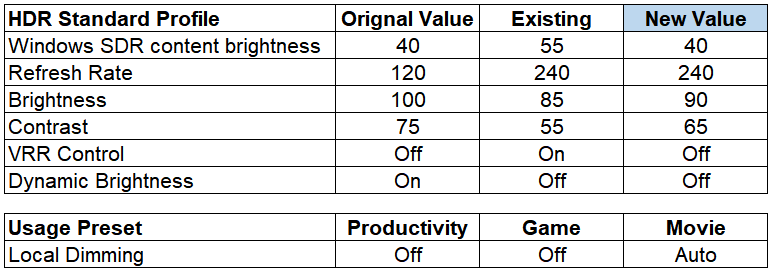
So far I am satisfied the Samsung Odyssey Neo G9 monitor but it will be even perfect if Samsung did a small apps that can control the Local Dimming auto on / off as to me the local dimming is better off when do productivity task like documentation and browsing internet when set monitor as HDR on. But local dimming should be on to get absolute awesome output when play video and gaming especially HDR format.
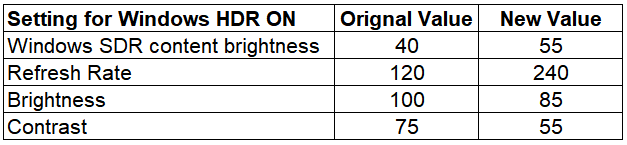
I do did some adjustment to make it look to what I prefer for setup "Use HDR" On in Windows 11 Display setting. 😅
- Refresh Rate 240 (original default 120)
- Brightness 84 (original default 100)
- Contrast 75 (original default 75)
- Sharpness 60 (original default 60)
- Picture Mode HDR Standard (original default HDR Standard)
- Red 47 (original default 50)
- Green 52 (original default 50)
- Blue 49 (original default 50)
and as all reviewer point out. Samsung provide you a Display Port cable that cannot handle 240Hz, your screen will keep distortion and blinking. 🤔😅
Lucky I got my own Display Port cable and it can handle 240Hz perfectly.
This post has been edited by Andrewtst: Apr 28 2022, 09:12 PM
 Quote
Quote




 0.0500sec
 0.73
0.73
 6 queries
 GZIP Disabled