Welcome Guest ( Log In | Register )

270 Pages « < 119 120 121 122 123 > » Bottom

Outline · [ Standard ] · Linear+

 Android Smartwatch V2, Discuss Any Smartwatch Here

views
     
lostasylum
post Jan 10 2017, 01:18 PM

running to stand still
******
Senior Member
1,085 posts

Joined: Jul 2007
if you wanna reply using 3rd party keyboard, you can try drextee messenger which i'm using. it's like using the preview of android wear 2.0's keyboard biggrin.gif

QUOTE(myshiokmore @ Jan 10 2017, 03:46 AM)
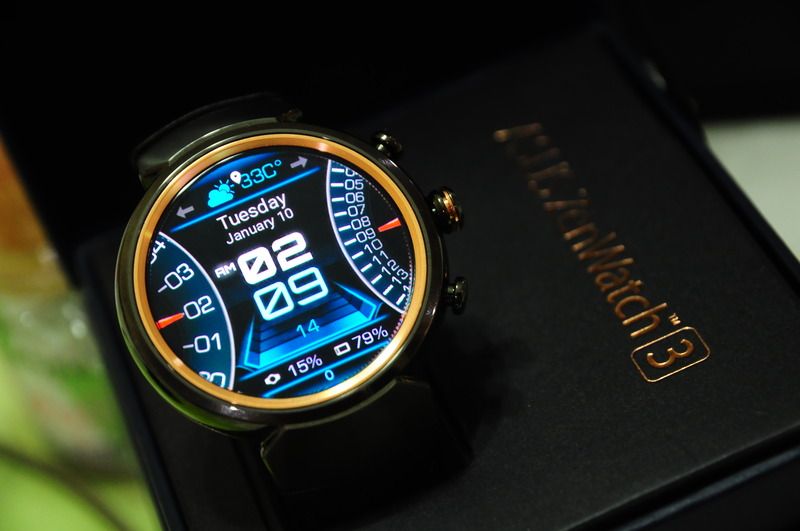
Zenwatch 3 user reported in.  biggrin.gif
user posted image

Have been using it for 1 week. Here provide some hands on feedback.

Pros
1. The screen is looks vivid. Definitely meet my expectation. Plenty of watch face apps to play around.
2. Very classs look, the gold bezel bring out the luxury and class look.
3. Very good speaker when play music. Clear and loud.
3. Mic on watch was good so far when use inside car, but speaker phone is loud but a bit not too clear (will monitor further)
4. all notification from phone able to sync with ZW3 seamlessly. Whatapps, fb, exchange,gmail, gemfive,lazada and etc.
5. Vibration of notification is adequate, however is acceptable level.
6. Wrist gesture work well during driving, to have a glance on notification such as whatapps/email. You could navigate between home screen, view notification, back and forth, scroll through wrist gesture.

Cons:
1. Very soft leather and thin in my opinion. Not sure if this leather really as indicate as good leather. Would like to know where to get gunmetal metal strap.
2. Battery life is just okay. around 1 day and half. However quick charge has compromise this.
3. Gesture to turn on the screen, sometimes it doesn't show up if i doesn't twist my wrist enough.
4. I couldnt found a way to reply whatapps message via keyboard, only through google voice recognition.
5. On google voice in android wear, i dunno why some word recognition success rate is so weak, maybe 50% can recogize. During driving, when wrong voice recognize into text, it will auto send after 3-4 second.
Using my Note 4, most of the words able to recognize.
6. Using google maps on watch, it will eventually need to have GPS turn on on Phone, it will trigger google maps on phone, from open apps to navigate, take about 30 sec.
*
Pok Leh
post Jan 11 2017, 12:56 AM

Getting Started
**
Junior Member
263 posts

Joined: Sep 2010
Guys, where to get best price for Moko Silicone strap for Gear S3..

Thanks..
sonotme
post Jan 11 2017, 01:15 AM

Regular
******
Senior Member
1,715 posts

Joined: Sep 2009


QUOTE(Pok Leh @ Jan 11 2017, 12:56 AM)
Guys, where to get best price for Moko Silicone strap for Gear S3..

Thanks..
*
i'm also looking for that.. only can find online..
jacksonywl
post Jan 11 2017, 10:43 AM

Getting Started
**
Junior Member
236 posts

Joined: Jun 2006


QUOTE(wintzen @ Jan 9 2017, 03:21 PM)
Saw any red silicon strap?
*
I am buying from Lazada hmm.gif
Should be arriving in the next couple of days, will report in on the quality...

For peeps looking for "branded" and high quality watchface (via Samsung's Gear Watch Designer), check out this "face maker" https://plus.google.com/u/1/104704492398430829346
sonotme
post Jan 11 2017, 12:26 PM

Regular
******
Senior Member
1,715 posts

Joined: Sep 2009


QUOTE(jacksonywl @ Jan 11 2017, 10:43 AM)
I am buying from Lazada  hmm.gif
Should be arriving in the next couple of days, will report in on the quality...

For peeps looking for "branded" and high quality watchface (via Samsung's Gear Watch Designer), check out this "face maker" https://plus.google.com/u/1/104704492398430829346
*
That is Moko band?
The face maker, is it an app?
skylinerz
post Jan 11 2017, 12:44 PM

Getting Started
**
Junior Member
129 posts

Joined: Jul 2006


QUOTE(tarm @ Dec 29 2016, 09:41 AM)
used tempered glass on it for 10 minutes, then i removed it. dont like the feel and look of it when applied on s3's screen.
*
Try look at this. Got mine installed & have 3 more units left for sale.

https://forum.lowyat.net/index.php?showtopic=4172116


QUOTE(Superman7 @ Dec 29 2016, 11:01 AM)
I supposed the screen protector for the watch would be smaller than the actual display itself causing the additional effect of a border. For sure does not look good.
Again, I'm sure nobody uses screen protector on their normal watches even if it's not sapphire glass.
*
Most screen protector in the market are a bit small & leaving a gap. Try look at this. I've installed mine & no gap at all. Got an extra 3 units for sale for those who are interested.

https://forum.lowyat.net/index.php?showtopic=4172116
jacksonywl
post Jan 11 2017, 12:47 PM

Getting Started
**
Junior Member
236 posts

Joined: Jun 2006


QUOTE(sonotme @ Jan 11 2017, 12:26 PM)
That is Moko band?
The face maker, is it an app?
*
No brand, from the picture displayed looks like OEM, but can only feedback on the actual look/quality once the item arrives to my doorstep bruce.gif

By "face maker" I mean watchface creator. The files are uploaded in .GWD, you will need Samsung's Gear Watch Designer to open and install it to your Gear S2/S3.
tarm
post Jan 11 2017, 02:31 PM

Enthusiast
*****
Senior Member
805 posts

Joined: Jan 2003
From: Kuala Lump...


QUOTE(skylinerz @ Jan 11 2017, 12:44 PM)
Try look at this. Got mine installed & have 3 more units left for sale.

https://forum.lowyat.net/index.php?showtopic=4172116
Most screen protector in the market are a bit small & leaving a gap. Try look at this. I've installed mine & no gap at all. Got an extra 3 units for sale for those who are interested.

https://forum.lowyat.net/index.php?showtopic=4172116
*
u can do the installation? i am terribly bad in installing this kind of stuff. if u can i can pay u for ur service
skylinerz
post Jan 11 2017, 03:51 PM

Getting Started
**
Junior Member
129 posts

Joined: Jul 2006


QUOTE(tarm @ Jan 11 2017, 02:31 PM)
u can do the installation? i am terribly bad in installing this kind of stuff. if u can i can pay u for ur service
*
I'm sorry I'm not really good at installing the glass too even tho its really easy. Simply use the suction cup provided to center up the glass and attach it to the display.
johnsontys
post Jan 11 2017, 05:45 PM

Getting Started
**
Junior Member
175 posts

Joined: May 2010


Can some sifu share some step-by-step guidance on how to load the .gwd files into the Gear S3? Have tried watchland but it does not allow me to install.

Thanks in advance
sonotme
post Jan 11 2017, 07:11 PM

Regular
******
Senior Member
1,715 posts

Joined: Sep 2009


QUOTE(johnsontys @ Jan 11 2017, 05:45 PM)
Can some sifu share some step-by-step guidance on how to load the .gwd files into the Gear S3? Have tried watchland but it does not allow me to install.

Thanks in advance
*
Try samsung gear watch designer. Can sync over wifi from PC. But i have yet to succeed
zero721
post Jan 11 2017, 07:58 PM

Enthusiast
*****
Senior Member
705 posts

Joined: Sep 2010


Any idea when Google will come out with their new smartwatch? Wondering should I wait for the new smartwatch or buy now? If buy now, any recommendation?
Someonesim
post Jan 11 2017, 08:43 PM

In my way
*******
Senior Member
9,132 posts

Joined: Aug 2005


QUOTE(zero721 @ Jan 11 2017, 07:58 PM)
Any idea when Google will come out with their new smartwatch? Wondering should I wait for the new smartwatch or buy now? If buy now, any recommendation?
*
Google themselves confirmed that they will launch their own Android Wear in Q1 2017 smile.gif
samsungXP
post Jan 11 2017, 09:41 PM

Look at all my stars!!
*******
Senior Member
5,284 posts

Joined: Nov 2011
Attached Image
Attached Image
Attached Image
huislaw
post Jan 11 2017, 10:26 PM

Regular
******
Senior Member
1,344 posts

Joined: Jan 2013


QUOTE(johnsontys @ Jan 11 2017, 05:45 PM)
Can some sifu share some step-by-step guidance on how to load the .gwd files into the Gear S3? Have tried watchland but it does not allow me to install.

Thanks in advance
*
I follow the steps here : http://developer.samsung.com/gear/design/w...r-watch-getting

But this page miss out one important step which is mentioned by someone in the Gear S3 Facebook Group.

In order to run on your Gear, you need to click Build first then only click Run, every single time.
sonotme
post Jan 12 2017, 12:09 AM

Regular
******
Senior Member
1,715 posts

Joined: Sep 2009


QUOTE(huislaw @ Jan 11 2017, 10:26 PM)
I follow the steps here : http://developer.samsung.com/gear/design/w...r-watch-getting

But this page miss out one important step which is mentioned by someone in the Gear S3 Facebook Group.

In order to run on your Gear, you need to click Build first then only click Run, every single time.
*
how do you connect to your Gear? My Gear is on the same wifi network as my PC, but it doesn't seem to be able to find it..

By the way..
http://www.samsung.com/my/news/global/sams...r-fitness-apps/


This post has been edited by sonotme: Jan 12 2017, 12:29 AM
huislaw
post Jan 12 2017, 12:33 AM

Regular
******
Senior Member
1,344 posts

Joined: Jan 2013


QUOTE(sonotme @ Jan 12 2017, 12:09 AM)
how do you connect to your Gear? My Gear is on the same wifi network as my PC, but it doesn't seem to be able to find it..

By the way..
http://www.samsung.com/my/news/global/sams...r-fitness-apps/
*
In gear wifi u can see the IP address. Then in gwd run on device, key in the ip. Make sure debug mode is on.
d33pbluez
post Jan 12 2017, 10:36 AM

On my way
****
Senior Member
559 posts

Joined: Mar 2005


QUOTE(sonotme @ Jan 12 2017, 01:09 AM)
how do you connect to your Gear? My Gear is on the same wifi network as my PC, but it doesn't seem to be able to find it..

By the way..
http://www.samsung.com/my/news/global/sams...r-fitness-apps/
*
Here is the breakdown instruction on how to do it. Hope it will help others in the process... Rather then some ppl just ask to search google.

1. Make sure you computer / laptop are connected to router via cable (Not Wifi, A common misunderstanding mistake for those who use laptop or dongle)
2. Make sure you have Author Cert (With samsung Account) register. Before do anything.
3. Make sure you have Distributor Cert (With Samsung Account) register. This would require your watch to connected with the Gear watch design before you can register them.. P/S: it can be done after step 6
3. Load the the watch face.
4. Press F10 or go to project > Build to build your face watch .GWD to .TPK
5. Press F9 or go to project > Run on devices
6. Then there is a menu "Connect to gear" pop up. Click on the plus sign. Key in the IP address you get from your watch. (Setting > Connection > WIFI > WIFI Network > Click on the wifi your on > Scroll down > IP)
7. Make sure you watch is in debugging mode (Settings > Gear info > Scroll down > Debugging mode)
8. You watch will show up on the "Connect to gear" menu. Click on it.

Note 1: If you don't have Distributor Cert registered. The transfer will stop at 61% an error will pop up.
Note 2: Author & Distributor Cert and Registered can be found at Gear Watch design app under Project


This post has been edited by d33pbluez: Jan 12 2017, 10:43 AM
sonotme
post Jan 12 2017, 11:18 AM

Regular
******
Senior Member
1,715 posts

Joined: Sep 2009


QUOTE(huislaw @ Jan 12 2017, 12:33 AM)
In gear wifi u can see the IP address. Then in gwd run on device, key in the ip. Make sure debug mode is on.
*
Thanks! I didnt turn the debug mode on..

QUOTE(d33pbluez @ Jan 12 2017, 10:36 AM)
Here is the breakdown instruction on how to do it. Hope it will help others in the process... Rather then some ppl just ask to search google.

1. Make sure you computer / laptop are connected to router via cable (Not Wifi, A common misunderstanding mistake for those who use laptop or dongle)
2. Make sure you have Author Cert (With samsung Account) register. Before do anything.
3. Make sure you have Distributor Cert (With Samsung Account) register. This would require your watch to connected with the Gear watch design before you can register them.. P/S: it can be done after step 6
3. Load the the watch face.
4. Press F10 or go to project > Build to build your face watch .GWD to .TPK
5. Press F9 or go to  project > Run on devices
6. Then there is a menu "Connect  to gear" pop up. Click on the plus sign. Key in the IP address you get from your watch. (Setting > Connection > WIFI > WIFI Network > Click on the wifi your on > Scroll down > IP)
7. Make sure you watch is in debugging mode (Settings > Gear info > Scroll down > Debugging mode)
8. You watch will show up on the "Connect to gear" menu. Click on it.

Note 1: If you don't have Distributor Cert registered. The transfer will stop at 61% an error will pop up.
Note 2: Author & Distributor Cert and Registered can be found at Gear Watch design app under Project

*
Thank you! Will try it later.. lots of watch faces to try hehe..
Luen
post Jan 12 2017, 11:46 AM

New Member
*
Junior Member
14 posts

Joined: Apr 2008
Just want to try my luck, anybody comes across any Samsung outlet or any outlet that have stock for Gear S3 Frontier? No luck searching around 1U & The Curve.

270 Pages « < 119 120 121 122 123 > » Top
 

Change to:
| Lo-Fi Version
0.0192sec    0.54    6 queries    GZIP Disabled
Time is now: 13th December 2025 - 09:34 PM