Welcome Guest ( Log In | Register )

270 Pages « < 120 121 122 123 124 > » Bottom

Outline · [ Standard ] · Linear+

 Android Smartwatch V2, Discuss Any Smartwatch Here

views
     
huislaw
post Jan 12 2017, 12:33 PM

Regular
******
Senior Member
1,344 posts

Joined: Jan 2013


QUOTE(Luen @ Jan 12 2017, 11:46 AM)
Just want to try my luck, anybody comes across any Samsung outlet or any outlet that have stock for Gear S3 Frontier? No luck searching around 1U & The Curve.
*
Saw people post on FB say alamanda mall putrajaya got. But better call first to confirm.
d33pbluez
post Jan 12 2017, 01:27 PM

On my way
****
Senior Member
559 posts

Joined: Mar 2005


Just wondering, Anyone had any source page for the watch face beside this two website ? Mind share some thumbup.gif

Watch face pros

Ken Van Vliet
Luen
post Jan 12 2017, 02:13 PM

New Member
*
Junior Member
14 posts

Joined: Apr 2008
QUOTE(huislaw @ Jan 12 2017, 12:33 PM)
Saw people post on FB say alamanda mall putrajaya got. But better call first to confirm.
*
TQ so much! There is indeed stock and booked.

Is there anyone here experience this S3 with the new released ios app? Is it good? Of coz wont be comparing the full function that can be found if paired with Samsung devices.
huislaw
post Jan 12 2017, 02:32 PM

Regular
******
Senior Member
1,344 posts

Joined: Jan 2013


QUOTE(Luen @ Jan 12 2017, 02:13 PM)
TQ so much! There is indeed stock and booked.

Is there anyone here experience this S3 with the new released ios app? Is it good? Of coz wont be comparing the full function that can be found if paired with Samsung devices.
*
Awesome biggrin.gif

I'm IOS 10.2 with the new Gear S app.
So far so good, no hang. Can install free faces and apps. Can sync health data.
No paid faces/apps yet.
danieltan
post Jan 12 2017, 02:54 PM

Abuthen
*****
Senior Member
750 posts

Joined: Jun 2006
From: Johor Bahru, Johor

I know Singapore going release LTE version Samsung Gear 3 this week. Not sure Malaysia will have too? Price sure abit pricey and battery life sure drain alot
Luen
post Jan 12 2017, 04:18 PM

New Member
*
Junior Member
14 posts

Joined: Apr 2008
QUOTE(huislaw @ Jan 12 2017, 02:32 PM)
Awesome  biggrin.gif

I'm IOS 10.2 with the new Gear S app.
So far so good, no hang. Can install free faces and apps. Can sync health data.
No paid faces/apps yet.
*
Great to hear! Do we receive all kinds of notification as we receive in our phone? Like reminders, whatsapp and others?

Was thinking to get Apple Watch already then I found out about this Gear S3. Instantly captivated me with the conventional watch look.
d33pbluez
post Jan 12 2017, 04:35 PM

On my way
****
Senior Member
559 posts

Joined: Mar 2005


QUOTE(Luen @ Jan 12 2017, 05:18 PM)
Great to hear! Do we receive all kinds of notification as we receive in our phone? Like reminders, whatsapp and others?

Was thinking to get Apple Watch already then I found out about this Gear S3. Instantly captivated me with the conventional watch look.
*
All those notification function had no problem but you cant used your watch to text or receive calls and you will notice some icon are missing (So far i only notice small call icon did not display)

This post has been edited by d33pbluez: Jan 12 2017, 04:36 PM
huislaw
post Jan 12 2017, 04:36 PM

Regular
******
Senior Member
1,344 posts

Joined: Jan 2013


QUOTE(Luen @ Jan 12 2017, 04:18 PM)
Great to hear! Do we receive all kinds of notification as we receive in our phone? Like reminders, whatsapp and others?

Was thinking to get Apple Watch already then I found out about this Gear S3. Instantly captivated me with the conventional watch look.
*
Yes, can get notification. The text displayed is what I see on my lock screen. Cannot read full message though.
Not sure if you set to show message on lock screen, the gear will display the message.

joytest
post Jan 12 2017, 09:51 PM

Vox populi vox dei? Quot homines,tot sententiae
********
All Stars
13,188 posts

Joined: Dec 2011
From: 127.0.0.1


QUOTE(danieltan @ Jan 12 2017, 02:54 PM)
I know Singapore going release LTE version Samsung Gear 3 this week. Not sure Malaysia will have too? Price sure abit pricey and battery life sure drain alot
*
Battery tech at present won't give you the same performance as a phone.

Had the Gear S1 with a nano SIM, never used the calling function after the first month.

Don't feel that LTE in a smartwatch is all that useful.
singgung
post Jan 13 2017, 12:34 AM

Regular
******
Senior Member
1,303 posts

Joined: Nov 2011
Thanks for the G+ link!!! Now I have loads more watch face that I can chose rclxm9.gif rclxm9.gif rclxm9.gif And they are awesome

QUOTE(d33pbluez @ Jan 12 2017, 10:36 AM)
Here is the breakdown instruction on how to do it. Hope it will help others in the process... Rather then some ppl just ask to search google.

1. Make sure you computer / laptop are connected to router via cable (Not Wifi, A common misunderstanding mistake for those who use laptop or dongle)
2. Make sure you have Author Cert (With samsung Account) register. Before do anything.
3. Make sure you have Distributor Cert (With Samsung Account) register. This would require your watch to connected with the Gear watch design before you can register them.. P/S: it can be done after step 6
3. Load the the watch face.
4. Press F10 or go to project > Build to build your face watch .GWD to .TPK
5. Press F9 or go to  project > Run on devices
6. Then there is a menu "Connect  to gear" pop up. Click on the plus sign. Key in the IP address you get from your watch. (Setting > Connection > WIFI > WIFI Network > Click on the wifi your on > Scroll down > IP)
7. Make sure you watch is in debugging mode (Settings > Gear info > Scroll down > Debugging mode)
8. You watch will show up on the "Connect to gear" menu. Click on it.

Note 1: If you don't have Distributor Cert registered. The transfer will stop at 61% an error will pop up.
Note 2: Author & Distributor Cert and Registered can be found at Gear Watch design app under Project

*
Thanks for the step by step guide. Really helped. But my laptop was not connected to a cable. Both laptop and watch were on wireless.

huislaw
post Jan 13 2017, 01:02 PM

Regular
******
Senior Member
1,344 posts

Joined: Jan 2013


QUOTE(singgung @ Jan 13 2017, 12:34 AM)
Thanks for the G+ link!!! Now I have loads more watch face that I can chose  rclxm9.gif  rclxm9.gif  rclxm9.gif  And they are awesome
Thanks for the step by step guide. Really helped. But my laptop was not connected to a cable. Both laptop and watch were on wireless.
*
I can deploy watch using Digi dongle without cable.
johnsontys
post Jan 13 2017, 02:11 PM

Getting Started
**
Junior Member
175 posts

Joined: May 2010


QUOTE(d33pbluez @ Jan 12 2017, 10:36 AM)
Here is the breakdown instruction on how to do it. Hope it will help others in the process... Rather then some ppl just ask to search google.

1. Make sure you computer / laptop are connected to router via cable (Not Wifi, A common misunderstanding mistake for those who use laptop or dongle)
2. Make sure you have Author Cert (With samsung Account) register. Before do anything.
3. Make sure you have Distributor Cert (With Samsung Account) register. This would require your watch to connected with the Gear watch design before you can register them.. P/S: it can be done after step 6
3. Load the the watch face.
4. Press F10 or go to project > Build to build your face watch .GWD to .TPK
5. Press F9 or go to  project > Run on devices
6. Then there is a menu "Connect  to gear" pop up. Click on the plus sign. Key in the IP address you get from your watch. (Setting > Connection > WIFI > WIFI Network > Click on the wifi your on > Scroll down > IP)
7. Make sure you watch is in debugging mode (Settings > Gear info > Scroll down > Debugging mode)
8. You watch will show up on the "Connect to gear" menu. Click on it.

Note 1: If you don't have Distributor Cert registered. The transfer will stop at 61% an error will pop up.
Note 2: Author & Distributor Cert and Registered can be found at Gear Watch design app under Project

*
I would like to thank you for a very easy step-by-step guidance.

Superb and I manage to upload a few watchface (.gwd) to my S3.

Thanks again for the sharing!
mad_man
post Jan 14 2017, 01:31 PM

Getting Started
**
Junior Member
94 posts

Joined: Sep 2009
QUOTE(d33pbluez @ Jan 12 2017, 10:36 AM)
Here is the breakdown instruction on how to do it. Hope it will help others in the process... Rather then some ppl just ask to search google.

1. Make sure you computer / laptop are connected to router via cable (Not Wifi, A common misunderstanding mistake for those who use laptop or dongle)
2. Make sure you have Author Cert (With samsung Account) register. Before do anything.
3. Make sure you have Distributor Cert (With Samsung Account) register. This would require your watch to connected with the Gear watch design before you can register them.. P/S: it can be done after step 6
3. Load the the watch face.
4. Press F10 or go to project > Build to build your face watch .GWD to .TPK
5. Press F9 or go to  project > Run on devices
6. Then there is a menu "Connect  to gear" pop up. Click on the plus sign. Key in the IP address you get from your watch. (Setting > Connection > WIFI > WIFI Network > Click on the wifi your on > Scroll down > IP)
7. Make sure you watch is in debugging mode (Settings > Gear info > Scroll down > Debugging mode)
8. You watch will show up on the "Connect to gear" menu. Click on it.

Note 1: If you don't have Distributor Cert registered. The transfer will stop at 61% an error will pop up.
Note 2: Author & Distributor Cert and Registered can be found at Gear Watch design app under Project

*
thks for the detailed guide.. appreciate it.. still face a problem though.. transfer stop at 61% and keep asking me to get distributor certificate eventhough I have registered for 1... any1 facing similar issues and how to resolve? tried installing the distributor cert before upload in project menu and also during upload.. both fail

This post has been edited by mad_man: Jan 14 2017, 01:32 PM
SUSPerfectIndigo
post Jan 14 2017, 01:37 PM

Casual
***
Junior Member
466 posts

Joined: Mar 2016


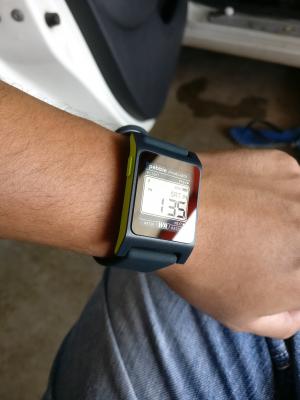
Haha, still using the same watchface as old pebble. bad habits.


Attached thumbnail(s)
Attached Image
huislaw
post Jan 14 2017, 01:55 PM

Regular
******
Senior Member
1,344 posts

Joined: Jan 2013


QUOTE(mad_man @ Jan 14 2017, 01:31 PM)
thks for the detailed guide.. appreciate it.. still face a problem though.. transfer stop at 61% and keep asking me to get distributor certificate eventhough I have registered for 1... any1 facing similar issues and how to resolve? tried installing the distributor cert before upload in project menu and also during upload.. both fail
*
Need to click build every single time you want to transfer.
johnsontys
post Jan 14 2017, 03:26 PM

Getting Started
**
Junior Member
175 posts

Joined: May 2010


QUOTE(huislaw @ Jan 14 2017, 01:55 PM)
Need to click build every single time you want to transfer.
*
My issue is that I am able to load the watchface to my Gear S3, but I am not able to load the High-Color for the Always on State. only able to load the Low-Color

Is there a way to load the High-Colour for the Always on State?
sonotme
post Jan 14 2017, 04:10 PM

Regular
******
Senior Member
1,715 posts

Joined: Sep 2009


QUOTE(d33pbluez @ Jan 12 2017, 10:36 AM)
Here is the breakdown instruction on how to do it. Hope it will help others in the process... Rather then some ppl just ask to search google.

1. Make sure you computer / laptop are connected to router via cable (Not Wifi, A common misunderstanding mistake for those who use laptop or dongle)
2. Make sure you have Author Cert (With samsung Account) register. Before do anything.
3. Make sure you have Distributor Cert (With Samsung Account) register. This would require your watch to connected with the Gear watch design before you can register them.. P/S: it can be done after step 6
3. Load the the watch face.
4. Press F10 or go to project > Build to build your face watch .GWD to .TPK
5. Press F9 or go to  project > Run on devices
6. Then there is a menu "Connect  to gear" pop up. Click on the plus sign. Key in the IP address you get from your watch. (Setting > Connection > WIFI > WIFI Network > Click on the wifi your on > Scroll down > IP)
7. Make sure you watch is in debugging mode (Settings > Gear info > Scroll down > Debugging mode)
8. You watch will show up on the "Connect to gear" menu. Click on it.

Note 1: If you don't have Distributor Cert registered. The transfer will stop at 61% an error will pop up.
Note 2: Author & Distributor Cert and Registered can be found at Gear Watch design app under Project

*
i can't build because it says i'm not connected to my device. but when I click connect to device, i insert my Gear ip, but nothing happened. How?
huislaw
post Jan 14 2017, 05:04 PM

Regular
******
Senior Member
1,344 posts

Joined: Jan 2013


QUOTE(sonotme @ Jan 14 2017, 04:10 PM)
i can't build because it says i'm not connected to my device. but when I click connect to device, i insert my Gear ip, but nothing happened. How?
*
I can build without connecting the gear, just in case we are looking at different build button, the build shortcut is F10.

Make sure gear is in debug more. If still cannot try to restart the gear.
rayzrblade
post Jan 14 2017, 10:41 PM

You are nobody in cyberworld
*******
Senior Member
5,040 posts

Joined: Nov 2005


Finally got my frontier..

I came a long way since gear till gear 3 and I don't see much improvement in terms of software.. The hardware did improved a lot. But they still lag of apps.. And some basic functions like wechat till now still can't reply anything.. Android wear already can reply text or even record 30seconds voice or read the whole conversation n stickers...

Anybody feel me? Hehe


Attached thumbnail(s)
Attached Image
mad_man
post Jan 15 2017, 06:55 AM

Getting Started
**
Junior Member
94 posts

Joined: Sep 2009
QUOTE(huislaw @ Jan 14 2017, 01:55 PM)
Need to click build every single time you want to transfer.
*
thks..will try it out..

270 Pages « < 120 121 122 123 124 > » Top
 

Change to:
| Lo-Fi Version
0.0249sec    0.63    6 queries    GZIP Disabled
Time is now: 14th December 2025 - 12:59 PM