Welcome Guest ( Log In | Register )

488 Pages « < 454 455 456 457 458 > » Bottom

Outline · [ Standard ] · Linear+

 The Official Maxis FTTH Thread | v5, Maxis Home Fibre Internet, from RM89

views
     
mrfique
post Aug 3 2024, 02:28 PM

New Member
*
Newbie
2 posts

Joined: Aug 2012
Hi all,

A noobies question. Currently i am using 100 Mbps Maxis Fibre. I managed to find 3 Huawei (LG8245X6) and 3 TP-Link (EX-510) router. I am thinking of using a Mesh Wifi at my new house (3 Storey, 2700 sq ft). Which brand is better in terms of stability, security and coverage, Huawei or TP-Link?

TQ In advance.

This post has been edited by mrfique: Aug 3 2024, 02:29 PM
QuantumEdge
post Aug 7 2024, 12:23 PM

Regular
******
Senior Member
1,597 posts

Joined: Jan 2016


Soyacincau:
Several Malaysian telcos/ISPs including TM, Time, Maxis, U Mobile and CelcomDigi have been found implementing Transparent DNS Proxy. This forces internet traffic to go through a local DNS even if you use Public DNS such as Google and Cloudflare. As a result, blocked websites are inaccessible even with Public DNS.

Time to go VPN/DNS over HTTPS
Keatsan
post Aug 7 2024, 05:02 PM

If it ain't broke, don't 6ix it
******
Senior Member
1,218 posts

Joined: Jan 2010
From: Today 06.09 am
QUOTE(QuantumEdge @ Aug 7 2024, 12:23 PM)
Soyacincau:
Several Malaysian telcos/ISPs including TM, Time, Maxis, U Mobile and CelcomDigi have been found implementing Transparent DNS Proxy. This forces internet traffic to go through a local DNS even if you use Public DNS such as Google and Cloudflare. As a result, blocked websites are inaccessible even with Public DNS.

Time to go VPN/DNS over HTTPS
*
I hope Asus router DoT function can override it. No?
QuantumEdge
post Aug 7 2024, 05:53 PM

Regular
******
Senior Member
1,597 posts

Joined: Jan 2016


QUOTE(Keatsan @ Aug 7 2024, 05:02 PM)
I hope Asus router DoT function can override it. No?
*
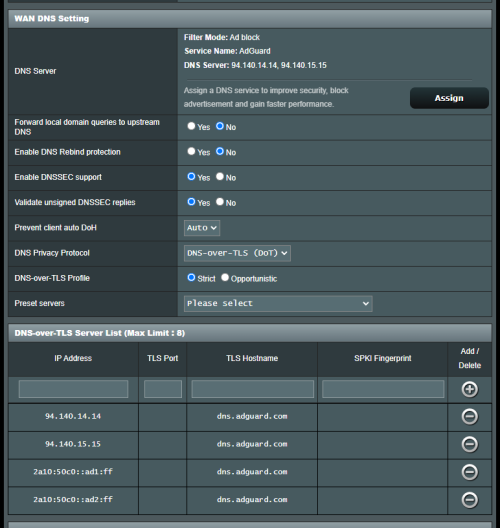
user posted image
First thing to do when I'm back home
* Funny thing, I cant get Adguard DoT to work
But Cloudflare no problem at all

This post has been edited by QuantumEdge: Aug 7 2024, 05:56 PM
PRSXFENG
post Aug 7 2024, 07:46 PM

Look at all my stars!!
*******
Senior Member
2,608 posts

Joined: Nov 2020


QUOTE(QuantumEdge @ Aug 7 2024, 05:53 PM)
user posted image
First thing to do when I'm back home
* Funny thing, I cant get Adguard DoT to work
But Cloudflare no problem at all
*
Because that's not their address whistling.gif

https://adguard-dns.io/en/public-dns.html

tls://dns.adguard-dns.com
PRSXFENG
post Aug 7 2024, 07:47 PM

Look at all my stars!!
*******
Senior Member
2,608 posts

Joined: Nov 2020


QUOTE(mrfique @ Aug 3 2024, 02:28 PM)
Hi all,

A noobies question. Currently i am using 100 Mbps Maxis Fibre. I managed to find 3 Huawei (LG8245X6) and 3 TP-Link (EX-510) router. I am thinking of using a Mesh Wifi at my new house (3 Storey, 2700 sq ft). Which brand is better in terms of stability, security and coverage, Huawei or TP-Link?

TQ In advance.
*
Personally I'll go with TP-Link
QuantumEdge
post Aug 7 2024, 09:20 PM

Regular
******
Senior Member
1,597 posts

Joined: Jan 2016


QUOTE(PRSXFENG @ Aug 7 2024, 07:46 PM)
Because that's not their address  whistling.gif

https://adguard-dns.io/en/public-dns.html

tls://dns.adguard-dns.com
*
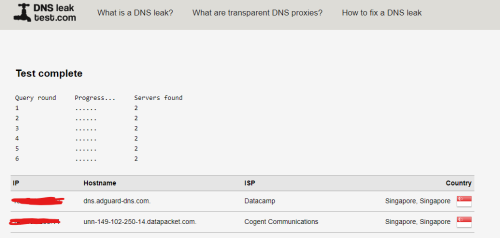
If I use tls://dns.adguard-dns.com, straightaway DC
dns.adguard.com no problem thou

user posted image
Keatsan
post Aug 9 2024, 09:19 AM

If it ain't broke, don't 6ix it
******
Senior Member
1,218 posts

Joined: Jan 2010
From: Today 06.09 am
QUOTE(QuantumEdge @ Aug 7 2024, 09:20 PM)
If I use tls://dns.adguard-dns.com, straightaway DC
dns.adguard.com no problem thou

user posted image
*
Try adding dns.adguard-dns.com instead.

Drop the tls://
QuantumEdge
post Aug 9 2024, 02:47 PM

Regular
******
Senior Member
1,597 posts

Joined: Jan 2016


QUOTE(Keatsan @ Aug 9 2024, 09:19 AM)
Try adding dns.adguard-dns.com instead.

Drop the tls://
*
Thanks
mrfique
post Aug 12 2024, 06:32 PM

New Member
*
Newbie
2 posts

Joined: Aug 2012
QUOTE(PRSXFENG @ Aug 7 2024, 07:47 PM)
Personally I'll go with TP-Link
*
Ok..baik
Anime in HD
post Aug 14 2024, 07:23 PM

Regular
******
Senior Member
1,510 posts

Joined: Oct 2016
From: Celcom Internet 4G × Malaysia
Idk what is happen today. But, Maxis Fibre 100Mbps in TM speed capped area no more cap at 93Mbps. Download files before stuck at 92~93Mbps. But now, easily reach 95~100Mbps..even above 200Mbps speed spike when first click download..

user posted image
ngyinchew
post Aug 14 2024, 09:58 PM

Getting Started
**
Junior Member
203 posts

Joined: Oct 2010


Wanna to ask 1 thing, if I switch from other isp to maxis, I need terminate manually then only subscribe to maxis, or maxis will do for us for switching from other?
Oltromen Ripot
post Aug 15 2024, 07:57 AM

👍 999999 person Likes this member
*******
Senior Member
4,034 posts

Joined: Dec 2019
QUOTE(ngyinchew @ Aug 14 2024, 09:58 PM)
Wanna to ask 1 thing, if I switch from other isp to maxis, I need terminate manually then only subscribe to maxis, or maxis will do for us for switching from other?
*
DON'T YOU DARE TERMINATE FIRST FROM CURRENT ISP.

once you terminate your current subscription, the fibre port that is currently was previously assigned to your premise will be snapped by those in waiting list.
what talk cock about "switching" when what really happened is you already releasing your port? and your next subscription need to re-enter at the back of same waiting list?

--

just like Mobile Number Portability (MNP):
register your switching application with your next receiving ISP.
get transfer ID, which you will then present to notify your current ISP of your intent to switch.
they will do the necessary (including coaxing you to not switch ISP, if you are worthy 😜).
if you still insists proceed, your new ISP will arrange to visit your premise to switch equipment.

there will be a period of time when both your ISPs will overlap charging your subscription. some ktards said even for 2 weeks(!).
that is normal practice to the ISP (even though our wallets are protesting), as they finalise the switching in the backend systems. last kopek at our wallet lah.
after all, you also want to make sure your new ISP can deliver before the old ISP really disconnect.

QuantumEdge
post Aug 15 2024, 08:23 AM

Regular
******
Senior Member
1,597 posts

Joined: Jan 2016


QUOTE(ngyinchew @ Aug 14 2024, 09:58 PM)
Wanna to ask 1 thing, if I switch from other isp to maxis, I need terminate manually then only subscribe to maxis, or maxis will do for us for switching from other?
*
If you terminate instead of transfer, the particular port you used will be locked
That means if that area is out of port, congratulations... you cant register for any service untill they releast the port
Dont to this, register at Maxis, get the transfer ID
They will guide you through

DO NOT TERMINATE
Personal experience here
ngyinchew
post Aug 15 2024, 10:24 AM

Getting Started
**
Junior Member
203 posts

Joined: Oct 2010


QUOTE(Oltromen Ripot @ Aug 15 2024, 07:57 AM)
DON'T YOU DARE TERMINATE FIRST FROM CURRENT ISP.

once you terminate your current subscription, the fibre port that is currently was previously assigned to your premise will be snapped by those in waiting list.
what talk cock about "switching" when what really happened is you already releasing your port? and your next subscription need to re-enter at the back of same waiting list?

--

just like Mobile Number Portability (MNP):
register your switching application with your next receiving ISP.
get transfer ID, which you will then present to notify your current ISP of your intent to switch.
they will do the necessary (including coaxing you to not switch ISP, if you are worthy 😜).
if you still insists proceed, your new ISP will arrange to visit your premise to switch equipment.

there will be a period of time when both your ISPs will overlap charging your subscription. some ktards said even for 2 weeks(!).
that is normal practice to the ISP (even though our wallets are protesting), as they finalise the switching in the backend systems. last kopek at our wallet lah.
after all, you also want to make sure your new ISP can deliver before the old ISP really disconnect.
*
Thanks for the advice, never did tat before, now I know
YoungMan
post Aug 15 2024, 07:42 PM

Look at all my stars!!
*******
Senior Member
6,806 posts

Joined: Oct 2008
From: Kuala Lumpur


QUOTE(Anime in HD @ Aug 14 2024, 07:23 PM)
Idk what is happen today. But, Maxis Fibre 100Mbps in TM speed capped area no more cap at 93Mbps. Download files before stuck at 92~93Mbps. But now, easily reach 95~100Mbps..even above 200Mbps speed spike when first click download..

user posted image
*
My area in Kuching here still got speed capped. Waiting for the day when there is no capping.

aeonsakura
post Aug 15 2024, 10:01 PM

Casual
***
Junior Member
372 posts

Joined: Nov 2010


now my fibre cable broken due to mouse bite, will unifi accept terminate and reapply or i just transfer to other service provider?
Anime in HD
post Aug 15 2024, 10:33 PM

Regular
******
Senior Member
1,510 posts

Joined: Oct 2016
From: Celcom Internet 4G × Malaysia
QUOTE(YoungMan @ Aug 15 2024, 07:42 PM)
My area in Kuching here still got speed capped. Waiting for the day when there is no capping.
*
Hmm. I think TM change OLT in my area. Not sure... hmm.gif
Speedtest result. Data usage now slightly bump. Despite different from 92~93Mbps to 95~100Mbps... too bad, only me use Maxis in my taman area. Cannot see difference. Will try get 300Mbps later in the next 2~3 years. When another round of price cut happen.. brows.gif Speed capped area for that plan suppose to be 270~280Mbps..
» Click to show Spoiler - click again to hide... «

YoungMan
post Aug 16 2024, 02:58 PM

Look at all my stars!!
*******
Senior Member
6,806 posts

Joined: Oct 2008
From: Kuala Lumpur


QUOTE(aeonsakura @ Aug 15 2024, 10:01 PM)
now my fibre cable broken due to mouse bite, will unifi accept terminate and reapply or i just transfer to other service provider?
*
Cable broken just report to customer service to get technician come and fix. No need to terminate or switch provider.

QUOTE(Anime in HD @ Aug 15 2024, 10:33 PM)
Hmm. I think TM change OLT in my area. Not sure... hmm.gif
Speedtest result. Data usage now slightly bump. Despite different from 92~93Mbps to 95~100Mbps... too bad, only me use Maxis in my taman area. Cannot see difference. Will try get 300Mbps later in the next 2~3 years. When another round of price cut happen.. brows.gif Speed capped area for that plan suppose to be 270~280Mbps..
» Click to show Spoiler - click again to hide... «

*
Good.. Hopefully as they change OLT the speed capped is lifted.
Oltromen Ripot
post Aug 16 2024, 03:00 PM

👍 999999 person Likes this member
*******
Senior Member
4,034 posts

Joined: Dec 2019
QUOTE(aeonsakura @ Aug 15 2024, 10:01 PM)
now my fibre cable broken due to mouse bite, will unifi accept terminate and reapply or i just transfer to other service provider?
*
.... that's like cutting off the leg just because your toenails got exposed after stumbling.

488 Pages « < 454 455 456 457 458 > » Top
 

Change to:
| Lo-Fi Version
0.0215sec    0.72    6 queries    GZIP Disabled
Time is now: 11th December 2025 - 08:04 AM