Welcome Guest ( Log In | Register )

Bump Topic Topic Closed RSS Feed
83 Pages « < 77 78 79 80 81 > » Bottom

Outline · [ Standard ] · Linear+

Maxis The Official LYN Maxis Wireless (3G/3.5G) Thread, Now it comes with soap !

views
     
antho88
post Oct 2 2007, 08:00 PM

Getting Started
**
Junior Member
72 posts

Joined: Dec 2006


QUOTE(MC_Amig0 @ Oct 2 2007, 02:32 PM)
mac osx doesnt detect the modem by itself. you have to install the driver. (i assume Huawei DataCard driver) you have the configure it and viola...
*
configure it and viola????i also newbie of mac...what should i do now???
cscheat
post Oct 2 2007, 08:12 PM

V.V.I.P member
******
Senior Member
1,262 posts

Joined: Aug 2005
From: Mars


QUOTE(cloudstrife07 @ Oct 2 2007, 11:48 AM)
WHAT  THE F******** FAST SPEED!!!!!!

user posted image

using maxis wbb starter package 384kbps.i hope it'll remain like this forever :tongue.gif


Added on October 2, 2007, 9:56 amand this:

user posted image

user posted image

user posted image

guess maxis really has upgraded its network?
*
WOW ! what the Fxxx ? i wonder when can i get that speed of my dream ? shocking.gif shocking.gif

QUOTE(antho88 @ Oct 2 2007, 02:48 PM)
i also use the same  huaiwei e220 like you...but when i plug in,it wrote something like can't detect the device..do i need to install the setup???got 2 setup...one is intel and another one is power...i installed both...but no reaction....why???
*
Pls help this guy ! he is my housemate rclxm9.gif rclxm9.gif rclxm9.gif !!! meaning 2 E220 RM138 package in the same house ! He use Mac, i use VISTA... wondering Maxis bb Speed Difference between Mac vs Vista whistling.gif
prasys
post Oct 2 2007, 09:26 PM

Heros Never Die
Group Icon
VIP
12,925 posts

Joined: Mar 2005
From: Kuala Lumpur
user posted image

They call this upgrading. I dont know whats going on with them. It seems that they dont a give a damn on their old customers. I use to get very good speeds and now this. Phew....I am going to call them and tell them that I'm just going to pay 10% of it. Cause i am getting 10% of the advertised speed
sui
post Oct 2 2007, 09:27 PM

Getting Started
**
Junior Member
115 posts

Joined: Dec 2004


i subscribed to the Power package (3.6mb peak) also i cant even reach 300kbps (even when im connected to their HSDPA network)

and now they charge RM 25 for downgrading

want play DOTA on b|ueserver also cannot, lag like mad

user posted image


This post has been edited by sui: Oct 2 2007, 09:31 PM
prasys
post Oct 2 2007, 09:32 PM

Heros Never Die
Group Icon
VIP
12,925 posts

Joined: Mar 2005
From: Kuala Lumpur
Great , they are cheating old users. Nice job maxis. It seems that they love new users very much. Typical maxis trick (as I expected)...Keep up the good job. What excuse are you going to give

Oh THEY STILL DO NOT ADMIT THEIR FAULT. Their customer support staff does not even know what is going on. Oh god...Now I am starting to rant. Give me 700Kbps++ for local link and I'll keep quiet. Seriously , I am not asking 3.6Mbps..Just 700Kbps is enough for me (local link)
digilife
post Oct 2 2007, 09:40 PM

The MNP guy, its me yeah.
*******
Senior Member
8,025 posts

Joined: Feb 2005
From: Planet Boleland


QUOTE(sui @ Oct 2 2007, 09:27 PM)
i subscribed to the Power package (3.6mb peak) also i cant even reach 300kbps (even when im connected to their HSDPA network)

and now they charge RM 25 for downgrading

want play DOTA on b|ueserver also cannot, lag like mad

user posted image
*
bro giv celcom a try tongue.gif
prasys
post Oct 2 2007, 09:46 PM

Heros Never Die
Group Icon
VIP
12,925 posts

Joined: Mar 2005
From: Kuala Lumpur
Celcom has few other major disadvantages compared to Maxis and the best part is that they use this IP '219.93.152.3' <-- please go and check as it will be your IP wherever you go

http://www.google.com/search?q=219.93.152.3

On top of that , its been blocked by Project Honeymoon for its spamming. So In other words , One Malaysia (aka Whole of Celcom Broadband users are tied behind one single IP. If some idiot continues to abuse the service , the rest has to suffer). On the other hand , maxis assigns each unique individual IP for every customer (which has an advantage , compared to Celcom). There you go. You be the judge

I rather suffer with slow speed (like I did with JARING) rather then to be tied up in One big mumbo jumbo Shared IP Connection.

http://www.projecthoneypot.org/i_efaeb8253...f415d039a505043

No no no no , I am not Promoting Maxis nor I am pro-Maxis

This post has been edited by prasys: Oct 2 2007, 09:48 PM
digilife
post Oct 2 2007, 09:54 PM

The MNP guy, its me yeah.
*******
Senior Member
8,025 posts

Joined: Feb 2005
From: Planet Boleland


QUOTE(prasys @ Oct 2 2007, 09:46 PM)
Celcom has few other major disadvantages compared to Maxis and the best part is that they use this IP '219.93.152.3' <-- please go and check as it will be your IP wherever you go

http://www.google.com/search?q=219.93.152.3

On top of that , its been blocked by Project Honeymoon for its spamming. So In other words , One Malaysia (aka Whole of Celcom Broadband users are tied behind one single IP. If some idiot continues to abuse the service , the rest has to suffer). On the other hand , maxis assigns each unique individual IP for every customer (which has an advantage , compared to Celcom). There you go. You be the judge

I rather suffer with slow speed (like I did with JARING) rather then to be tied up in One big mumbo jumbo Shared IP Connection.

http://www.projecthoneypot.org/i_efaeb8253...f415d039a505043

No no no no , I am not Promoting Maxis nor I am pro-Maxis
*
my dear fren,

i dun care wat ever one ip assigned to all of malaysial ppl , as long i can surf at more than 384 kbps on a rm68/ mth package ...............tats called sial package..........

ie
pay for 384 and can surf at more than 384Attached Image

This post has been edited by digilife: Oct 2 2007, 10:06 PM
prasys
post Oct 2 2007, 09:57 PM

Heros Never Die
Group Icon
VIP
12,925 posts

Joined: Mar 2005
From: Kuala Lumpur
But then you will face a problem. If your IP Address is blocked. You will have a problem such as certain MMORPG , Games and certain application that does not allow you to have more then 1 concurrent connections. But then if you are just using it for surfing , its not a problem. There is a problem there. I've just found out that Celcom has not really secured their proxy server and its currently blacklisted by few Spambots etc. So there is a problem there. I hope Celcom looks into that matter.
digilife
post Oct 2 2007, 10:08 PM

The MNP guy, its me yeah.
*******
Senior Member
8,025 posts

Joined: Feb 2005
From: Planet Boleland


QUOTE(prasys @ Oct 2 2007, 09:57 PM)
But then you will face a problem. If your IP Address is blocked. You will have a problem such as certain MMORPG , Games and certain application that does not allow you to have more then 1 concurrent connections. But then if you are just using it for surfing , its not a problem. There is a problem there. I've just found out that Celcom has not really secured their proxy server and its currently blacklisted by few Spambots etc. So there is a problem there. I hope Celcom looks into that matter.
*
i hav edited my previous post to include a screenshot of my speed test and it still in haywire mode to let me surf at more than 384......... rclxms.gif rclxms.gif rclxms.gif
prasys
post Oct 2 2007, 10:10 PM

Heros Never Die
Group Icon
VIP
12,925 posts

Joined: Mar 2005
From: Kuala Lumpur
Thats great. Its because TM has a large backbone. Sadly , they still dont assign each individual address for Celcom Broadband users. Other then that , it seems to be a good alternative to maxis
digilife
post Oct 2 2007, 10:13 PM

The MNP guy, its me yeah.
*******
Senior Member
8,025 posts

Joined: Feb 2005
From: Planet Boleland


QUOTE(prasys @ Oct 2 2007, 10:10 PM)
Thats great.  Its because TM has a large backbone. Sadly , they still dont assign each individual address for Celcom Broadband users. Other then that , it seems to be a good alternative to maxis
*
tats was my intention to contribute here

notworthy.gif notworthy.gif
SUSvmammoth
post Oct 2 2007, 10:49 PM

Getting Started
**
Junior Member
265 posts

Joined: Feb 2006
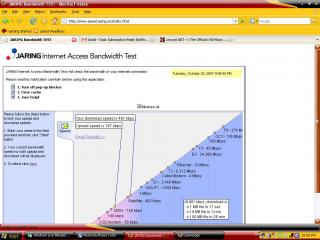
This is my speed test. Tested in George Town, Penang, very strong signal.
user posted image

user posted image

And of course, you call this broadband....

This post has been edited by vmammoth: Oct 2 2007, 11:11 PM
cloudstrife07
post Oct 3 2007, 12:02 AM

I'm back, beaches!
*******
Senior Member
4,688 posts

Joined: Jan 2003
From: http://127.0.0.1


QUOTE(prasys @ Oct 2 2007, 09:32 PM)
Great , they are cheating old users. Nice job maxis. It seems that they love new users very much. Typical maxis trick (as I expected)...Keep up the good job. What excuse are you going to give

Oh THEY STILL DO NOT ADMIT THEIR FAULT. Their customer support staff does not even know what is going on. Oh god...Now I am starting to rant. Give me 700Kbps++ for local link and I'll keep quiet. Seriously , I am not asking 3.6Mbps..Just 700Kbps is enough for me (local link)
*
as i expected, the uber insanely high download and upload speed are merely for testing only.

my speed right now:

user posted image

what the F is my upload speed higher than download? doh.gif
jeremy05
post Oct 3 2007, 09:54 AM

software engineer
******
Senior Member
1,851 posts

Joined: Apr 2005
From: kuala lumpur


hi guy, yesterday and today, morning(8am to 9am) i test the speed with speedtest.net, maxisbb bandwidth test and tm speedometer test.

Im using 384kbps package for around 1 month, the speed reach up to 1mb!!! i wonder why can reach so high ler...just like some other guy can get higer speed...

i live in kepong area, near jaya jusco metro prima...

This post has been edited by jeremy05: Oct 3 2007, 09:55 AM
kevyon6
post Oct 3 2007, 10:31 AM

Getting Started
**
Junior Member
179 posts

Joined: May 2006
From: Kuala Lumpur


i tried this morning also and its fast. at night only the speed comes to a crawling state. i think its either i downgrade my line to 384 package and pay rm68 every month instead of paying rm98 for 3.6Mbps OR just cut it and try Izzinet.
prasys
post Oct 3 2007, 02:28 PM

Heros Never Die
Group Icon
VIP
12,925 posts

Joined: Mar 2005
From: Kuala Lumpur
The speed during the wee hours of morning is pretty fast. But then I don't use the Internet during the daytime as I've to attend college. So its pretty useless. During the nightime , when i really need it..bam it does not work
JWCheah
post Oct 3 2007, 06:09 PM

Getting Started
**
Junior Member
251 posts

Joined: Sep 2007


QUOTE(prasys @ Oct 3 2007, 02:28 PM)
The speed during the wee hours of morning is pretty fast. But then I don't use the Internet during the daytime as I've to attend college. So its pretty useless. During the nightime , when i really need it..bam it does not work
*
Topic : Open SSH and tunnel everything thru it using PuTTY.

Hi, i've experiment this on Maxis WBB USB and somehow manage to open a port "60000" verified by Advanced Port Scanner v1.3.
The d/l speed did not change much but when i Telnet my IP (or 'double-click' on port 60000 at the Port scanner), my uTorrent shows
the beautiful "GREEN" tick at the bottom and speed started to surge forward by as much as 100%. But this could not last for more than
5 minutes. but as soon as I re-do it again, the speed gone up again. It is like "ping-ing" a port but you can't do it without telnet. I've
checked the Port forwarded test at uTorrent and it still shows "Error! Port 60000 does not appear to be open."

Any advice? With the above method, my Torrent d/l speed jumps from 15kB/s to 30-35 kB/s.

=======================================================================================
cj

riku2replica
post Oct 4 2007, 06:17 AM

Mugi-chan!! 可愛い!!
*******
Senior Member
3,304 posts

Joined: Mar 2006
From: Chicago(Port25)
QUOTE(JWCheah @ Oct 3 2007, 06:09 PM)
Topic : Open SSH and tunnel everything thru it using PuTTY.

Hi, i've experiment this on Maxis WBB USB and somehow manage to open a port "60000" verified by Advanced Port Scanner v1.3.
The d/l speed did not change much but when i Telnet my IP (or 'double-click' on port 60000 at the Port scanner), my uTorrent shows
the beautiful "GREEN" tick at the bottom and speed started to surge forward by as much as 100%. But this could not last for more than
5 minutes. but as soon as I re-do it again, the speed gone up again. It is like "ping-ing" a port but you can't do it without telnet. I've
checked the Port forwarded test at uTorrent and it still shows "Error! Port 60000 does not appear to be open."

Any advice? With the above method, my Torrent d/l speed jumps from 15kB/s to 30-35 kB/s.

=======================================================================================
cj
*
Bro, are you staying in cyberjaya? Did they manage to cover the Cyberia Condo here?
asiatrader98
post Oct 4 2007, 07:48 AM

Regular
******
Senior Member
1,485 posts

Joined: Dec 2005
QUOTE(jeremy05 @ Oct 3 2007, 09:54 AM)
hi guy, yesterday and today, morning(8am to 9am) i test the speed with speedtest.net, maxisbb bandwidth test and tm speedometer test.

Im using 384kbps package for around 1 month, the speed reach up to 1mb!!! i wonder why can reach so high ler...just like some other guy can get higer speed...

i live in kepong area, near jaya jusco metro prima...
*
yes, this few days..........the speed is great ...And i can get the speed reach up to 1mb too & emule up to 50~80kB/s (max to 100kB/s++) .....but i just hope the connection is stable rather than the speed.....I am using 384kbps package around segambut, kepong baru & damasara heigh area

This post has been edited by asiatrader98: Oct 4 2007, 07:48 AM

83 Pages « < 77 78 79 80 81 > » Top
Topic ClosedOptions
 

Change to:
| Lo-Fi Version
0.0264sec    0.55    6 queries    GZIP Disabled
Time is now: 8th December 2025 - 05:12 PM