

QUOTE(Cloud2322 @ Apr 9 2015, 10:33 AM)
Haiya! Need to travel back again 

Well I guess I'm lucky that my Z5 is v1. No screen bleeding or dead pixel problem. illegear z5 discussion thread, anything and everything about the beast
|
|
 Apr 9 2015, 12:02 PM Apr 9 2015, 12:02 PM
|
 
Senior Member
1,236 posts Joined: Apr 2013 
|
QUOTE(Cloud2322 @ Apr 9 2015, 10:33 AM) Haiya! Need to travel back again Well I guess I'm lucky that my Z5 is v1. No screen bleeding or dead pixel problem. |
|
|
|
|
|
Apr 9 2015, 12:05 PM
|

Junior Member
42 posts Joined: Aug 2010
|
== I guess I have to buy warranty for on site service
Very suffer leh if I have to drive from johor to pj |
|
|
Apr 9 2015, 12:14 PM
|

Junior Member
275 posts Joined: Dec 2005
|
QUOTE(miong93 @ Apr 9 2015, 12:02 PM) Well I guess I'm lucky that my Z5 is v1. No screen bleeding or dead pixel problem. The 2 Z5 v2 laptops at my place have no screen bleeding or dead pixels either. |
|
|
Apr 9 2015, 01:23 PM
|

Junior Member
517 posts Joined: May 2010 From: Your Heart 
|
QUOTE(randytsx @ Apr 9 2015, 12:14 PM) The 2 Z5 v2 laptops at my place have no screen bleeding or dead pixels either. Can you snap a picture of you screen in low light places with blacklight background? Cause if you check under a high light exposure room, you won't notice the screen bleeding. |
|
|
Apr 9 2015, 01:34 PM
|

Senior Member
1,567 posts Joined: Jul 2011 From: Grand Ol' Lady 
|
QUOTE(miong93 @ Apr 9 2015, 12:02 PM) Well I guess I'm lucky that my Z5 is v1. No screen bleeding or dead pixel problem. i second this. everything works perfect. and i tested what all the sifus asked to test like usb screen etc  |
|
|
Apr 9 2015, 01:54 PM
|
|
Senior Member
2,094 posts Joined: Jan 2008
|
QUOTE(randytsx @ Apr 9 2015, 12:14 PM) The 2 Z5 v2 laptops at my place have no screen bleeding or dead pixels either. ya bro, post picture here so that its easy for people to make comparison later.  |
|
|
|
|
|
Apr 9 2015, 04:18 PM
|

Senior Member
3,928 posts Joined: Jan 2012
|
QUOTE(miong93 @ Apr 9 2015, 12:02 PM) Well I guess I'm lucky that my Z5 is v1. No screen bleeding or dead pixel problem. QUOTE(christ14 @ Apr 9 2015, 01:34 PM) i second this. everything works perfect. and i tested what all the sifus asked to test like usb screen etc can say lucky la..coz we decided to just stick to the normal lcd, not the ips lcdQUOTE(randytsx @ Apr 9 2015, 12:14 PM) The 2 Z5 v2 laptops at my place have no screen bleeding or dead pixels either. gambar bro |
|
|
Apr 9 2015, 07:59 PM
|

Senior Member
639 posts Joined: Jan 2003
|
It's normal IPS will have some degree of bleeding
but under normal usage u won't even notice it, who stare at black screen anyway? |
|
|
 Apr 9 2015, 08:05 PM Apr 9 2015, 08:05 PM
|

Junior Member
101 posts Joined: Dec 2014
|
guys check attachment first. Is that mean that we can play gta v in 30FPS on z5 gtx860m 4gb vram?
Attached thumbnail(s) 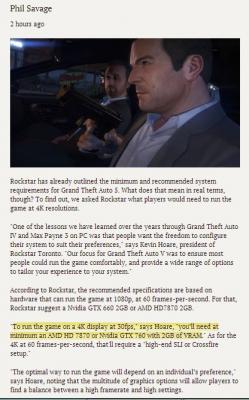
|
|
|
Apr 9 2015, 08:11 PM
|
|
Senior Member
1,236 posts Joined: Apr 2013
|
QUOTE(MgrSagaaboyz @ Apr 9 2015, 08:05 PM) guys check attachment first. Is that mean that we can play gta v in 30FPS on z5 gtx860m 4gb vram? The article is talking about desktop gpu, gtx760 not gtx760m. Take note about the M postfix. GTX 760 > GTX 860M |
|
|
Apr 9 2015, 08:55 PM
|
|
Junior Member
517 posts Joined: May 2010 From: Your Heart
|
QUOTE(wingwp @ Apr 9 2015, 07:59 PM) It's normal IPS will have some degree of bleeding Its about the quality. Not about staring at black screen or not. Its a gaming laptop anyway, and most games have dark corners so somehow you'll notice it sometimes.but under normal usage u won't even notice it, who stare at black screen anyway? But do you think this is acceptable? |
|
|
Apr 9 2015, 09:14 PM
|
|
Senior Member
639 posts Joined: Jan 2003
|
my LG IPS also bleed at corners, before i read up article about these IPS bleeding issue I am totally fine with gaming or movie even on darker images
only when u looking at full screen of black u'll get annoyed I say just try a few game or movie see if it's ok or not else use back TN since Illegear claim the panel is high quality y not check out the model urself? QUOTE(Cloud2322 @ Apr 9 2015, 08:55 PM) Its about the quality. Not about staring at black screen or not. Its a gaming laptop anyway, and most games have dark corners so somehow you'll notice it sometimes. But do you think this is acceptable? |
|
|
Apr 10 2015, 09:50 AM
|

Junior Member
65 posts Joined: Apr 2012
|
QUOTE(Cloud2322 @ Apr 9 2015, 12:48 AM) GG.. I think IPS display got problem.. Mine is having serious screen bleeding.. However, there's 0 dead pixel. Check this out Prince J Please take note of this too. And anyone who is getting their z5 COD, please check your screen on the spot so you don't have to go back and forth.. This is V2 Z5 with IPS display » Click to show Spoiler - click again to hide... « Description: When it's on lowest brightness level no screen bleeding. But when I set it one level higher the problem occur. V1 Z5, tested at different brightness. » Click to show Spoiler - click again to hide... « QUOTE(zuhaili87 @ Apr 9 2015, 09:14 AM) Actually yours is quite ok compared to @fr3eze one, he got the worst screen bled ive ever seen. Btw may i know what IPS panel this new Z5 use? Quite bad quality if u asked me. Yes, I urge the Z5 buyers must do a thorough checking on the screen quality upon receiving the machine. Ask them to check for you if you opt for shipping method like I did. It is doubtful for me since they claim that A+ grade screen is being used here, and possibly it is the poor installation causes the bleeding problem though  My screen bleeding is very noticeable even under normal room lighting on darker screen. QUOTE(Prince J @ Apr 9 2015, 10:31 AM) Hi Cloud2322, Actually I did my research on screen bleeding issue between IPS and TN on Google. And I could not found any facts nor reviews saying IPS tends to have more bleeding than TN typically. The overall conclusion from my amateur researches is, IPS is better in everything compared to TN except for the slight response time difference and price. IPS screen has more backlit bleeding than TN screen and to be frank your screen bleeding level is ok. You can visit us and let us take a closer look of it though. Thanks.  This post has been edited by fr3eze: Apr 10 2015, 10:02 AM |
|
|
|
|
|
Apr 10 2015, 09:57 AM
|

Junior Member
36 posts Joined: Dec 2014
|
my dell ultrasharp bought 2 year ago also got corner bleeding, i call dell they say normal cannot exchange.
|
|
|
Apr 10 2015, 10:18 AM
|
|
Senior Member
639 posts Joined: Jan 2003
|
ya TN panel wil also have bleeding issue.. if urs is really bad no choice u have to bring back to seller, even DELL dun exchange their monitor for bleeding and not cover under warranty
QUOTE(fr3eze @ Apr 10 2015, 09:50 AM) Yes, I urge the Z5 buyers must do a thorough checking on the screen quality upon receiving the machine. Ask them to check for you if you opt for shipping method like I did. It is doubtful for me since they claim that A+ grade screen is being used here, and possibly it is the poor installation causes the bleeding problem though My screen bleeding is very noticeable even under normal room lighting on darker screen. Actually I did my research on screen bleeding issue between IPS and TN on Google. And I could not found any facts nor reviews saying IPS tends to have more bleeding than TN typically. The overall conclusion from my amateur researches is, IPS is better in everything compared to TN except for the slight response time difference and price. |
|
|
Apr 10 2015, 01:38 PM
|
|
Senior Member
1,236 posts Joined: Apr 2013
|
QUOTE(fr3eze @ Apr 10 2015, 09:50 AM) Yes, I urge the Z5 buyers must do a thorough checking on the screen quality upon receiving the machine. Ask them to check for you if you opt for shipping method like I did. It is doubtful for me since they claim that A+ grade screen is being used here, and possibly it is the poor installation causes the bleeding problem though I think there is no screen which has no bleeding issue. Almost all screen I had seem have slight bleeding. My v1 Z5 IPS panel also have slight bleeding, but it is unnotice-able though, even in low light. I need to switch off all light and be in a completely dark room I just can notice the bleeding. If your bleeding is too serious, try ask whether there is a replacement possible. Like what other said, I hardly see any manufacturer exchange a new screen for bleeding case. My screen bleeding is very noticeable even under normal room lighting on darker screen. Actually I did my research on screen bleeding issue between IPS and TN on Google. And I could not found any facts nor reviews saying IPS tends to have more bleeding than TN typically. The overall conclusion from my amateur researches is, IPS is better in everything compared to TN except for the slight response time difference and price. |
|
|
Apr 10 2015, 01:59 PM
|
|
Junior Member
36 posts Joined: Dec 2014
|
QUOTE(wingwp @ Apr 10 2015, 10:18 AM) ya TN panel wil also have bleeding issue.. if urs is really bad no choice u have to bring back to seller, even DELL dun exchange their monitor for bleeding and not cover under warranty erm i think my dell ultrasharp is ips screen. |
|
|
Apr 10 2015, 02:13 PM
|
|
Junior Member
65 posts Joined: Apr 2012
|
QUOTE(miong93 @ Apr 10 2015, 01:38 PM) I think there is no screen which has no bleeding issue. Almost all screen I had seem have slight bleeding. My v1 Z5 IPS panel also have slight bleeding, but it is unnotice-able though, even in low light. I need to switch off all light and be in a completely dark room I just can notice the bleeding. If your bleeding is too serious, try ask whether there is a replacement possible. Like what other said, I hardly see any manufacturer exchange a new screen for bleeding case. Yeah @PrinceJ already offer me to exchange the screen and im very grateful for that. I know all screen have bleeding issue just that the bleeding level is acceptable or not. |
|
|
Apr 10 2015, 03:27 PM
|
|
Senior Member
1,236 posts Joined: Apr 2013
|
QUOTE(fr3eze @ Apr 10 2015, 02:13 PM) Yeah @PrinceJ already offer me to exchange the screen and im very grateful for that. I know all screen have bleeding issue just that the bleeding level is acceptable or not. Good to know then. But I seldom see manufacturer replace a screen even though it has serious bleeding issue. Well at least that is my case. lol |
|
|
Apr 10 2015, 03:35 PM
|

Senior Member
1,272 posts Joined: May 2010 From: Team ILLEGEAR
|
QUOTE(fr3eze @ Apr 10 2015, 09:50 AM) Yes, I urge the Z5 buyers must do a thorough checking on the screen quality upon receiving the machine. Ask them to check for you if you opt for shipping method like I did. It is doubtful for me since they claim that A+ grade screen is being used here, and possibly it is the poor installation causes the bleeding problem though The Z5 screen is assembled in the factory (the same factory that manufacture Alienware FYI), not assembled by ILLEGEAR. My screen bleeding is very noticeable even under normal room lighting on darker screen. Actually I did my research on screen bleeding issue between IPS and TN on Google. And I could not found any facts nor reviews saying IPS tends to have more bleeding than TN typically. The overall conclusion from my amateur researches is, IPS is better in everything compared to TN except for the slight response time difference and price. IPS bleeding is very common in the industry and almost all IPS screens we see have backlit bleeding. If you want something that has less bleeding, go for TN display I suggest. This post has been edited by Prince J: Apr 10 2015, 03:38 PM |
|
Topic ClosedOptions
|
| Change to: |  0.0291sec 0.0291sec
 0.40 0.40
 6 queries 6 queries
 GZIP Disabled GZIP Disabled
Time is now: 3rd December 2025 - 09:06 PM |
 Quote
Quote


