Outline ·
[ Standard ] ·
Linear+
Xiaomi Mi3 Official Thread V13, MIUI 6 official developer released :)
|
briantwj
|
 Aug 11 2014, 02:17 PM Aug 11 2014, 02:17 PM
|

|
QUOTE(danieloo @ Aug 11 2014, 02:11 PM) Yup...my PC was not on the same socket, but was from the same main fuse. The small explosion trip the main fuse to trip. That's why my PC also kena. Nothing relate to phone. Just the extension & adapter burnt. I would conclude the old aged extension & charger. well. Look at the bright side, at least it's just the charger and extension problem. If ur PC and mi3 kena sure gg, nid to spend money to buy new phone again. Coz I think warranty will not cover for this type of situation. Time to buy a new charger and extension. Btw, u can use 2A charger to charge ur mi3 too, will charge slightly faster. But iinm, Mi3 max can accept 1.5A input only. It will auto regulate to 1.5A when charging ur Mi3.  I'm using my Nexus 7 2A charger to charge my Mi3, did notice that it charges a bit faster compared to the stock charger. This post has been edited by briantwj: Aug 11 2014, 02:18 PM |
|
|
|
|
|
mansooriqbal
|
Aug 11 2014, 02:25 PM
|
|
|
QUOTE(briantwj @ Aug 11 2014, 02:17 PM) well. Look at the bright side, at least it's just the charger and extension problem. If ur PC and mi3 kena sure gg, nid to spend money to buy new phone again. Coz I think warranty will not cover for this type of situation. Time to buy a new charger and extension. Btw, u can use 2A charger to charge ur mi3 too, will charge slightly faster. But iinm, Mi3 max can accept 1.5A input only. It will auto regulate to 1.5A when charging ur Mi3. I'm using my Nexus 7 2A charger to charge my Mi3, did notice that it charges a bit faster compared to the stock charger. can we use 2.1A ipad2 charger too? |
|
|
|
|
|
briantwj
|
Aug 11 2014, 02:32 PM
|
|
|
QUOTE(mansooriqbal @ Aug 11 2014, 02:25 PM) can we use 2.1A ipad2 charger too? Not sure. But it shud b the same result i think. Coz Mi3 max input supported is just 1.5A iinm. |
|
|
|
|
|
orangutan
|
Aug 11 2014, 02:40 PM
|
|
|
Let's see if I remember this correctly, read somewhere that if the charger/adapter output is greater than the device , then it should be fine . May not be optimum and may cause damage internally (ie. Battery, circuit) if prolong usage.
DANGER : output is lower than device recommended specs. This will cause the charger to work 'harder' to meet the difference . Hence, may cause an explosion if prolong usage.
Best is to use the device's original charger .
|
|
|
|
|
|
LightningZERO
|
Aug 11 2014, 02:43 PM
|
|
|
Damn it, I got the sms issue again. If I reply via the sms thread, my sms won't be received. But if I go contact and send message from there, only the recipient can receive.
Sigh. Maybe I will do a full reboot or something
|
|
|
|
|
|
suntzulee
|
Aug 11 2014, 02:50 PM
|
Look at all my stars!!

|
regarding charger issue, consult benny888. He will tell you the myth of chargers. i'm using ipad charger which is 2.1A to charge all my devices after listening to him..so far, no issue and happy about it.
|
|
|
|
|
|
movanns
|
Aug 11 2014, 02:57 PM
|
|
|
QUOTE(danieloo @ Aug 11 2014, 12:23 PM) Last night about 11pm, while I was watching movie from my PC & my wife was asleep, I heard a blow up sound, my PC went blank. I had a shock.... Found out that my wife's charger - a 4 years old HTC charger blown up while charging her Mi3. Been charging the Mi3 for the past 3 weeks without any problem. I quickly remove the phone & check, luckily no problem...noticed that, this happen after she updated to the latest ROM V23 & going usual night charging. Now it's back to Xiaomi original charger since the incident. Anyone have this before? Wonder if this is got to do with the new ROM ? I'm sure your extension plug comes with fuse. So if there is a spike on the incoming, the fuse will get burned first. In your case, it might be not the incoming current spike, could be the HTC adapter internal circuit kong (possibly overcurrent) and heat up+blow the adapter. This happen if your adapter Amp rating lower than the charging Amp of the phone. In new adapter, there is a built in protection circuit to protect the adapter from overcurrent and getting hot+burn. Old adapter, I doubt so. You are lucky it is not your phone. By the way, can you run the Battery Monitor widget and see what is the charging flow when you connect your phone to a 2A charger? On the earlier threads, we found out the Mi3 pulls max of 1.7A for charging. |
|
|
|
|
|
hazril
|
Aug 11 2014, 02:57 PM
|
|
|
QUOTE(sengko @ Aug 11 2014, 02:02 PM) I believe you guys has heard about the MI cloud security issue. http://www.soyacincau.com/2014/08/11/xiaom...urity-concerns/Even the just OTA the v23 to fix the problem, but I highly encourage you to install CM security and do a scanning. You will find another leak that need to be fix. towelroot exploit ka bro??i can detect that one only on my phone... |
|
|
|
|
|
danieloo
|
Aug 11 2014, 03:01 PM
|
|
|
QUOTE(orangutan @ Aug 11 2014, 02:40 PM) Let's see if I remember this correctly, read somewhere that if the charger/adapter output is greater than the device , then it should be fine . May not be optimum and may cause damage internally (ie. Battery, circuit) if prolong usage. DANGER : output is lower than device recommended specs. This will cause the charger to work 'harder' to meet the difference . Hence, may cause an explosion if prolong usage. Best is to use the device's original charger . QUOTE(movanns @ Aug 11 2014, 02:57 PM) I'm sure your extension plug comes with fuse. So if there is a spike on the incoming, the fuse will get burned first. In your case, it might be not the incoming current spike, could be the HTC adapter internal circuit kong (possibly overcurrent) and heat up+blow the adapter. This happen if your adapter Amp rating lower than the charging Amp of the phone. In new adapter, there is a built in protection circuit to protect the adapter from overcurrent and getting hot+burn. Old adapter, I doubt so. You are lucky it is not your phone. By the way, can you run the Battery Monitor widget and see what is the charging flow when you connect your phone to a 2A charger? On the earlier threads, we found out the Mi3 pulls max of 1.7A for charging. Thanks for the head up. Shall just let it charge with Xiaomi original charger since it will have whole night to charge, no worry for slow charging. |
|
|
|
|
|
ottomatteseo
|
Aug 11 2014, 03:02 PM
|
New Member

|
I'm using the 2.1amp 10watts ori ipad 3 charger to charge almost every single gadget from smartphone to powerbank.
No issue whatsoever, in fact they charged faster compared to 1amp
|
|
|
|
|
|
movanns
|
Aug 11 2014, 03:08 PM
|
|
|
QUOTE(ottomatteseo @ Aug 11 2014, 03:02 PM) I'm using the 2.1amp 10watts ori ipad 3 charger to charge almost every single gadget from smartphone to powerbank. No issue whatsoever, in fact they charged faster compared to 1amp Bigger amp on adapter means bigger amp can be supply to device if needed. If your device pulls only max 1A on a 2A adapter, then it will make no different to the device charging hours when compare to original Adapter which only supply 1A as well  |
|
|
|
|
|
movanns
|
Aug 11 2014, 03:31 PM
|
|
|
Folks, Im on v23..when I plan to share something from the browser, there is a selection called KuaiPan..when I select it, it goes FC. Any idea what it is? 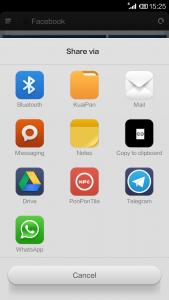
|
|
|
|
|
|
kennethkee93
|
Aug 11 2014, 03:36 PM
|
|
|
QUOTE(movanns @ Aug 11 2014, 03:31 PM) Folks, Im on v23..when I plan to share something from the browser, there is a selection called KuaiPan..when I select it, it goes FC. Any idea what it is?
That's a cloud storage app by Kingsoft company, China MIUI ROM and dev rom have this as default. Can remove it if you want. |
|
|
|
|
|
sengko
|
Aug 11 2014, 03:50 PM
|
Getting Started
|
QUOTE(hazril @ Aug 11 2014, 02:57 PM) towelroot exploit ka bro??i can detect that one only on my phone... Ya, more information can refer here: http://geeksided.com/2014/06/16/towelroot-...htmare-android/ |
|
|
|
|
|
bearbearhong
|
Aug 11 2014, 03:51 PM
|
|
|
QUOTE(danieloo @ Aug 11 2014, 03:01 PM) Thanks for the head up. Shall just let it charge with Xiaomi original charger since it will have whole night to charge, no worry for slow charging. i prefer not to have any phone or power bank , or gadget charging during night sleeping time for safety purpose. |
|
|
|
|
|
bearbearhong
|
Aug 11 2014, 03:53 PM
|
|
|
QUOTE(bearbearhong @ Aug 11 2014, 03:51 PM) i prefer not to have any phone or power bank , or gadget charging during night sleeping time for safety purpose. anyone who ordered mi3 have received shipping info? |
|
|
|
|
|
Cavino
|
Aug 11 2014, 03:55 PM
|
|
|
QUOTE(bearbearhong @ Aug 11 2014, 03:51 PM) i prefer not to have any phone or power bank , or gadget charging during night sleeping time for safety purpose. If you have Xiaomi PB, you will notice that when it charge a phone to full status, it will STOP charging even if you leave it connected to powerbank the whole night. Your phone will start draining its own battery instead. This is a very good safety feature. If you charge via normal charger, it will change to trickle charge that supply minimal amp to keep your phone at 100% till morning. At trickle charge, both phones and charger are cool too touch coz only minimal current goes thru. |
|
|
|
|
|
bearbearhong
|
Aug 11 2014, 04:08 PM
|
|
|
QUOTE(Cavino @ Aug 11 2014, 03:55 PM) If you have Xiaomi PB, you will notice that when it charge a phone to full status, it will STOP charging even if you leave it connected to powerbank the whole night. Your phone will start draining its own battery instead. This is a very good safety feature. If you charge via normal charger, it will change to trickle charge that supply minimal amp to keep your phone at 100% till morning. At trickle charge, both phones and charger are cool too touch coz only minimal current goes thru. hmm...thanks for the sharing! wondering if the exploded xiaomi PB confirmed is fake PB? |
|
|
|
|
|
SUSgogo2
|
Aug 11 2014, 04:16 PM
|
|
|
QUOTE(bearbearhong @ Aug 11 2014, 04:08 PM) hmm...thanks for the sharing! wondering if the exploded xiaomi PB confirmed is fake PB? Yes, its confirmed. |
|
|
|
|
|
JC_jun
|
Aug 11 2014, 04:17 PM
|
|
|
QUOTE(hazril @ Aug 11 2014, 11:33 AM) same here bro...facing the same problem even after root...if not mistaken those are system apps...need to use root explorer if not mistaken... to remove system apps, here are things you need to do # root your phone # install "titanium backup" app inside your phone # go to backup&restore, then select the system app you want to remove, click it, then you can choose to "frost" or "delete" i suggest you freeze it first, means fully disable the app from running, after a few weeks if nothing strange happen to your phone, then only you go back and click on delete. |
|
|
|
|



 Quote
Quote





 0.0270sec
 0.66
0.66
 6 queries
 GZIP Disabled