Welcome Guest ( Log In | Register )

Outline · [ Standard ] · Linear+

MacOS X OS X Yosemite - Every bit as powerful as it looks, 10.10.5 now available

views
     
TSTownshend
post Jun 1 2014, 03:05 PM, updated 11y ago

Regular
******
Senior Member
1,677 posts

Joined: Sep 2009
QUOTE
Attention: OS X Yosemite is now officially available. You can download it for free via the Mac App Store or by visiting this link

Note: Before you start, please check whether your Mac is supported and meet all the minimum requirements below. Also please backup your Mac using Time Machine before installing OS X Yosemite.

How to install OS X Yosemite (Upgrade, clean install or on a separate partition) Tutorial

List of supported Macs and requirements

» Click to show Spoiler - click again to hide... «

OS X 10.10

Apple officially unveiled the new OS X 10.10, known as Yosemite at the 25th annual Worldwide Developers Conference on 2 June 2014.

It is the upcoming eleventh major release of the Apple's operating system after Mavericks.

user posted image

Redesigned UI

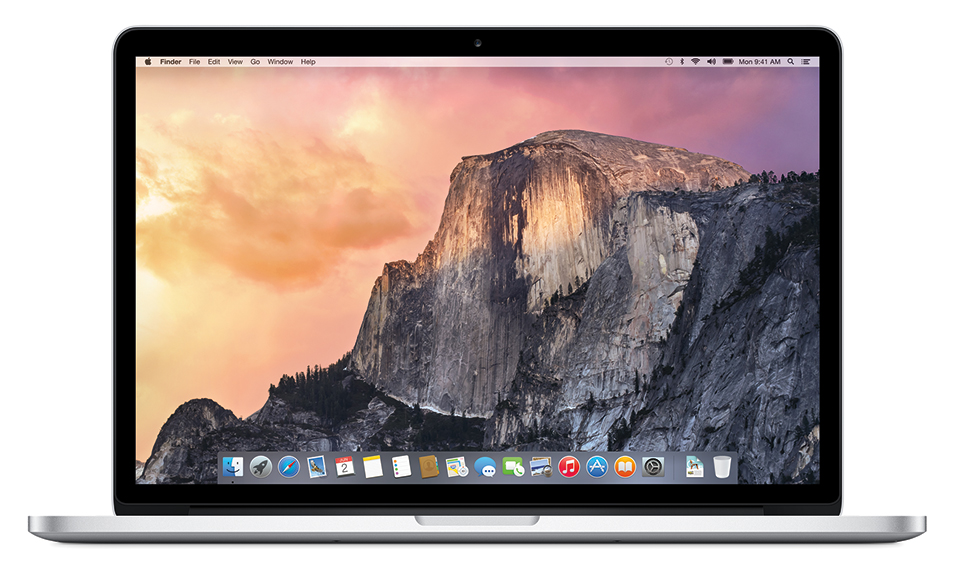
OS X Yosemite features new and revamped user interface, inspired by iOS 7.

Of course, it still has the generic and familiar look of the previous OS X, such as the iconic dock and the menu bar, but with much flatter and modern visual appearance.

Other major visual changes in OS X Yosemite are the 2D dock, translucency, new icons, Dark Mode and Helvetica Neue as the new default system font.
user posted image

user posted image


Other visual changes :

Safari - Safari 8 features a new UI.

Boot Screen - New iOS-inspired Boot Screen.

Login Screen - New login screen background.

Launchpad - Revamped Launchpad UI.

Game Center - iOS 7-like Game Center UI.

QuickTime - Flatter QuickTime UI.

Time Machine - New Time Machine UI.

New Features

Yosemite has a bunch of new features and many of them focus on the theme of Continuity.

Continuity is a set of new features that allows iPhone, iPad, and Mac to remain true to their form-factors while still working seamlessly together.

With Continuity, users now have better and seamless integration between their Mac and iOS 8 Devices.

Moving on, here is a list of some of the notable new/improved features that are included in OS X Yosemite.

1) AirDrop: AirDrop now works between iOS and OS X.

user posted image

2) Handoff: Handoff lets your devices communicate with each other to help you work on the same project across multiple Apple devices.

user posted image

3) Improved Spotlight: Spotlight now appears in center of screen. You can type in a few characters to find news, Wikipedia info, maps, docs, movie times nearby, or see media you can buy from Apple that’s related to that topic.

user posted image

4) iCloud Drive: iCloud Drive lets you access docs in the cloud, and they can be synced across all your Mac products.

user posted image

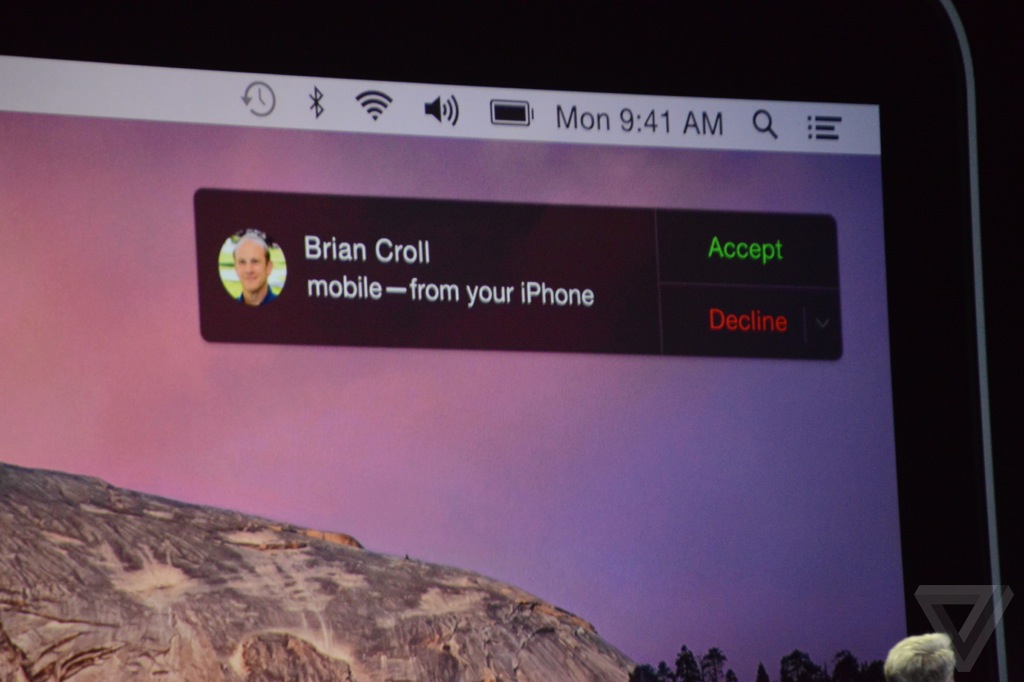
5) Phone Integration: Your Mac now acts as a caller ID when you get a call on your iPhone. You can also use your Mac as a speaker phone, or call a number you see on webpage. Not only that, you will be able to send and receive SMS/MMS right on your Mac as well.
user posted image

6) Instant Hotspot: With OS X Yosemite, your Mac can automatically use the personal hotspot on your iDevice when they are within the range of each other. Your Mac even displays the signal strength and battery life of your iDevice.

user posted image


Other features/changes:

Safari - OS X Yosemite includes the new and more energy efficient Safari 8 along with an improved Nitro JavaScript engine, making it faster than ever. The new Safari also features new tabbed browsing.

iCloud everywhere - Yosemite now lets users log into their Mac using their iCloud password instead of user account password.

Currency conversion - Currency conversion in Spotlight.

Spotlight search - Bing now replaces Google as Spotlight search engine.

Batch rename - Yosemite's Finder brings you the ability to rename multiple selected items using right-click.

Near networking - Apple's move to open Multipeer Connectivity means Macs and iOS devices will be far easier to network together over Wi-Fi or Bluetooth.

Cloud control - Yosemite allows you to remotely close pages that you have open on all your devices using iCloud Tabs.

New sounds - Apple has added new alert tones to Messages.

File location - Click on a file and hold the command key and you'll still see where that file is located at the bottom of the window.

Launchpad - Extra row and add pages in Launchpad Folders.

Dictation - OS X Yosemite includes 24 new dictation languages.

Record - You can plug in an iOS 8 device and record audio and video in QuickTime.

Video encoding - You can encode video files by right-clicking on the video file and selecting the encode file option.

Mission Control - Improved Mission Control.

Mail - Updated Mail App with Markup feature.

Release date

OS X Yosemite was released on 16 October 2014 right after the Apple October event. Like the previous OS X Mavericks, OS X Yosemite is available as a free upgrade and it can be downloaded through the Mac App Store.

This post has been edited by Townshend: Aug 15 2015, 10:45 AM
TSTownshend
post Jun 1 2014, 03:05 PM

Regular
******
Senior Member
1,677 posts

Joined: Sep 2009
Before installing OS X Yosemite

Before you install OS X Yosemite, I strongly recommend you to:

1) Backup using Time Machine.

In case something goes wrong or if you are not happy with the new OS, you can revert to the previous OS easily and still have all your data.

2) Make a Mavericks bootable drive.

Download the Mavericks installer from Mac App Store and make a bootable drive. Once you installed Yosemite (on your main partition), you will not be able to download Mavericks anymore. So, it is a good idea to download the installer so you can reinstall Mavericks anytime.

How to make a Mavericks bootable drive:

» Click to show Spoiler - click again to hide... «


3) Upgrade, clean install or install on a separate partition

Basically, you have the option to either upgrade or perform a clean install. If you have no problem with your previous OS, you can just save your time and proceed with the upgrade method. Upgrading is the easiest and fastest way to install the new OS on your machine.

How to upgrade:

» Click to show Spoiler - click again to hide... «


However, if you have problems with current OS, or want to make sure that your Mac get the best performance, I recommend you to do a clean install instead. A clean install is able to eliminate the bugs and errors on a previously installed OS that may still present if you choose the upgrade option.

How to do clean install:

» Click to show Spoiler - click again to hide... «


If you would like to keep your previous OS on your machine due to some reasons, you can install OS X Yosemite on a separate partition of your drive. You can do that by following the guide below.

How to create a partition:

» Click to show Spoiler - click again to hide... «


How to install OS X Yosemite on different partition

1) Download OS X Yosemite via the Mac App Store.

2) After Yosemite has finished downloading, quit when it prompts you to install because you may want to copy the installer somewhere else in case you need it again (trust me, you do not want to waste your time to download it again). The installer is located in the Application folder.

3) To install the OS on different partition, just open the installer, and when it asks for install location, click on Show All Disks and choose a partition that you created earlier (you can skip this step if you want to upgrade your current OS).

4) After the installation, you can press and hold Option during startup to choose between your previous OS or OS X Yosemite. To select Startup Disk, go to System Preferences > Startup Disk > Choose what OS you want to use during startup.

Help, my Mac is slow after Yosemite update

Your Mac might be slow because of Spotlight indexing. But if it is still slow after a few hours or days, try the following

1) If FileVault is enabled, try disabling it and see if it fixes the issue.

2) Reduce the Transparency and disable Dashboard in System Preferences. This seems to solve the issue for some people.

3) Use Disk Utility to repair your disk. To do so, go to Applications > Utilities > Disk Utility. Then choose Yosemite partition and click Verify Disk Permissions, then Repair Disk Permissions. Next, click Verify Disk and then Repair Disk.

4) Reset the SMC and PRAM.

5) Do a clean install if you did an upgrade.

How to revert to previous OS after you have installed Yosemite

1) Via Time Machine (recommended).

-Make sure Time Machine drive is connected.
-During startup, press and hold Command-R (works for OS X Lion and later).
-Choose Restore From Time Machine Backup and follow the instructions.

*You will still have all your data and settings and your Mac will be in the same state as it was on the date of the backup.

2) Via bootable installer (clean install).

-Make sure the bootable installer is connected, then press option during startup.
-In OS X Utilities screen, choose Disk Utility and erase your main hard drive.
-After it is done, go back to OS X Utilities screen and choose Install OS X and then follow the instructions.

*You will lose all your data, but you will have the option to restore files from Time Machine after the process (provided that you have Time Machine backup).

This post has been edited by Townshend: Mar 3 2015, 07:32 PM
tamiyasaka12
post Jun 1 2014, 04:04 PM

Getting Started
**
Junior Member
195 posts

Joined: Nov 2013
Gooding maa
Bonchi
post Jun 1 2014, 06:08 PM

KittehPowah
******
Senior Member
1,649 posts

Joined: Sep 2008
i personally dont like how the mock up design looks like.. luckily it's not the real thing but what people think it will look like. (i hope the real thing don't look like that sad.gif )
quadcube
post Jun 1 2014, 06:16 PM

Regular
******
Senior Member
1,924 posts

Joined: May 2009
From: Yokohama, JP


yuck,ugly doh.gif
blueblood619
post Jun 1 2014, 10:20 PM

Getting Started
**
Junior Member
111 posts

Joined: Sep 2012
it sux..
Anonymous34
post Jun 2 2014, 12:39 AM

Look at all my stars!!
*******
Senior Member
3,176 posts

Joined: May 2013
From: Petaling Jaya


Hope they can put more translucency to the UI!
I don't want flatter designs, rather old designs with less reflection and shadow.
kopiPeng
post Jun 2 2014, 09:48 AM

★ Xiaomi VIP ★
*******
Senior Member
2,548 posts

Joined: Aug 2008
The new Finder UI is nice!!

But the Dock is ugly... prefer the old one thou... sad.gif
Xefron
post Jun 2 2014, 09:58 AM

Look at all my stars!!
*******
Senior Member
2,507 posts

Joined: Jan 2003


ahhh craps.

btw Apple really did this ? facepalm.

QUOTE
Also, Apple appears to have quietly filed for trademarks on a number of California-themed names which probably will be used for future OS X names.

The names include: Yosemite, Redwood, Mammoth,California, Big Sur, Pacific, Diablo, Miramar, Rincon, El Cap, Redtail, Condor, Grizzly, Farallon,Tiburon, Monterey, Skyline, Shasta, Sierra, Mojave, Sequoia, Ventura, and Sonoma.

mudkipryan94
post Jun 2 2014, 10:37 AM

someone need a sarcasm meter?
********
All Stars
12,000 posts

Joined: Feb 2010
From: Banting, Puchong, KL


-Finder UI nice thou... but for other mmg.. [woii APA BENDO niii vmad.gif]
pengleong
post Jun 2 2014, 10:56 AM

New Member
*
Junior Member
35 posts

Joined: Jun 2014


SYRAH?


islamic inspire?
TSTownshend
post Jun 2 2014, 11:27 AM

Regular
******
Senior Member
1,677 posts

Joined: Sep 2009
QUOTE(kopiPeng @ Jun 2 2014, 09:48 AM)
The new Finder UI is nice!!

But the Dock is ugly... prefer the old one thou... sad.gif
*
Those are just mockups based on rumours. The new OS is said to have a flat and minimalistic look.

QUOTE(pengleong @ Jun 2 2014, 10:56 AM)
SYRAH?
islamic inspire?
*
No, Syrah is a wine grape.
kopiPeng
post Jun 2 2014, 11:57 AM

★ Xiaomi VIP ★
*******
Senior Member
2,548 posts

Joined: Aug 2008
QUOTE(Townshend @ Jun 2 2014, 11:27 AM)
Those are just mockups based on rumours. The new OS is said to have a flat and minimalistic look.
No, Syrah is a wine grape.
*
The Keynote is 3 days right??

Do u know which day they will talk about OSX? thinking to watch live stream about OSX... hmm.gif
JeremyLord
post Jun 2 2014, 01:07 PM

Casual
***
Junior Member
321 posts

Joined: Nov 2012
From: Planet Earth

Damn. Hope that that flat design is not happening.
TSTownshend
post Jun 2 2014, 04:15 PM

Regular
******
Senior Member
1,677 posts

Joined: Sep 2009
QUOTE(kopiPeng @ Jun 2 2014, 11:57 AM)
The Keynote is 3 days right??

Do u know which day they will talk about OSX? thinking to watch live stream about OSX...  hmm.gif
*
The keynote is on 2 June, so everything they want us to know will be announced on that day.

https://developer.apple.com/wwdc/schedule/events/

The rest (3/4/5/6 June events) are just for developers.

BTW, the two hours live stream starts at 1.00 AM, 3 June - Malaysia time

https://www.apple.com/apple-events/june-2014/

Fortunately, I'm still on holiday, so I can watch that live stream lol.
kopiPeng
post Jun 2 2014, 04:18 PM

★ Xiaomi VIP ★
*******
Senior Member
2,548 posts

Joined: Aug 2008
QUOTE(Townshend @ Jun 2 2014, 04:15 PM)
The keynote is on 2 June, so everything they want us to know will be announced on that day.

https://developer.apple.com/wwdc/schedule/events/

The rest (3/4/5/6 June events) are just for developers.

BTW, the two hours live stream starts at 1.00 AM, 3 June - Malaysia time

https://www.apple.com/apple-events/june-2014/

Fortunately, I'm still on holiday, so I can watch that live stream lol.
*
Okay! Thanks alot for your info bro!

Lucky u! I still have to work tomorrow.. now thinking whether want to watch tonight anot.. after watch tomorrow fishing during work ady.. sad.gif

Dont know still can watch replay tomorrow morning ady... laugh.gif

This post has been edited by kopiPeng: Jun 2 2014, 04:19 PM
TSTownshend
post Jun 2 2014, 04:31 PM

Regular
******
Senior Member
1,677 posts

Joined: Sep 2009
The 24 March leaked OS X 10.10 photos doesn't seem to show much redesign though.

user posted image

user posted image

user posted image

http://www.iphonehacks.com/2014/06/leaked-...creenshots.html

This post has been edited by Townshend: Jun 2 2014, 04:31 PM
McFazo
post Jun 3 2014, 12:31 AM

New Member
*
Junior Member
49 posts

Joined: Jul 2013
uh.

i dunno how i feel about this. some of it do look nice, i just dont like the new dock look. the 3d plate is gone
ahaksz28
post Jun 3 2014, 03:10 AM

Getting Started
**
Junior Member
174 posts

Joined: Dec 2008


Quite awesome this new OS! I like that we can make and accept calls using Mac now.
adurian
post Jun 3 2014, 03:26 AM

Getting Started
**
Junior Member
151 posts

Joined: Sep 2011
Is it free?
ahaksz28
post Jun 3 2014, 03:29 AM

Getting Started
**
Junior Member
174 posts

Joined: Dec 2008


Yeah it is free. biggrin.gif
Rei7
post Jun 3 2014, 03:34 AM

Game, anime and headphones ❤️
******
Senior Member
1,669 posts

Joined: Apr 2011


I am happy we get another free update.
Bonchi
post Jun 3 2014, 03:37 AM

KittehPowah
******
Senior Member
1,649 posts

Joined: Sep 2008
interesting features.......crappy UI doh.gif a bit too bright/white (hopefully the dark theme which they didn't show would make things better)

also..the old trash can looks so nice on retina... why change it XD
SUSchokia
post Jun 3 2014, 07:51 AM

Chartered Member
*******
Senior Member
3,617 posts

Joined: Oct 2010
Call and sms notification ability to make and take call from any platform is amazing.

Continuity will make more people to stick to apple ecosystem.


Anonymous34
post Jun 3 2014, 08:48 AM

Look at all my stars!!
*******
Senior Member
3,176 posts

Joined: May 2013
From: Petaling Jaya


https://appleseed.apple.com/sp/betaprogram/

JOIN THIS BROS!

Attached Image

This post has been edited by Anonymous34: Jun 3 2014, 08:50 AM
TSTownshend
post Jun 3 2014, 11:17 AM

Regular
******
Senior Member
1,677 posts

Joined: Sep 2009
QUOTE(Anonymous34 @ Jun 3 2014, 08:48 AM)
Yea, I just joined.

Luckily it is still open.
Anonymous34
post Jun 3 2014, 11:40 AM

Look at all my stars!!
*******
Senior Member
3,176 posts

Joined: May 2013
From: Petaling Jaya


QUOTE(Townshend @ Jun 3 2014, 11:17 AM)
Yea, I just joined.

Luckily it is still open.
*
It's open until 1 mil users have signed up.
I think most didn't sign up because they didn't bother because it's a beta or those who already has a developer account.
Hopefully we can get it in 1 week!
Mac Man @ LYF
post Jun 3 2014, 12:28 PM

Casual
***
Junior Member
433 posts

Joined: Apr 2012
I just sign up also with my Apple ID.

Anyway here is the link - https://appleseed.apple.com/sp/betaprogram
blueblood619
post Jun 3 2014, 02:14 PM

Getting Started
**
Junior Member
111 posts

Joined: Sep 2012
the flat design sux
TSTownshend
post Jun 3 2014, 03:00 PM

Regular
******
Senior Member
1,677 posts

Joined: Sep 2009
QUOTE(adurian @ Jun 3 2014, 03:26 AM)
Is it free?
*
Yes, it is free just like the previous OS X Mavericks.
yewfatt
post Jun 3 2014, 03:03 PM

Regular
******
Senior Member
1,468 posts

Joined: Sep 2004


just signup for the public beta. hopefully the answer call from any platform works for me to try it out biggrin.gif
TSTownshend
post Jun 3 2014, 03:48 PM

Regular
******
Senior Member
1,677 posts

Joined: Sep 2009
QUOTE(yewfatt @ Jun 3 2014, 03:03 PM)
just signup for the public beta. hopefully the answer call from any platform works for me to try it out biggrin.gif
*
I want to try the Handoff feature.

That feature looks awesome.
Anonymous34
post Jun 3 2014, 04:28 PM

Look at all my stars!!
*******
Senior Member
3,176 posts

Joined: May 2013
From: Petaling Jaya


QUOTE(Townshend @ Jun 3 2014, 03:48 PM)
I want to try the Handoff feature.

That feature looks awesome.
*
Its called continuity isn't it?
wan_d7
post Jun 3 2014, 05:18 PM

Getting Started
**
Junior Member
182 posts

Joined: Jan 2008
I think you gonna need ios8 to try most hand off and continuity stuff.
JeremyLord
post Jun 3 2014, 09:02 PM

Casual
***
Junior Member
321 posts

Joined: Nov 2012
From: Planet Earth

Did u guys installed OSX 10.10 in your daily use mac? I'm afraid there are many bugs and crashes. sad.gif
Anonymous34
post Jun 3 2014, 09:04 PM

Look at all my stars!!
*******
Senior Member
3,176 posts

Joined: May 2013
From: Petaling Jaya


QUOTE(JeremyLord @ Jun 3 2014, 09:02 PM)
Did u guys installed OSX 10.10 in your daily use mac? I'm afraid there are many bugs and crashes. sad.gif
*
Nope. Not yet so far. Most are waiting for public beta to release and install. Expect some bugs as its a beta OS.
JeremyLord
post Jun 3 2014, 09:07 PM

Casual
***
Junior Member
321 posts

Joined: Nov 2012
From: Planet Earth

QUOTE(Anonymous34 @ Jun 3 2014, 09:04 PM)
Nope. Not yet so far. Most are waiting for public beta to release and install. Expect some bugs as its a beta OS.
*
Are there any differences between mavericks and Yosemite?instead of UI changes.
TSTownshend
post Jun 3 2014, 09:27 PM

Regular
******
Senior Member
1,677 posts

Joined: Sep 2009
QUOTE(JeremyLord @ Jun 3 2014, 09:07 PM)
Are there any differences between mavericks and Yosemite?instead of UI changes.
*
Of course there are such as Continuity/Handoff, phone integration, AirDrop with iOS, iCloud Drive, improved Spotlight and Safari.
JeremyLord
post Jun 3 2014, 09:30 PM

Casual
***
Junior Member
321 posts

Joined: Nov 2012
From: Planet Earth

QUOTE(Townshend @ Jun 3 2014, 09:27 PM)
Of course there are such as Continuity/Handoff, phone integration, AirDrop with iOS, iCloud Drive, improved Spotlight and Safari.
*
So most of the features are usable if for IOS 8? xD
JeremyLord
post Jun 3 2014, 09:32 PM

Casual
***
Junior Member
321 posts

Joined: Nov 2012
From: Planet Earth

if got*
((Xa))0102
post Jun 3 2014, 09:53 PM

兩支湯匙         一個碗
*******
Senior Member
2,553 posts

Joined: May 2013
From: Joined: Jan 2001
Ewww. I prefer the old dock.
JeremyLord
post Jun 3 2014, 09:56 PM

Casual
***
Junior Member
321 posts

Joined: Nov 2012
From: Planet Earth

QUOTE(((Xa))0102 @ Jun 3 2014, 09:53 PM)
Ewww. I prefer the old dock.
*
The 'translucency' dock looks like windows 7. 😞
Anonymous34
post Jun 3 2014, 09:58 PM

Look at all my stars!!
*******
Senior Member
3,176 posts

Joined: May 2013
From: Petaling Jaya


QUOTE(JeremyLord @ Jun 3 2014, 09:56 PM)
The 'translucency' dock looks like windows 7. 😞
*
This is revolution. Don't insult Mac OS X.
Anonymous34
post Jun 3 2014, 10:00 PM

Look at all my stars!!
*******
Senior Member
3,176 posts

Joined: May 2013
From: Petaling Jaya


QUOTE(JeremyLord @ Jun 3 2014, 09:30 PM)
So most of the features are usable if for IOS 8? xD
*
Best if used with iOS 8.
((Xa))0102
post Jun 3 2014, 10:00 PM

兩支湯匙         一個碗
*******
Senior Member
2,553 posts

Joined: May 2013
From: Joined: Jan 2001
QUOTE(JeremyLord @ Jun 3 2014, 09:56 PM)
The 'translucency' dock looks like windows 7. 😞
*
It resembles nothing, but imho it is hideous.
McFazo
post Jun 3 2014, 10:02 PM

New Member
*
Junior Member
49 posts

Joined: Jul 2013
QUOTE(((Xa))0102 @ Jun 3 2014, 10:00 PM)
It resembles nothing, but imho it is hideous.
*
if they made the dock 3d like tmavericks, but translucent it'll look better imo.
((Xa))0102
post Jun 3 2014, 10:16 PM

兩支湯匙         一個碗
*******
Senior Member
2,553 posts

Joined: May 2013
From: Joined: Jan 2001
QUOTE(McFazo @ Jun 3 2014, 10:02 PM)
if they made the dock 3d like tmavericks, but translucent it'll look better imo.
*
3D but flatter, not flat to the extent of being 2D
dinodog_Jr
post Jun 3 2014, 10:27 PM

I am not a dog
*******
Senior Member
3,813 posts

Joined: Jan 2003
How big is the whole system after installation?

Going to be smaller than Maverick is a great thing to hear. Since their graphics is so simplicity and neat... Might save up some space..haha


ychlee
post Jun 4 2014, 06:47 PM

On my way
****
Senior Member
602 posts

Joined: Apr 2010


X 10.10 torrent is available already
but too many tried and reinstalled their maverick
lag issue...battery drains very quickly....

kopiPeng
post Jun 4 2014, 07:42 PM

★ Xiaomi VIP ★
*******
Senior Member
2,548 posts

Joined: Aug 2008
And 1 more thing... the new spotlight on desktop is a joke... shakehead.gif

Even now on Maverick I can easily press (cmd + space bar) and directly type what i wanna search there.. and *poof*

result is there.. not even 1.5 second...

I guess I wont rush to upgrade Yosemite until a more stable version released...
ahaksz28
post Jun 4 2014, 08:40 PM

Getting Started
**
Junior Member
174 posts

Joined: Dec 2008


Well, it's Beta. Just wait for the official release. thumbup.gif
andrewtho
post Jun 4 2014, 10:16 PM

Hooded Knight
*******
Senior Member
5,936 posts

Joined: Dec 2009
From: City of Subang Jaya
The most important feature for me, AirDrop. Oh yeah!

I dont now why but I kinda like the dock. Personal preference. The current dock is fine, but kinda bored with it and I welcome a change.
TSTownshend
post Jun 4 2014, 10:37 PM

Regular
******
Senior Member
1,677 posts

Joined: Sep 2009
QUOTE(andrewtho @ Jun 4 2014, 10:16 PM)
I dont now why but I kinda like the dock. Personal preference. The current dock is fine, but kinda bored with it and I welcome a change.
*
Yea, some people hate it, but I like the new dock design.
Bonchi
post Jun 5 2014, 02:17 AM

KittehPowah
******
Senior Member
1,649 posts

Joined: Sep 2008
QUOTE(andrewtho @ Jun 4 2014, 10:16 PM)
The current dock is fine, but kinda bored with it and I welcome a change.
*
...so lets reintroduce OSX cheetah's dock thumbup.gif ... doh.gif
mudkipryan94
post Jun 5 2014, 07:05 AM

someone need a sarcasm meter?
********
All Stars
12,000 posts

Joined: Feb 2010
From: Banting, Puchong, KL


QUOTE(Bonchi @ Jun 5 2014, 02:17 AM)
...so lets reintroduce OSX cheetah's dock  thumbup.gif ... doh.gif
*
doh.gif...
so outdated punya...
Anonymous34
post Jun 5 2014, 10:50 AM

Look at all my stars!!
*******
Senior Member
3,176 posts

Joined: May 2013
From: Petaling Jaya


QUOTE(andrewtho @ Jun 4 2014, 10:16 PM)
The most important feature for me, AirDrop. Oh yeah!

I dont now why but I kinda like the dock. Personal preference. The current dock is fine, but kinda bored with it and I welcome a change.
*
QUOTE(Townshend @ Jun 4 2014, 10:37 PM)
Yea, some people hate it, but I like the new dock design.
*
QUOTE(mudkipryan94 @ Jun 5 2014, 07:05 AM)
doh.gif...
so outdated punya...
*
Its the dock from older OSes with new icon. Lel

TSTownshend
post Jun 5 2014, 10:59 AM

Regular
******
Senior Member
1,677 posts

Joined: Sep 2009
QUOTE(Bonchi @ Jun 5 2014, 02:17 AM)
...so lets reintroduce OSX cheetah's dock  thumbup.gif ... doh.gif
*
Looks slightly different.

I still like the dock on OS X Yosemite though.
clarks
post Jun 5 2014, 11:03 AM

Getting Started
**
Junior Member
62 posts

Joined: Sep 2011


hope yosemite solve adobe Ai and PPro issue.
andrewtho
post Jun 5 2014, 11:10 AM

Hooded Knight
*******
Senior Member
5,936 posts

Joined: Dec 2009
From: City of Subang Jaya
QUOTE(Anonymous34 @ Jun 5 2014, 10:50 AM)
Its the dock from older OSes with new icon. Lel
*
With some slight visual change, but I'm fine with it
TSTownshend
post Jun 5 2014, 12:17 PM

Regular
******
Senior Member
1,677 posts

Joined: Sep 2009

Bonchi
post Jun 5 2014, 02:51 PM

KittehPowah
******
Senior Member
1,649 posts

Joined: Sep 2008
^thanks for sharing neat new features thumbup.gif... but.... makes me not like the UI even more :| .. the folder so bright blue ><

hopefully the dark theme would be diff *fingers crossed*
TSTownshend
post Jun 5 2014, 09:55 PM

Regular
******
Senior Member
1,677 posts

Joined: Sep 2009
QUOTE(Bonchi @ Jun 5 2014, 02:51 PM)
^thanks for sharing neat new features thumbup.gif... but.... makes me not like the UI even more :| .. the folder so bright blue ><

hopefully the dark theme would be diff *fingers crossed*
*
Still, there is no review of that Dark Mode yet because I read that it is not currently build in Beta 1. Really wish to see it though.
tzxsean
post Jun 8 2014, 10:07 AM

Lonely Driver
*******
Senior Member
5,608 posts

Joined: Jan 2010


hate the new dock vmad.gif
wanna be hi-tech
post Jun 9 2014, 10:08 PM

Any self respecting GEEK, certainly owns more than a single rig
******
Senior Member
1,598 posts

Joined: Jan 2010


i LOVE to MAC, but seriously, the look of the new OSs'/IOSs', are beginning to suck ! The IOS 7..the look ..not great. Now Yosemite, damn i hate the look of the dock, it's as if its goin primitive again.
COME ON APPLE, give us a better design ! cry.gif
bert2662
post Jun 10 2014, 11:49 AM

Getting Started
**
Junior Member
280 posts

Joined: Jun 2013


LOL somehow I like the dock.. As all the time prefer 2D dock instead.
However, hope that it's able to change the dock background to be transparent, then it would look even better~

and be frank, the dark mode, hope it implemented well, as i can get rid of obsidian menu bar alrd~ XD
SUSchokia
post Jun 10 2014, 12:43 PM

Chartered Member
*******
Senior Member
3,617 posts

Joined: Oct 2010
Apple share Official Yosemite video


eagleknight
post Jun 11 2014, 06:39 AM

On my way
****
Senior Member
520 posts

Joined: Oct 2010


I just upgraded to 10.10 Yosemite on Monday, its Developer Beta.

Working fine but my email client "Foxmail" is not compatible.
NoKusshon
post Jun 11 2014, 07:39 AM

Knowledge is Everything. Well Yeah.
******
Senior Member
1,391 posts

Joined: May 2011
From: Muar, Johor


What is the exact date the 10.10 will come out ?? 😊
ahaksz28
post Jun 11 2014, 07:53 AM

Getting Started
**
Junior Member
174 posts

Joined: Dec 2008


They only mentioned this fall. No exact date at the moment afaik. Probably will be released around the same time we got Maverick last year.
NoKusshon
post Jun 11 2014, 08:00 AM

Knowledge is Everything. Well Yeah.
******
Senior Member
1,391 posts

Joined: May 2011
From: Muar, Johor


QUOTE(ahaksz28 @ Jun 11 2014, 07:53 AM)
They only mentioned this fall. No exact date at the moment afaik. Probably will be released around the same time we got Maverick last year.
*
Oh, that means it's will probably come out this October ? 😱
TSTownshend
post Jun 11 2014, 09:45 AM

Regular
******
Senior Member
1,677 posts

Joined: Sep 2009
QUOTE(NoKusshon @ Jun 11 2014, 08:00 AM)
Oh, that means it's will probably come out this October ? 😱
*
The release should be on September or October.

Sign up for the public Beta if you want early access.
NoKusshon
post Jun 11 2014, 09:49 AM

Knowledge is Everything. Well Yeah.
******
Senior Member
1,391 posts

Joined: May 2011
From: Muar, Johor


QUOTE(Townshend @ Jun 11 2014, 09:45 AM)
The release should be on September or October.

Sign up for the public Beta if you want early access.
*
Is it safe to get public beta ? since i have 1 mac only, hehe 😭
TSTownshend
post Jun 11 2014, 10:00 AM

Regular
******
Senior Member
1,677 posts

Joined: Sep 2009
QUOTE(NoKusshon @ Jun 11 2014, 09:49 AM)
Is it safe to get public beta ? since i have 1 mac only, hehe 😭
*
Can't really say, therefore it is recommended to backup your Mac first.

Anyway, expect bugs and issues since it is Beta.

This post has been edited by Townshend: Jun 11 2014, 10:00 AM
NoKusshon
post Jun 11 2014, 10:03 AM

Knowledge is Everything. Well Yeah.
******
Senior Member
1,391 posts

Joined: May 2011
From: Muar, Johor


QUOTE(Townshend @ Jun 11 2014, 10:00 AM)
Can't really say, therefore it is recommended to backup your Mac first.

Anyway, expect bugs and issues since it is Beta.
*
Seem I will just wait this september/october hehe..Afraid if face with all those bug and issues 😭
ahaksz28
post Jun 11 2014, 10:28 AM

Getting Started
**
Junior Member
174 posts

Joined: Dec 2008


QUOTE(NoKusshon @ Jun 11 2014, 10:03 AM)
Seem I will just wait this september/october hehe..Afraid if face with all those bug and issues 😭
*
Well you can do dual boot if you want to try. biggrin.gif

http://osxdaily.com/2014/06/05/install-os-...rate-partition/ <------ Disclaimer: I never tried. tongue.gif
NoKusshon
post Jun 11 2014, 10:31 AM

Knowledge is Everything. Well Yeah.
******
Senior Member
1,391 posts

Joined: May 2011
From: Muar, Johor


QUOTE(ahaksz28 @ Jun 11 2014, 10:28 AM)
Well you can do dual boot if you want to try. biggrin.gif

http://osxdaily.com/2014/06/05/install-os-...rate-partition/    <------ Disclaimer: I never tried. tongue.gif
*
Im afraid my macbook will laggy if duel boot to do that hehehe..i will just wait for this september/oct 😊
iVW
post Jun 12 2014, 10:24 AM

Busy Finding Money
*****
Senior Member
886 posts

Joined: Aug 2010
From: AMG Engineered
QUOTE(ahaksz28 @ Jun 11 2014, 10:28 AM)
Well you can do dual boot if you want to try. biggrin.gif

http://osxdaily.com/2014/06/05/install-os-...rate-partition/    <------ Disclaimer: I never tried. tongue.gif
*
I am doing dual boot on my MBA2013. So far no problem at all and free to switch from one to another. File sharing across both OS is working flawlessly too.
eagleknight
post Jun 12 2014, 01:31 PM

On my way
****
Senior Member
520 posts

Joined: Oct 2010


QUOTE(NoKusshon @ Jun 11 2014, 10:31 AM)
Im afraid my macbook will laggy if duel boot to do that hehehe..i will just wait for this september/oct 😊
*
I am running Yosemite on my MBA 11 with 4GB RAM. Working fine
adurian
post Jun 13 2014, 10:12 PM

Getting Started
**
Junior Member
151 posts

Joined: Sep 2011
Using Snow Leopard :3 now. just wondering is it better to upgrade to Mavericks and wait for stable update of Yosemite.

Or wait for my email for public beta and straightaway install yosemite.

Will it effect my macbook performance wise? Can i downgrade my os?


TSTownshend
post Jun 14 2014, 06:29 PM

Regular
******
Senior Member
1,677 posts

Joined: Sep 2009
QUOTE(adurian @ Jun 13 2014, 10:12 PM)
Using Snow Leopard :3 now. just wondering is it better to upgrade to Mavericks and wait for stable update of Yosemite.

Or wait for my email for public beta and straightaway install yosemite.

Will it effect my macbook performance wise? Can i downgrade my os?
*
I don't think you should install Yosemite (Public Beta) as your main OS. There are bugs and issues as the OS is not yet stable.

Anyway, as long as you backup your Mac using Time Machine, you can easily revert back to previous OS if you are not happy with the new one.
NoKusshon
post Jun 14 2014, 10:00 PM

Knowledge is Everything. Well Yeah.
******
Senior Member
1,391 posts

Joined: May 2011
From: Muar, Johor


QUOTE(Townshend @ Jun 14 2014, 06:29 PM)
I don't think you should install Yosemite (Public Beta) as your main OS. There are bugs and issues as the OS is not yet stable.

Anyway, as long as you backup your Mac using Time Machine, you can easily revert back to previous OS if you are not happy with the new one.
*
Townshend, how long you think to upgrade from Mavericks into Yosemite ? my internet speed is 1mbps cry.gif
TSTownshend
post Jun 14 2014, 10:13 PM

Regular
******
Senior Member
1,677 posts

Joined: Sep 2009
QUOTE(NoKusshon @ Jun 14 2014, 10:00 PM)
Townshend, how long you think to upgrade from Mavericks into Yosemite ? my internet speed is 1mbps  cry.gif
*
I don't know the exact size of OS X Yosemite but IINM, the developer preview is around 5GB+.

So that's about 11 hours if you have a constant 1 Mbps connection.
NoKusshon
post Jun 14 2014, 10:17 PM

Knowledge is Everything. Well Yeah.
******
Senior Member
1,391 posts

Joined: May 2011
From: Muar, Johor


QUOTE(Townshend @ Jun 14 2014, 10:13 PM)
I don't know the exact size of OS X Yosemite but IINM, the developer preview is around 5GB+.

So that's about 11 hours if you have a constant 1 Mbps connection.
*
omg, 5GB size which means i need to wait almost 1 day hehehe cry.gif
wanna be hi-tech
post Jun 17 2014, 10:24 PM

Any self respecting GEEK, certainly owns more than a single rig
******
Senior Member
1,598 posts

Joined: Jan 2010


QUOTE(NoKusshon @ Jun 11 2014, 09:49 AM)
Is it safe to get public beta ? since i have 1 mac only, hehe 😭
*
Clone ur drive dude...n them dare it. My colleague has installed Yosemite, n he is tempting me..... The real thing would be September ....
The Foch however seems to be a come of panther or jaguar ...I m not sure which. But it is a come back alright !
wanna be hi-tech
post Jun 17 2014, 10:50 PM

Any self respecting GEEK, certainly owns more than a single rig
******
Senior Member
1,598 posts

Joined: Jan 2010


QUOTE(NoKusshon @ Jun 14 2014, 10:17 PM)
omg, 5GB size which means i need to wait almost 1 day hehehe  cry.gif
*
Careful whn u install.... If u dnt follow procedures, u may end up with a fresh install... blink.gif which means, evrythg u had in mavericks would be gone... icon_idea.gif
McFazo
post Jun 18 2014, 03:01 AM

New Member
*
Junior Member
49 posts

Joined: Jul 2013
any of u guys installed the beta 2 yet? notice any difference?
denze87
post Jun 20 2014, 01:54 PM

Getting Started
**
Junior Member
105 posts

Joined: Sep 2008
From: Sungai Petani, Kedah
just installed DP2 yesterday...everything words pretty smooth ,and some buggy on the Facebook website during chatting.and the final cut pro not working via short cut,with some trick then its works fine.
NoKusshon
post Jun 20 2014, 04:12 PM

Knowledge is Everything. Well Yeah.
******
Senior Member
1,391 posts

Joined: May 2011
From: Muar, Johor


QUOTE(denze87 @ Jun 20 2014, 01:54 PM)
just installed DP2 yesterday...everything words pretty smooth ,and some buggy on the Facebook website during chatting.and the final cut pro not working via short cut,with some trick then its works fine.
*
does it work with BetterTouchTools software ? hmm.gif
denze87
post Jun 20 2014, 04:26 PM

Getting Started
**
Junior Member
105 posts

Joined: Sep 2008
From: Sungai Petani, Kedah
QUOTE(NoKusshon @ Jun 20 2014, 04:12 PM)
does it work with BetterTouchTools software ?  hmm.gif
*
Im not use that software,so im not sure..smile.gif
NoKusshon
post Jun 20 2014, 04:32 PM

Knowledge is Everything. Well Yeah.
******
Senior Member
1,391 posts

Joined: May 2011
From: Muar, Johor


QUOTE(denze87 @ Jun 20 2014, 04:26 PM)
Im not use that software,so im not sure..smile.gif
*
oh okie dokie, thank you btw sir wink.gif
denze87
post Jun 20 2014, 04:36 PM

Getting Started
**
Junior Member
105 posts

Joined: Sep 2008
From: Sungai Petani, Kedah
QUOTE(NoKusshon @ Jun 20 2014, 04:32 PM)
oh okie dokie, thank you btw sir wink.gif
*
U r most welcome bro..smile.gif
Ardt
post Jun 23 2014, 03:37 PM

Getting Started
**
Junior Member
62 posts

Joined: Oct 2008
From: Puchong-Upon-Avon


shoot. I'm late. doh.gif
Just sent a request to apple for the beta copy
Dunno whether the allocated 1mil beta already finish or not

personally.. quite liking the look of it.

TSTownshend
post Jun 27 2014, 07:18 PM

Regular
******
Senior Member
1,677 posts

Joined: Sep 2009
QUOTE(Ardt @ Jun 23 2014, 03:37 PM)
shoot. I'm late.  doh.gif
Just sent a request to apple for the beta copy
Dunno whether the allocated 1mil beta already finish or not

personally.. quite liking the look of it.
*
Yea, you are probably too late for the public beta. It's been like four weeks.

But, even those who signed up early still haven't received the beta. Probably will receive it in July or August.
zororo
post Jun 29 2014, 09:11 PM

Casual
***
Junior Member
366 posts

Joined: Mar 2011
Bros... If I get a used older mbp or MBA models...do I have to pay for Yosemite ?
NoKusshon
post Jun 29 2014, 09:17 PM

Knowledge is Everything. Well Yeah.
******
Senior Member
1,391 posts

Joined: May 2011
From: Muar, Johor


QUOTE(zororo @ Jun 29 2014, 09:11 PM)
Bros... If I get a used older mbp or MBA models...do I have to pay for Yosemite ?
*
It's free bro wink.gif
TSTownshend
post Jun 29 2014, 10:00 PM

Regular
******
Senior Member
1,677 posts

Joined: Sep 2009
QUOTE(zororo @ Jun 29 2014, 09:11 PM)
Bros... If I get a used older mbp or MBA models...do I have to pay for Yosemite ?
*
Nope, it's free just like the previous OS X Mavericks.
mamakap
post Jul 8 2014, 09:01 PM

Casual
***
Junior Member
403 posts

Joined: Jan 2005
Anyone managed to install DP3? It seem my Macbook Pro doesn't support Theme. sad.gif
-pWs-
post Jul 9 2014, 09:36 PM

Look at all my stars!!
Group Icon
Elite
8,545 posts

Joined: Aug 2006
From: 224.0.0.6


Anyone here using Yosemite w Parallel Desktop 9?

-pWs-
rookie93
post Jul 11 2014, 01:03 PM

Captain Slow
****
Senior Member
647 posts

Joined: Apr 2014
does it retain the compressed memory function as that in Mavericks?
wanna be hi-tech
post Jul 11 2014, 01:50 PM

Any self respecting GEEK, certainly owns more than a single rig
******
Senior Member
1,598 posts

Joined: Jan 2010


QUOTE(Ardt @ Jun 23 2014, 03:37 PM)
shoot. I'm late.  doh.gif
Just sent a request to apple for the beta copy
Dunno whether the allocated 1mil beta already finish or not

personally.. quite liking the look of it.
*
Dude, if u want to have the look but have missed the quota, then load the Yosemite lookalike dock..... biggrin.gif might suffice ur craving for the moment....
((Xa))0102
post Jul 11 2014, 08:19 PM

兩支湯匙         一個碗
*******
Senior Member
2,553 posts

Joined: May 2013
From: Joined: Jan 2001
I have Yosmite on an external hard drive.

And used time machine to restore the personalisations.
nyem
post Jul 12 2014, 12:19 AM

Enthusiast
*****
Senior Member
751 posts

Joined: Jan 2007


QUOTE(-pWs- @ Jul 9 2014, 09:36 PM)
Anyone here using Yosemite w Parallel Desktop 9?

-pWs-
*
crashes a lot.. but better than vmware. Vmware fusion 6 won't start at all on yosemite


TSTownshend
post Jul 13 2014, 04:17 AM

Regular
******
Senior Member
1,677 posts

Joined: Sep 2009
QUOTE(rookie93 @ Jul 11 2014, 01:03 PM)
does it retain the compressed memory function as that in Mavericks?
*
There is a Compressed Memory column in Developer Preview 1, so yeah.
SUSLVL1NiNjA
post Jul 13 2014, 07:48 AM

Enthusiast
*****
Senior Member
753 posts

Joined: Dec 2013


QUOTE(rookie93 @ Jul 11 2014, 01:03 PM)
does it retain the compressed memory function as that in Mavericks?
*
Yes of course.
-pWs-
post Jul 13 2014, 09:16 AM

Look at all my stars!!
Group Icon
Elite
8,545 posts

Joined: Aug 2006
From: 224.0.0.6


QUOTE(nyem @ Jul 12 2014, 12:19 AM)
crashes a lot.. but better than vmware. Vmware fusion 6 won't start at all on yosemite
*
Thanks a lot bro. thumbup.gif thumbup.gif
Guess i will hold.

-pWs-
wanna be hi-tech
post Jul 13 2014, 02:08 PM

Any self respecting GEEK, certainly owns more than a single rig
******
Senior Member
1,598 posts

Joined: Jan 2010


this was an issue....at least for me...., i would have to clear the data manually from each one of my device......

Attached Image
onscreen
post Jul 18 2014, 12:53 PM

Nomby
****
Senior Member
675 posts

Joined: Jan 2003
From: PJ, Selangor


Installed Yosemite DP3 on my MBP on Tuesday. Stable enough for daily use except for a few minor issues :

Safari Tabs is a bit bugg, not showing at times..

Activity Monitor crash on launch

Dual screen causes the new transparency effect on windows to flicker (Just on Safari)

Other than that.. 10.10 is more refined than 10.9 in some ways. Loving it!
moiskyrie
post Jul 20 2014, 09:52 PM

Look at all my stars!!
*******
Senior Member
3,217 posts

Joined: Dec 2006
From: City of Neko~~Nyaa~
how about the memory consumption?
will the device with only 4gb ram able to run smooth?
TSTownshend
post Jul 21 2014, 04:57 PM

Regular
******
Senior Member
1,677 posts

Joined: Sep 2009
QUOTE(moiskyrie @ Jul 20 2014, 09:52 PM)
how about the memory consumption?
will the device with only 4gb ram able to run smooth?
*
I think 4GB will run it just fine if you are not a heavy user.
moiskyrie
post Jul 21 2014, 10:19 PM

Look at all my stars!!
*******
Senior Member
3,217 posts

Joined: Dec 2006
From: City of Neko~~Nyaa~
if run photoshop, etc sure lag?
nyem
post Jul 22 2014, 02:08 AM

Enthusiast
*****
Senior Member
751 posts

Joined: Jan 2007


QUOTE(nyem @ Jul 12 2014, 12:19 AM)
crashes a lot.. but better than vmware. Vmware fusion 6 won't start at all on yosemite
*
Vmware Fusion 6.0.4 is now working on Yosemite. Haven't been running on it long enough to encounter any crash.


onscreen
post Jul 22 2014, 04:23 PM

Nomby
****
Senior Member
675 posts

Joined: Jan 2003
From: PJ, Selangor


QUOTE(moiskyrie @ Jul 21 2014, 10:19 PM)
if run photoshop, etc sure lag?
*
Depends on how big the file size are. Large photoshop files requires at least 8GB to load properly. 4GB is doable but will encounter some slow downs. 4GB is the bare minimum for general Photoshop usage.
TSTownshend
post Jul 23 2014, 08:00 PM

Regular
******
Senior Member
1,677 posts

Joined: Sep 2009
QUOTE(moiskyrie @ Jul 21 2014, 10:19 PM)
if run photoshop, etc sure lag?
*
Not really. It depends on how heavy your Photoshop work will be.
Mac Man @ LYF
post Jul 25 2014, 12:40 AM

Casual
***
Junior Member
433 posts

Joined: Apr 2012
Apple releases OS X Yosemite Public Beta

http://9to5mac.com/2014/07/24/apple-releas...te-public-beta/


NoKusshon
post Jul 25 2014, 05:48 AM

Knowledge is Everything. Well Yeah.
******
Senior Member
1,391 posts

Joined: May 2011
From: Muar, Johor


QUOTE(Mac Man @ LYF @ Jul 25 2014, 12:40 AM)
Apple releases OS X Yosemite Public Beta

http://9to5mac.com/2014/07/24/apple-releas...te-public-beta/
*
I rather wait till their final release this October hehe smile.gif ios8 will release on september btw drool.gif
onscreen
post Jul 25 2014, 11:17 AM

Nomby
****
Senior Member
675 posts

Joined: Jan 2003
From: PJ, Selangor


Received my invitation to the Public Beta this morning. The release will be the same as DP4 but with slower updates compared to the Developer's Preview build.
TSTownshend
post Jul 25 2014, 04:27 PM

Regular
******
Senior Member
1,677 posts

Joined: Sep 2009
So, I've received the email too.

Next week is break, so that means more time to mess around with the beta.
roysun
post Jul 25 2014, 05:19 PM

Getting Started
**
Junior Member
273 posts

Joined: Oct 2008
my keep error when download the beta
youloke
post Jul 25 2014, 09:37 PM

On my way
****
Senior Member
596 posts

Joined: May 2010
From: KL


I have been using it now, already encounter a few issue, those who use their MAC for their everyday work, don't install it, stutter lag sometimes.
lee1966
post Jul 26 2014, 03:36 PM

New Member
*
Junior Member
21 posts

Joined: Jan 2007
Downloaded Yosemite public beta, and install on my 2nd partitioned HD on my 27" iMac model 2009. First impression after 24 hour use:
1. visual appearance much more pleasing than Maverick, which I like.
2. no issue during installation.
3. feel much more snappier than Maverick.
4. migration assistant works well too, to transfer the apps.
I should say so far so good.
Looking forward to official Yosemite release this fall.
Word of caution though! do not install in you main working partition drive for this public beta osx. Better be safe than sorry.
TSTownshend
post Jul 26 2014, 09:41 PM

Regular
******
Senior Member
1,677 posts

Joined: Sep 2009
Yes, it is recommended to install Yosemite public beta on a secondary Mac or partition.

Don't use it as your main OS.
moiskyrie
post Jul 26 2014, 10:02 PM

Look at all my stars!!
*******
Senior Member
3,217 posts

Joined: Dec 2006
From: City of Neko~~Nyaa~
just install it on my mac main partition...
just hate the maximize become full screen...
Anonymous34
post Jul 28 2014, 09:02 AM

Look at all my stars!!
*******
Senior Member
3,176 posts

Joined: May 2013
From: Petaling Jaya


got my public beta redemption code but unfortunately my computer was long gone sad.gif
Kernkraft400
post Jul 29 2014, 02:19 PM

Master Chief
*******
Senior Member
2,978 posts

Joined: Sep 2006
From: 3°10'21.80"N , 101°43'17.20"E


Using it as my main OS. Looks good so far.
TSTownshend
post Jul 29 2014, 08:42 PM

Regular
******
Senior Member
1,677 posts

Joined: Sep 2009
Currently on OS X Yosemite and just submitted my first feedback.

Here is a screenshot of Yosemite running in Dark Mode.

user posted image

Anyway, I still won't use it as my main OS. I will wait for the official release.

BTW, Safari is so freaking slow. It seems like Safari in Mavericks is faster.
bert2662
post Jul 30 2014, 02:54 AM

Getting Started
**
Junior Member
280 posts

Joined: Jun 2013


Will try to experience with the beta build once finishing my current photos projects. Damn it simply looked nice, but I see that some apps' icons aren't designed for the flat UI yet, such that the itunes apps
iVW
post Jul 30 2014, 02:37 PM

Busy Finding Money
*****
Senior Member
886 posts

Joined: Aug 2010
From: AMG Engineered
anyone faced the trouble when you begun downloading at App Store but it tells you that the activation code has been used? Mine has this issue but I didn't redeem it at all before this.
TSTownshend
post Jul 30 2014, 04:31 PM

Regular
******
Senior Member
1,677 posts

Joined: Sep 2009
QUOTE(iVW @ Jul 30 2014, 02:37 PM)
anyone faced the trouble when you begun downloading at App Store but it tells you that the activation code has been used? Mine has this issue but I didn't redeem it at all before this.
*
Try this solution http://www.redmondpie.com/fix-os-x-yosemit...ng-public-beta/
SUSPS3.Gamer
post Jul 31 2014, 06:20 PM

Getting Started
**
Junior Member
118 posts

Joined: Oct 2011


I don't like how after I open a new tab it doesn't automatically go to the address bar and I can straight away type.

It was like this in Mavericks.
imthebat
post Jul 31 2014, 11:34 PM

New Member
*
Junior Member
11 posts

Joined: Jun 2013
QUOTE(Townshend @ Jul 29 2014, 08:42 PM)

BTW, Safari is so freaking slow. It seems like Safari in Mavericks is faster.
*
hmm i find it faster in Yosemite than in Mavericks. and the transparency is so cool icon_rolleyes.gif
ZeneticX
post Aug 3 2014, 01:06 AM

stars for what
********
All Stars
12,413 posts

Joined: Jan 2008
From: KL - Cardiff - Subang - Sydney


so how is yosemite beta so far ? any serious issues or bugs ? is it suitable for daily usage ?
Kernkraft400
post Aug 4 2014, 11:07 AM

Master Chief
*******
Senior Member
2,978 posts

Joined: Sep 2006
From: 3°10'21.80"N , 101°43'17.20"E


QUOTE(ZeneticX @ Aug 3 2014, 01:06 AM)
so how is yosemite beta so far ? any serious issues or bugs ? is it suitable for daily usage ?
*
It is pretty sufficient against my workload, and it fares about slightly faster than Mavericks for me.
kopiPeng
post Aug 4 2014, 01:40 PM

★ Xiaomi VIP ★
*******
Senior Member
2,548 posts

Joined: Aug 2008
QUOTE(Townshend @ Jul 29 2014, 08:42 PM)
Currently on OS X Yosemite and just submitted my first feedback.

Here is a screenshot of Yosemite running in Dark Mode.

user posted image

Anyway, I still won't use it as my main OS. I will wait for the official release.

BTW, Safari is so freaking slow. It seems like Safari in Mavericks is faster.
*
but i still dislike the new dock... prefer the old one...

is the any setting can change back the old dock design?
ZeneticX
post Aug 4 2014, 05:18 PM

stars for what
********
All Stars
12,413 posts

Joined: Jan 2008
From: KL - Cardiff - Subang - Sydney


downloaded and installed mine on a seperate partition just to be safe

yosemite is just beautiful.... the flat design might not be everyone's cup of tea but it certainly look very nice and simple in real


IMO dark mode is best used with a dark wallpaper. a bright wallpaper will defeat its purpose

user posted image
TSTownshend
post Aug 4 2014, 09:12 PM

Regular
******
Senior Member
1,677 posts

Joined: Sep 2009
QUOTE(imthebat @ Jul 31 2014, 11:34 PM)
hmm i find it faster in Yosemite than in Mavericks. and the transparency is so cool  icon_rolleyes.gif
*
IDK, other browsers seem to work fine tho.

QUOTE(kopiPeng @ Aug 4 2014, 01:40 PM)
but i still dislike the new dock... prefer the old one...

is the any setting can change back the old dock design?
*
No setting for that.

Maybe you can change it via third-party apps later.
kopiPeng
post Aug 4 2014, 09:14 PM

★ Xiaomi VIP ★
*******
Senior Member
2,548 posts

Joined: Aug 2008
QUOTE(ZeneticX @ Aug 4 2014, 05:18 PM)
downloaded and installed mine on a seperate partition just to be safe

yosemite is just beautiful.... the flat design might not be everyone's cup of tea but it certainly look very nice and simple in real
IMO dark mode is best used with a dark wallpaper. a bright wallpaper will defeat its purpose

user posted image
*
OMG!!! THe wallpaper is SUPERB!!!!!

is it come by default??
kopiPeng
post Aug 4 2014, 09:14 PM

★ Xiaomi VIP ★
*******
Senior Member
2,548 posts

Joined: Aug 2008
QUOTE(Townshend @ Aug 4 2014, 09:12 PM)

Maybe you can change it via third-party apps later.
*
how about the "zooming" effect? still have?
TSTownshend
post Aug 4 2014, 09:22 PM

Regular
******
Senior Member
1,677 posts

Joined: Sep 2009
QUOTE(kopiPeng @ Aug 4 2014, 09:14 PM)
how about the "zooming" effect? still have?
*
You mean the magnification ? Yeah, it's still there.

Just need to enable it in Dock settings.
amoxacilin
post Aug 4 2014, 09:27 PM

On my way
****
Junior Member
513 posts

Joined: May 2010


Any issues for Parallel Dekstop when using Yosemite?
ZeneticX
post Aug 4 2014, 09:49 PM

stars for what
********
All Stars
12,413 posts

Joined: Jan 2008
From: KL - Cardiff - Subang - Sydney


QUOTE(kopiPeng @ Aug 4 2014, 09:14 PM)
OMG!!! THe wallpaper is SUPERB!!!!!

is it come by default??
*
got it here

http://interfacelift.com/wallpaper/downloa...800/index8.html
kopiPeng
post Aug 4 2014, 09:52 PM

★ Xiaomi VIP ★
*******
Senior Member
2,548 posts

Joined: Aug 2008
QUOTE(ZeneticX @ Aug 4 2014, 09:49 PM)
THANKS BRO. downloading drool.gif
ZeneticX
post Aug 4 2014, 10:00 PM

stars for what
********
All Stars
12,413 posts

Joined: Jan 2008
From: KL - Cardiff - Subang - Sydney


QUOTE(kopiPeng @ Aug 4 2014, 09:52 PM)
THANKS BRO. downloading  drool.gif
*
no problem. do take a look at the other wallpapers, many of them are very nice. can't stop downloading them for my rMBP
mrlock13
post Aug 5 2014, 09:50 PM

New Member
*
Junior Member
16 posts

Joined: Sep 2013


QUOTE(Townshend @ Jul 29 2014, 08:42 PM)
Currently on OS X Yosemite and just submitted my first feedback.

Here is a screenshot of Yosemite running in Dark Mode.

user posted image

Anyway, I still won't use it as my main OS. I will wait for the official release.

BTW, Safari is so freaking slow. It seems like Safari in Mavericks is faster.
*
omg, that new battery icon sucks doh.gif prefer the old one
KoYuKii
post Aug 5 2014, 10:12 PM

Regular
******
Senior Member
1,979 posts

Joined: Jan 2003
From: Coconut Tree. That's what my mum said
QUOTE(mrlock13 @ Aug 5 2014, 09:50 PM)
omg, that new battery icon sucks  doh.gif  prefer the old one
*
battery icon ok ma...macam iOS tongue.gif rclxms.gif rclxms.gif rclxms.gif
mrlock13
post Aug 5 2014, 10:25 PM

New Member
*
Junior Member
16 posts

Joined: Sep 2013


QUOTE(KoYuKii @ Aug 5 2014, 10:12 PM)
battery icon ok ma...macam iOS  tongue.gif  rclxms.gif  rclxms.gif  rclxms.gif
*
haha thats why i hate lol,, sweat.gif
SUSchokia
post Aug 5 2014, 11:46 PM

Chartered Member
*******
Senior Member
3,617 posts

Joined: Oct 2010
user posted image
TSTownshend
post Aug 6 2014, 12:05 AM

Regular
******
Senior Member
1,677 posts

Joined: Sep 2009
So, my Safari 8 works fine now.

I can say that it is indeed faster than Safari 7 in Mavericks.

QUOTE(mrlock13 @ Aug 5 2014, 09:50 PM)
omg, that new battery icon sucks  doh.gif  prefer the old one
*
Looks OK to me.
Ardt
post Aug 6 2014, 03:16 PM

Getting Started
**
Junior Member
62 posts

Joined: Oct 2008
From: Puchong-Upon-Avon


somehow.. after a while (about a week or two), my yosemite mbp lagging when opening up new app.

3 years under lion/maverick never lag like this..
waiting for the complete final version
TSTownshend
post Aug 20 2014, 10:05 PM

Regular
******
Senior Member
1,677 posts

Joined: Sep 2009
QUOTE(Ardt @ Aug 6 2014, 03:16 PM)
somehow.. after a while (about a week or two), my yosemite mbp lagging when opening up new app.

3 years under lion/maverick never lag like this..
*
System Preferences is kinda slow.

I always see spinning beach ball whenever I click on some of the things in there such as iCloud and Internet Accounts.

Kernkraft400
post Aug 22 2014, 09:16 AM

Master Chief
*******
Senior Member
2,978 posts

Joined: Sep 2006
From: 3°10'21.80"N , 101°43'17.20"E


Mac OS X: Yosemite Beta 2 is out, along with iWork and iMovie updates, lads.
iVW
post Aug 22 2014, 09:36 AM

Busy Finding Money
*****
Senior Member
886 posts

Joined: Aug 2010
From: AMG Engineered
I have received voucher code from Apple but it failed when I start downloading. Error code was the voucher has been redeemed?? Anyone face this before?
TSTownshend
post Aug 22 2014, 04:48 PM

Regular
******
Senior Member
1,677 posts

Joined: Sep 2009
OS X Yosemite Beta 2 is now available

user posted image

QUOTE(iVW @ Aug 22 2014, 09:36 AM)
I have received voucher code from Apple but it failed when I start downloading. Error code was the voucher has been redeemed?? Anyone face this before?
*
Have you tried the guide that I gave to you ?
iVW
post Aug 23 2014, 12:51 PM

Busy Finding Money
*****
Senior Member
886 posts

Joined: Aug 2010
From: AMG Engineered
QUOTE(Townshend @ Aug 22 2014, 04:48 PM)
OS X Yosemite Beta 2 is now available

user posted image
Have you tried the guide that I gave to you ?
*
I'm sorry but i got this .. sad.gif

Attached Image

I've never redeem that before rclxub.gif
TSTownshend
post Aug 23 2014, 02:59 PM

Regular
******
Senior Member
1,677 posts

Joined: Sep 2009
QUOTE(iVW @ Aug 23 2014, 12:51 PM)
I'm sorry but i got this ..  sad.gif

Attached Image

I've never redeem that before  rclxub.gif
*
Tried this yet ?

http://www.redmondpie.com/fix-os-x-yosemit...ng-public-beta/
andrewtho
post Aug 25 2014, 08:33 PM

Hooded Knight
*******
Senior Member
5,936 posts

Joined: Dec 2009
From: City of Subang Jaya
QUOTE(Townshend @ Aug 22 2014, 04:48 PM)
OS X Yosemite Beta 2 is now available

user posted image
Have you tried the guide that I gave to you ?
*
Damnnn Dark Mode looks wub.gif wub.gif


SUSNicklly
post Aug 31 2014, 10:27 PM

On my way
****
Junior Member
523 posts

Joined: Jun 2009
new yosemite can phone call in macbook, can the new yosemite send sms like phone? not IMessage... is normal sms.. anyone know?
tzxsean
post Sep 1 2014, 02:04 AM

Lonely Driver
*******
Senior Member
5,608 posts

Joined: Jan 2010


Dark mode and normal mode for comparison

Attached Image

Attached Image

new icon for the battery
onscreen
post Sep 1 2014, 10:35 PM

Nomby
****
Senior Member
675 posts

Joined: Jan 2003
From: PJ, Selangor


Unfortunately the Dark Mode isn't as optimised as the normal. There are still pixelation issue on non-retina screens and developers have yet to update their menubar related elements to make full use of the dark mode sad.gif

Cant wait for the retail release. Loved 10.10 so much biggrin.gif
TSTownshend
post Sep 5 2014, 11:45 PM

Regular
******
Senior Member
1,677 posts

Joined: Sep 2009
QUOTE(Nicklly @ Aug 31 2014, 10:27 PM)
new yosemite can phone call in macbook, can the new yosemite send sms like phone? not IMessage... is normal sms.. anyone know?
*
Yes, as long as your iPhone is nearby.
Kernkraft400
post Sep 16 2014, 12:42 PM

Master Chief
*******
Senior Member
2,978 posts

Joined: Sep 2006
From: 3°10'21.80"N , 101°43'17.20"E


MAC OS X YOSEMITE BETA 3 is out
Axel95
post Sep 16 2014, 03:17 PM

KEEP ROCKING!
******
Senior Member
1,284 posts

Joined: Sep 2010
From: Christchurch


QUOTE(Kernkraft400 @ Sep 16 2014, 12:42 PM)
MAC OS X YOSEMITE BETA 3 is out
*
have u tried it? gonna install it tonight
Kernkraft400
post Sep 16 2014, 03:29 PM

Master Chief
*******
Senior Member
2,978 posts

Joined: Sep 2006
From: 3°10'21.80"N , 101°43'17.20"E


QUOTE(Axel95 @ Sep 16 2014, 03:17 PM)
have u tried it? gonna install it tonight
*
I'm downloading it now. 1.63GB download, might take me a while. I have to update to it, since Beta 2 was rather buggy on some apps smile.gif
fauzanafandi
post Sep 17 2014, 01:02 PM

New Member
*
Junior Member
5 posts

Joined: May 2010
I am installing now. News reports do not say anything new for Beta 3. Lets see.
fauzanafandi
post Sep 17 2014, 01:16 PM

New Member
*
Junior Member
5 posts

Joined: May 2010
Unfortunately, it's still does not solve incorrect storage display problem

Attached Image
Axel95
post Sep 17 2014, 02:16 PM

KEEP ROCKING!
******
Senior Member
1,284 posts

Joined: Sep 2010
From: Christchurch


My MBP became painfully slow for the first 10-15 minutes after installation. rebooted twice and still slow. its running smooth after that tho
TSTownshend
post Oct 1 2014, 06:25 PM

Regular
******
Senior Member
1,677 posts

Joined: Sep 2009
OS X Yosemite Beta 4 is now available for download.

Looks like the OS is almost ready for a public release.
cocooh
post Oct 1 2014, 09:35 PM

✔ Awesomeness ✔
*******
Senior Member
2,789 posts

Joined: Jul 2010
From: Silicon Valley


Beta 4 has battery drain issues, gone from 7 hours to 3~4 hours of regular usage.

Submitted the bug via Feedback.

Hope they issue another Beta before the final or fixes this in the final
officeBoy
post Oct 4 2014, 01:15 AM

Enthusiast
*****
Senior Member
849 posts

Joined: Sep 2004
Friend,

When we expect the official release ?
ahaksz28
post Oct 4 2014, 03:27 AM

Getting Started
**
Junior Member
174 posts

Joined: Dec 2008


Most people expect it to be released soon after the next Apple event (16th October).
Axel95
post Oct 5 2014, 02:18 AM

KEEP ROCKING!
******
Senior Member
1,284 posts

Joined: Sep 2010
From: Christchurch


is anyone loving the level bars for the volume, brightness and keyboard backlit? it looks so much better than beta 3
DiRecToRofSaTaN
post Oct 5 2014, 11:22 AM

Regular
******
Senior Member
1,114 posts

Joined: Mar 2008
it wont be called Beta if there OS is free of problem right ...

But all in all really hopes that it will be delivered as promise with a lot of functionality and technology.
TSTownshend
post Oct 6 2014, 06:17 PM

Regular
******
Senior Member
1,677 posts

Joined: Sep 2009
QUOTE(Axel95 @ Oct 5 2014, 02:18 AM)
is anyone loving the level bars for the volume, brightness and keyboard backlit? it looks so much better than beta 3
*
You mean the icons displayed when you push F1,F2 etc ? I didn't notice that because I rarely use those keys.
TSTownshend
post Oct 9 2014, 06:50 AM

Regular
******
Senior Member
1,677 posts

Joined: Sep 2009
Beta 5 is out

user posted image
babykids
post Oct 11 2014, 02:59 AM

Getting Started
**
Junior Member
168 posts

Joined: Aug 2007
I just install Mac OS X Yosemite candidate 2.0 GM recently, now got 3.0 already. Look like they prepare for iPad event next week.
cocooh
post Oct 11 2014, 11:40 AM

✔ Awesomeness ✔
*******
Senior Member
2,789 posts

Joined: Jul 2010
From: Silicon Valley


PB5 fixes the battery drain issue

You might experience some rapid decrease upon upgrading due to Spotlight indexing

laugh.gif
Axel95
post Oct 14 2014, 04:14 AM

KEEP ROCKING!
******
Senior Member
1,284 posts

Joined: Sep 2010
From: Christchurch


PB6 is out
Attached Image
Kernkraft400
post Oct 14 2014, 10:31 AM

Master Chief
*******
Senior Member
2,978 posts

Joined: Sep 2006
From: 3°10'21.80"N , 101°43'17.20"E


QUOTE(Axel95 @ Oct 14 2014, 04:14 AM)
PB6 is out
Attached Image
*
MAC OS X Yosemite Beta 6 is out @AppStore @TUAW @MacRumors @macworld
faizalmzain
post Oct 15 2014, 12:24 PM

Regular
******
Senior Member
1,416 posts

Joined: Apr 2005
From: Kuala Lumpur


with beta 6 i think the battery life greatly improved.

last night i use visual studio via parallels for at least 3.5 hours or so and the remaining battery life estimated is 3 hours ++, perviously can only last 4-5 hours if i use windows via parallels.

This post has been edited by faizalmzain: Oct 15 2014, 12:25 PM
Axel95
post Oct 17 2014, 01:38 AM

KEEP ROCKING!
******
Senior Member
1,284 posts

Joined: Sep 2010
From: Christchurch


Officially released now biggrin.gif
KoYuKii
post Oct 17 2014, 02:05 AM

Regular
******
Senior Member
1,979 posts

Joined: Jan 2003
From: Coconut Tree. That's what my mum said
how big is the size of OS X yosimite ?
NoKusshon
post Oct 17 2014, 02:33 AM

Knowledge is Everything. Well Yeah.
******
Senior Member
1,391 posts

Joined: May 2011
From: Muar, Johor


Trying to Update Yosemite, and get this feedback "Item is currently not available at Malaysia App store"...what ?? sad.gif

This post has been edited by NoKusshon: Oct 17 2014, 02:34 AM
Lynixx
post Oct 17 2014, 02:35 AM

Gooner
******
Senior Member
1,916 posts

Joined: Mar 2007
From: Petaling Jaya


i cant find the source to download in app store.

anyone?
NoKusshon
post Oct 17 2014, 02:35 AM

Knowledge is Everything. Well Yeah.
******
Senior Member
1,391 posts

Joined: May 2011
From: Muar, Johor


QUOTE(Lynixx @ Oct 17 2014, 02:35 AM)
i cant find the source to download in app store.

anyone?
*
same >.<

dawn152
post Oct 17 2014, 02:55 AM

Casual
***
Junior Member
419 posts

Joined: Jul 2006
From: PJ, Selangor
It's not up yet, basically.
SUSaltimi
post Oct 17 2014, 03:19 AM

Look at all my stars!!
*******
Senior Member
2,173 posts

Joined: Jan 2006

QUOTE(NoKusshon @ Oct 17 2014, 02:33 AM)
Trying to Update Yosemite, and get this feedback "Item is currently not available at Malaysia App store"...what ?? sad.gif
*
maybe staggered released kot....
ahaksz28
post Oct 17 2014, 05:23 AM

Getting Started
**
Junior Member
174 posts

Joined: Dec 2008


QUOTE(KoYuKii @ Oct 17 2014, 02:05 AM)
how big is the size of OS X yosimite ?
*
5.16GB it seems

user posted image
Aiman131
post Oct 17 2014, 05:32 AM

iFag
******
Senior Member
1,313 posts

Joined: Nov 2010
QUOTE(NoKusshon @ Oct 17 2014, 02:33 AM)
Trying to Update Yosemite, and get this feedback "Item is currently not available at Malaysia App store"...what ?? sad.gif
*
Us oso tak dpt lg
ahaksz28
post Oct 17 2014, 05:40 AM

Getting Started
**
Junior Member
174 posts

Joined: Dec 2008


Can download already. 1 hour away to complete for me.
Aiman131
post Oct 17 2014, 05:57 AM

iFag
******
Senior Member
1,313 posts

Joined: Nov 2010
QUOTE(ahaksz28 @ Oct 17 2014, 05:40 AM)
Can download already. 1 hour away to complete for me.
*
Mana account? My or us? Link please

ahaksz28
post Oct 17 2014, 06:07 AM

Getting Started
**
Junior Member
174 posts

Joined: Dec 2008


QUOTE(Aiman131 @ Oct 17 2014, 05:57 AM)
Mana account? My or us? Link please
*
UK. Sorry forgot to mention. Malaysia can already?
cengkadad
post Oct 17 2014, 06:14 AM

Getting Started
**
Junior Member
108 posts

Joined: Sep 2006
MY can .. 5.16 GB .. take a while . . .
SUSchokia
post Oct 17 2014, 07:05 AM

Chartered Member
*******
Senior Member
3,617 posts

Joined: Oct 2010
Downloading now...

user posted image
KoYuKii
post Oct 17 2014, 09:12 AM

Regular
******
Senior Member
1,979 posts

Joined: Jan 2003
From: Coconut Tree. That's what my mum said
can i do a fresh restore after finish download yosemite?
kayFX
post Oct 17 2014, 09:19 AM

i got title 0.o
*****
Senior Member
913 posts

Joined: Dec 2008
From: mobile 0.o


its here.. downloading.. brb.. wth 8hrs to complete? come on unifi..
Axel95
post Oct 17 2014, 09:28 AM

KEEP ROCKING!
******
Senior Member
1,284 posts

Joined: Sep 2010
From: Christchurch


So this happened

Attached Image

It won't allow me to install it into my main hard drive(Macintosh HD). I'm currently running the public beta version of it
amoxacilin
post Oct 17 2014, 09:28 AM

On my way
****
Junior Member
513 posts

Joined: May 2010


QUOTE(kayFX @ Oct 17 2014, 09:19 AM)
its here.. downloading.. brb.. wth 8hrs to complete? come on unifi..
*
8 hours? Internet connection problem maybe? or poor speed.
It takes only 41 mins on my MPBr. And i hate the new dock design. Hahahha
kayFX
post Oct 17 2014, 10:46 AM

i got title 0.o
*****
Senior Member
913 posts

Joined: Dec 2008
From: mobile 0.o


QUOTE(amoxacilin @ Oct 17 2014, 09:28 AM)
8 hours? Internet connection problem maybe? or poor speed.
It takes only 41 mins on my MPBr. And i hate the new dock design. Hahahha
*
using office unifi.. BIZ 20 but wth.. rclxub.gif
Lynixx
post Oct 17 2014, 10:52 AM

Gooner
******
Senior Member
1,916 posts

Joined: Mar 2007
From: Petaling Jaya


if been asked to select which partition to install...which one you guys recommend?

p/s: newbie and first time update new OS here....
dergawan futura
post Oct 17 2014, 10:55 AM

New Member
*
Junior Member
26 posts

Joined: Sep 2011
Just downloaded . It took 73 minutes .

Did anyone install already ???

Keep reading review from tech crunch...


SUSchokia
post Oct 17 2014, 11:14 AM

Chartered Member
*******
Senior Member
3,617 posts

Joined: Oct 2010
QUOTE(Lynixx @ Oct 17 2014, 10:52 AM)
if been asked to select which partition to install...which one you guys recommend?

p/s: newbie and first time update new OS here....
*
if you dont have a lot of space just select the main macintoshHD. This will replace maverick with yosemite.

care less about maverick when you have yosemite
Lynixx
post Oct 17 2014, 11:20 AM

Gooner
******
Senior Member
1,916 posts

Joined: Mar 2007
From: Petaling Jaya


QUOTE(chokia @ Oct 17 2014, 11:14 AM)
if you dont have a lot of space just select the main macintoshHD. This will replace maverick with yosemite.

care less about maverick when you have yosemite
*
which mean Mavericks os was originally installed on macintoshHD and i just install Yosemite into that partition to replace it.

am i right?
SUSchokia
post Oct 17 2014, 11:22 AM

Chartered Member
*******
Senior Member
3,617 posts

Joined: Oct 2010
QUOTE(Lynixx @ Oct 17 2014, 11:20 AM)
which mean Mavericks os was originally installed on macintoshHD and i just install Yosemite into that partition to replace it.

am i right?
*
Yes
eekhai
post Oct 17 2014, 11:23 AM

Getting Started
**
Junior Member
218 posts

Joined: Feb 2011


Guys, pls review on the new os battery life on mac book pro. Tq
Lynixx
post Oct 17 2014, 11:24 AM

Gooner
******
Senior Member
1,916 posts

Joined: Mar 2007
From: Petaling Jaya


QUOTE(chokia @ Oct 17 2014, 11:22 AM)
Yes
*
thank you buddy icon_rolleyes.gif
almertfrenzy
post Oct 17 2014, 11:36 AM

Getting Started
**
Junior Member
261 posts

Joined: Jun 2007
From: north malaya


already update to yosemite...hope everything going fine...

just took me around 1 hour to complete install...

thumbup.gif thumbup.gif thumbup.gif

» Click to show Spoiler - click again to hide... «


This post has been edited by almertfrenzy: Oct 17 2014, 11:37 AM
dergawan futura
post Oct 17 2014, 11:49 AM

New Member
*
Junior Member
26 posts

Joined: Sep 2011

Can we revert back to maverick ..if we do care more about maverick???

or just create another partition and install yosemite on it ??
BigMan123
post Oct 17 2014, 11:49 AM

Look at all my stars!!
*******
Senior Member
2,470 posts

Joined: Oct 2010
Whats the new stuff in yosemite? Will it be like ios 8 where on regrets upgrading
Axel95
post Oct 17 2014, 12:11 PM

KEEP ROCKING!
******
Senior Member
1,284 posts

Joined: Sep 2010
From: Christchurch


QUOTE(dergawan futura @ Oct 17 2014, 11:49 AM)
Can we revert back to maverick ..if we do care more about maverick???

or just create another partition and install yosemite on it ??
*
You can't install older OS X unless you wipe out your disk and make a fresh installation. I'd recommend partitioning the disk to run 2 OS

This post has been edited by Axel95: Oct 17 2014, 12:12 PM
Axel95
post Oct 17 2014, 12:13 PM

KEEP ROCKING!
******
Senior Member
1,284 posts

Joined: Sep 2010
From: Christchurch


QUOTE(BigMan123 @ Oct 17 2014, 11:49 AM)
Whats the new stuff in yosemite? Will it be like ios 8 where on regrets upgrading
*
I haven't installed it yet, still backing up data. but I've been using the public beta from day 1 and i really like the new design. Continuity and handoff is really handy too. Performance wise, its smooth
one2ka4
post Oct 17 2014, 12:17 PM

Casual
***
Junior Member
438 posts

Joined: Apr 2010
From: 3.192621,101.691742


QUOTE(BigMan123 @ Oct 17 2014, 11:49 AM)
Whats the new stuff in yosemite? Will it be like ios 8 where on regrets upgrading
*
rclxms.gif rclxms.gif rclxms.gif rclxms.gif rclxms.gif

ahhahahahhahahah
tarzanyow
post Oct 17 2014, 12:17 PM

New Member
*
Junior Member
44 posts

Joined: Oct 2012
i have install new Yosemite, hmm, for me nth much diff yet, coz not really explore yet. will try later.... lol

one2ka4
post Oct 17 2014, 12:22 PM

Casual
***
Junior Member
438 posts

Joined: Apr 2010
From: 3.192621,101.691742


I guess the dark mode could brighten the day =D

Yosemite Dark Mode
quadcube
post Oct 17 2014, 12:22 PM

Regular
******
Senior Member
1,924 posts

Joined: May 2009
From: Yokohama, JP


still downloading T.T
lazybump_nonsense
post Oct 17 2014, 12:49 PM

Gotta Catch'em All
******
Senior Member
1,654 posts

Joined: Nov 2011
i am new to mac... on maverick.. so what's the step before going for Yosemite? how to backup things like we did on iphone? is it the same? or just move to external HDD? o.O any guide? XD
TSTownshend
post Oct 17 2014, 12:57 PM

Regular
******
Senior Member
1,677 posts

Joined: Sep 2009
Hi guys, I just updated the title. I will update the rest and try to answer your questions when I'm back from school.

Can't wait to upgrade mine later.
fabianz03
post Oct 17 2014, 02:01 PM

Look at all my stars!!
*******
Senior Member
4,649 posts

Joined: Aug 2008
From: Tāmaki Makaurau
Downloaded and installed, whole process from download to start using about 2 hours. (I have 10Mbps internet)

One thing though. Safari is blazing fast, switched to Safari now.
Love the look and feel, though the folders' colours are quite bright, wish they can tone it down a little in future updates.

So far so good, minimal laggings (expected on every new release)
Can't tell about battery yet coz havent used it unplugged.

Almost all essential apps works without any problem (Chrome, Spotify, Twitter etc.)
sin2010
post Oct 17 2014, 02:01 PM

Getting Started
**
Junior Member
148 posts

Joined: May 2010
i just updated..... the flat design on OSx is lot better than ios8....

about the battery:

Attached Image

This post has been edited by sin2010: Oct 17 2014, 02:09 PM
dvlzplayground
post Oct 17 2014, 02:32 PM

Web developer Nadzim.com
*******
Senior Member
7,916 posts

Joined: Jul 2005
From: Kuala Lumpur


QUOTE(lazybump_nonsense @ Oct 17 2014, 12:49 PM)
i am new to mac... on maverick.. so what's the step before going for Yosemite? how to backup things like we did on iphone? is it the same? or just move to external HDD? o.O any guide? XD
*
nope, nothing similar to backing up iphones at all.

3 options:

1. manually move ur files to external DVD, or upload to some cloud service.

2. clone ur current drive (use SuperDrive or Carbon Copy Cloner app) to a external hard drive. this creates a bootable copy of ur current drive. meaning, u can take this external drive, connect to another mac, boot from the external and it's exactly as how u left it.

3. backup using Time Machine to an external hard drive. this is not a bootable copy, but handy for you to 'go back in time' to retrieve deleted / damaged files n so on.

more info on 2 & 3, just google the bolded keywords tongue.gif

This post has been edited by dvlzplayground: Oct 17 2014, 02:33 PM
lazybump_nonsense
post Oct 17 2014, 03:24 PM

Gotta Catch'em All
******
Senior Member
1,654 posts

Joined: Nov 2011
QUOTE(dvlzplayground @ Oct 17 2014, 02:32 PM)
nope, nothing similar to backing up iphones at all.

3 options:

1. manually move ur files to external DVD, or upload to some cloud service.

2. clone ur current drive (use SuperDrive or Carbon Copy Cloner app) to a external hard drive. this creates a bootable copy of ur current drive. meaning, u can take this external drive, connect to another mac, boot from the external and it's exactly as how u left it.

3. backup using Time Machine to an external hard drive. this is not a bootable copy, but handy for you to 'go back in time' to retrieve deleted / damaged files n so on.

more info on 2 & 3, just google the bolded keywords tongue.gif
*
thanks for your info biggrin.gif
quadcube
post Oct 17 2014, 03:39 PM

Regular
******
Senior Member
1,924 posts

Joined: May 2009
From: Yokohama, JP


fuuu...dafuq..after installing Yosemite,my MPLABX cannot open liao doh.gif
kayFX
post Oct 17 2014, 04:12 PM

i got title 0.o
*****
Senior Member
913 posts

Joined: Dec 2008
From: mobile 0.o


dammit now my network printer not working.. try to google but to no avail.. anyone can help? printer is Ricoh Aficio MP C3000 sweat.gif

This post has been edited by kayFX: Oct 17 2014, 04:13 PM
ajin999
post Oct 17 2014, 06:19 PM

Casual
***
Junior Member
338 posts

Joined: Mar 2012
waiting more feedback hurmm..anyone install on mbp mid 2012?
almertfrenzy
post Oct 17 2014, 06:43 PM

Getting Started
**
Junior Member
261 posts

Joined: Jun 2007
From: north malaya


some apps cannot open coz need to uprade to match with yosemite...

so far so good...
blacktubi
post Oct 17 2014, 06:55 PM

-
Group Icon
Elite
8,421 posts

Joined: Jul 2008

My calendar widget is not working on Notification Centre

Anyone got the same issue?
ionStorm
post Oct 17 2014, 07:22 PM

*nyan*
Group Icon
Elite
3,350 posts

Joined: Jan 2003
From: Petaling Jaya


Is there like a cleanup app to cleanup unnecessary files after the Yosemite install?
crash_makers
post Oct 17 2014, 07:40 PM

Casual
***
Junior Member
320 posts

Joined: Feb 2005
From: Dead City


which way is better? upgrade or fresh install?
Cheapodude
post Oct 17 2014, 07:42 PM

Getting Started
**
Junior Member
292 posts

Joined: May 2006


I did upgrade from Maverick. So far I like. Have to update iPhoto, iMovie, Pages, Numbers and Keynote though.
lazybump_nonsense
post Oct 17 2014, 07:42 PM

Gotta Catch'em All
******
Senior Member
1,654 posts

Joined: Nov 2011
QUOTE(crash_makers @ Oct 17 2014, 07:40 PM)
which way is better? upgrade or fresh install?
*
how to fresh install?
crash_makers
post Oct 17 2014, 07:54 PM

Casual
***
Junior Member
320 posts

Joined: Feb 2005
From: Dead City


QUOTE(lazybump_nonsense @ Oct 17 2014, 07:42 PM)
how to fresh install?
*
i did maveriks fresh install after upgrading to SSD.using disk utilities and create the installer.hook up new SSD and install from USB. press ALT when boot and choose. i assuming the same way for yosemite. but i think since i dont encounter any problem with my MBP i'm just gonna upgrade it from maveriks and save me all the trouble
BigMan123
post Oct 17 2014, 07:58 PM

Look at all my stars!!
*******
Senior Member
2,470 posts

Joined: Oct 2010
Apple seems weak in managing upgrades of late...
yuka
post Oct 17 2014, 08:37 PM

ヾ(\ ̄ー ̄)
*******
Senior Member
2,265 posts

Joined: Aug 2006
From: Damansara


Guys, if upgrade will it effect my bootcamp win7? And how bout all my file in current osx? Need to backup?
Cheapodude
post Oct 17 2014, 09:32 PM

Getting Started
**
Junior Member
292 posts

Joined: May 2006


Notice a little bug where when updating iMovie, in App Store it would only show 'Update' but in Lauchpad, it would show the percentage of how much has been downloaded. Minor but could be misleading.
SUSaltimi
post Oct 17 2014, 09:43 PM

Look at all my stars!!
*******
Senior Member
2,173 posts

Joined: Jan 2006

QUOTE(eekhai @ Oct 17 2014, 11:23 AM)
Guys, pls review on the new os battery life on mac book pro. Tq
*
slightly better than mavericks...
10% = 1 hour

user posted image


lazybump_nonsense
post Oct 17 2014, 09:46 PM

Gotta Catch'em All
******
Senior Member
1,654 posts

Joined: Nov 2011
QUOTE(altimi @ Oct 17 2014, 09:43 PM)
slightly better than mavericks...
10% = 1 hour

user posted image
*
what's that battery app? haha i am new here
butetzzz
post Oct 17 2014, 09:50 PM

Getting Started
**
Junior Member
166 posts

Joined: Jul 2011


just installed on mba 13 2013.
safari damn fast.
SUSaltimi
post Oct 17 2014, 09:56 PM

Look at all my stars!!
*******
Senior Member
2,173 posts

Joined: Jan 2006

Battery Logger

https://itunes.apple.com/my/app/battery-log...473673114?mt=12

45% = 4 hours

user posted image
acoms
post Oct 17 2014, 11:14 PM

Getting Started
**
Junior Member
90 posts

Joined: Aug 2008
safari is very fast...
lazybump_nonsense
post Oct 17 2014, 11:59 PM

Gotta Catch'em All
******
Senior Member
1,654 posts

Joined: Nov 2011
QUOTE(altimi @ Oct 17 2014, 09:56 PM)
thanks !
lazybump_nonsense
post Oct 18 2014, 12:13 AM

Gotta Catch'em All
******
Senior Member
1,654 posts

Joined: Nov 2011
hi guys, is iPhone app store paid app = mac paid app? like i bought an app like real racing 2 in iPhone ...does it come free in mac too? or different store?
tolaktakjatuh
post Oct 18 2014, 12:22 AM

Huehuehue
****
Senior Member
653 posts

Joined: Aug 2010
From: Alor Setar


just bought a mbp, should i update it directly to yosemite? newly fresh mbp still on 10.9.4, it doesn't matter if i skip the 10.9.5 and straight to 10.10 right? biggrin.gif

This post has been edited by tolaktakjatuh: Oct 18 2014, 12:25 AM
KoYuKii
post Oct 18 2014, 12:26 AM

Regular
******
Senior Member
1,979 posts

Joined: Jan 2003
From: Coconut Tree. That's what my mum said
QUOTE(tolaktakjatuh @ Oct 18 2014, 12:22 AM)
just bought a mbp, should i update it directly to yosemite? newly fresh mbp still on 10.9.4, it doesn't matter if i skip the 10.9.5 and straight to 10.10 right? biggrin.gif
*
direct upgrade...no regret
tolaktakjatuh
post Oct 18 2014, 12:31 AM

Huehuehue
****
Senior Member
653 posts

Joined: Aug 2010
From: Alor Setar


QUOTE(KoYuKii @ Oct 18 2014, 12:26 AM)
direct upgrade...no regret
*
should there be any like '8-hours of charge' for new lappy? biggrin.gif
our_team89
post Oct 18 2014, 12:49 AM

Enthusiast
*****
Senior Member
960 posts

Joined: Mar 2009


i'm still waiting for any good reason to update to yosemite..
things that block me to change to yosemite is coz of no 3d dock anymore..all seems flat icon.

quadcube
post Oct 18 2014, 01:02 AM

Regular
******
Senior Member
1,924 posts

Joined: May 2009
From: Yokohama, JP


QUOTE(our_team89 @ Oct 18 2014, 12:49 AM)
i'm still waiting for any good reason to update to yosemite..
things that block me to change to yosemite is coz of no 3d dock anymore..all seems flat icon.
*
seem ok,everything is seamless,didn't even bother to back up anything n update laugh.gif except for a few software that failed to work after java is missing,reinstalling solved everything
SUSblinkxox
post Oct 18 2014, 01:18 AM

Getting Started
**
Junior Member
143 posts

Joined: Aug 2012
From: Kuala Lumpur


im on mbp 5,5

i find this upgrade even more memory intensive than mavericks...sigh

user posted image

it lags badly when i have excel + word + pages + opera (5-6 tabs) opened at d same time sad.gif

even after flushing its inactive memory it just skyrockets in a few secs

and kernel_task was at 1.8gb before i restart cry.gif

This post has been edited by blinkxox: Oct 18 2014, 01:18 AM
our_team89
post Oct 18 2014, 01:22 AM

Enthusiast
*****
Senior Member
960 posts

Joined: Mar 2009


QUOTE(quadcube @ Oct 18 2014, 01:02 AM)
seem ok,everything is seamless,didn't even bother to back up anything n update laugh.gif except for a few software that failed to work after java is missing,reinstalling solved everything
*
can the icon on the dock magnified like previously?
i see youtube video all not magnified..
if only can use back old dock i will change to yosemite
ahaksz28
post Oct 18 2014, 01:27 AM

Getting Started
**
Junior Member
174 posts

Joined: Dec 2008


QUOTE(our_team89 @ Oct 18 2014, 01:22 AM)
can the icon on the dock magnified like previously?
i see youtube video all not magnified..
if only can use back old dock i will change to yosemite
*
Yes the icon can be magnified like before.

Attached Image

quadcube
post Oct 18 2014, 01:40 AM

Regular
******
Senior Member
1,924 posts

Joined: May 2009
From: Yokohama, JP


QUOTE(our_team89 @ Oct 18 2014, 01:22 AM)
can the icon on the dock magnified like previously?
i see youtube video all not magnified..
if only can use back old dock i will change to yosemite
*
laugh.gif no worries,the icon are still magnified,safari look very clean,love the dark mode thumbup.gif
SUSchokia
post Oct 18 2014, 09:55 AM

Chartered Member
*******
Senior Member
3,617 posts

Joined: Oct 2010
Safari still slow to me compare to chrome
mbpdroid
post Oct 18 2014, 10:02 AM

New Member
*
Junior Member
45 posts

Joined: Jan 2014
I've upgraded to Yosemite and when I open Mac App Store, iWork is not free despite Apple mentioned that they will be giving iWork Suite for free sad.gif
SUSchokia
post Oct 18 2014, 10:11 AM

Chartered Member
*******
Senior Member
3,617 posts

Joined: Oct 2010
QUOTE(mbpdroid @ Oct 18 2014, 10:02 AM)
I've upgraded to Yosemite and when I open Mac App Store, iWork is not free despite Apple mentioned that they will be giving iWork Suite for free sad.gif
*
Do you have iWork previously installed?
axn992
post Oct 18 2014, 10:14 AM

On my way
****
Senior Member
676 posts

Joined: Jan 2008


If i upgrade from Mavericks to Yosemite, will all my current apps such as Microsoft office, parallels desktop 9 eg stays? or its a clean upgrade? no existing apps will be carried over
lazybump_nonsense
post Oct 18 2014, 10:20 AM

Gotta Catch'em All
******
Senior Member
1,654 posts

Joined: Nov 2011
MBA how much battery % I need to upgrade? I left 30% battery ..can i upgrade? XD
mbpdroid
post Oct 18 2014, 10:20 AM

New Member
*
Junior Member
45 posts

Joined: Jan 2014
QUOTE(chokia @ Oct 18 2014, 10:11 AM)
Do you have iWork previously installed?
*
Nope. But as they mentioned in their keynote, iWork suite should be free.

This post has been edited by mbpdroid: Oct 18 2014, 10:21 AM
ahaksz28
post Oct 18 2014, 10:37 AM

Getting Started
**
Junior Member
174 posts

Joined: Dec 2008


Handoff. Anyone managed to use this feature consistently? I couldn't. Sometimes it shows up, sometimes it doesn't.
SUSchokia
post Oct 18 2014, 10:42 AM

Chartered Member
*******
Senior Member
3,617 posts

Joined: Oct 2010
QUOTE(mbpdroid @ Oct 18 2014, 10:20 AM)
Nope. But as they mentioned in their keynote, iWork suite should be free.
*
I think you need to installed the previously version.

These free stuffs only started since marverick, but need to have previously installed iWork. Apple even gave away free Aperture provided you have the old version installed.
amoxacilin
post Oct 18 2014, 11:49 AM

On my way
****
Junior Member
513 posts

Joined: May 2010


After upgrading and 1 day usage of my MBPr 13" (late 2013, 8GB ram), I noticed that:

1. Boot up kinda slow compared to mavericks (I love the black boot up screen with white apple logo! thumbup.gif )
2. Safari slower than before
3. Overall performance is almost the same like before. Yet to test editing software, VM and other heavy stuff
4. Hands off features sometimes didn't works. I can make phone call using my MBP, but cannot received call. Hahah. Will figure out later.

icon_rolleyes.gif
KanGz
post Oct 18 2014, 12:03 PM

Getting Started
**
Junior Member
241 posts

Joined: Apr 2011
just finish download 5.16GB last night...

now doing fresh install...

MBPr mid 2014...
NoKusshon
post Oct 18 2014, 12:11 PM

Knowledge is Everything. Well Yeah.
******
Senior Member
1,391 posts

Joined: May 2011
From: Muar, Johor


Overall i like Yosemite wink.gif better compare to mavericks, look more simple and ease to use.
lazybump_nonsense
post Oct 18 2014, 12:17 PM

Gotta Catch'em All
******
Senior Member
1,654 posts

Joined: Nov 2011
QUOTE(KanGz @ Oct 18 2014, 12:03 PM)
just finish download 5.16GB last night...

now doing fresh install...

MBPr mid 2014...
*
power plugged in to update? or just use battery is enough?
NoKusshon
post Oct 18 2014, 12:24 PM

Knowledge is Everything. Well Yeah.
******
Senior Member
1,391 posts

Joined: May 2011
From: Muar, Johor


QUOTE(lazybump_nonsense @ Oct 18 2014, 12:17 PM)
power plugged in to update? or just use battery is enough?
*
better plug in if u want to download the update + install it, if just to install it battery is enough already smile.gif
Cheapodude
post Oct 18 2014, 12:34 PM

Getting Started
**
Junior Member
292 posts

Joined: May 2006


Like the dark mode. Manage to enable the magnify. Nice.
sin2010
post Oct 18 2014, 01:06 PM

Getting Started
**
Junior Member
148 posts

Joined: May 2010
QUOTE(ahaksz28 @ Oct 18 2014, 10:37 AM)
Handoff. Anyone managed to use this feature consistently? I couldn't. Sometimes it shows up, sometimes it doesn't.
*
i thought we need ios 8.1 to do that...
lazybump_nonsense
post Oct 18 2014, 01:08 PM

Gotta Catch'em All
******
Senior Member
1,654 posts

Joined: Nov 2011
QUOTE(NoKusshon @ Oct 18 2014, 12:24 PM)
better plug in if u want to download the update + install it, if just to install it battery is enough already  smile.gif
*
okay biggrin.gif thanks ..got say need more than how many %?
tolaktakjatuh
post Oct 18 2014, 01:09 PM

Huehuehue
****
Senior Member
653 posts

Joined: Aug 2010
From: Alor Setar


Updated to Yosemite, looks, uuhh, cheerful, colourful, but not liking the new flat menu bar much tho. It looks too flat.
NoKusshon
post Oct 18 2014, 01:27 PM

Knowledge is Everything. Well Yeah.
******
Senior Member
1,391 posts

Joined: May 2011
From: Muar, Johor


QUOTE(lazybump_nonsense @ Oct 18 2014, 01:08 PM)
okay biggrin.gif thanks ..got say need more than how many %?
*
For me, need 1 hour full install, estimation % will be min 60% smile.gif
lazybump_nonsense
post Oct 18 2014, 02:08 PM

Gotta Catch'em All
******
Senior Member
1,654 posts

Joined: Nov 2011
QUOTE(NoKusshon @ Oct 18 2014, 01:27 PM)
For me, need 1 hour full install, estimation % will be min 60% smile.gif
*
haha alright ..thankiu ...
NoKusshon
post Oct 18 2014, 02:40 PM

Knowledge is Everything. Well Yeah.
******
Senior Member
1,391 posts

Joined: May 2011
From: Muar, Johor


QUOTE(lazybump_nonsense @ Oct 18 2014, 02:08 PM)
haha alright ..thankiu ...
*
welcome..and gud luck, enjoy your new os later wink.gif
kopiPeng
post Oct 18 2014, 03:20 PM

★ Xiaomi VIP ★
*******
Senior Member
2,548 posts

Joined: Aug 2008
QUOTE(axn992 @ Oct 18 2014, 10:14 AM)
If i upgrade from Mavericks to Yosemite, will all my current apps such as Microsoft office, parallels desktop 9 eg stays? or its a clean upgrade? no existing apps will be carried over
*
If you direct upgrade, yes. all your apps and files still there. but it might be sluggish or buggy.

I would suggest you to do a full backup for your things (document, MS office, Parellels, etc) to a external harddisk using TimeMachine. Then do a clean install for Yosemite.

Its effortless and simple!

This post has been edited by kopiPeng: Oct 18 2014, 03:20 PM
gorgonzilla
post Oct 18 2014, 04:14 PM

New Member
*
Junior Member
38 posts

Joined: Sep 2010
where is the top sites located?
alvin8866
post Oct 18 2014, 04:36 PM

Casual
***
Junior Member
428 posts

Joined: Nov 2008


Hi guys, I have updated to Yosemite. The Finder is not smooth. I guess the FileVault causes problem. Optimizing process takes very long time (estimated day is more than 3 days). I can only turn off FileVault after optimizing process. Does anyone face the same problem like me?

PS: it is running on a SSD
andrewtho
post Oct 18 2014, 07:22 PM

Hooded Knight
*******
Senior Member
5,936 posts

Joined: Dec 2009
From: City of Subang Jaya
Finally upgraded, loving the new visuals except the boring dock. Kinda flat for my liking.
doomx
post Oct 18 2014, 07:44 PM

Look at mah stars
*******
Senior Member
2,802 posts

Joined: Dec 2006


This update is not available for this Apple ID either because it was bought by a different user or the item was refunded or cancelled

getting this error msg when i try to update my keynotes, pages and etc.

ffff help? rMBP
ahaksz28
post Oct 18 2014, 08:50 PM

Getting Started
**
Junior Member
174 posts

Joined: Dec 2008


QUOTE(sin2010 @ Oct 18 2014, 01:06 PM)
i thought we need ios 8.1 to do that...
*
Nope. Continuity and Handoff are available for the latest ios. But SMS and Instant Hotspot will be available this Monday.

QUOTE(doomx @ Oct 18 2014, 07:44 PM)
This update is not available for this Apple ID either because it was bought by a different user or the item was refunded or cancelled

getting this error msg when i try to update my keynotes, pages and etc.

ffff help? rMBP
*
Second hand? If second hand those apps probably registered to previous owner. So you can't update them since they aren't yours.
andrewtho
post Oct 18 2014, 09:47 PM

Hooded Knight
*******
Senior Member
5,936 posts

Joined: Dec 2009
From: City of Subang Jaya
The FireVault encryption slows down the computer quite abit eh? Everything seems sluggish.
officeBoy
post Oct 18 2014, 10:06 PM

Enthusiast
*****
Senior Member
849 posts

Joined: Sep 2004
Hi Everyone,

I'm interest to get one MBP to my wife as B'day gift, but i worry later she doesn't like it, worst case, i have to sell it, May i know whether 13" or 15" MBP is more people looking for?


ionStorm
post Oct 18 2014, 10:35 PM

*nyan*
Group Icon
Elite
3,350 posts

Joined: Jan 2003
From: Petaling Jaya


QUOTE(officeBoy @ Oct 18 2014, 10:06 PM)
Hi Everyone,

I'm interest to get one MBP to my wife as B'day gift, but i worry later she doesn't like it, worst case, i have to sell it, May i know whether 13" or 15" MBP is more people looking for?
*
MBP Retina 13. The 15 is a bit heavy.
ionStorm
post Oct 18 2014, 10:36 PM

*nyan*
Group Icon
Elite
3,350 posts

Joined: Jan 2003
From: Petaling Jaya


QUOTE(alvin8866 @ Oct 18 2014, 04:36 PM)
Hi guys, I have updated to Yosemite. The Finder is not smooth. I guess the FileVault causes problem. Optimizing process takes very long time (estimated day is more than 3 days). I can only turn off FileVault after optimizing process. Does anyone face the same problem like me?

PS: it is running on a SSD
*
You'll have to wait till everything's encrypted then it'll back to normal. It's going to take awhile...
alvin8866
post Oct 18 2014, 10:42 PM

Casual
***
Junior Member
428 posts

Joined: Nov 2008


13" is more demanding as it is more affordable and suits for most people usage.

15" suits for people who needs bigger screen and processing power. The drawback is its weight
alvin8866
post Oct 18 2014, 10:49 PM

Casual
***
Junior Member
428 posts

Joined: Nov 2008


QUOTE(ionStorm @ Oct 18 2014, 10:36 PM)
You'll have to wait till everything's encrypted then it'll back to normal. It's going to take awhile...
*
I use about 100GB capacity. System Preference (FileVault) estimates 3 days remaining. Is it normal (seriously)?

As I notice, the login takes 10 seconds longer than Mavericks as status bar appears in Yosemite. Do you have the same experience too?
yuka
post Oct 18 2014, 11:04 PM

ヾ(\ ̄ー ̄)
*******
Senior Member
2,265 posts

Joined: Aug 2006
From: Damansara


QUOTE(yuka @ Oct 17 2014, 08:37 PM)
Guys, if upgrade will it effect my bootcamp win7? And how bout all my file in current osx? Need to backup?
*
Anyone on bootcamp? Had to bring this up. sweat.gif
monked
post Oct 18 2014, 11:08 PM

Regular
******
Senior Member
1,079 posts

Joined: Jun 2008


updated to Yosemite today, but felt that my whole MBP slow down a lot..

Currently using Macbook pro 13" early 2011
tolaktakjatuh
post Oct 18 2014, 11:09 PM

Huehuehue
****
Senior Member
653 posts

Joined: Aug 2010
From: Alor Setar


sifus, looking for a video player (mkv avi etc), is VLC is good enough?
-pWs-
post Oct 18 2014, 11:39 PM

Look at all my stars!!
Group Icon
Elite
8,545 posts

Joined: Aug 2006
From: 224.0.0.6


I would like to know it as well. Currently using VLC.

-pWs-
officeBoy
post Oct 19 2014, 12:20 AM

Enthusiast
*****
Senior Member
849 posts

Joined: Sep 2004
Thanks ionStorm and alvin8866 for warm reply smile.gif
dvlzplayground
post Oct 19 2014, 12:55 AM

Web developer Nadzim.com
*******
Senior Member
7,916 posts

Joined: Jul 2005
From: Kuala Lumpur


QUOTE(tolaktakjatuh @ Oct 18 2014, 11:09 PM)
sifus, looking for a video player (mkv avi etc), is VLC is good enough?
*
can try MPlayerX too
doomx
post Oct 19 2014, 01:23 AM

Look at mah stars
*******
Senior Member
2,802 posts

Joined: Dec 2006


QUOTE(ahaksz28 @ Oct 18 2014, 08:50 PM)
Second hand? If second hand those apps probably registered to previous owner. So you can't update them since they aren't yours.
*
nope i am the only user it is brand new. suddenly get this error.
eekhai
post Oct 19 2014, 01:30 AM

Getting Started
**
Junior Member
218 posts

Joined: Feb 2011


just done fresh upgraded on my early 2011 MBP, and restored my files using time machine....so far so good...testing the battery life now.
alongN9
post Oct 19 2014, 02:22 AM

New Member
*
Junior Member
9 posts

Joined: Apr 2008


just upgrade to yosemite
3 hour in front my mac, learn about new feature

1. my previous vmware cant use anymore, need to install vmware fusion 7

2. handoff work smooth, writing email, note or surfing internet at safari using iphone, can continue using mac

3. can make call to outside, but did'nt received any notification to answering call from mac

4. instant hotspot, working fine. no need to on personal hotspot from iphone, can activate thru mac.
Joelles
post Oct 19 2014, 03:59 AM

@Call me Uncle@
******
Senior Member
1,355 posts

Joined: Nov 2007


Just updated my Mac mini from Mavericks to Yosemite, everything seems fast especially booting up took me around 6 seconds. Safari seems a lil' faster than the previous when being launch right after booting up. The Dark mode are cool when pairing with a dark wall paper. Updating the iWorks now and hopes everything are running fine.
JLuvA
post Oct 19 2014, 10:21 AM

Getting Started
**
Junior Member
233 posts

Joined: Oct 2006


Guys, anyone know how to fix the delete button issue,

when i type a msg in FB comment box and i press delete button, all the works just stick together (all spacing between words is gone), I'm been google it and try to search some forums, i can't find any solution.. please assist, TQ.
quadcube
post Oct 19 2014, 11:24 AM

Regular
******
Senior Member
1,924 posts

Joined: May 2009
From: Yokohama, JP


QUOTE(alongN9 @ Oct 19 2014, 02:22 AM)
just upgrade to yosemite
3 hour in front my mac, learn about new feature

1. my previous vmware cant use anymore, need to install vmware fusion 7

2. handoff work smooth, writing email, note or surfing internet at safari using iphone, can continue using mac

3. can make call to outside, but did'nt received any notification to answering call from mac

4. instant hotspot, working fine. no need to on personal hotspot from iphone, can activate thru mac.
*
someone in /k had the same prob with vm fusion hmm.gif i had no problem at all,missed out any dependancy? some of my software wouldn't work without installing java 6,reinstalling loves the problem
SUSblinkxox
post Oct 19 2014, 11:42 AM

Getting Started
**
Junior Member
143 posts

Joined: Aug 2012
From: Kuala Lumpur


sigh handoff aint working my lmp is ox4 instead of ox6 cry.gif

so much for leaving us oldies out cry.gif

This post has been edited by blinkxox: Oct 19 2014, 04:39 PM
andrewtho
post Oct 19 2014, 11:57 AM

Hooded Knight
*******
Senior Member
5,936 posts

Joined: Dec 2009
From: City of Subang Jaya
Anyone managed to AirDrop from iOS8 to Yosemite? I am unable to send from both iPhone/iPad to my Mac but I am able to send from my Mac to my iDevices. Odd
BigMan123
post Oct 19 2014, 11:57 AM

Look at all my stars!!
*******
Senior Member
2,470 posts

Joined: Oct 2010
Sleek looking....but experiencing slight lag in safari
more2teayap
post Oct 19 2014, 12:34 PM

(づ。◕‿‿◕。)づ
*******
Senior Member
2,746 posts

Joined: Jun 2006
From: LYN Database


QUOTE(dvlzplayground @ Oct 19 2014, 12:55 AM)
can try MPlayerX too
*
MPlayerX used to be my favourite player, after upgrade to Yosemite, it can't go full screen, when i try, it become blank white.
GA11AGH3R
post Oct 19 2014, 03:04 PM

New Member
*
Junior Member
32 posts

Joined: Oct 2007
QUOTE(more2teayap @ Oct 19 2014, 12:34 PM)
MPlayerX used to be my favourite player, after upgrade to Yosemite, it can't go full screen, when i try, it become blank white.
*
Download the latest MPlayerX v1.0.22 from http://mplayerx.org/download.html. It fixes the issue.
The MPlayerX from AppStore is v1.0.14 that has the white full screen issue.
more2teayap
post Oct 19 2014, 03:06 PM

(づ。◕‿‿◕。)づ
*******
Senior Member
2,746 posts

Joined: Jun 2006
From: LYN Database


QUOTE(GA11AGH3R @ Oct 19 2014, 03:04 PM)
Download the latest MPlayerX v1.0.22 from http://mplayerx.org/download.html. It fixes the issue.
The MPlayerX from AppStore is v1.0.14 that has the white full screen issue.
*
Great, thanks for the share.
sin2010
post Oct 19 2014, 03:12 PM

Getting Started
**
Junior Member
148 posts

Joined: May 2010
why my storage is 121G, but my apps are about 126G? doh.gif
Attached Image
more2teayap
post Oct 19 2014, 03:17 PM

(づ。◕‿‿◕。)づ
*******
Senior Member
2,746 posts

Joined: Jun 2006
From: LYN Database


QUOTE(sin2010 @ Oct 19 2014, 03:12 PM)
why my storage is 121G, but my apps are about 126G?  doh.gif
Attached Image
*
What magic you performed on it? laugh.gif
SUSblinkxox
post Oct 19 2014, 04:40 PM

Getting Started
**
Junior Member
143 posts

Joined: Aug 2012
From: Kuala Lumpur


digbick

upgraded to yosemite alrdy? how's handoff? mine kenot mac too old sigh.
ahaksz28
post Oct 19 2014, 06:06 PM

Getting Started
**
Junior Member
174 posts

Joined: Dec 2008


QUOTE(andrewtho @ Oct 19 2014, 11:57 AM)
Anyone managed to AirDrop from iOS8 to Yosemite? I am unable to send from both iPhone/iPad to my Mac but I am able to send from my Mac to my iDevices. Odd
*
Me. I had the same issue before. I fixed it by signing out iCloud from both device and then restart. Re-login when it finished restarting. That's what I did. Not sure if it can fix your problem.
axn992
post Oct 19 2014, 06:53 PM

On my way
****
Senior Member
676 posts

Joined: Jan 2008


Hey guys. How's ur safari?
Opening a new tab not as smooth as Mavericks. Sometimes quite slow.

How to fix?
ionStorm
post Oct 19 2014, 07:14 PM

*nyan*
Group Icon
Elite
3,350 posts

Joined: Jan 2003
From: Petaling Jaya


QUOTE(axn992 @ Oct 19 2014, 06:53 PM)
Hey guys. How's ur safari?
Opening a new tab not as smooth as Mavericks. Sometimes quite slow.

How to fix?
*
Try using it without extensions then re-enable one by one to see which is the culprit.
axn992
post Oct 19 2014, 07:29 PM

On my way
****
Senior Member
676 posts

Joined: Jan 2008


QUOTE(ionStorm @ Oct 19 2014, 07:14 PM)
Try using it without extensions then re-enable one by one to see which is the culprit.
*
no extensions on my safari.
th3game
post Oct 19 2014, 08:07 PM

Getting Started
**
Junior Member
235 posts

Joined: Sep 2014


I've been using OS X Yosemite since the beta, no prob at all
andrewtho
post Oct 19 2014, 08:27 PM

Hooded Knight
*******
Senior Member
5,936 posts

Joined: Dec 2009
From: City of Subang Jaya
QUOTE(ahaksz28 @ Oct 19 2014, 06:06 PM)
Me. I had the same issue before. I fixed it by signing out iCloud from both device and then restart. Re-login when it finished restarting. That's what I did. Not sure if it can fix your problem.
*
I see, alright will give it a try and hopefully it works tongue.gif

Thanks for your help smile.gif
xproc
post Oct 19 2014, 10:40 PM

free for all
*******
Senior Member
4,470 posts

Joined: Sep 2007
From: Kuala Lumpur


i dont know why i keep use chrome even safari keep improving... both in mac and iphone also...
kopiPeng
post Oct 19 2014, 11:34 PM

★ Xiaomi VIP ★
*******
Senior Member
2,548 posts

Joined: Aug 2008
QUOTE(xproc @ Oct 19 2014, 10:40 PM)
i dont know why i keep use chrome even safari keep improving... both in mac and iphone also...
*
Safari vs Chrome on Yosemite

In your opinion, Which performance / experience is better? hmm.gif

This post has been edited by kopiPeng: Oct 19 2014, 11:35 PM
quadcube
post Oct 20 2014, 12:28 AM

Regular
******
Senior Member
1,924 posts

Joined: May 2009
From: Yokohama, JP


QUOTE(yuka @ Oct 18 2014, 11:04 PM)
Anyone on bootcamp? Had to bring this up.  sweat.gif
*
no prob with bootcamp,still work like normal,all files intact,basically,only some extension is removed along with the old OS,such as Java in my case,just reinstall it and it would work like maverick laugh.gif
^_^
post Oct 20 2014, 12:36 AM

Getting Started
**
Junior Member
202 posts

Joined: Sep 2004
From: Klang Valley


Just installed Yosemite yesterday, it has very cool interface. rclxms.gif

user posted image


Attached thumbnail(s)
Attached Image
digbick
post Oct 20 2014, 05:30 AM

Getting Started
**
Junior Member
54 posts

Joined: Feb 2012


QUOTE(blinkxox @ Oct 19 2014, 04:40 PM)
digbick

upgraded to yosemite alrdy? how's handoff? mine kenot mac too old sigh.
*
Not yet, still using Lion. I want to upgrade but sked lag like shit sweat.gif
yuka
post Oct 20 2014, 09:01 AM

ヾ(\ ̄ー ̄)
*******
Senior Member
2,265 posts

Joined: Aug 2006
From: Damansara


QUOTE(quadcube @ Oct 20 2014, 12:28 AM)
no prob with bootcamp,still work like normal,all files intact,basically,only some extension is removed along with the old OS,such as Java in my case,just reinstall it and it would work like maverick laugh.gif
*
Thanks yes it works. And I thought Handoff works on MBA Mid 2011, or no? And why can't I send regular SMS via MBA? It says "The number is not registered with iMessage". Calling works fine though.
amoxacilin
post Oct 20 2014, 09:04 AM

On my way
****
Junior Member
513 posts

Joined: May 2010


I can't use handoff on my office wi-fi network. My home wi-fi just working fine. Anyone know how to solve this?
I even can't use Apple TV to Airplay my presentation in the office.
amoxacilin
post Oct 20 2014, 09:05 AM

On my way
****
Junior Member
513 posts

Joined: May 2010


QUOTE(yuka @ Oct 20 2014, 09:01 AM)
Thanks yes it works. And I thought Handoff works on MBA Mid 2011, or no? And why can't I send regular SMS via MBA? It says "The number is not registered with iMessage". Calling works fine though.
*
I think for SMS feature, it require iOS 8.1
yuka
post Oct 20 2014, 10:58 AM

ヾ(\ ̄ー ̄)
*******
Senior Member
2,265 posts

Joined: Aug 2006
From: Damansara


QUOTE(amoxacilin @ Oct 20 2014, 09:05 AM)
I think for SMS feature, it require iOS 8.1
*
Ah I see. Thank you. \o/
SUSblinkxox
post Oct 20 2014, 11:38 AM

Getting Started
**
Junior Member
143 posts

Joined: Aug 2012
From: Kuala Lumpur


QUOTE(digbick @ Oct 20 2014, 05:30 AM)
Not yet, still using Lion. I want to upgrade but sked lag like shit  sweat.gif
*
laugh.gif laugh.gif laugh.gif

mine 2009 mbp on yosemite

so far ok la...but dont know why it makan alot of memory even tho not multitasking...even after purge inactive memory 2 sec later spike up again....thts d cause of d lag i suppose
SUSblinkxox
post Oct 20 2014, 11:39 AM

Getting Started
**
Junior Member
143 posts

Joined: Aug 2012
From: Kuala Lumpur


QUOTE(amoxacilin @ Oct 20 2014, 09:04 AM)
I can't use handoff on my office wi-fi network. My home wi-fi just working fine. Anyone know how to solve this?
I even can't use Apple TV to Airplay my presentation in the office.
*
iinm currently there is a known yosemite problem with wifi connections
SUSblinkxox
post Oct 20 2014, 11:40 AM

Getting Started
**
Junior Member
143 posts

Joined: Aug 2012
From: Kuala Lumpur


QUOTE(yuka @ Oct 20 2014, 09:01 AM)
Thanks yes it works. And I thought Handoff works on MBA Mid 2011, or no? And why can't I send regular SMS via MBA? It says "The number is not registered with iMessage". Calling works fine though.
*
check here to see if your mac supports handoff

http://lifehacker.com/find-out-if-your-mac...osem-1605078625
TSTownshend
post Oct 20 2014, 05:15 PM

Regular
******
Senior Member
1,677 posts

Joined: Sep 2009
QUOTE(yuka @ Oct 18 2014, 11:04 PM)
Anyone on bootcamp? Had to bring this up.  sweat.gif
*
I am not sure since I already removed Boot Camp on my Mac. But there are some complaints about this on Apple Support Communities.

https://discussions.apple.com/thread/660513.../thread/6605135

https://discussions.apple.com/thread/660244.../thread/6602449

This post has been edited by Townshend: Oct 20 2014, 05:16 PM
TSTownshend
post Oct 20 2014, 05:19 PM

Regular
******
Senior Member
1,677 posts

Joined: Sep 2009
QUOTE(tolaktakjatuh @ Oct 18 2014, 11:09 PM)
sifus, looking for a video player (mkv avi etc), is VLC is good enough?
*
VLC is the best player for Mac IMO.
trade818
post Oct 20 2014, 05:28 PM

Getting Started
**
Junior Member
64 posts

Joined: Oct 2014
QUOTE(NoKusshon @ Oct 18 2014, 12:11 PM)
Overall i like Yosemite wink.gif better compare to mavericks, look more simple and ease to use.
*
I have photoshop in my brother's iMac. will it slow under the new yosemite? what about some of the helicopter games?
SUSchokia
post Oct 20 2014, 08:34 PM

Chartered Member
*******
Senior Member
3,617 posts

Joined: Oct 2010
Can anyone makes this work?

user posted image

http://9to5mac.com/2014/10/19/make-phone-c...r-mac-and-ipad/
ahaksz28
post Oct 20 2014, 08:41 PM

Getting Started
**
Junior Member
174 posts

Joined: Dec 2008


^Yep mine working well. smile.gif
xproc
post Oct 20 2014, 08:49 PM

free for all
*******
Senior Member
4,470 posts

Joined: Sep 2007
From: Kuala Lumpur


QUOTE(kopiPeng @ Oct 19 2014, 11:34 PM)
Safari vs Chrome on Yosemite

In your opinion, Which performance / experience is better?  hmm.gif
*
because i used chrome / windows at work... so i think i just stick to chrome

even more features from safari came out i just cant used to it...
xproc
post Oct 20 2014, 08:53 PM

free for all
*******
Senior Member
4,470 posts

Joined: Sep 2007
From: Kuala Lumpur


QUOTE(chokia @ Oct 20 2014, 08:34 PM)
yes mine working 7 out of 10 times but a bit slow....

procedures

make sure your device compatible... iphone 5 or newer, mac device at least 2011 or older
open bluetooth at both your iphone and mac
connect both in same wifi
you need manual off/on the setting in your iphone and reboot it
keep trying...
quadcube
post Oct 20 2014, 08:59 PM

Regular
******
Senior Member
1,924 posts

Joined: May 2009
From: Yokohama, JP


QUOTE(yuka @ Oct 20 2014, 09:01 AM)
Thanks yes it works. And I thought Handoff works on MBA Mid 2011, or no? And why can't I send regular SMS via MBA? It says "The number is not registered with iMessage". Calling works fine though.
*
thumbup.gif no idea,dun have iPhone to test...
NoKusshon
post Oct 20 2014, 09:47 PM

Knowledge is Everything. Well Yeah.
******
Senior Member
1,391 posts

Joined: May 2011
From: Muar, Johor


QUOTE(trade818 @ Oct 20 2014, 05:28 PM)
I have photoshop in my brother's iMac. will it slow under the new yosemite?  what about some of the helicopter games?
*
I don't know about the rest, but Yosemite make my macbook lighter compare to mavericks..In term of photoshop (or any design soft.) seem okay and fast..the only problem for me since update to Yosemite is my "Dropbox" always not respond huhu cry.gif the rest is okay wink.gif
kerjaluar
post Oct 20 2014, 10:01 PM

New Member
*
Junior Member
30 posts

Joined: Mar 2005
From: Shah Alam


upgraded during weekend (saturday), bought brand new Seagate-hybrid 1TB, and install Yosemite from USB, then restore my files/settings from Time-Machine... running smoothly on my old Mid-2010 MacBookPro... it does feels a bit lighter than Mavericks. the iMessage (SMS) and pick-up call works fine.

biggrin.gif


krayden
post Oct 20 2014, 10:20 PM

On my way
****
Junior Member
578 posts

Joined: Jun 2006


Is there an advantage to do a fresh install? My iMac 2010 from some lion, now on mavericks.
tolaktakjatuh
post Oct 20 2014, 10:44 PM

Huehuehue
****
Senior Member
653 posts

Joined: Aug 2010
From: Alor Setar


hi guys, would like to know what photo editor do you use on your mac?

Getting PS CC (yearly subscription) is a bit expensive for me, so any other cheaper/free alternative for photo editor?

This post has been edited by tolaktakjatuh: Oct 20 2014, 10:46 PM
SpIcYjOe
post Oct 20 2014, 11:21 PM

Lookie at my many staries...
******
Senior Member
1,953 posts

Joined: Jul 2006
Anyone getting this error after Yosemite update? I used chrome and safari also same thing. :S

Attached Image
ahaksz28
post Oct 20 2014, 11:35 PM

Getting Started
**
Junior Member
174 posts

Joined: Dec 2008


^Have you cleared your cache?
kayFX
post Oct 20 2014, 11:39 PM

i got title 0.o
*****
Senior Member
913 posts

Joined: Dec 2008
From: mobile 0.o


QUOTE(SpIcYjOe @ Oct 20 2014, 11:21 PM)
Anyone getting this error after Yosemite update? I used chrome and safari also same thing. :S

Attached Image
*
i just close the warning and click on youtube home and i can access my account normally.. tongue.gif
shaynewai
post Oct 21 2014, 12:10 AM

Getting Started
**
Junior Member
159 posts

Joined: Nov 2013
Hi, I'm using Macbook air. having problem with the wifi connection since I updated to Yosomite. Anyone having such problem and is there any way to solve this annoying problem?
quineMc
post Oct 21 2014, 12:43 AM

Casual
***
Junior Member
308 posts

Joined: Mar 2010


QUOTE(tolaktakjatuh @ Oct 20 2014, 10:44 PM)
hi guys, would like to know what photo editor do you use on your mac?

Getting PS CC (yearly subscription) is a bit expensive for me, so any other cheaper/free alternative for photo editor?
*
Try GIMP
SUSblinkxox
post Oct 21 2014, 01:15 AM

Getting Started
**
Junior Member
143 posts

Joined: Aug 2012
From: Kuala Lumpur


QUOTE(tolaktakjatuh @ Oct 18 2014, 11:09 PM)
sifus, looking for a video player (mkv avi etc), is VLC is good enough?
*
QUOTE(Townshend @ Oct 20 2014, 05:19 PM)
VLC is the best player for Mac IMO.
*
yup. vlc is d best. been using it for a long time.
SUSblinkxox
post Oct 21 2014, 01:17 AM

Getting Started
**
Junior Member
143 posts

Joined: Aug 2012
From: Kuala Lumpur


nobody with memory issues? 1.8gb kernel task cry.gif
dvlzplayground
post Oct 21 2014, 10:05 AM

Web developer Nadzim.com
*******
Senior Member
7,916 posts

Joined: Jul 2005
From: Kuala Lumpur


QUOTE(kopiPeng @ Oct 19 2014, 11:34 PM)
Safari vs Chrome on Yosemite

In your opinion, Which performance / experience is better?  hmm.gif
*
seems like safari is way speedier compared to chrome on yosemite. just my impression biggrin.gif

QUOTE(digbick @ Oct 20 2014, 05:30 AM)
Not yet, still using Lion. I want to upgrade but sked lag like shit  sweat.gif
*
Lion is horrible bro. I managed to switch back to snow leopard after using lion for a week or so.

things changed with mavericks, it ran just as well as snow leopard on my 2008 MBP. yosemite also i dont feel any slowdown at all. so im pretty sure you're good to go smile.gif
SpIcYjOe
post Oct 21 2014, 10:10 AM

Lookie at my many staries...
******
Senior Member
1,953 posts

Joined: Jul 2006
QUOTE(kayFX @ Oct 20 2014, 11:39 PM)
i just close the warning and click on youtube home and i can access my account normally.. tongue.gif
*
It is pretty annoying as I switch from three gmail accounts everyday. Hope it is a common issue that YouTube will fix it soon.
kopiPeng
post Oct 21 2014, 10:17 AM

★ Xiaomi VIP ★
*******
Senior Member
2,548 posts

Joined: Aug 2008
QUOTE(shaynewai @ Oct 21 2014, 12:10 AM)
Hi, I'm using Macbook air. having problem with the wifi connection since I updated to Yosomite. Anyone having such problem and is there any way to solve this annoying problem?
*
what kind of wifi connection issue?

mind to elaborate more? hmm.gif
tolaktakjatuh
post Oct 21 2014, 10:50 AM

Huehuehue
****
Senior Member
653 posts

Joined: Aug 2010
From: Alor Setar


QUOTE(quineMc @ Oct 21 2014, 12:43 AM)
Try GIMP
*
How bout Pixelmator? Seen the app at Apple Event, seem cool. Anyone tried it?
cocooh
post Oct 21 2014, 11:02 AM

✔ Awesomeness ✔
*******
Senior Member
2,789 posts

Joined: Jul 2010
From: Silicon Valley


QUOTE(tolaktakjatuh @ Oct 21 2014, 10:50 AM)
How bout Pixelmator? Seen the app at Apple Event, seem cool. Anyone tried it?
*
Pixelmator is much more feature heavy as compared to GIMP

Tad cheaper than Photoshop at $29.99
shaynewai
post Oct 21 2014, 11:15 AM

Getting Started
**
Junior Member
159 posts

Joined: Nov 2013
QUOTE(kopiPeng @ Oct 21 2014, 10:17 AM)
what kind of wifi connection issue?

mind to elaborate more?  hmm.gif
*
The connection keep on dropping and unstable. I think this issue has been reflected to Apple as I guess many users experiencing the same problem.

http://www.product-reviews.net/2014/10/20/...-during-review/
SimonsayZ
post Oct 21 2014, 01:56 PM

Newbie
*******
Senior Member
2,792 posts

Joined: Dec 2004
From: Neverland


QUOTE(shaynewai @ Oct 21 2014, 11:15 AM)
The connection keep on dropping and unstable. I think this issue has been reflected to Apple as I guess many users experiencing the same problem.

http://www.product-reviews.net/2014/10/20/...-during-review/
*
Yep Im getting that on Air 2013 13inch. It drops out occasionally.
tolaktakjatuh
post Oct 21 2014, 03:35 PM

Huehuehue
****
Senior Member
653 posts

Joined: Aug 2010
From: Alor Setar


QUOTE(cocooh @ Oct 21 2014, 11:02 AM)
Pixelmator is much more feature heavy as compared to GIMP

Tad cheaper than Photoshop at $29.99
*
Using PS/Lightroom *ahem ahem* on Windows, can use same version on Mac? biggrin.gif

$30 paid once is better than yearly sub, gonna get the trial 1st.
TSTownshend
post Oct 21 2014, 03:55 PM

Regular
******
Senior Member
1,677 posts

Joined: Sep 2009
QUOTE(shaynewai @ Oct 21 2014, 11:15 AM)
The connection keep on dropping and unstable. I think this issue has been reflected to Apple as I guess many users experiencing the same problem.

http://www.product-reviews.net/2014/10/20/...-during-review/
*
QUOTE(SimonsayZ @ Oct 21 2014, 01:56 PM)
Yep Im getting that on Air 2013 13inch. It drops out occasionally.
*
I read somewhere about disabling the Thunderbolt Bridge helps solve this issue on Mavericks. Maybe you can try and see if it works for Yosemite ?

BTW, I don't have any problem with my Wi-Fi connection.
cocooh
post Oct 21 2014, 04:03 PM

✔ Awesomeness ✔
*******
Senior Member
2,789 posts

Joined: Jul 2010
From: Silicon Valley


QUOTE(tolaktakjatuh @ Oct 21 2014, 03:35 PM)
Using PS/Lightroom *ahem ahem* on Windows, can use same version on Mac? biggrin.gif

$30 paid once is better than yearly sub, gonna get the trial 1st.
*
Yosemite is brick hard on counterfeit, good luck in trying
sin2010
post Oct 21 2014, 04:36 PM

Getting Started
**
Junior Member
148 posts

Joined: May 2010
mine is macbook air mid 2013, so far so good, no wifi problem...safari /mail continuity is woking on both phone and mac, but can't call or sms from my mac.
TSTownshend
post Oct 21 2014, 04:49 PM

Regular
******
Senior Member
1,677 posts

Joined: Sep 2009
QUOTE(SpIcYjOe @ Oct 20 2014, 11:21 PM)
Anyone getting this error after Yosemite update? I used chrome and safari also same thing. :S

Attached Image
*
I think this is YouTube issue.
latias93
post Oct 22 2014, 12:30 PM

Peminat Setia Exists
******
Senior Member
1,270 posts

Joined: Nov 2008
From: Soviet State of Sarawak Status: Exiled


How are you guys finding Yosemite? I find that Yosemite eats up more RAM compared to Mavericks. Haven't measured the battery consumption yet in my MacBook Air 11" 8GB. Hm..

I love the new spotlight, but that's about it. I'm somewhat partial to Mavericks.
ciwi1166
post Oct 22 2014, 02:32 PM

~~~Prestissimo~~~
*******
Senior Member
2,263 posts

Joined: Dec 2006
From: In your head...
jus upgraded to yosemite. minimalist design quite ok. not sure about the technical side though.
NoKusshon
post Oct 22 2014, 02:39 PM

Knowledge is Everything. Well Yeah.
******
Senior Member
1,391 posts

Joined: May 2011
From: Muar, Johor


QUOTE(latias93 @ Oct 22 2014, 12:30 PM)
How are you guys finding Yosemite? I find that Yosemite eats up more RAM compared to Mavericks. Haven't measured the battery consumption yet in my MacBook Air 11" 8GB. Hm..

I love the new spotlight, but that's about it. I'm somewhat partial to Mavericks.
*
I'm quite like it, since it more simple & ease to use. my boot process little bit faster especially when shut down brows.gif
TSTownshend
post Oct 22 2014, 04:15 PM

Regular
******
Senior Member
1,677 posts

Joined: Sep 2009
QUOTE(latias93 @ Oct 22 2014, 12:30 PM)
How are you guys finding Yosemite? I find that Yosemite eats up more RAM compared to Mavericks. Haven't measured the battery consumption yet in my MacBook Air 11" 8GB. Hm..

I love the new spotlight, but that's about it. I'm somewhat partial to Mavericks.
*
So far I like it and I can feel that the battery life is somewhat longer compared to Mavericks.

As for the RAM part, yeah I do notice that it uses almost all available RAM even though I am just using Safari. But Memory Pressure in Activity Monitor is still green and Swap Used is still zero, and I haven't noticed any decrease in performance, so I guess it's ok.
KoYuKii
post Oct 22 2014, 05:48 PM

Regular
******
Senior Member
1,979 posts

Joined: Jan 2003
From: Coconut Tree. That's what my mum said
fresh install yosemite on my macbook air. so far so good. battery improve and safari is fast.
TSTownshend
post Oct 22 2014, 06:47 PM

Regular
******
Senior Member
1,677 posts

Joined: Sep 2009
QUOTE(KoYuKii @ Oct 22 2014, 05:48 PM)
fresh install yosemite on my macbook air. so far so good. battery improve and safari is fast.
*
Yeah, Safari is fast. The speed is comparable to Chrome IMO, and it uses less energy.
latias93
post Oct 22 2014, 09:00 PM

Peminat Setia Exists
******
Senior Member
1,270 posts

Joined: Nov 2008
From: Soviet State of Sarawak Status: Exiled


QUOTE(NoKusshon @ Oct 22 2014, 01:39 AM)
I'm quite like it, since it more simple & ease to use. my boot process little bit faster especially when shut down  brows.gif
*
My boot process also quite fast. I love being able to restart my MBA within SECONDS. brows.gif

QUOTE(Townshend @ Oct 22 2014, 03:15 AM)
So far I like it and I can feel that the battery life is somewhat longer compared to Mavericks.

As for the RAM part, yeah I do notice that it uses almost all available RAM even though I am just using Safari. But Memory Pressure in Activity Monitor is still green and Swap Used is still zero, and I haven't noticed any decrease in performance, so I guess it's ok.
*
Yeah, I've been measuring that too. My MBP hits swap easily though on Yosemite. My MBA is running lean so it hasn't been hitting swap yet. So far so good! (I'm still partial to Mavericks at this point).
1kokies
post Oct 23 2014, 12:07 AM

On my way
****
Senior Member
532 posts

Joined: Aug 2011


Boot on MBP mid 2010 is slower, on MB Unibody 2010 is faster, have not installed on rMBP yet.
ResQ
post Oct 23 2014, 03:59 AM

Regular
******
Senior Member
1,039 posts

Joined: Jun 2006
From: Malaka


QUOTE(shaynewai @ Oct 21 2014, 11:15 AM)
The connection keep on dropping and unstable. I think this issue has been reflected to Apple as I guess many users experiencing the same problem.

http://www.product-reviews.net/2014/10/20/...-during-review/
*
you are not alone, im also have problem with wifi. connection at my uni very slow.

http://www.macworld.co.uk/news/mac-softwar...-wi-fi-3581917/
BRY7
post Oct 23 2014, 07:15 AM

Siri: I'm your humble personal assistant
*******
Senior Member
7,924 posts

Joined: Jul 2009


QUOTE(ResQ @ Oct 23 2014, 03:59 AM)
you are not alone, im also have problem with wifi. connection at my uni very slow.

http://www.macworld.co.uk/news/mac-softwar...-wi-fi-3581917/
*
if you just updated and you experience this, i believe its because your Mac is sending diagnostic data to Apple.
i checked my Activity Monitor and noticed that, after a day my Mac is up to speed
ionStorm
post Oct 23 2014, 08:26 AM

*nyan*
Group Icon
Elite
3,350 posts

Joined: Jan 2003
From: Petaling Jaya


QUOTE(BRY7 @ Oct 23 2014, 07:15 AM)
if you just updated and you experience this, i believe its because your Mac is sending diagnostic data to Apple.
i checked my Activity Monitor and noticed that, after a day my Mac is up to speed
*
Oooh. Is that so. That's a relief then.
hanrx7
post Oct 23 2014, 09:51 AM

New Member
*
Junior Member
29 posts

Joined: Jun 2012


Hi all sifu,

i m using MBA 2014 When i doing upgrade to OSX Yosemite is asking add in File vault? so should i add in?
another thing about wifi issue so far still stable but the only thing i found out is battery drain fast because usually when i watch movie 8 or 9 minute will using 1% battery (internal not using external hard disk) but after i upgrade it, result showing every 4 or 5 minute battery will drain 1%. is it a normal issue for every mac user here?
quadcube
post Oct 23 2014, 11:08 AM

Regular
******
Senior Member
1,924 posts

Joined: May 2009
From: Yokohama, JP


QUOTE(latias93 @ Oct 22 2014, 09:00 PM)
My boot process also quite fast. I love being able to restart my MBA within SECONDS. brows.gif
Yeah, I've been measuring that too. My MBP hits swap easily though on Yosemite. My MBA is running lean so it hasn't been hitting swap yet. So far so good! (I'm still partial to Mavericks at this point).
*
too bad,yosemite looks ugly on MBA screen cry.gif so pixelated
KoYuKii
post Oct 23 2014, 11:26 AM

Regular
******
Senior Member
1,979 posts

Joined: Jan 2003
From: Coconut Tree. That's what my mum said
QUOTE(quadcube @ Oct 23 2014, 11:08 AM)
too bad,yosemite looks ugly on MBA screen cry.gif so pixelated
*
MBA 11" or 13"? Im using 13" looks normal to me
quadcube
post Oct 23 2014, 12:12 PM

Regular
******
Senior Member
1,924 posts

Joined: May 2009
From: Yokohama, JP


QUOTE(KoYuKii @ Oct 23 2014, 11:26 AM)
MBA 11" or 13"? Im using 13" looks normal to me
*
13",stuff like fan out downloads folder in the dock looks ugly doh.gif
digitalz
post Oct 23 2014, 08:25 PM

The only thing we have to fear is fear itself.
*******
Senior Member
2,030 posts

Joined: Oct 2011


Updated. No issues yet up till now but then, all I did was work so haven't really got the time to explore yet apart from the sidebar.

Also, is it me or did Yosemite updated the volume part too? It used to be 15 bars but now 16. Lol.

Edit: Found out that the dictionary has also been upgraded.

This post has been edited by digitalz: Oct 24 2014, 12:12 AM
david888
post Oct 23 2014, 08:50 PM

Regular
******
Senior Member
1,069 posts

Joined: Jan 2003
From: Batu Berendam, Melaka
hi all,

Yosemite file size is quite big, is it ok if we go to Mac City to get help upgrade for a service fee? anyone try that before?
Lynixx
post Oct 23 2014, 08:55 PM

Gooner
******
Senior Member
1,916 posts

Joined: Mar 2007
From: Petaling Jaya


QUOTE(david888 @ Oct 23 2014, 08:50 PM)
hi all,

Yosemite file size is quite big, is it ok if we go to Mac City to get help upgrade for a service fee? anyone try that before?
*
they will charge Rm50 for software upgrading
david888
post Oct 23 2014, 08:57 PM

Regular
******
Senior Member
1,069 posts

Joined: Jan 2003
From: Batu Berendam, Melaka
QUOTE(Lynixx @ Oct 23 2014, 08:55 PM)
they will charge Rm50 for software upgrading
*
noted. thanks for the reply. RM50? hmmm...need to think twice smile.gif
kopiPeng
post Oct 23 2014, 09:34 PM

★ Xiaomi VIP ★
*******
Senior Member
2,548 posts

Joined: Aug 2008
QUOTE(david888 @ Oct 23 2014, 08:57 PM)
noted. thanks for the reply. RM50? hmmm...need to think twice  smile.gif
*
not worth to pay RM50 bro... you can easily do it by following a video step by step.

all you need is just 3 thing then u are good to go. 1 8GB pendrive for bootable OS, 1 hardddisk for Time machine backup and 30-50minutes. wink.gif

If you no confidence to do it, i guess any forummer here are more than happy to help u if u belanja kopipeng biggrin.gif

Anyway, here is a video you can follow.


Step-by-step guide.

How to make a bootable OSX on USB
http://www.macworld.com/article/2367748/ho...tall-drive.html

How to Clean Install OXS Yosemite
http://osxdaily.com/2014/10/18/clean-install-os-x-yosemite/

Hope it helps bro icon_rolleyes.gif

artman
post Oct 23 2014, 10:03 PM

Getting Started
**
Junior Member
145 posts

Joined: Nov 2005
Hi sifus, after installed Yosemite on my MBA (Home) & iMac (Office).
Got Unexpected Sigh-In Attempt from Yahoo mail, I checked my Yahoo mail activity is from WA,US ip address each time I log into it in both location either home or office. Any idea y? Something to do with iCloud...??
our_team89
post Oct 23 2014, 10:04 PM

Enthusiast
*****
Senior Member
960 posts

Joined: Mar 2009


QUOTE(kopiPeng @ Oct 23 2014, 09:34 PM)
not worth to pay RM50 bro... you can easily do it by following a video step by step.

all you need is just 3 thing then u are good to go. 1 8GB pendrive for bootable OS, 1 hardddisk for Time machine backup and 30-50minutes. wink.gif

If you no confidence to do it, i guess any forummer here are more than happy to help u if u belanja kopipeng  biggrin.gif

Anyway, here is a video you can follow.


Step-by-step guide.

How to make a bootable OSX on USB
http://www.macworld.com/article/2367748/ho...tall-drive.html

How to Clean Install OXS Yosemite
http://osxdaily.com/2014/10/18/clean-install-os-x-yosemite/

Hope it helps bro  icon_rolleyes.gif
*
question,
if we backup data from maverick, it will backup all software also?then in yosemite no need to install back?just recover data from maverick

kopiPeng
post Oct 23 2014, 10:20 PM

★ Xiaomi VIP ★
*******
Senior Member
2,548 posts

Joined: Aug 2008
QUOTE(our_team89 @ Oct 23 2014, 10:04 PM)
question,
if we backup data from maverick, it will backup all software also?then in yosemite no need to install back?just recover data from maverick
*
if we backup data from maverick, it will backup all software also?
Yes. Will backup everything which includes Apps and software.

then in yosemite no need to install back?
After your clean install, it will ask you whether you want to restore your Data & Software from a Backup Time Machine Harddisk. Plug in your Harddisk, select yes. Then it will automatically recover ALL your data & software from Maverick to Yosemite.

If you have any question please do not hesitate to ask here ya~ DIY is fun! Enjoy the process~

Good luck! icon_rolleyes.gif

This post has been edited by kopiPeng: Oct 23 2014, 10:21 PM
our_team89
post Oct 23 2014, 11:55 PM

Enthusiast
*****
Senior Member
960 posts

Joined: Mar 2009


QUOTE(kopiPeng @ Oct 23 2014, 10:20 PM)
if we backup data from maverick, it will backup all software also?
Yes. Will backup everything which includes Apps and software.

then in yosemite no need to install back?
After your clean install, it will ask you whether you want to restore your Data & Software from a Backup Time Machine Harddisk. Plug in your Harddisk, select yes. Then it will automatically recover ALL your data & software from Maverick to Yosemite.

If you have any question please do not hesitate to ask here ya~ DIY is fun! Enjoy the process~

Good luck!  icon_rolleyes.gif
*
thanks brah notworthy.gif
ur answer really helpful for new user like me..
david888
post Oct 24 2014, 08:32 AM

Regular
******
Senior Member
1,069 posts

Joined: Jan 2003
From: Batu Berendam, Melaka
QUOTE(kopiPeng @ Oct 23 2014, 09:34 PM)
not worth to pay RM50 bro... you can easily do it by following a video step by step.

all you need is just 3 thing then u are good to go. 1 8GB pendrive for bootable OS, 1 hardddisk for Time machine backup and 30-50minutes. wink.gif

If you no confidence to do it, i guess any forummer here are more than happy to help u if u belanja kopipeng  biggrin.gif

Anyway, here is a video you can follow.


Step-by-step guide.

How to make a bootable OSX on USB
http://www.macworld.com/article/2367748/ho...tall-drive.html

How to Clean Install OXS Yosemite
http://osxdaily.com/2014/10/18/clean-install-os-x-yosemite/

Hope it helps bro  icon_rolleyes.gif
*
thanks for the guide! rclxms.gif really useful guide.

This post has been edited by david888: Oct 24 2014, 08:32 AM
KanGz
post Oct 24 2014, 09:11 AM

Getting Started
**
Junior Member
241 posts

Joined: Apr 2011
QUOTE(digitalz @ Oct 23 2014, 08:25 PM)
Updated. No issues yet up till now but then, all I did was  work so haven't really got the time to explore yet apart from the sidebar.

Also, is it me or did Yosemite updated the volume part too? It used to be 15 bars but now 16. Lol.

Edit: Found out that the dictionary has also been upgraded.
*
mavericks also 16 bar
digitalz
post Oct 24 2014, 11:06 AM

The only thing we have to fear is fear itself.
*******
Senior Member
2,030 posts

Joined: Oct 2011


QUOTE(KanGz @ Oct 24 2014, 09:11 AM)
mavericks also 16 bar
*
Is it? Lol. Maybe I didn't notice it. hmm.gif
cengkadad
post Oct 24 2014, 11:06 AM

Getting Started
**
Junior Member
108 posts

Joined: Sep 2006
seem the yosemite not very good with unifi. or it just me
it keep on and off. .. searching

anything to keep the network steady. me on MBPr


Attached thumbnail(s)
Attached Image Attached Image
kopiPeng
post Oct 24 2014, 11:23 AM

★ Xiaomi VIP ★
*******
Senior Member
2,548 posts

Joined: Aug 2008
QUOTE(our_team89 @ Oct 23 2014, 11:55 PM)
thanks brah  notworthy.gif
ur answer really helpful for new user like me..
*
QUOTE(david888 @ Oct 24 2014, 08:32 AM)
thanks for the guide! rclxms.gif really useful guide.
*
You're most welcome. I'm glad that able to help u guys out wink.gif
digbick
post Oct 24 2014, 02:46 PM

Getting Started
**
Junior Member
54 posts

Joined: Feb 2012


QUOTE(blinkxox @ Oct 20 2014, 11:38 AM)
laugh.gif  laugh.gif  laugh.gif

mine 2009 mbp on yosemite

so far ok la...but dont know why it makan alot of memory even tho not multitasking...even after purge inactive memory 2 sec later spike up again....thts d cause of d lag i suppose
*
I see, I think it's time to upgrade your mbp to retina brows.gif drool.gif

Btw, do you make a clean install? I'm thinking of upgrading to Yosemite
SUSblinkxox
post Oct 24 2014, 03:07 PM

Getting Started
**
Junior Member
143 posts

Joined: Aug 2012
From: Kuala Lumpur


QUOTE(digbick @ Oct 24 2014, 02:46 PM)
I see, I think it's time to upgrade your mbp to retina  brows.gif  drool.gif

Btw, do you make a clean install? I'm thinking of upgrading to Yosemite
*
imo d only decent reason to upgrade to yosemite is d continuity/handoff feature so u better check if your mac supports handoff

http://lifehacker.com/find-out-if-your-mac...osem-1605078625

mine doesnt sigh cry.gif

no money to upgrade nowadays kegawatan ekonomi laugh.gif

no i didnt clean install (got no spare ext hdd) - i think its best that u do but then again i read online got some ppl who did clean install also suffering from yosemite's wifi issues.

i suggest u dont upgrade yet till apple resolves the problem bcoz wifi is fcukin slow now.

This post has been edited by blinkxox: Oct 24 2014, 03:09 PM
TSTownshend
post Oct 24 2014, 04:35 PM

Regular
******
Senior Member
1,677 posts

Joined: Sep 2009
QUOTE(blinkxox @ Oct 24 2014, 03:07 PM)
imo d only decent reason to upgrade to yosemite is d continuity/handoff feature so u better check if your mac supports handoff
*
How about Safari ? It is one of the reasons to upgrade too because it is fast. I haven't updated my iMac yet so I can see the difference between Safari in Mavericks and Safari in Yosemite.
ionStorm
post Oct 24 2014, 04:58 PM

*nyan*
Group Icon
Elite
3,350 posts

Joined: Jan 2003
From: Petaling Jaya


The WiFi seems to be unstable for me on occasion. Doesn't happen on my home AP. Are you guys using dual band routers with same SSID? That might be a cause for problems.
SUSblinkxox
post Oct 24 2014, 05:05 PM

Getting Started
**
Junior Member
143 posts

Joined: Aug 2012
From: Kuala Lumpur


QUOTE(Townshend @ Oct 24 2014, 04:35 PM)
How about Safari ? It is one of the reasons to upgrade too because it is fast. I haven't updated my iMac yet so I can see the difference between Safari in Mavericks and Safari in Yosemite.
*
ahh that is true! missed tht out lol. but wifi is so slow sigh. that is a good enough reason to wait till there's an update for yosemite.
tarvalslain87
post Oct 24 2014, 05:12 PM

(•_•) / ( •_•)>⌐■-■ / (⌐■_■)
Group Icon
Staff
5,054 posts

Joined: Aug 2008


Harlo,

I would like to ask if anyone upgrade their MBP 2010 to Yosemite?
Is it advisable? Im currently on Lion.. Must I do a clean install or just upgrade from the App store without losing my files? I know its recommended to do a clean install...

Sorry, been too long since I done any research on Macs haha... Hope you guys can share your experience **spoonfeed** me abit biggrin.gif
TSTownshend
post Oct 24 2014, 06:51 PM

Regular
******
Senior Member
1,677 posts

Joined: Sep 2009
QUOTE(tarvalslain87 @ Oct 24 2014, 05:12 PM)
Harlo,

I would like to ask if anyone upgrade their MBP 2010 to Yosemite?
Is it advisable? Im currently on Lion.. Must I do a clean install or just upgrade from the App store without losing my files? I know its recommended to do a clean install...

Sorry, been too long since I done any research on Macs haha... Hope you guys can share your experience **spoonfeed** me abit biggrin.gif
*
I don't have MBP 2010 but I can tell you this, do an upgrade if you don't have any problems with your current OS, otherwise do a clean install.

Upgrading does not delete your files and apps, unless there is an error.
tarvalslain87
post Oct 24 2014, 07:09 PM

(•_•) / ( •_•)>⌐■-■ / (⌐■_■)
Group Icon
Staff
5,054 posts

Joined: Aug 2008


QUOTE(Townshend @ Oct 24 2014, 06:51 PM)
I don't have MBP 2010 but I can tell you this, do an upgrade if you don't have any problems with your current OS, otherwise do a clean install.

Upgrading does not delete your files and apps, unless there is an error.
*
Oh nice.. Thanks for the info.. My MBP has slowed down alot compared to the first year after buying it... Might consider doing a clean install to clear everything...

biggrin.gif
zenhai88
post Oct 24 2014, 07:42 PM

Casual
***
Junior Member
419 posts

Joined: Apr 2009
I can't make call from my Mac (by using iPhone). Anyone experience the same? I am using Macbook pro Retina late 2013
quadcube
post Oct 25 2014, 12:02 AM

Regular
******
Senior Member
1,924 posts

Joined: May 2009
From: Yokohama, JP


damn..VPN PPTP on yosemite is totally unusable doh.gif buggy to the max
Axel95
post Oct 25 2014, 11:18 AM

KEEP ROCKING!
******
Senior Member
1,284 posts

Joined: Sep 2010
From: Christchurch


QUOTE(zenhai88 @ Oct 24 2014, 07:42 PM)
I can't make call from my Mac (by using iPhone). Anyone experience the same? I am using Macbook pro Retina late 2013
*
what iPhone are u using?
cheryl99
post Oct 25 2014, 05:41 PM

New Member
*
Junior Member
15 posts

Joined: Mar 2013
From: Bukit Rimau


I have photoshop and iworks copied from macAir on one imac.

if i do clean install will i lose them or is it better to opt for upgrade?
quadcube
post Oct 25 2014, 08:27 PM

Regular
******
Senior Member
1,924 posts

Joined: May 2009
From: Yokohama, JP


QUOTE(cheryl99 @ Oct 25 2014, 05:41 PM)
I have photoshop and iworks copied from macAir on one imac.

if i do clean install will i lose them or is it better to opt for upgrade?
*
u would lose it if u opt for clean install,even on upgrade,plugins such as java would need to be reinstalled if your softwares are dependent on them
1kokies
post Oct 26 2014, 12:47 AM

On my way
****
Senior Member
532 posts

Joined: Aug 2011


Upgraded rMBP 2013, MBP 2010 & MB Unibody, all without problems. Best performance from rMBP. Great upgrade
ijat84
post Oct 26 2014, 11:06 PM

Kodi
*****
Senior Member
884 posts

Joined: Aug 2005
From: http://portfolio.hafizadt.ghazali.tv


QUOTE(tarvalslain87 @ Oct 24 2014, 05:12 PM)
Harlo,

I would like to ask if anyone upgrade their MBP 2010 to Yosemite?
Is it advisable? Im currently on Lion.. Must I do a clean install or just upgrade from the App store without losing my files? I know its recommended to do a clean install...

Sorry, been too long since I done any research on Macs haha... Hope you guys can share your experience **spoonfeed** me abit biggrin.gif
*
i have mid 2010 mbp but the ram upgraded to 8gb. all of my osx upgraded with no clean install. so far so good. i am not really that heavy user though, mostly using text editor doing my coding stuff, and just a little bit of flash doing my vector stuff.
zenhai88
post Oct 27 2014, 12:08 AM

Casual
***
Junior Member
419 posts

Joined: Apr 2009
QUOTE(Axel95 @ Oct 25 2014, 11:18 AM)
what iPhone are u using?
*
iPhone 5
orangutan
post Oct 27 2014, 01:21 PM

On my way
****
Senior Member
671 posts

Joined: Jan 2006
In Finder, is there a way to cycle all files that start with a particular letter?

Say for example, I sort using 'Date Created', and now I want to find all files that starts with 'L' without using the Search.

In Windows, all I have to do is to press 'L' until I find the desired file. It will cycle all the files that start with 'L' but I can't seems to do it on a mac unless I use Search.
SUSNicklly
post Oct 27 2014, 09:44 PM

On my way
****
Junior Member
523 posts

Joined: Jun 2009
why my mac don have iCloud drive 1? previously when first after update to yosemite it appears in my finder after don't know few day no long shown on there.. why a?
quadcube
post Oct 27 2014, 11:59 PM

Regular
******
Senior Member
1,924 posts

Joined: May 2009
From: Yokohama, JP


QUOTE(Nicklly @ Oct 27 2014, 09:44 PM)
why my mac don have iCloud drive 1? previously when first after update to yosemite it appears in my finder after don't know few day no long shown on there.. why a?
*
you removed it from favourite bar? biggrin.gif try go finder and click the go bar,see if its there
naughtyz
post Oct 28 2014, 10:27 AM

Regular
******
Senior Member
1,557 posts

Joined: Jul 2007
From: -KL-


having problem with java runtime enviroment, already install but keep asking me to install again,
quadcube
post Oct 28 2014, 11:01 AM

Regular
******
Senior Member
1,924 posts

Joined: May 2009
From: Yokohama, JP


QUOTE(naughtyz @ Oct 28 2014, 10:27 AM)
having problem with java runtime enviroment, already install but keep  asking me to install again,
*
version?
lazybump_nonsense
post Oct 28 2014, 01:54 PM

Gotta Catch'em All
******
Senior Member
1,654 posts

Joined: Nov 2011
my macbook air cannot send sms =.= when i switch on the message forwarding.. my macbook doesn't appear the 6 digit code... anyone facing this issue ?
KoYuKii
post Oct 28 2014, 04:18 PM

Regular
******
Senior Member
1,979 posts

Joined: Jan 2003
From: Coconut Tree. That's what my mum said
QUOTE(lazybump_nonsense @ Oct 28 2014, 01:54 PM)
my macbook air cannot send sms =.= when i switch on the message forwarding.. my macbook doesn't appear the 6 digit code... anyone facing this issue ?
*
u mean iMassage?
lazybump_nonsense
post Oct 28 2014, 06:52 PM

Gotta Catch'em All
******
Senior Member
1,654 posts

Joined: Nov 2011
QUOTE(KoYuKii @ Oct 28 2014, 04:18 PM)
u mean iMassage?
*
no not imessage ...

http://www.cnet.com/au/how-to/how-to-set-u...10-10-yosemite/

this is what i mean... my mac doesn't appear the security code hence i cant connect two devices ...my iphone and my mac
azimut
post Oct 28 2014, 07:23 PM

Getting Started
**
Junior Member
56 posts

Joined: Sep 2014
QUOTE(lazybump_nonsense @ Oct 28 2014, 06:52 PM)
no not imessage ...

this is what i mean... my mac doesn't appear the security code hence i cant connect two devices ...my iphone and my mac
*
Had that problem, worked after turning iMessages off waited 10 minutes and turn on again.

Hope it works biggrin.gif
lazybump_nonsense
post Oct 28 2014, 07:54 PM

Gotta Catch'em All
******
Senior Member
1,654 posts

Joined: Nov 2011
QUOTE(azimut @ Oct 28 2014, 07:23 PM)
Had that problem, worked after turning iMessages off waited 10 minutes and turn on again.

Hope it works biggrin.gif
*
thanks i will try it again later... did you on the bonjour thing?
azimut
post Oct 28 2014, 08:22 PM

Getting Started
**
Junior Member
56 posts

Joined: Sep 2014
QUOTE(lazybump_nonsense @ Oct 28 2014, 07:54 PM)
thanks i will try it again later... did you on the bonjour thing?
*
Yeah, I was going through that same cnet article, followed the bonjour thing in the comment.

I think apple server overloaded? I dunno...
ryori
post Oct 28 2014, 08:23 PM

Getting Started
**
Junior Member
62 posts

Joined: Jul 2011
Faced problem with iCloud on Yosemite...out of a sudden....everything in iCloud (System Preference) is grey out...i can't click anything....I have to sign out and sign in and it's normal now
lazybump_nonsense
post Oct 28 2014, 09:01 PM

Gotta Catch'em All
******
Senior Member
1,654 posts

Joined: Nov 2011
QUOTE(azimut @ Oct 28 2014, 08:22 PM)
Yeah, I was going through that same cnet article, followed the bonjour thing in the comment.

I think apple server overloaded? I dunno...
*
hmm..thanks for the info...i will try it again later thumbup.gif
sin2010
post Oct 28 2014, 11:44 PM

Getting Started
**
Junior Member
148 posts

Joined: May 2010
QUOTE(lazybump_nonsense @ Oct 28 2014, 01:54 PM)
my macbook air cannot send sms =.= when i switch on the message forwarding.. my macbook doesn't appear the 6 digit code... anyone facing this issue ?
*
me too..... hmm.gif
EdwinCodec
post Oct 29 2014, 03:42 AM

Anonymous
******
Senior Member
1,430 posts

Joined: Apr 2012
From: Malaysia


Anyone experiences connection lost whenever your mac goes to sleep mode? and you got to plug out your LAN connection and reconnect again in order to connect to the internet. Sometimes, it may even needs to restart in order to get the job done. This happens after the Yosemite update.

This post has been edited by EdwinCodec: Oct 29 2014, 03:43 AM
amoxacilin
post Oct 29 2014, 08:42 PM

On my way
****
Junior Member
513 posts

Joined: May 2010


I really love the continuity features on Yosemite and iOS8! thumbup.gif rclxm9.gif
Answering call while doing works on MBP, entering TAC code for internet banking without picking up my iphone, etc2.
Very useful features i must said. rclxms.gif rclxms.gif
naughtyz
post Oct 30 2014, 01:57 AM

Regular
******
Senior Member
1,557 posts

Joined: Jul 2007
From: -KL-


QUOTE(quadcube @ Oct 28 2014, 12:01 PM)
version?
*
upgraded the JVE 8u25, do i need to upgrade the 8u20 first?
ionStorm
post Oct 30 2014, 07:39 AM

*nyan*
Group Icon
Elite
3,350 posts

Joined: Jan 2003
From: Petaling Jaya


QUOTE(EdwinCodec @ Oct 29 2014, 03:42 AM)
Anyone experiences connection lost whenever your mac goes to sleep mode? and you got to plug out your LAN connection and reconnect again in order to connect to the internet. Sometimes, it may even needs to restart in order to get the job done. This happens after the Yosemite update.
*
Yup. Happens to me on occasion. I made an automator script to disable and re-enable the connection.
ResQ
post Oct 30 2014, 08:22 PM

Regular
******
Senior Member
1,039 posts

Joined: Jun 2006
From: Malaka


QUOTE(amoxacilin @ Oct 29 2014, 08:42 PM)
I really love the continuity features on Yosemite and iOS8!  thumbup.gif  rclxm9.gif
Answering call while doing works on MBP, entering TAC code for internet banking without picking up my iphone, etc2.
Very useful features i must said.  rclxms.gif  rclxms.gif
*
may i know how to set our phone no in yosemite?
EdwinCodec
post Oct 30 2014, 10:26 PM

Anonymous
******
Senior Member
1,430 posts

Joined: Apr 2012
From: Malaysia


QUOTE(ionStorm @ Oct 30 2014, 07:39 AM)
Yup. Happens to me on occasion. I made an automator script to disable and re-enable the connection.
*
Glad that I'm not alone. It's kinda annoying...
makaveli
post Oct 31 2014, 01:46 AM

Livin' la Vida Loca
******
Senior Member
1,491 posts

Joined: Feb 2008
From: Pattaya,Thailand Status: Online


anyone can report Yosemite on iMac 2011 mid i5 4gb ?
amoxacilin
post Oct 31 2014, 07:16 AM

On my way
****
Junior Member
513 posts

Joined: May 2010


QUOTE(ResQ @ Oct 30 2014, 08:22 PM)
may i know how to set our phone no in yosemite?
*
Set phone no? What u mean? It will just work if u signed in with the same apple id/icloud acc on both device and connected to the same wifi network.

Just for sms features u have to key in the code given when u turn in that features on your iphone.

Hope this helps smile.gif

This post has been edited by amoxacilin: Oct 31 2014, 07:16 AM
Kernkraft400
post Oct 31 2014, 02:47 PM

Master Chief
*******
Senior Member
2,978 posts

Joined: Sep 2006
From: 3°10'21.80"N , 101°43'17.20"E


Yosemite to iOS calls and text message work steadily well for me, but I don't know why other apps like Safari is not working at all? Any idea?
mastering89
post Oct 31 2014, 06:59 PM

miao miao
*******
Senior Member
2,546 posts

Joined: Jan 2009
From: Cyberjaya
Hi my 2011 mbp updated to Yosmite.
now after my usual close lid to sleep, when i playback video on chrome or spotify on chrome it will be kinda sluggish.
works fine on safari icon_question.gif

my current fix is by rebooting.
is there any fix?
or should i reinstall chrome?
TSTownshend
post Oct 31 2014, 08:13 PM

Regular
******
Senior Member
1,677 posts

Joined: Sep 2009
QUOTE(mastering89 @ Oct 31 2014, 06:59 PM)
Hi my 2011 mbp updated to Yosmite.
now after my usual close lid to sleep, when i playback video on chrome or spotify on chrome it will be kinda sluggish.
works fine on safari  icon_question.gif

my current fix is by rebooting.
is there any fix?
or should i reinstall chrome?
*
Try reinstalling Chrome first.
sin2010
post Nov 1 2014, 09:10 AM

Getting Started
**
Junior Member
148 posts

Joined: May 2010
QUOTE(Kernkraft400 @ Oct 31 2014, 02:47 PM)
Yosemite to iOS calls and text message work steadily well for me, but I don't know why other apps like Safari is not working at all? Any idea?
*
safari, email etc apps need to on you Bluetooth on mac and ios..
odnilafaw
post Nov 1 2014, 01:50 PM

Getting Started
**
Junior Member
66 posts

Joined: Apr 2013
Yosemite continuity is really a big help. I don't really look at my phone when I am doing my work on the computer sometimes I didn't realize when my friends and family calls and messages.

Just sometimes I think the new minimalist icons really hurts my eyes
TSTownshend
post Nov 2 2014, 12:50 AM

Regular
******
Senior Member
1,677 posts

Joined: Sep 2009
Apparently, Tuba keeps crashing on Yosemite, and I haven't found any good alternative.
unixcorp
post Nov 2 2014, 01:55 AM

On my way
****
Senior Member
564 posts

Joined: Dec 2007


Hi to all sifus here..
I'm using MBP RD late 2013 with osx 10.9.4.. What will happen to my apps (Microsoft Office, Photoshop, etc) if i upgrade to Yosemite?

This post has been edited by unixcorp: Nov 2 2014, 01:55 AM
TSTownshend
post Nov 2 2014, 01:57 AM

Regular
******
Senior Member
1,677 posts

Joined: Sep 2009
QUOTE(unixcorp @ Nov 2 2014, 01:55 AM)
Hi to all sifus here..
I'm using MBP RD late 2013 with osx 10.9.4.. What will happen to my apps (Microsoft Office, Photoshop, etc) if i upgrade to Yosemite?
*
Still usable after you upgrade. Clean install is a different story.
unixcorp
post Nov 2 2014, 09:06 AM

On my way
****
Senior Member
564 posts

Joined: Dec 2007


QUOTE(Townshend @ Nov 2 2014, 01:57 AM)
Still usable after you upgrade. Clean install is a different story.
*
So, all of my apps will still available even after i upgrade to Yosemite?
TSTownshend
post Nov 2 2014, 10:51 AM

Regular
******
Senior Member
1,677 posts

Joined: Sep 2009
QUOTE(unixcorp @ Nov 2 2014, 09:06 AM)
So, all of my apps will still available even after i upgrade to Yosemite?
*
Yeah, all my files and apps are still available after Yosemite upgrade.

But some apps might crash or doesn't work normally or at all due to compatibility issues with Yosemite. So far, among all my apps, only Tuba keeps crashing when I launch it.
unixcorp
post Nov 2 2014, 01:05 PM

On my way
****
Senior Member
564 posts

Joined: Dec 2007


Ok.. Thank you smile.gif
TSTownshend
post Nov 2 2014, 01:11 PM

Regular
******
Senior Member
1,677 posts

Joined: Sep 2009
QUOTE(unixcorp @ Nov 2 2014, 01:05 PM)
Ok.. Thank you smile.gif
*
No problem.
quadcube
post Nov 2 2014, 05:39 PM

Regular
******
Senior Member
1,924 posts

Joined: May 2009
From: Yokohama, JP


QUOTE(unixcorp @ Nov 2 2014, 09:06 AM)
So, all of my apps will still available even after i upgrade to Yosemite?
*
yup,however if u have third party software such as java which some apps relies on it to function properly,u would most probably have to reinstall it as mine was removed when i upgraded it
gizmodo
post Nov 2 2014, 09:56 PM

Getting Started
**
Junior Member
270 posts

Joined: Oct 2005


Do you guys feel OS Yosemite lag as compared to OS Mavericks after you have upgraded?
quadcube
post Nov 3 2014, 10:26 AM

Regular
******
Senior Member
1,924 posts

Joined: May 2009
From: Yokohama, JP


QUOTE(gizmodo @ Nov 2 2014, 09:56 PM)
Do you guys feel OS Yosemite lag as compared to OS Mavericks after you have upgraded?
*
nope,but IU look horrible on non retina screen shakehead.gif mad.gif
kopiPeng
post Nov 3 2014, 03:00 PM

★ Xiaomi VIP ★
*******
Senior Member
2,548 posts

Joined: Aug 2008
QUOTE(gizmodo @ Nov 2 2014, 09:56 PM)
Do you guys feel OS Yosemite lag as compared to OS Mavericks after you have upgraded?
*
did u run a clean install?
seancorr
post Nov 3 2014, 04:07 PM

Shut your trap!
****
Senior Member
582 posts

Joined: Nov 2005
From: Subang Jaya


QUOTE(gizmodo @ Nov 2 2014, 09:56 PM)
Do you guys feel OS Yosemite lag as compared to OS Mavericks after you have upgraded?
*
I wouldn't say mine lags but after I updated it from Mavericks..the loading time after I key in my password is longer...anyone got this? FYI I'm using the MBP Mid 2014 model.
Cheapodude
post Nov 3 2014, 08:09 PM

Getting Started
**
Junior Member
292 posts

Joined: May 2006


QUOTE(seancorr @ Nov 3 2014, 04:07 PM)
I wouldn't say mine lags but after I updated it from Mavericks..the loading time after I key in my password is longer...anyone got this? FYI I'm using the MBP Mid 2014 model.
*
Using MBP Mid 2014 model too, I didn't feel the lag or maybe it's a minor set back compare to the overall performance rclxms.gif
kayFX
post Nov 3 2014, 11:47 PM

i got title 0.o
*****
Senior Member
913 posts

Joined: Dec 2008
From: mobile 0.o


anybody experiencing when open a folder all file not appear? have to reopen many times or make it full screen then close and open again.. feeling like to do fresh install.. mine is late 2013.. so far that is my problem..
TSTownshend
post Nov 4 2014, 06:53 AM

Regular
******
Senior Member
1,677 posts

Joined: Sep 2009
QUOTE(gizmodo @ Nov 2 2014, 09:56 PM)
Do you guys feel OS Yosemite lag as compared to OS Mavericks after you have upgraded?
*
No, so far everything is smooth.
TSTownshend
post Nov 4 2014, 06:57 AM

Regular
******
Senior Member
1,677 posts

Joined: Sep 2009
QUOTE(kayFX @ Nov 3 2014, 11:47 PM)
anybody experiencing when open a folder all file not appear? have to reopen many times or make it full screen then close and open again.. feeling like to do fresh install.. mine is late 2013.. so far that is my problem..
*
I don't have such problem. Try using Disk Utility to repair permissions or disk.

If it fails, you might want to do a clean install.
seancorr
post Nov 4 2014, 11:46 AM

Shut your trap!
****
Senior Member
582 posts

Joined: Nov 2005
From: Subang Jaya


QUOTE(Cheapodude @ Nov 3 2014, 08:09 PM)
Using MBP Mid 2014 model too, I didn't feel the lag or maybe it's a minor set back compare to the overall performance  rclxms.gif
*
Yeah a minor one indeed just hope it doesn't continue to degrade lol.
orangutan
post Nov 4 2014, 12:17 PM

On my way
****
Senior Member
671 posts

Joined: Jan 2006
QUOTE(quadcube @ Nov 3 2014, 10:26 AM)
nope,but IU look horrible on non retina screen shakehead.gif  mad.gif
*
Can you show some print screen? I have a non retina too but haven't upgrade.
quadcube
post Nov 4 2014, 12:48 PM

Regular
******
Senior Member
1,924 posts

Joined: May 2009
From: Yokohama, JP


QUOTE(orangutan @ Nov 4 2014, 12:17 PM)
Can you show some print screen? I have a non retina too but haven't upgrade.
*
noticed the download fan out,the graphic shakehead.gif doh.gif why apple no do a good job mad.gif


Attached thumbnail(s)
Attached Image
digitalz
post Nov 4 2014, 02:40 PM

The only thing we have to fear is fear itself.
*******
Senior Member
2,030 posts

Joined: Oct 2011


QUOTE(quadcube @ Nov 4 2014, 12:48 PM)
noticed the download fan out,the graphic shakehead.gif  doh.gif why apple no do a good job mad.gif
*
That's why I used grid. My eyes couldn't stand it. At least grid looks much better!
quadcube
post Nov 4 2014, 03:44 PM

Regular
******
Senior Member
1,924 posts

Joined: May 2009
From: Yokohama, JP


QUOTE(digitalz @ Nov 4 2014, 02:40 PM)
That's why I used grid. My eyes couldn't stand it. At least grid looks much better!
*
but...but...grid...i don't really like grid laugh.gif fan out very nice,but now graphic become shitty mad.gif mad.gif
digitalz
post Nov 4 2014, 03:54 PM

The only thing we have to fear is fear itself.
*******
Senior Member
2,030 posts

Joined: Oct 2011


QUOTE(quadcube @ Nov 4 2014, 03:44 PM)
but...but...grid...i don't really like grid laugh.gif fan out very nice,but now graphic become shitty mad.gif  mad.gif
*
Because it is shitty. Don't stress your eyes. Let them rest. Use GRID! brows.gif
quadcube
post Nov 4 2014, 07:00 PM

Regular
******
Senior Member
1,924 posts

Joined: May 2009
From: Yokohama, JP


QUOTE(digitalz @ Nov 4 2014, 03:54 PM)
Because it is shitty. Don't stress your eyes. Let them rest. Use GRID!  brows.gif
*
i rather get a retina icon_idea.gif inb4,now quit using dark mode to reduce the obviousness
M@r0R!
post Nov 4 2014, 07:26 PM

Like a Sir
******
Senior Member
1,702 posts

Joined: Aug 2006
From: Who Cares?


my retina macbook is getting hot and the fan noise is loud after updated to Yosemite. sad.gif any solutions?
orangutan
post Nov 4 2014, 07:39 PM

On my way
****
Senior Member
671 posts

Joined: Jan 2006
QUOTE(quadcube @ Nov 4 2014, 12:48 PM)
noticed the download fan out,the graphic shakehead.gif  doh.gif why apple no do a good job mad.gif
*
Thanks thumbup.gif

It's acceptable to me lah (for my device) sweat.gif


QUOTE(M@r0R! @ Nov 4 2014, 07:26 PM)
my retina macbook is getting hot and the fan noise is loud after updated to Yosemite. sad.gif any solutions?
*
Clean your machine, specifically the fan.
quadcube
post Nov 4 2014, 08:21 PM

Regular
******
Senior Member
1,924 posts

Joined: May 2009
From: Yokohama, JP


QUOTE(orangutan @ Nov 4 2014, 07:39 PM)
Thanks  thumbup.gif

It's acceptable to me lah (for my device)  sweat.gif
Clean your machine, specifically the fan.
*
my eyes sensitive rolleyes.gif
Kernkraft400
post Nov 5 2014, 09:30 AM

Master Chief
*******
Senior Member
2,978 posts

Joined: Sep 2006
From: 3°10'21.80"N , 101°43'17.20"E


MAC OS X Yosemite 10.10.1 seed update available.
SimonsayZ
post Nov 5 2014, 10:06 AM

Newbie
*******
Senior Member
2,792 posts

Joined: Dec 2004
From: Neverland


Anyone knows how to get back the yosmite background on the login page when you startup? Mine is getting the grey dull background.
tarzanyow
post Nov 5 2014, 01:02 PM

New Member
*
Junior Member
44 posts

Joined: Oct 2012
after i use Yosemite for few week, it feel wonderful on my systems, at this moment, not much issue for me as stated by statement on above.

This post has been edited by tarzanyow: Nov 5 2014, 01:03 PM
Joelles
post Nov 5 2014, 02:15 PM

@Call me Uncle@
******
Senior Member
1,355 posts

Joined: Nov 2007


QUOTE(SimonsayZ @ Nov 5 2014, 10:06 AM)
Anyone knows how to get back the yosmite background on the login page when you startup? Mine is getting the grey dull background.
*
If not mistaken it's hardware dependent, 2013-2014 batch of Mac will get the black start up screen while the older batch will get the gray background startup screen.

ahaksz28
post Nov 5 2014, 08:10 PM

Getting Started
**
Junior Member
174 posts

Joined: Dec 2008


QUOTE(SimonsayZ @ Nov 5 2014, 10:06 AM)
Anyone knows how to get back the yosmite background on the login page when you startup? Mine is getting the grey dull background.
*
That happens when you have FileVault on. It requires you to login first before your Mac boot.
wingdover
post Nov 5 2014, 08:38 PM

Getting Started
**
Junior Member
85 posts

Joined: Sep 2012


QUOTE(ahaksz28 @ Nov 5 2014, 08:10 PM)
That happens when you have FileVault on. It requires you to login first before your Mac boot.
*
yup
shinchan^^
post Nov 6 2014, 05:35 PM

K66
*********
All Stars
21,256 posts

Joined: Jan 2003
From: Pekopon


just wonder how you guys burn DVD videos?
what software to use?
digbick
post Nov 6 2014, 08:47 PM

Getting Started
**
Junior Member
54 posts

Joined: Feb 2012


QUOTE(dvlzplayground @ Oct 21 2014, 10:05 AM)
Lion is horrible bro. I managed to switch back to snow leopard after using lion for a week or so.

things changed with mavericks, it ran just as well as snow leopard on my 2008 MBP. yosemite also i dont feel any slowdown at all. so im pretty sure you're good to go smile.gif
*
Ok bro thanks for the suggestion, will do after the minor problems are being fix by Apple nod.gif

QUOTE(blinkxox @ Oct 24 2014, 03:07 PM)
imo d only decent reason to upgrade to yosemite is d continuity/handoff feature so u better check if your mac supports handoff

http://lifehacker.com/find-out-if-your-mac...osem-1605078625

mine doesnt sigh  cry.gif

no money to upgrade nowadays kegawatan ekonomi laugh.gif

no i didnt clean install (got no spare ext hdd) - i think its best that u do but then again i read online got some ppl who did clean install also suffering from yosemite's wifi issues.

i suggest u dont upgrade yet till apple resolves the problem bcoz wifi is fcukin slow now.
*
lol fml my mbp tak support handoff feature cry.gif

Tabuli itu machem taukey brows.gif btw after I set my mbp to 'dynamic switching', speed seems faster than before sweat.gif
sonerin
post Nov 9 2014, 01:01 PM

Look at all my stars!!
*******
Senior Member
8,740 posts

Joined: Aug 2009
Had been using Yosemite for 2 weeks now, no slowness
kayFX
post Nov 9 2014, 02:22 PM

i got title 0.o
*****
Senior Member
913 posts

Joined: Dec 2008
From: mobile 0.o


QUOTE(Townshend @ Nov 4 2014, 06:57 AM)
I don't have such problem. Try using Disk Utility to repair permissions or disk.

If it fails, you might want to do a clean install.
*
i've done the suggestion that you told me.. been doing fresh install twice but the problem still there..
further discussion about this can be found here --> Yosemite Finder bug, folders get unresponsive in icon view
from the reading it seems to affect retina owner.. anyone here with same problem?

if you have retina MBP or mac try opening finder in icon view.. it either show nothing or have artefact like in the example below (borrowed from apple support communities)

Attached Image
SimonsayZ
post Nov 10 2014, 10:42 AM

Newbie
*******
Senior Member
2,792 posts

Joined: Dec 2004
From: Neverland


QUOTE(ahaksz28 @ Nov 5 2014, 08:10 PM)
That happens when you have FileVault on. It requires you to login first before your Mac boot.
*
Nope my filevault is Off. Initially my startup login page has the background image but I dont know what I did and now its just grey background at login. Mines a mabook Air mid 2013. hmm.gif
mochagirl99
post Nov 12 2014, 01:24 PM

New Member
*
Junior Member
22 posts

Joined: Dec 2012


Just like windows 8, the improvements in Yosemite is very small and psychological than anything else.
Sky.Live
post Nov 12 2014, 02:46 PM

Proctected Species
*******
Senior Member
4,390 posts

Joined: Oct 2004
From: Cheras, Malaysia


I upgraded from 10.7, the differences is vast.
Sky.Live
post Nov 12 2014, 02:47 PM

Proctected Species
*******
Senior Member
4,390 posts

Joined: Oct 2004
From: Cheras, Malaysia


QUOTE(Townshend @ Nov 2 2014, 10:51 AM)
Yeah, all my files and apps are still available after Yosemite upgrade.

But some apps might crash or doesn't work normally or at all due to compatibility issues with Yosemite. So far, among all my apps, only Tuba keeps crashing when I launch it.
*
My Matlab never worked too, again who use Matlab haha..
((Xa))0102
post Nov 12 2014, 02:59 PM

兩支湯匙         一個碗
*******
Senior Member
2,553 posts

Joined: May 2013
From: Joined: Jan 2001
QUOTE(Kernkraft400 @ Nov 5 2014, 09:30 AM)
MAC OS X Yosemite 10.10.1 seed update available.
*
Updated to it.
Kernkraft400
post Nov 12 2014, 04:19 PM

Master Chief
*******
Senior Member
2,978 posts

Joined: Sep 2006
From: 3°10'21.80"N , 101°43'17.20"E


QUOTE(((Xa))0102 @ Nov 12 2014, 02:59 PM)
Updated to it.
*
Brilliant. How do you like the new update? To be honest, I'm experiencing some graphics glitch, especially when I access Dashboard. Other than that, it's all good.
((Xa))0102
post Nov 12 2014, 05:42 PM

兩支湯匙         一個碗
*******
Senior Member
2,553 posts

Joined: May 2013
From: Joined: Jan 2001
QUOTE(Kernkraft400 @ Nov 12 2014, 04:19 PM)
Brilliant. How do you like the new update? To be honest, I'm experiencing some graphics glitch, especially when I access Dashboard. Other than that, it's all good.
*
No difference. Ever since I updated to the second beta release of Yosemite from the first ever beta release, I see no difference.

Unless you want me to compare to Mavericks, like that battery consumption has increased, probably due to the increase graphics load for the translucent bars. And I have two Mid-2013 rMBP 13", both the same variant, one running on Mavericks and the other on Yosemite 10.10.1, I believe my statement is valid.

Not sure since I don't really use dashboard.

Plus most of the time I would be using Windows for Microsoft Office 2013, things that happen on Mac doesn't adversely affects my using experience.
ahaksz28
post Nov 12 2014, 08:45 PM

Getting Started
**
Junior Member
174 posts

Joined: Dec 2008


QUOTE(Sky.Live @ Nov 12 2014, 02:47 PM)
My Matlab never worked too, again who use Matlab haha..
*
I'm using Matlab on Yosemite. biggrin.gif They have released the patch like 3 weeks ago I think.
Sky.Live
post Nov 12 2014, 08:58 PM

Proctected Species
*******
Senior Member
4,390 posts

Joined: Oct 2004
From: Cheras, Malaysia


QUOTE(ahaksz28 @ Nov 12 2014, 08:45 PM)
I'm using Matlab on Yosemite. biggrin.gif They have released the patch like 3 weeks ago I think.
*
Mine is 2012 Matlab I believe lolx

ahaksz28
post Nov 12 2014, 10:23 PM

Getting Started
**
Junior Member
174 posts

Joined: Dec 2008


^Try this patch https://www.mathworks.com/support/bugreports/1098655
Pat89
post Nov 13 2014, 02:19 PM

Look at all my stars!!
*******
Senior Member
2,092 posts

Joined: Dec 2009
From: Malaysia


Can't wait to get my rmbp and test it out...
quadcube
post Nov 13 2014, 02:49 PM

Regular
******
Senior Member
1,924 posts

Joined: May 2009
From: Yokohama, JP


QUOTE(ahaksz28 @ Nov 12 2014, 08:45 PM)
I'm using Matlab on Yosemite. biggrin.gif They have released the patch like 3 weeks ago I think.
*
got new version adi? brows.gif jack sparrow version?
Kernkraft400
post Nov 13 2014, 02:56 PM

Master Chief
*******
Senior Member
2,978 posts

Joined: Sep 2006
From: 3°10'21.80"N , 101°43'17.20"E


QUOTE(ahaksz28 @ Nov 12 2014, 08:45 PM)
I'm using Matlab on Yosemite. biggrin.gif They have released the patch like 3 weeks ago I think.
*
Matlab on Yosemite? Link me bruv. What about SolidWorks?
ahaksz28
post Nov 14 2014, 02:32 AM

Getting Started
**
Junior Member
174 posts

Joined: Dec 2008


QUOTE(quadcube @ Nov 13 2014, 02:49 PM)
got new version adi? brows.gif jack sparrow version?
*
tongue.gif

QUOTE(Kernkraft400 @ Nov 13 2014, 02:56 PM)
Matlab on Yosemite? Link me bruv. What about SolidWorks?
*
I dont use SolidWorks so I'm not sure. blush.gif
quadcube
post Nov 14 2014, 02:35 PM

Regular
******
Senior Member
1,924 posts

Joined: May 2009
From: Yokohama, JP


QUOTE(Kernkraft400 @ Nov 13 2014, 02:56 PM)
Matlab on Yosemite? Link me bruv. What about SolidWorks?
*
solid work only for window isn't it? sweat.gif sweat.gif except for edrawing
kayFX
post Nov 15 2014, 03:51 PM

i got title 0.o
*****
Senior Member
913 posts

Joined: Dec 2008
From: mobile 0.o


QUOTE(Pat89 @ Nov 13 2014, 02:19 PM)
Can't wait to get my rmbp and test it out...
*
fresh install recommended thumbup.gif
lswang
post Nov 15 2014, 06:38 PM

On my way
****
Senior Member
627 posts

Joined: May 2006
From: Terengganu


I have 2010 MBP. Is running 10.9 now and I find it sluggish compare to when i was using it with snow leopard. Is it the OS itself or my hardware is getting old? anbody with 2010 machine care to share their experience? I have not upgraded to yosemite yet.
quadcube
post Nov 16 2014, 08:23 PM

Regular
******
Senior Member
1,924 posts

Joined: May 2009
From: Yokohama, JP


QUOTE(ahaksz28 @ Nov 12 2014, 08:45 PM)
I'm using Matlab on Yosemite. biggrin.gif They have released the patch like 3 weeks ago I think.
*
what version?2013?
ahaksz28
post Nov 17 2014, 05:50 AM

Getting Started
**
Junior Member
174 posts

Joined: Dec 2008


QUOTE(quadcube @ Nov 16 2014, 08:23 PM)
what version?2013?
*
2014a. smile.gif
ijat84
post Nov 17 2014, 09:35 AM

Kodi
*****
Senior Member
884 posts

Joined: Aug 2005
From: http://portfolio.hafizadt.ghazali.tv


QUOTE(lswang @ Nov 15 2014, 06:38 PM)
I have 2010 MBP. Is running 10.9 now and I find it sluggish compare to when i was using it with snow leopard. Is it the OS itself or my hardware is getting old? anbody with 2010 machine care to share their experience? I have not upgraded to yosemite yet.
*
user posted image
i am using mid 2010. but with upgraded ram. so far, it is good for my daily use, not that sluggish and not that blazing fast. all i can tell, our machine is getting old.

This post has been edited by ijat84: Nov 17 2014, 09:38 AM
quadcube
post Nov 17 2014, 01:35 PM

Regular
******
Senior Member
1,924 posts

Joined: May 2009
From: Yokohama, JP


QUOTE(ahaksz28 @ Nov 17 2014, 05:50 AM)
2014a. smile.gif
*
just patched my 2013a laugh.gif laugh.gif glad i don't need to download the latest
Joelles
post Nov 17 2014, 01:41 PM

@Call me Uncle@
******
Senior Member
1,355 posts

Joined: Nov 2007


QUOTE(ijat84 @ Nov 17 2014, 09:35 AM)
user posted image
i am using mid 2010. but with upgraded ram. so far, it is good for my daily use, not that sluggish and not that blazing fast. all i can tell, our machine is getting old.
*
It will performs better if you tick the "reduce transperancy" in the System Preference/assesibility.
tarzanyow
post Nov 17 2014, 02:43 PM

New Member
*
Junior Member
44 posts

Joined: Oct 2012
after yosimite .

currently i facing some issue when my mac going to sleep mode, sometime it will be auto disconnect wifi, and need to reconnect when use,

another issue is it sometime will sudden black screen awhile, a flash moment. not so happen.

anyone happen the same issue?

This post has been edited by tarzanyow: Nov 17 2014, 02:44 PM
Kernkraft400
post Nov 18 2014, 03:00 AM

Master Chief
*******
Senior Member
2,978 posts

Joined: Sep 2006
From: 3°10'21.80"N , 101°43'17.20"E


There's another update to Yosemite, with build number 10.10.1. Check for updates on Mac Store.
Pat89
post Nov 18 2014, 08:38 AM

Look at all my stars!!
*******
Senior Member
2,092 posts

Joined: Dec 2009
From: Malaysia


QUOTE(kayFX @ Nov 15 2014, 04:51 PM)
fresh install recommended thumbup.gif
*
Means I need to re-install back when I get it?
tolaktakjatuh
post Nov 18 2014, 03:11 PM

Huehuehue
****
Senior Member
653 posts

Joined: Aug 2010
From: Alor Setar


My Mac Store doesn't provide the latest 10.10.1 update, instead a full installer for Yosemite. Not a big problem tho, just wonder why. hmm.gif
TSTownshend
post Nov 18 2014, 04:08 PM

Regular
******
Senior Member
1,677 posts

Joined: Sep 2009
10.10.1 update available.

» Click to show Spoiler - click again to hide... «


This post has been edited by Townshend: Nov 18 2014, 04:15 PM
blackmachine
post Nov 18 2014, 04:16 PM

Enthusiast
*****
Senior Member
723 posts

Joined: Jan 2003
From: SG Wang Plaza


hi guys,
do you have problem with FCPX?
previously im using mountain lion, and updated to mavericks, then my fcpx cant export to movie (jack sparrow version)

do you know how to overcome this issue?

later i want to upgrade to yosemite, anybody have problem with fcpx on yosemite?
TSTownshend
post Nov 18 2014, 04:19 PM

Regular
******
Senior Member
1,677 posts

Joined: Sep 2009
QUOTE(Pat89 @ Nov 18 2014, 08:38 AM)
Means I need to re-install back when I get it?
*
If it's pre-installed with Yosemite, then you don't have too.

But if its come with Mavericks and you want to upgrade instead of clean install, no problem since it is a new machine.

By the way, it is a brand new one, right ?

This post has been edited by Townshend: Nov 18 2014, 04:20 PM
johnny82
post Nov 18 2014, 08:00 PM

Enthusiast
*****
Senior Member
831 posts

Joined: Jul 2005


omg the iCloud
so bloody annoying
keeps popping up here n there
don't apple understand i just don't want fckin use it
lol
TSTownshend
post Nov 18 2014, 09:10 PM

Regular
******
Senior Member
1,677 posts

Joined: Sep 2009
QUOTE(johnny82 @ Nov 18 2014, 08:00 PM)
omg the iCloud
so bloody annoying
keeps popping up here n there
don't apple understand i just don't want fckin use it
lol
*
That's weird, I don't think I have that problem. Can you post screenshot ?

IMO, iCloud Drive is quite nice actually.
tzxsean
post Nov 18 2014, 09:47 PM

Lonely Driver
*******
Senior Member
5,608 posts

Joined: Jan 2010


hi guys .. I encountered 'updates cannot be installed automatically' error

any idea how to solve this?
TSTownshend
post Nov 18 2014, 10:02 PM

Regular
******
Senior Member
1,677 posts

Joined: Sep 2009
QUOTE(tzxsean @ Nov 18 2014, 09:47 PM)
hi guys .. I encountered 'updates cannot be installed automatically' error

any idea how to solve this?
*
Screenshot ? By the way, is that the full error message ?
tzxsean
post Nov 18 2014, 10:03 PM

Lonely Driver
*******
Senior Member
5,608 posts

Joined: Jan 2010


QUOTE(Townshend @ Nov 18 2014, 10:02 PM)
Screenshot ? By the way, is that the full error message ?
*
it's something like "updates cannot be installed automatically" after downloaded the updates and restarted the laptop ...

no issues with 3rd party software except for Apple's software (e.g. pages, keynote & 10.10.1) vmad.gif

This post has been edited by tzxsean: Nov 18 2014, 10:03 PM
Pat89
post Nov 19 2014, 09:24 AM

Look at all my stars!!
*******
Senior Member
2,092 posts

Joined: Dec 2009
From: Malaysia


QUOTE(Townshend @ Nov 18 2014, 05:19 PM)
If it's pre-installed with Yosemite, then you don't have too.

But if its come with Mavericks and you want to upgrade instead of clean install, no problem since it is a new machine.

By the way, it is a brand new one, right ?
*
Yes, it's a brand new one from apple store smile.gif
kayFX
post Nov 19 2014, 12:10 PM

i got title 0.o
*****
Senior Member
913 posts

Joined: Dec 2008
From: mobile 0.o


QUOTE(Pat89 @ Nov 19 2014, 09:24 AM)
Yes, it's a brand new one from apple store smile.gif
*
if its already comes with Yosemite no need to fresh install.. mine was bought with mavericks and has been used for several month before Yosemite so i do a fresh install.. so when you're expecting yours? biggrin.gif
TSTownshend
post Nov 19 2014, 04:29 PM

Regular
******
Senior Member
1,677 posts

Joined: Sep 2009
QUOTE(tzxsean @ Nov 18 2014, 10:03 PM)
it's something like "updates cannot be installed automatically" after downloaded the updates and restarted the laptop ...

no issues with 3rd party software except for Apple's software (e.g. pages, keynote & 10.10.1) vmad.gif
*
Some things you can try, sign out and sign in again in Mac App Store.

In System Preferences, go to App Store, and uncheck Automatically check for updates and Automatically download apps purchased on other Macs. Then, try updating again.

Also, check if you have enough space.
akamaqra
post Nov 19 2014, 06:29 PM

New Member
*
Junior Member
30 posts

Joined: Oct 2008
Hi guys...after installed to yosemite...there is no sound at all on my mba for output and input source...does anyone know how to get the sound back
TSTownshend
post Nov 19 2014, 06:49 PM

Regular
******
Senior Member
1,677 posts

Joined: Sep 2009
QUOTE(akamaqra @ Nov 19 2014, 06:29 PM)
Hi guys...after installed to yosemite...there is no sound at all on my mba for output and input source...does anyone know how to get the sound back
*
Check under System Preferences > Sound > Output, Input

Do you have Internal Speakers and Internal Microphone selected ?
syirbiznatch
post Nov 19 2014, 08:19 PM

On my way
****
Senior Member
549 posts

Joined: Jan 2009


QUOTE(akamaqra @ Nov 19 2014, 06:29 PM)
Hi guys...after installed to yosemite...there is no sound at all on my mba for output and input source...does anyone know how to get the sound back
*
I am afraid of this issue when I download Yosemite.. blink.gif Any problem occur after updating? With Maverick, so far I have this issue

= Wifi sometime need to re-connect many times
= Slow FCPX rendering
= Office sometime error when open in Window
Pat89
post Nov 20 2014, 08:02 AM

Look at all my stars!!
*******
Senior Member
2,092 posts

Joined: Dec 2009
From: Malaysia


QUOTE(kayFX @ Nov 19 2014, 01:10 PM)
if its already comes with Yosemite no need to fresh install.. mine was bought with mavericks and has been used for several month before Yosemite so i do a fresh install.. so when you're expecting yours? biggrin.gif
*
Haha I haven't bought it yet....maybe end of this month or early next month.
Joelles
post Nov 20 2014, 02:43 PM

@Call me Uncle@
******
Senior Member
1,355 posts

Joined: Nov 2007


My company just got a new iMac 21.5" late 2013 which comes with Maverick. Since it's using wifi networking so have to hold the horses first since the 10.10.1 still didn't solve the wifi issue.

2 Pages  1 2 >Top
 

Change to:
| Lo-Fi Version
0.3143sec    0.92    6 queries    GZIP Disabled
Time is now: 21st December 2025 - 09:34 PM