QUOTE(xxboxx @ Jul 3 2022, 11:17 AM)
You didn't state what are the monitor size you aiming for. 27" if 1080p doesn't look as bad as 32" in 1080p.
Your hardware won't able to run 2 monitor at 4k? Using laptop?
Also can consider getting ultra wide instead of 2 16:9 monitor.
If getting 2 monitors, better buy from shop and check on the spot for how the color looks side by side. Running dual monitor and seeing different color is annoying for me, if you don't mind then it's ok.
Thanks for your feedback.
For the sake of completion, on top of my previous reply, I need to give one more input.
I do agree that it is better to check the new 2 monitors side-by-side at a physical shop selling them. Hope the colour issues happen rarely? At the moment, I am trying to save by buying online. I guess I have to risk it a bit, haha.
QUOTE(Andrewtst @ Jul 3 2022, 02:22 AM)
LCD should only use in native resolution.
It is not advice use in not native resolution as it will be not sharp especially text.
You will not notice in video and may not obvious in games but it is obvious in text.
Running downscale will not cause more heavy load in your GPU as it is running at the resolution you choose.
If 4K resolution is something you prefer, suggest only get the monitor after upgrading your GPU. 4K display still got more improvement to go and it is not that value yet, when the time you upgrading your GPU, they probably had more choices, better and much value for 4K monitor.
Thanks for the insights.
In short, you are saying that it is best to use native resolutions and to hold on to the 4k monitors for now?
And to get the 4k ones once I have upgraded my GPU?
I don't have immediate plans to upgrade the GPU yet.
With the above said, I was thinking that 4k monitors are much cheaper now and are slightly more expensive than 1440p monitors of the same size for a similar config (27 inches).
So my initial thought was to future-proof it, just in case I am getting a new PC/laptop end of the year (with RTX 30 series) or early next year, making me ready by having my 'new' 4k monitors. Otherwise, my 'new' 1440p may become obsolete?
The choice of whether to upgrade to the soon-to-be-released RTX 40 series as my GPU, will be another story.
Your feedback about the current 4k monitors being not 'matured' yet and not of value yet, is indeed good feedback. I am considering these seriously.
QUOTE(Andrewtst @ Jul 3 2022, 02:54 PM)
Laptop? Laptop GPU is fixed and cannot upgrade.
Normally older Laptop only have 1 HDMI and 1 VGA, which means 2 monitor maximum and one of it cannot more than 1080p (VGA connection).
Even newer laptop also normally came with 1 HDMI and may also came with 1 extra DP. In this case also 2 monitor maximum.
Unless the 3rd monitor is connected via USB-C but older laptop not came with USB-C and only USB 2.1 which required converter and it is not enough bandwidth for 4K monitor, unless you accept 30hz which is very lagging even in Windows usage only (not gaming).
Since it is laptop, just bring to shop to test it out.In additional, here is the common XX:9 aspect ratio screen resolution, size and type.
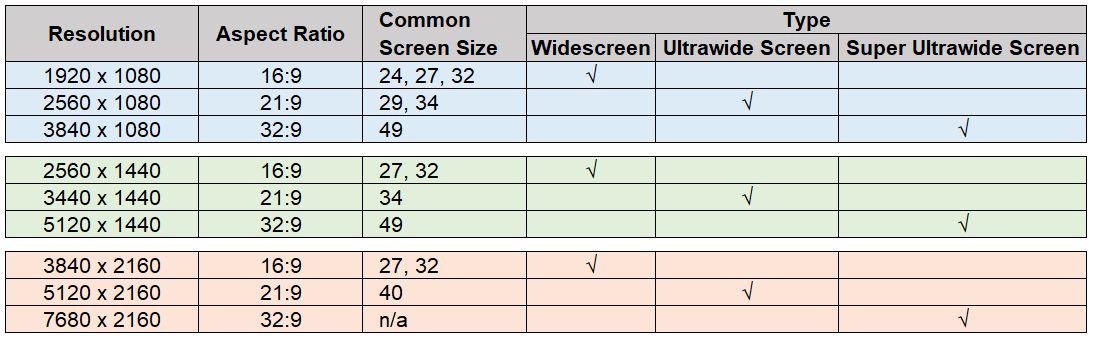
Yes, fully agree. The GPU of a laptop cannot be upgraded. Not for typical end-users unless one is a hardcore person or professional that tinkers with the soldering and has access to mobile components to break the supported factory configuration... a super-risky thing that shouldn't be done. Better to upgrade those on a desktop one instead.
Another way is to use a eGPU, right? But that's more expensive and the return of investment may not be worth it because of the limited bandwidth of the connection (maybe TB4 or TB5 connectivity may address it) and the expensive eGPU case.
When I mentioned upgrading my GPU, I meant to say either I buy a new lappy or a desktop.
The laptop in discussion is a 2018 version with GTX 1060 6GB that comes with a mini dual-mode DP, an HDMI 2.0 port, and a USB Type-C Thunderbolt that provides DP output. I hope that means it can connect to 3 external monitors via 1 HDMI port and 2 DPs? Both the DPs are of version 1.2.
I am going for a minimum of 60Hz for all my external monitors.
To clarify, I have an existing 34-inch 3440X1440 UW as the main external monitor. I am thinking of getting 2 units of 27-inch 1440p as 2nd and 3rd external monitors (portrait) for productivity reasons (or is this overkill?). Then it dawned on me that, maybe I should get 4k monitors instead of 1440p monitors for future-proofing. Hence, the question came about.
The current UW has a PPI of around 108. The corresponding 1440p monitors have similar PPI, at around 108. I prefer such parity.
If I am going to get 4k monitors instead, then I have to downscale it to maintain that parity. Hence that question also.
This post has been edited by toffy: Jul 3 2022, 09:42 PM 

 May 11 2022, 09:21 PM


 Quote
Quote


 0.0478sec
 1.15
1.15
 7 queries
 GZIP Disabled