

QUOTE(teng_08 @ May 1 2020, 07:01 PM)
Dell U2520D with AC511M Soundbar 
Cos soundbar quality > built-in speakers hands down

...or just plug a headphone into the audio output port of the monitor Cos soundbar quality > built-in speakers hands down

LCD Monitor Thread v13.
|
|
 May 3 2020, 08:16 AM May 3 2020, 08:16 AM
Show posts by this member only | IPv6 | Post
#2021
|
 
All Stars
14,674 posts Joined: Sep 2010 
|
QUOTE(teng_08 @ May 1 2020, 07:01 PM) Dell U2520D with AC511M Soundbar ...or just plug a headphone into the audio output port of the monitor Cos soundbar quality > built-in speakers hands down |
|
|
|
|
|
May 3 2020, 11:09 PM
|

Senior Member
1,591 posts Joined: Mar 2014 From: 75°26'11.6"S, 136°16'16.0"E 
|
QUOTE(babycry123 @ May 3 2020, 01:44 AM) hahahha even with vesa arm you can't close that much...vesa arms are not small. need to readjust your desk to not have its edge fully stick to your wall...btw refer to my picture 2, do u think I can close the gap? I've never used an arm before. About to purchase 1 |
|
|
May 3 2020, 11:13 PM
|

Senior Member
1,223 posts Joined: Mar 2010
|
QUOTE(lolzcalvin @ May 3 2020, 11:09 PM) even with vesa arm you can't close that much...vesa arms are not small. need to readjust your desk to not have its edge fully stick to your wall... I've ever used an arm before so not really familiar. What if I pull my table away from the wall a bit so that there's space behind my desk you know what I mean? Then can I push the arm all the way against the wall then position the monitor the same line as my desk's edge? |
|
|
May 3 2020, 11:22 PM
|
|
Senior Member
1,591 posts Joined: Mar 2014 From: 75°26'11.6"S, 136°16'16.0"E
|
QUOTE(babycry123 @ May 3 2020, 11:13 PM) I've ever used an arm before so not really familiar. What if I pull my table away from the wall a bit so that there's space behind my desk you know what I mean? Then can I push the arm all the way against the wall then position the monitor the same line as my desk's edge? you'll need to aware of some things..can your monitor be removed from its original arm? does your monitor have 100x100mm vesa mount?the vesa arm usually will clamp onto your desk, that's why if you have your table's edge pushed all the way to the wall you're not gonna be able to install any arms at all, unless there are spaces between your table and your desk all down to depending on you on how you want to set it up..how much you want to pull your table away or anything is not I who can tell, and arms have different dimensions and ways to adjust due to different manufacturers. all i can suggest is basically what are the stuffs you'll need to achieve what you want. » Click to show Spoiler - click again to hide... « This post has been edited by lolzcalvin: May 3 2020, 11:23 PM |
|
|
May 3 2020, 11:41 PM
|
|
Senior Member
1,223 posts Joined: Mar 2010
|
QUOTE(lolzcalvin @ May 3 2020, 11:22 PM) you'll need to aware of some things..can your monitor be removed from its original arm? does your monitor have 100x100mm vesa mount? Yes... my monitor has 100x100mm vesa mount and the stand of the monitor is removable...the vesa arm usually will clamp onto your desk, that's why if you have your table's edge pushed all the way to the wall you're not gonna be able to install any arms at all, unless there are spaces between your table and your desk all down to depending on you on how you want to set it up..how much you want to pull your table away or anything is not I who can tell, and arms have different dimensions and ways to adjust due to different manufacturers. all i can suggest is basically what are the stuffs you'll need to achieve what you want. » Click to show Spoiler - click again to hide... « To have a better understanding of my question, I have illustrated a simple pic as below... do you think that can be achieved? 
|
|
|
May 4 2020, 12:12 AM
|
|
Senior Member
1,591 posts Joined: Mar 2014 From: 75°26'11.6"S, 136°16'16.0"E
|
QUOTE(babycry123 @ May 3 2020, 11:41 PM) Yes... my monitor has 100x100mm vesa mount and the stand of the monitor is removable... yes, canTo have a better understanding of my question, I have illustrated a simple pic as below... do you think that can be achieved?
it eventually depends on the types of vesa mount you buy -- some allows you to clamp a bit side of your table's edge due to their flexibility: https://www.lazada.com.my/products/bestand-...XWxLap&search=1 see https://www.youtube.com/watch?v=__K4V8pFhf4 for more arm details, maybe you find one you like and you can make it directly proportional to your desk This post has been edited by lolzcalvin: May 4 2020, 12:14 AM |
|
|
|
|
|
May 8 2020, 09:23 PM
|
|
Junior Member
382 posts Joined: Nov 2010
|
QUOTE(babycry123 @ May 3 2020, 11:41 PM) Yes... my monitor has 100x100mm vesa mount and the stand of the monitor is removable... Yes, you can put the monitor further to the back with such monitor arm. But you have to mount the pole to the side and sacrifice the full range of motion from the monitor arm. To have a better understanding of my question, I have illustrated a simple pic as below... do you think that can be achieved?
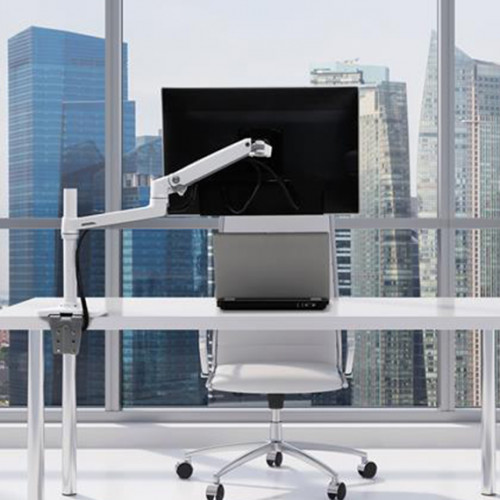 I use monitor arm and at first I have your problem too to make the monitor really horizontal. The nature of the monitor arm is to give you flexibility to move the monitor around and the ability to rotate the monitor. So it is hard to get it really horizontal. I did use spirit meter but after some time you will get used to it. Another thing you need to keep in mind is the extra cable length required. For something like your photo easily takes up additional 1-1.5m. If you only need to put the monitor close to wall and do not need flexibility of a monitor mount, perhaps can look for fixed wall mount? You can get it close to wall and can get the monitor horizontally fixed in place. This post has been edited by otnuus: May 8 2020, 09:33 PM |
|
|
May 9 2020, 05:03 PM
|

Senior Member
6,214 posts Joined: Sep 2010 From: Busan, Kr | Kuching, Swk 
|
Just gt me this monitor after poison myself many times  keep sold out whenever i try to buy it... keep sold out whenever i try to buy it... |
|
|
May 9 2020, 06:33 PM
|

Junior Member
180 posts Joined: Nov 2012 From: Land Below The Wind
|
Need advice for my new monitor Asus TUF VG249Q
1. I already download driver from Asus site,but there is no install option 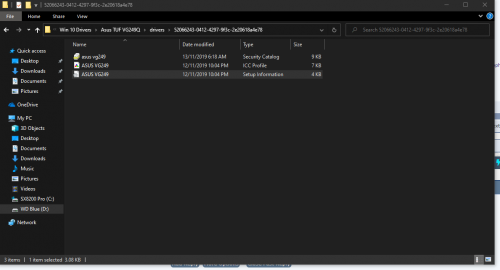 2.Can any1 suggest me best setting for this monitor? 3.Already set to 144Hz also,but it show only 143Hz.Is that normal? 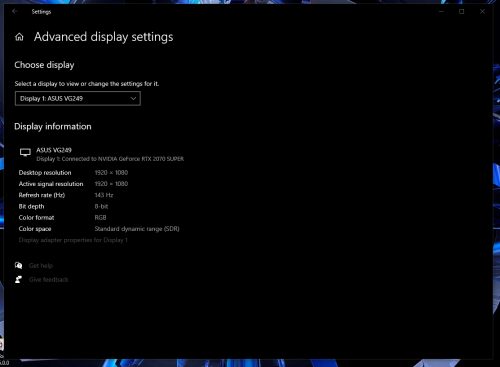 P/S At first order last stock AOC 24G2 on Lazada,but suddenly they cancelled my order.... 😥 This post has been edited by soba_82: May 9 2020, 06:36 PM |
|
|
May 9 2020, 07:18 PM
|
|
Senior Member
1,223 posts Joined: Mar 2010
|
QUOTE(otnuus @ May 8 2020, 09:23 PM) Yes, you can put the monitor further to the back with such monitor arm. But you have to mount the pole to the side and sacrifice the full range of motion from the monitor arm. I have 1 question, if I put too far back (cos I don't want to strain my eyes) can my IKEA table sustain the weight and not break?I use monitor arm and at first I have your problem too to make the monitor really horizontal. The nature of the monitor arm is to give you flexibility to move the monitor around and the ability to rotate the monitor. So it is hard to get it really horizontal. I did use spirit meter but after some time you will get used to it. Another thing you need to keep in mind is the extra cable length required. For something like your photo easily takes up additional 1-1.5m. If you only need to put the monitor close to wall and do not need flexibility of a monitor mount, perhaps can look for fixed wall mount? You can get it close to wall and can get the monitor horizontally fixed in place. |
|
|
May 9 2020, 09:45 PM
|
|
Junior Member
382 posts Joined: Nov 2010
|
QUOTE(babycry123 @ May 9 2020, 07:18 PM) I have 1 question, if I put too far back (cos I don't want to strain my eyes) can my IKEA table sustain the weight and not break? I think it depends on material of the Ikea table. Is it made of those honeycomb paper? You can have a look at youtube video "$25 vs. $300 Monitor Arm - What Stands Do I Recommend?". Around 2'30" he show to add a board on the bottom mounting plate to spread the pressure point. To show you the perspective, my table is around 11 inches away from wall. If your monitor is in front of the mounting pole, the monitor will be few inches inside the table. 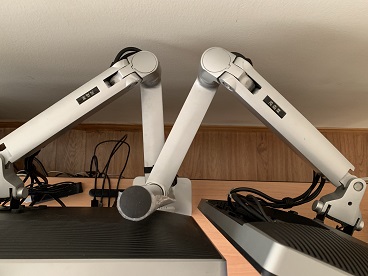 You can even move the monitor further away from the table. Just need to beware of the size as the monitor width can hit the arm and limit how far you can move it to the back.  This post has been edited by otnuus: May 9 2020, 09:48 PM |
|
|
May 9 2020, 11:03 PM
|
|
Junior Member
238 posts Joined: Jun 2013
|
QUOTE(pandera999 @ May 9 2020, 05:03 PM) Just gt me this monitor after poison myself many times keep sold out whenever i try to buy it... to replace my end of life Dell monitor to replace my end of life Dell monitor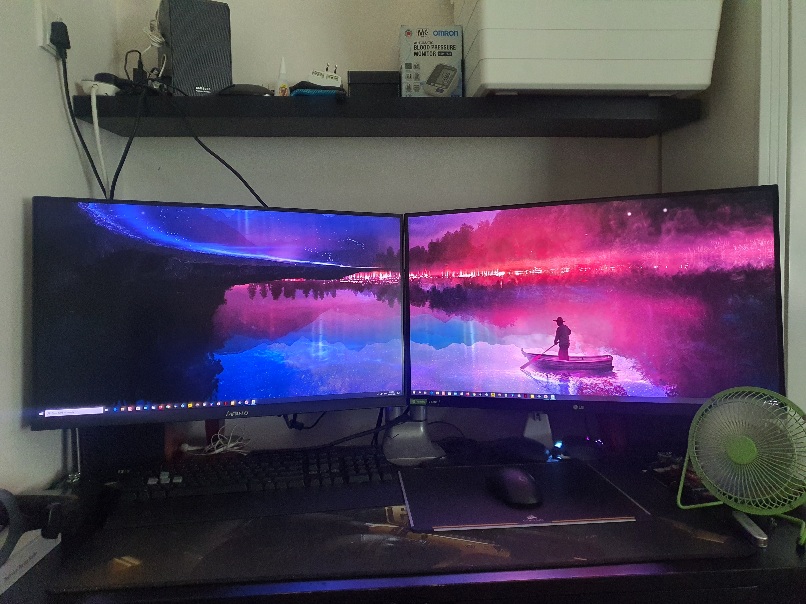 |
|
|
May 10 2020, 02:43 AM
Show posts by this member only | IPv6 | Post
#2033
|
|
Senior Member
6,214 posts Joined: Sep 2010 From: Busan, Kr | Kuching, Swk
|
QUOTE(cyrobytes @ May 9 2020, 11:03 PM) Me also get one few days back Best 27" 2K reso with freesync outthere.... how much u bought it? to replace my end of life Dell monitor |
|
|
|
|
|
May 10 2020, 03:18 AM
|

All Stars
12,573 posts Joined: Nov 2008
|
QUOTE(radiohear91 @ May 2 2020, 07:16 PM) guys any of this monitor worth? Extra 4" is hardly anything. Go for something bigger like 32" or 40" currently using U2311H..but already boring  main purpose in youtube,movie,simple editing photo/video..gaming.   My 40" 4k VA panel setup below which I got a few years ago. The switch from the same monitor as yours, U2311H is such a huge improvement as watching videos/movies and playing games on such a big display is orgasmic. I'm looking to upgrading to a 50 or 55" OLED/QLED display next  p/s: Don't mind the cable from my secondary monitor, have already ordered a longer cable to tuck underneath the table. Still thinking about the keyboard cable though 
This person below is using an LG C9 65" OLED as his monitor  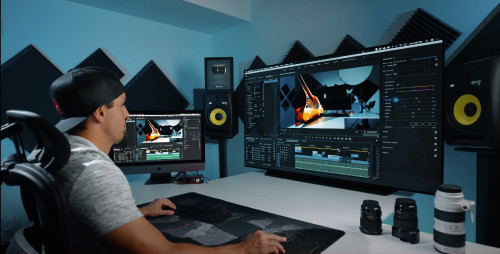 https://www.youtube.com/watch?v=Ww8havSLa9E This post has been edited by -kytz-: May 10 2020, 03:29 AM |
|
|
May 10 2020, 03:20 AM
|
|
Junior Member
8 posts Joined: Sep 2011
|
Anyone knows when any of these will be available locally?
Acer XB253Q GX Asus VG259QM MSI MAG251RX |
|
|
May 10 2020, 09:25 AM
|
|
Junior Member
238 posts Joined: Jun 2013
|
QUOTE(pandera999 @ May 10 2020, 02:43 AM) Best 27" 2K reso with freesync outthere.... how much u bought it? Bought with the price of MYR 1849 at shopee, last 2 stock when i placed the order. |
|
|
May 10 2020, 10:29 AM
Show posts by this member only | IPv6 | Post
#2037
|
|
Senior Member
6,214 posts Joined: Sep 2010 From: Busan, Kr | Kuching, Swk
|
QUOTE(cyrobytes @ May 10 2020, 09:25 AM) Bought with the price of MYR 1849 at shopee, last 2 stock when i placed the order. i bought for rm1846 same seller i think... sunway there... last 2 stock too when i placed the order..i find it still cheaper even applied voucher for preferred seller. |
|
|
May 10 2020, 12:14 PM
|
|
Senior Member
1,591 posts Joined: Mar 2014 From: 75°26'11.6"S, 136°16'16.0"E
|
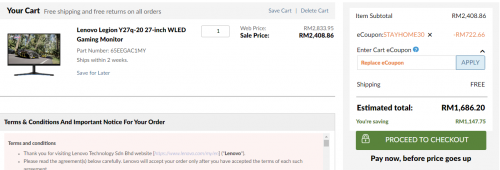
just saying guys, you can buy this monitor at 1700. it uses the same Nano IPS panel as LG 27GL850, and comes with 165Hz. expect identical performance
 This post has been edited by lolzcalvin: May 10 2020, 12:14 PM |
|
|
May 10 2020, 02:18 PM
|
|
Junior Member
238 posts Joined: Jun 2013
|
QUOTE(lolzcalvin @ May 10 2020, 12:14 PM) just saying guys, you can buy this monitor at 1700. it uses the same Nano IPS panel as LG 27GL850, and comes with 165Hz. expect identical performance Shopee can get even cheaper at 1.4K Anyway, thanks for the icc profile. |
|
|
May 10 2020, 05:32 PM
Show posts by this member only | IPv6 | Post
#2040
|

Senior Member
1,269 posts Joined: Dec 2005 From: Sibu, KL
|
hi guys, can recommend 2 monitors, im looking at 24, i have the desk arm to hold 2 monitors.
usage: for stocks trading purpose only. with budget RM800, if can cheaper, would be good. currently looking at viewsonic 24 VA2419 IPS, RM380+ This post has been edited by David900924: May 10 2020, 05:40 PM |
| Change to: |  0.0332sec 0.0332sec
 0.93 0.93
 6 queries 6 queries
 GZIP Disabled GZIP Disabled
Time is now: 14th December 2025 - 10:13 AM |
 Quote
Quote