Outline ·
[ Standard ] ·
Linear+
LCD Monitor Thread v13.
|
otnuus
|
 May 8 2020, 09:23 PM May 8 2020, 09:23 PM
|

|
QUOTE(babycry123 @ May 3 2020, 11:41 PM) Yes... my monitor has 100x100mm vesa mount and the stand of the monitor is removable... To have a better understanding of my question, I have illustrated a simple pic as below... do you think that can be achieved? [attachmentid=10482822] Yes, you can put the monitor further to the back with such monitor arm. But you have to mount the pole to the side and sacrifice the full range of motion from the monitor arm. 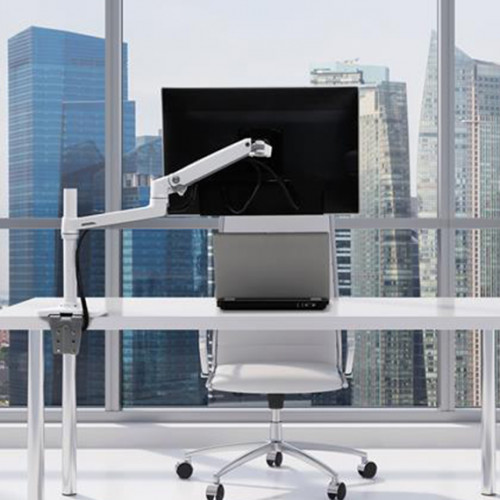 I use monitor arm and at first I have your problem too to make the monitor really horizontal. The nature of the monitor arm is to give you flexibility to move the monitor around and the ability to rotate the monitor. So it is hard to get it really horizontal. I did use spirit meter but after some time you will get used to it. Another thing you need to keep in mind is the extra cable length required. For something like your photo easily takes up additional 1-1.5m. If you only need to put the monitor close to wall and do not need flexibility of a monitor mount, perhaps can look for fixed wall mount? You can get it close to wall and can get the monitor horizontally fixed in place. This post has been edited by otnuus: May 8 2020, 09:33 PM |
|
|
|
|
|
otnuus
|
May 9 2020, 09:45 PM
|
|
|
QUOTE(babycry123 @ May 9 2020, 07:18 PM) I have 1 question, if I put too far back (cos I don't want to strain my eyes) can my IKEA table sustain the weight and not break? I think it depends on material of the Ikea table. Is it made of those honeycomb paper? You can have a look at youtube video "$25 vs. $300 Monitor Arm - What Stands Do I Recommend?". Around 2'30" he show to add a board on the bottom mounting plate to spread the pressure point. To show you the perspective, my table is around 11 inches away from wall. If your monitor is in front of the mounting pole, the monitor will be few inches inside the table. 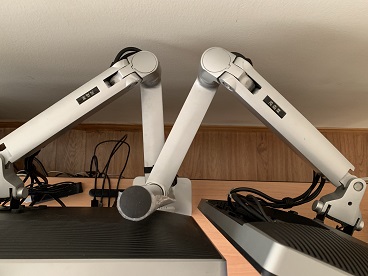 You can even move the monitor further away from the table. Just need to beware of the size as the monitor width can hit the arm and limit how far you can move it to the back.  This post has been edited by otnuus: May 9 2020, 09:48 PM This post has been edited by otnuus: May 9 2020, 09:48 PM |
|
|
|
|
|
otnuus
|
May 19 2020, 12:50 AM
|
|
|
QUOTE(robin98 @ May 18 2020, 10:09 PM) Where did you bought this monitor so cheap? I see online mostly selling above RM2K. Can you share the link and coupon code? That code is expired. "MCO30" still valid.  |
|
|
|
|
|
otnuus
|
May 19 2020, 01:04 AM
|
|
|
QUOTE(MPIK @ May 19 2020, 12:59 AM) Really? I just tried both. It seems that both STAYHOME30 & MCO30 are working. My bad. I use the code "STAYATHOME30" instead of "STAYHOME30". |
|
|
|
|
|
otnuus
|
May 19 2020, 08:27 AM
|
|
|
QUOTE(Lurker @ May 19 2020, 01:15 AM) which website is this? lenovo's own? Yes, lenovo own website. |
|
|
|
|
|
otnuus
|
May 19 2020, 08:12 PM
|
|
|
QUOTE(pandera999 @ May 19 2020, 10:36 AM) it was said same panel with 27GL850, but LG have higher color bits.... otnuus received your monitor already? btw, anyone know bout LG vesa adapter? now.. the problem with LG 27GL850 is mounting with existing dual arm monitor (North Bayou).. cant fit in the arm inside.. lol... see that space in pic.. ahhh  The price is good after discount so I just look around. My Dell monitor still good enough so I try not to spend and get new monitor. QUOTE(pandera999 @ May 19 2020, 07:57 PM) as explain below... maybe can read here for panel bit depth Read HERE and refresh rate different. currently price lenovo are expensive except get from shopee for rm1.4k+ as some member share... kinda cheap Im using NB F180, the issue with this vesa is the vesa wing... actually, its fit, but its design make it not fit inside 27gl850  the vesa i highlight below.. make my eye pain see.. its fit well for all monitor since its standard, but due to some monitor design, then, this kind of vesa design cant fit inside the monitor like lg  Perhaps can add some spacer with longer screws? Something like this:   This post has been edited by otnuus: May 19 2020, 08:18 PM This post has been edited by otnuus: May 19 2020, 08:18 PM |
|
|
|
|
|
otnuus
|
May 20 2020, 06:14 PM
|
|
|
QUOTE(pandera999 @ May 20 2020, 12:18 AM) do you think it is sturdy enuf?  looks interesting A 10mm spacer should be enough right? I think it should be sturdy. Some TV mount also use similar spacer. |
|
|
|
|
|
otnuus
|
Apr 13 2021, 06:51 PM
|
|
|
QUOTE(Alpha_Tay @ Mar 22 2021, 07:13 AM) receive free repair last week with only around 2 weeks wait time due to Spare Parts Availability from Acer Malaysia and Highpoint Service Network for Acer Nitro XV273 X 27-inch 1920 x 1080 G-SYNC Compatible / Adaptive-Sync 240Hz Gaming Monitor damage by Ant goes inside building Nest. Monitor just Purchase at December 30 2020. they even offer a Brand new Acer Nitro XV272U P 27-inch 2560 x 1440@144 Hz around the same price range Just Arrive Ready Stock for Free Exchange on the 3rd days of repair due to unknown time table for Spare Parts Availability at that time. UPDATE: the issue was part of the screen went dark, the area would change, sometime left, right or middle, but it wont change in a few hours, mostly change by turn on next day, the panel screen itself still working well without issue, so it's the backlight issue. according to the photo of Highpoint Staff open up inside showing area of Ant Nest, it's around Main Board area, but Highpoint Staff claim they replace the Panel, Service Report write LCD Module replaced, i am not sure, but now the Monitor has 2 Serial Number, Monitor OSD and HWiNFO show new serial number, but Acer Display Widget still show Old Serial Number. Those Ant goes inside wasnt just a few, it's those one by one queue up Ant. this video show how to replace LED Backlight easily if it's just simpler LED Backlight issue. https://www.youtube.com/watch?v=M9SKNDSa6hYNice repair video. What could go wrong when whole backlight is out? My U2413 whole screen backlight is gone, still can see very dim display. Few days before it totally gone, I noticed some flickering, whole display dim a bit then back to normal for few times. Then all of sudden the backlight totally gone. |
|
|
|
|
|
otnuus
|
Feb 13 2024, 03:01 PM
|
|
|
My Dell U3014 kaput and now looking for a replacement monitor. My use is work and sometimes watch movie, no gaming. The features I am looking for is bigger screen real estate, good native ppi so no need to do scaling, builtin kvm switch and USB PD so I can easily plug in my office laptop. Currently saw that Dell factory outlet has refurbished U4323QE asking for RM3699. Any comment on this or is there any other recommendation?
|
|
|
|
|
|
otnuus
|
Feb 24 2024, 03:37 PM
|
|
|
QUOTE(myway1985 @ Feb 17 2024, 02:21 PM) Thanks to @myway1985, the dfo 43” 4k monitor is working well. Still getting use to the large screen coming from 30” 16x10 monitor. Unfortunately my existing monitor arm cannot sustain the weight of this new monitor, which is 13.2kg according to Dell. I want to put the screen as far away from me as possible, any monitor mount recommendation from you guys? I’ll likely fixed it and leave it, so flexibility is not a priority, but the depth is. |
|
|
|
|



 Quote
Quote
 0.0859sec
 0.74
0.74
 7 queries
 GZIP Disabled