

QUOTE(pandera999 @ May 9 2020, 05:03 PM)
Just gt me this monitor after poison myself many times
 keep sold out whenever i try to buy it...
 to replace my end of life Dell monitor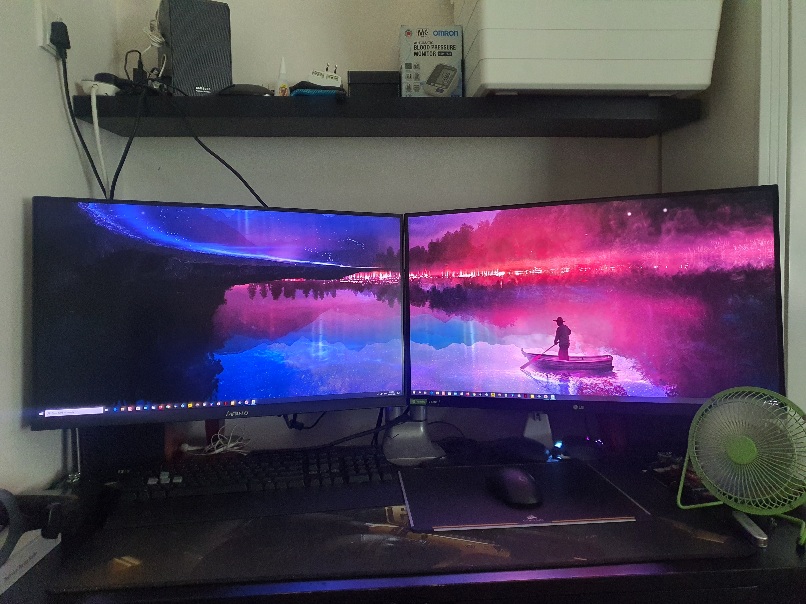
LCD Monitor Thread v13.
|
|
 May 9 2020, 11:03 PM May 9 2020, 11:03 PM
Return to original view | Post
#1
|
 
Junior Member
238 posts Joined: Jun 2013 
|
QUOTE(pandera999 @ May 9 2020, 05:03 PM) Just gt me this monitor after poison myself many times keep sold out whenever i try to buy it... to replace my end of life Dell monitor |
|
|
|
|
|
May 10 2020, 09:25 AM
Return to original view | Post
#2
|
|
Junior Member
238 posts Joined: Jun 2013
|
QUOTE(pandera999 @ May 10 2020, 02:43 AM) Best 27" 2K reso with freesync outthere.... how much u bought it? Bought with the price of MYR 1849 at shopee, last 2 stock when i placed the order. |
|
|
May 10 2020, 02:18 PM
Return to original view | Post
#3
|
|
Junior Member
238 posts Joined: Jun 2013
|
QUOTE(lolzcalvin @ May 10 2020, 12:14 PM) just saying guys, you can buy this monitor at 1700. it uses the same Nano IPS panel as LG 27GL850, and comes with 165Hz. expect identical performance Shopee can get even cheaper at 1.4K   Anyway, thanks for the icc profile. |
|
|
May 13 2020, 08:55 PM
Return to original view | Post
#4
|
|
Junior Member
238 posts Joined: Jun 2013
|
QUOTE(pandera999 @ May 13 2020, 11:11 AM) current price.. wish i know bout this first.. earlier.. before bought LG.. lol... You still can go over here to buy at MYR1.4K 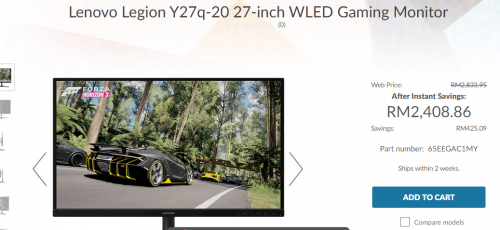 putting comparison.. lenovo damn cheaper if buy during promo. 1.4k.. damnit 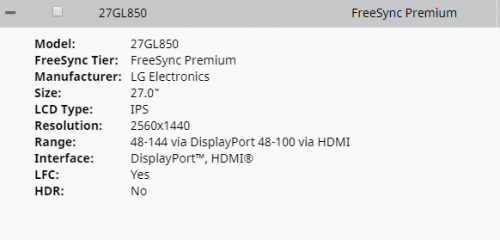 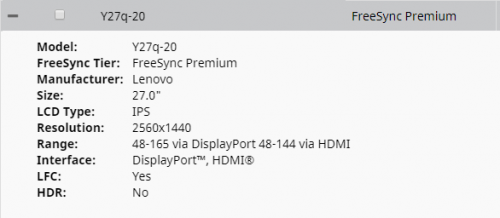 just add comparison table : https://www.displayspecifications.com/en/co...rison/d728c2815  Shopee From what i read, lenovo Y20q-20 is using the same lg panel LM270WQA SSA1 which able to run at 10 bit and overdrive to 165hz. Review here This post has been edited by cyrobytes: May 13 2020, 09:16 PM |
|
|
May 13 2020, 11:55 PM
Return to original view | Post
#5
|
|
Junior Member
238 posts Joined: Jun 2013
|
QUOTE(pandera999 @ May 13 2020, 11:41 PM) maybe end of year  |
|
|
May 15 2020, 01:53 PM
Return to original view | Post
#6
|
|
Junior Member
238 posts Joined: Jun 2013
|
QUOTE(soba_82 @ May 14 2020, 09:56 PM) Need some advice here.Any1? 1. Just right click the inf file and click install. That's it.The rest questions cant answer you as i don't the monitor. |
|
|
|
|
|
May 19 2020, 12:17 PM
Return to original view | Post
#7
|
|
Junior Member
238 posts Joined: Jun 2013
|
QUOTE(pandera999 @ May 19 2020, 10:36 AM) it was said same panel with 27GL850, but LG have higher color bits.... otnuus received your monitor already? My brateck dual arm fit well on the GL850.btw, anyone know bout LG vesa adapter? now.. the problem with LG 27GL850 is mounting with existing dual arm monitor (North Bayou).. cant fit in the arm inside.. lol... see that space in pic.. ahhh  |
|
|
May 19 2020, 12:35 PM
Return to original view | Post
#8
|
|
Junior Member
238 posts Joined: Jun 2013
|
QUOTE(robin98 @ May 19 2020, 11:24 AM) Higher color bits? Do you mean higher number of colors? Both using LG NanoIPS panel and able to have 10bit (8bit+ FRC) RGB444 color by using dp 1.4 cable. Only different is Y20q can go up to 165hz. Both also cant reach HDR400 standard.The edge Lenovo Legion has over LG one is 165Hz vs 144Hz |
|
|
May 20 2020, 01:39 AM
Return to original view | Post
#9
|
|
Junior Member
238 posts Joined: Jun 2013
|
QUOTE(pandera999 @ May 14 2020, 01:43 AM) I can feel u... hurts, if me..uneasy and distracted with the scratches... how about wipe it with some err.. like dashboard cleaner?. Is it visibile? Geez.. how you scratch it? Just to update and provide some info to others that might need to remove the monitor deep scratches in future.Was accidently hit my monitor by the sharp edges of my corsair keyboard. Leaving a 5cm deep scratches that can be felt by finger nail at the bottom left of my monitor. Rainbow effect like reflection can be observed and is a bit annoying if the background is in white color. Google internet, some person using magic eraser to remove monitor scratch - Youtube i've tried, not working on deep scratches but very effective on surface scratches (only for plastic material). Then i come to this Site I manage to get one Novus Plastic Polish no 2 in shopee. After polishing by hand for nearly 2 hrs, manage to remove the scratches and no more tiny rainbow reflection. Not using polishing machine is to prevent overheating and damage the monitor. Do bare in mind, it will leave shiny surface at the polish area. In my case, since i using hand, the shiny area is just a small area and hardly noticable unless purposely flash with high power flashlight. Hope this can help, but try at your own risk. This post has been edited by cyrobytes: May 20 2020, 02:39 PM |
|
|
May 22 2020, 06:05 PM
Return to original view | Post
#10
|
|
Junior Member
238 posts Joined: Jun 2013
|
QUOTE(lolzcalvin @ May 22 2020, 04:15 PM) https://www.lg.com/us/monitors/lg-27gn850-b-gaming-monitor From Reddithttps://www.displayspecifications.com/en/model/c5071f26 looks like there's a new iteration of LG 1440p 144Hz monitor just came out. zero idea what improvement it gives. "The LG 27GN850-B is a just-released update to the LG 27GL850-B. From what info I could find they are identical except the GN850 does not have a USB hub and is $50 cheaper. The LG 27GL83A-B has the same panel except it uses an sRGB color gamut backlight. The GN850 and the GL850 use a different backlight that covers a wide DCI-P3 gamut." Also found that the max power consumption GL850-65W and GN850-55W. |
|
|
Jun 3 2020, 06:09 PM
Return to original view | Post
#11
|
|
Junior Member
238 posts Joined: Jun 2013
|
QUOTE(vindiesal @ Jun 3 2020, 04:57 PM) Nice dua monitor, what is your OSD setup for the LG GL850? I am using Rting and lolzcalvin's icc profile as a reference since i don't have the proper color calibrator. |
| Change to: |  0.0801sec 0.0801sec
 1.16 1.16
 7 queries 7 queries
 GZIP Disabled GZIP Disabled
Time is now: 16th December 2025 - 04:11 AM |
 Quote
Quote