Outline ·
[ Standard ] ·
Linear+
LCD Monitor Thread v13.
|
retroRT
|
 Jul 19 2016, 01:07 PM Jul 19 2016, 01:07 PM
|
New Member


|
QUOTE(-kytz- @ Jul 19 2016, 08:36 AM) One big difference is how glossy the Philips TV is vs the slightly anti glare AMH A409U. Anti glare is my most important criteria in a monitor so a lot of monitors are out of my list already  i'm not too fond of glossy screens too. saw some people remove the glass part of their 4k korean monitors but some can't as it is glued together permanently. how about the warranty? how long the seller covers the monitor? |
|
|
|
|
|
iZuDeeN
|
 Jul 20 2016, 08:18 PM Jul 20 2016, 08:18 PM
|
|
|
QUOTE(kevyeoh @ Jul 15 2016, 09:04 PM) Anyone here bought Dell U2715H before? What is the lowest price you can get? I called to Dell because not published at website... The sales agent told me that if I am serious and confirm wanna buy he can quote me further discounts... so I am just trying to check market on best price obtained so far... thanks! Lazada with 10% off its about RM710 (including shipping fee) Just ordered additional 2 today ; to complete tri-monitor anyway , I bought my first yesterday at RM770 at C-zone |
|
|
|
|
|
-kytz-
|
Jul 20 2016, 08:20 PM
|
|
|
QUOTE(iZuDeeN @ Jul 20 2016, 08:18 PM) Lazada with 10% off its about RM710 (including shipping fee) Just ordered additional 2 today ; to complete tri-monitor anyway , I bought my first yesterday at RM770 at C-zone Whut? Dell U2715H is like RM2k plus |
|
|
|
|
|
kevyeoh
|
Jul 20 2016, 08:30 PM
|
|
|
I think he mistaken for another model...  QUOTE(-kytz- @ Jul 20 2016, 08:20 PM) Whut? Dell U2715H is like RM2k plus |
|
|
|
|
|
EdwinCodec
|
Jul 20 2016, 08:41 PM
|
|
|
QUOTE(randnum23 @ Jun 28 2016, 12:18 AM) Haha I thought I already updated my previous post .Yeah, dell replaced it the next day and been using it. But the replacement turned a bit yellowish/bright when gaming, apparently it is a known issue for this monitor. The yellowish might be a lot more pronounced when youre playing in windowed mode. And the power button feels uneven when pushed, better put my whole fingertip when turning it on.  . Using custom icc profile from tftcentral helps for video or normal use but not gaming since it reverts to default so the yellow/bright issue is back. Mine just died ytd as well! Exactly 4 years and the no power when connect to the power cord. They replaced u2312hm for you? Damn, I thought it's an EOF model already and was expecting to get a U2414h haha. It took exactly how many days for the replacement? But it's okay, I've decided to sell off the RMA unit and get U2417h. This post has been edited by EdwinCodec: Jul 20 2016, 08:42 PM |
|
|
|
|
|
iZuDeeN
|
Jul 20 2016, 08:49 PM
|
|
|
QUOTE(kevyeoh @ Jul 20 2016, 08:30 PM) I think he mistaken for another model... lol..yeah...was referring to S2415H  |
|
|
|
|
|
randnum23
|
Jul 24 2016, 04:59 AM
|
Getting Started
|
QUOTE(EdwinCodec @ Jul 20 2016, 08:41 PM) Mine just died ytd as well! Exactly 4 years and the no power when connect to the power cord. They replaced u2312hm for you? Damn, I thought it's an EOF model already and was expecting to get a U2414h haha. It took exactly how many days for the replacement? But it's okay, I've decided to sell off the RMA unit and get U2417h. Only took a day for replacement to arrive.Nice upgrade and yeah, its EOL already. I got a refurbished one. Hopefully this one stay alive long enough until those ips g sync monitors become cheaper. |
|
|
|
|
|
kevyeoh
|
Jul 26 2016, 09:26 AM
|
|
|
hi all,
i have a general question and it will help me decide on my monitor purchase decision. So assuming if i get a 27inch monitor 1440p, can i set it to 1080p when playing game and will it impact the image quality with pixelation?
Because currently I am really interested to buy 27inch 1440p monitor but maybe my graphics card can only support up to 1080p for ultra high settings....so i am thinking if i should go for 27inch 1440p or just get 24inch 1080p monitor.... my preference is the 27inch...
thanks!
|
|
|
|
|
|
Vannus
|
Jul 26 2016, 01:26 PM
|
|
|
QUOTE(kevyeoh @ Jul 26 2016, 09:26 AM) hi all, i have a general question and it will help me decide on my monitor purchase decision. So assuming if i get a 27inch monitor 1440p, can i set it to 1080p when playing game and will it impact the image quality with pixelation? Because currently I am really interested to buy 27inch 1440p monitor but maybe my graphics card can only support up to 1080p for ultra high settings....so i am thinking if i should go for 27inch 1440p or just get 24inch 1080p monitor.... my preference is the 27inch... thanks! Which monitor are you aiming and what is your current gpu card now? |
|
|
|
|
|
Lurker
|
Jul 26 2016, 01:27 PM
|
L U R K I N G

|
QUOTE(kevyeoh @ Jul 26 2016, 09:26 AM) hi all, i have a general question and it will help me decide on my monitor purchase decision. So assuming if i get a 27inch monitor 1440p, can i set it to 1080p when playing game and will it impact the image quality with pixelation? Because currently I am really interested to buy 27inch 1440p monitor but maybe my graphics card can only support up to 1080p for ultra high settings....so i am thinking if i should go for 27inch 1440p or just get 24inch 1080p monitor.... my preference is the 27inch... thanks! no pixelation, just image is not as sharp vs native res |
|
|
|
|
|
kevyeoh
|
Jul 26 2016, 01:58 PM
|
|
|
Dell U2715H... Using GTX 970 gfx. QUOTE(Vannus @ Jul 26 2016, 01:26 PM) Which monitor are you aiming and what is your current gpu card now? |
|
|
|
|
|
Vannus
|
Jul 26 2016, 05:24 PM
|
|
|
QUOTE(kevyeoh @ Jul 26 2016, 01:58 PM) Dell U2715H... Using GTX 970 gfx. ERM, that dell monitor cost around rm2k right? You sure you want to pay this amount for 1440p @ 60hz IPS? Somemore your graphic card is gtx970 is only good at 1080p. It will be sweating pushing 1440p (unless you tune down the graphic settings on the games to medium or low). I suggest if you want to go 1440p with gtx970 for time being, you need G-Sync monitor so when at low fps it will help smooth'en the screen, so no tearing. Have a good thought about it before purchase. |
|
|
|
|
|
kevyeoh
|
Jul 26 2016, 06:37 PM
|
|
|
Any other better suggestions? Aiming for IPS... I play games and also watch movies from PC... 27in seems to be the sweet spot for me.... I am using 22in now so if I buy 24in like not really upgrade in size... QUOTE(Vannus @ Jul 26 2016, 05:24 PM) ERM, that dell monitor cost around rm2k right? You sure you want to pay this amount for 1440p @ 60hz IPS? Somemore your graphic card is gtx970 is only good at 1080p. It will be sweating pushing 1440p (unless you tune down the graphic settings on the games to medium or low). I suggest if you want to go 1440p with gtx970 for time being, you need G-Sync monitor so when at low fps it will help smooth'en the screen, so no tearing. Have a good thought about it before purchase. |
|
|
|
|
|
Vannus
|
Jul 26 2016, 06:50 PM
|
|
|
QUOTE(kevyeoh @ Jul 26 2016, 06:37 PM) Any other better suggestions? Aiming for IPS... I play games and also watch movies from PC... 27in seems to be the sweet spot for me.... I am using 22in now so if I buy 24in like not really upgrade in size... Haha knew it you are like me, want 27 minimum and 1440p. Do you need 144hz and gsync? Gaming very shoik wei 144hz. Kan cheong time in game you hardly miss a single move. Aiya, just pain 1 time add a few more hundred and get acer xb271hu. If you know where to find. Drawback is ips glow and backlight bleed. Go test out first properly before you buy. And if possible take the display set if backlight bleed is super minimal. A brand new out from box doesnt guarentee that. Might be worst.and most time is. |
|
|
|
|
|
kevyeoh
|
Jul 26 2016, 10:49 PM
|
|
|
gosh...i just noticed your signature... poison alert poison alert! one time pain again? i am still recovering from the one time pain from my rig just setup... LOL ... i am a casual gamer, starcraft 2 and COD series, minimum requirement is to able to play smooth at ultra or highest setting... so i got myself a used 970 card first so i can use on my old 22in monitor... while i do more search on which monitor i should be getting... eventually i will upgrade my gfx but that is later la.... right now still trying to understand if i really need those super high end monitor....hard to see demo sets around so was thinking probably the normal 60Hz monitor works well already since last time we don't have such 144Hz monitor anyway.... QUOTE(Vannus @ Jul 26 2016, 06:50 PM) Haha knew it you are like me, want 27 minimum and 1440p. Do you need 144hz and gsync? Gaming very shoik wei 144hz. Kan cheong time in game you hardly miss a single move. Aiya, just pain 1 time add a few more hundred and get acer xb271hu. If you know where to find. Drawback is ips glow and backlight bleed. Go test out first properly before you buy. And if possible take the display set if backlight bleed is super minimal. A brand new out from box doesnt guarentee that. Might be worst.and most time is. |
|
|
|
|
|
Lurker
|
Jul 26 2016, 11:16 PM
|
L U R K I N G
|
QUOTE(kevyeoh @ Jul 26 2016, 10:49 PM) right now still trying to understand if i really need those super high end monitor....hard to see demo sets around so was thinking probably the normal 60Hz monitor works well already since last time we don't have such 144Hz monitor anyway.... Beware... Once u seen it, it can't be unseen |
|
|
|
|
|
-kytz-
|
Jul 27 2016, 09:30 PM
|
|
|
Really need help here in getting 60hz at 4k. 30hz is fine but when I select 60hz the whole screen turns white and bottom half is flickering like mad. Any help? Using display port supplied with the monitor, GTX760 which can definitely output 4k @60hz, did a clean reinstallation of graphics driver already 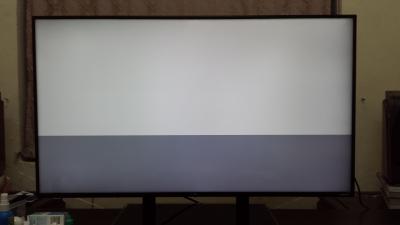
|
|
|
|
|
|
koonghx
|
Jul 27 2016, 10:30 PM
|
|
|
QUOTE(kevyeoh @ Jul 26 2016, 06:37 PM) Any other better suggestions? Aiming for IPS... I play games and also watch movies from PC... 27in seems to be the sweet spot for me.... I am using 22in now so if I buy 24in like not really upgrade in size... Buy 27 inch 1440p IPS from me, use the extra saved up money to upgrade GFX card What games are you aiming for though? I know dota 2 works at 1440p highest settings even from using Integrated intel. |
|
|
|
|
|
MsPopcorn
|
Jul 29 2016, 11:11 PM
|
|
|
Hi, LYN members..
Appreciate that if anyone can advise on my situation..
My Dell monitor suddenly black off (power light blinking for like 1min before black off) when I'm using my PC.
I try to reboot my PC, the PC is fine but the monitor wont turn on.
After few days, i turn on my PC, the monitor is working alright and 5mins later black out again.
By the way, Im using DVI cable to connect to my video card.
I tried to use another monitor (older than the Dell) and plug in, its working fine. Im wondering is it the monitor problem? Doesnt seem like video card problem to me..
Please advise if anyone faced the same issue before.. thank you.
|
|
|
|
|
|
iZuDeeN
|
Jul 31 2016, 03:19 PM
|
|
|
QUOTE(-kytz- @ Jul 27 2016, 09:30 PM) Really need help here in getting 60hz at 4k. 30hz is fine but when I select 60hz the whole screen turns white and bottom half is flickering like mad. Any help? Using display port supplied with the monitor, GTX760 which can definitely output 4k @60hz, did a clean reinstallation of graphics driver already
not sure about this..but most older 4k panel doesnt support 4k @ 60Hz.. only 2k @ 60hz check whether your panel support 4k@60 hz and you are using HDMI 2.0 (not 1.4) |
|
|
|
|



 Quote
Quote




 0.0260sec
 0.56
0.56
 6 queries
 GZIP Disabled